功能說明
Chrono Glass — Every second, in full telemetry.
Get FREE matching wallpapers for your phone and desktop at teccy.us/watchfaces, plus all our other Teccy designs.
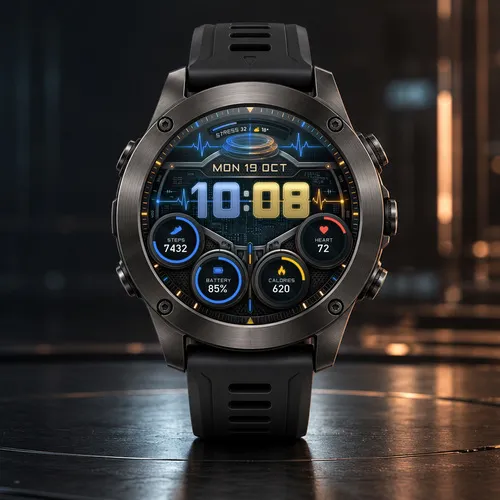
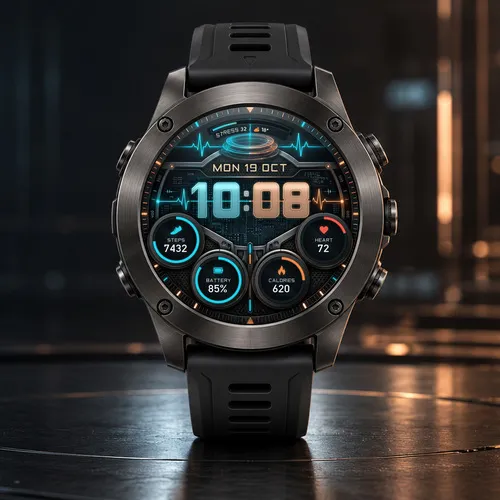
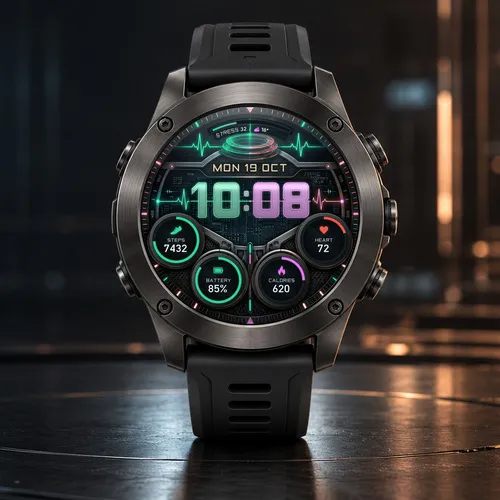
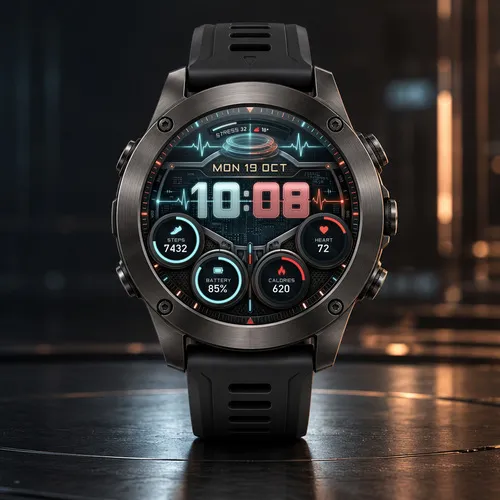
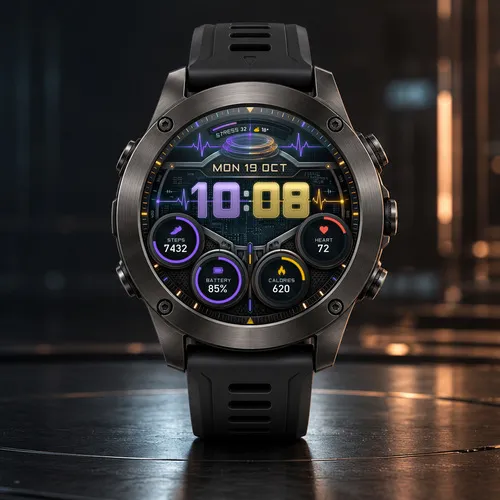
A heartbeat line runs straight through the time, glowing cyan on one side and copper on the other. Chrono Glass turns your wrist into a glass cockpit display: big translucent digits, a holographic ring under a curved gauge, and four round dials that keep your day in view.
The screen is split in two tones: the hours and everything on the left glow in one color, the minutes and everything on the right in the other.
Features
- Large glass-style time that follows your 12/24-hour setting, always with a leading zero
- Date with weekday and month in your watch's language
- Top arc gauge: Stress (default), Body Battery, Steps goal or Battery, plus weather and temperature
- 4 customizable data dials: Steps, Heart rate, Battery, Calories, Distance, Floors climbed, Active minutes (week), Body Battery, Stress, Altitude, Temperature or Off
- Progress arc on every dial, in the color of its side
- 5 dual-tone color pairs: Cyan / Copper (default), Blue / Amber, Green / Magenta, Violet / Gold and Ice / Red
- Heart rate always shown in red; battery icon empties with your charge, turns red below 20% and blinks at 10% or less
- Always-On mode: minimal outlined time and date that shift every minute
- 36 languages
How to customize
Long-press the watch face (or open Connect IQ on your phone) and choose Customize.
Compatibility
Made for 41 round AMOLED Garmin watches. Some data depends on your watch's sensors, and weather needs a phone connection; unavailable values show two dashes.
Every second, in full telemetry.
Designed and crafted with care by Teccy.
更新記錄
Now by Teccy (formerly Oliverx). Updated store description, with FREE matching wallpapers for your phone and desktop at teccy.us/watchfaces.
螢幕截圖
支援語言(1)
相容機型(55)
Approach® S50
Approach® S70 (42mm)
Approach® S70 (47mm)
D2™ Air X10
D2™ Air X15
D2™ Mach 1
D2™ Mach 1 Pro
D2™ Mach 2
D2™ Mach 2 Pro
Descent™ MK3 - 43mm
Descent™ MK3i - 51mm
epix™ (Gen 2)
epix™ (Gen 2)
epix™ Pro (42mm)
epix™ Pro (47mm)
epix™ Pro (51mm)
fēnix® 8 AMOLED (43mm)
fēnix® 8 AMOLED (47mm/51mm)
fēnix® 8 Pro
fenix® 9 - 43 mm
fenix® 9 – 47 mm
fenix® 9 Pro - 43 mm
fenix® 9 Pro - 47 mm
fenix® 9 Pro - 51 mm
fēnix® E
Forerunner® 170
Forerunner® 170 Music
Forerunner® 265
Forerunner® 265S
Forerunner® 570 - 42mm
Forerunner® 570 - 47mm
Forerunner® 965
Forerunner® 970
MARQ® (Gen 2)
MARQ® Adventurer (Gen 3)
MARQ® Commander (Gen 2) – Carbon Edition
MARQ™ Aviator (Gen 2)
Mercedes-Benz Venu® 2
Mercedes-Benz Venu® 2
Mercedes-Benz Venu® 2S
Mercedes-Benz Venu® 2S
tactix® 7 – AMOLED Edition
tactix® 8 – 47 mm, AMOLED
Venu® 2
Venu® 2
Venu® 2 Plus
Venu® 2 Plus
Venu® 2S
Venu® 2S
Venu® 3
Venu® 3S
Venu® 4 – 41 mm
Venu® 4 – 45 mm
vívoactive® 5
vívoactive® 6
最近指標趨勢
評分
評論
快照日期
2026-10-27 → 2026-10-29