功能說明
I don’t like to wear my glasses when hiking or mountain climbing.
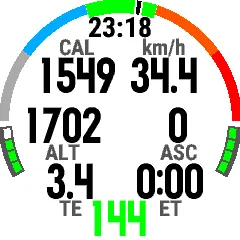
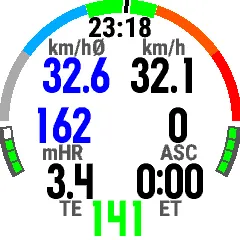
So I decided to make a data field with big letters which I can read easily.
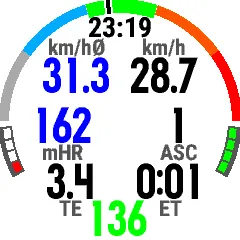
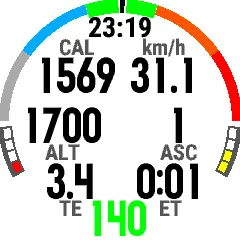
Beside a heart rate zone bar (and the current heart rate at the bottom) it shows 6 fields where you can choose from the following values.
Altitude
TotalAscent
TotalDescent
Calories
CurrentSpeed
AverageSpeed
ElapsedTime
ElapsedDistance
MaxHeartRate
AverageHeartRate
TrainingEffect
Steps
You can choose 6 primary values for every field and 6 alternative values and configure how long primary / secondary values are visible.
When you set 7 / 3 then after 7 seconds the fields will show the alternative values (in blue) for three seconds before it changes back to primary for 7 seconds.
Left bottom shows a battery indicator and right bottom and indicator for GPS quality.
更新記錄
Added support for Fenix 8 + 9
螢幕截圖
支援語言(1)
相容機型(60)
Enduro™ 2
fēnix® 5
fēnix® 5
fēnix® 5 Plus
fēnix® 5 Plus
fēnix® 5S Plus
fēnix® 5S Plus
fēnix® 5X
fēnix® 5X
fēnix® 5X Plus
fēnix® 5X Plus
fēnix® 6
fēnix® 6
fēnix® 6 Dual Power
fēnix® 6 Pro
fēnix® 6 Pro
fēnix® 6 Pro Dual Power
fēnix® 6 Pro Solar
fēnix® 6 Solar
fēnix® 6S
fēnix® 6S
fēnix® 6S Dual Power
fēnix® 6S Pro
fēnix® 6S Pro
fēnix® 6S Pro Dual Power
fēnix® 6S Pro Solar
fēnix® 6S Solar
fēnix® 6X Pro
fēnix® 6X Pro
fēnix® 7
fēnix® 7
fēnix® 7 Pro
fēnix® 7 Pro – Solar Edition (No Wi-Fi®)
fēnix® 7X
fēnix® 7X
fēnix® 7X Pro
fēnix® 7X Pro No Wi-Fi
fēnix® 8 AMOLED (47mm/51mm)
fēnix® 8 Pro
fēnix® 8 Solar (47mm)
fēnix® 8 Solar (51mm)
fenix® 9 – 47 mm
fenix® 9 Pro - 43 mm
fenix® 9 Pro - 47 mm
fenix® 9 Pro - 51 mm
fenix® 9 Pro - Solar 47 mm
fenix® 9 Pro - Solar 51 mm
fēnix® Chronos
fēnix® Chronos
MARQ® Adventurer (Gen 3)
quatix® 6
quatix® 6X
tactix® 7
tactix® 8 – 47 mm, AMOLED
tactix® 8 – 51 mm, Solar
vívoactive® 3
vívoactive® 3
vívoactive® 3
vívoactive® 3 Music
vívoactive® 3 Music
最近指標趨勢
評分
評論
快照日期
2026-10-27 → 2026-11-02