功能說明
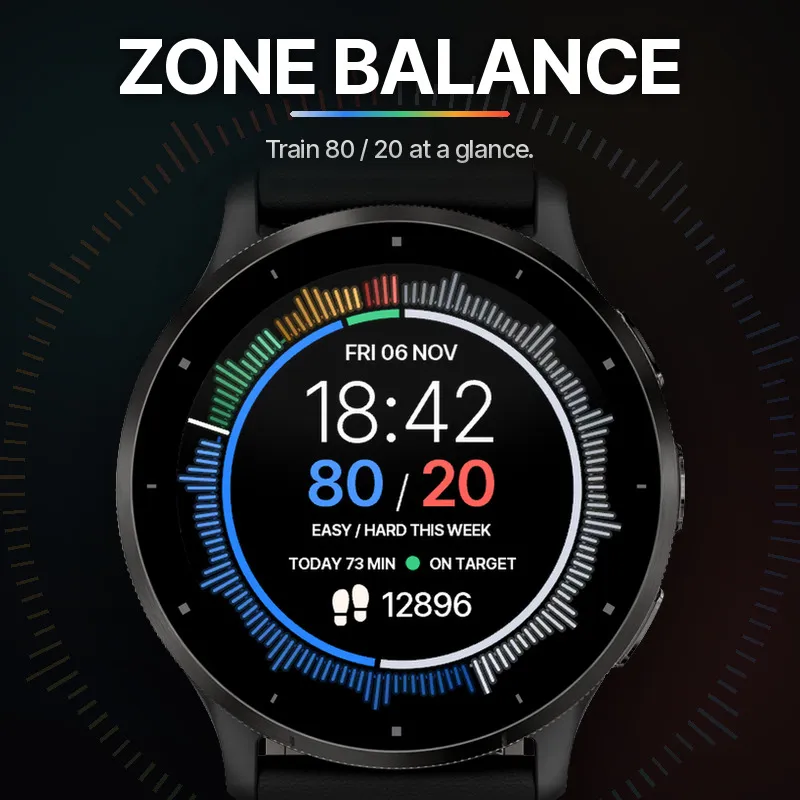
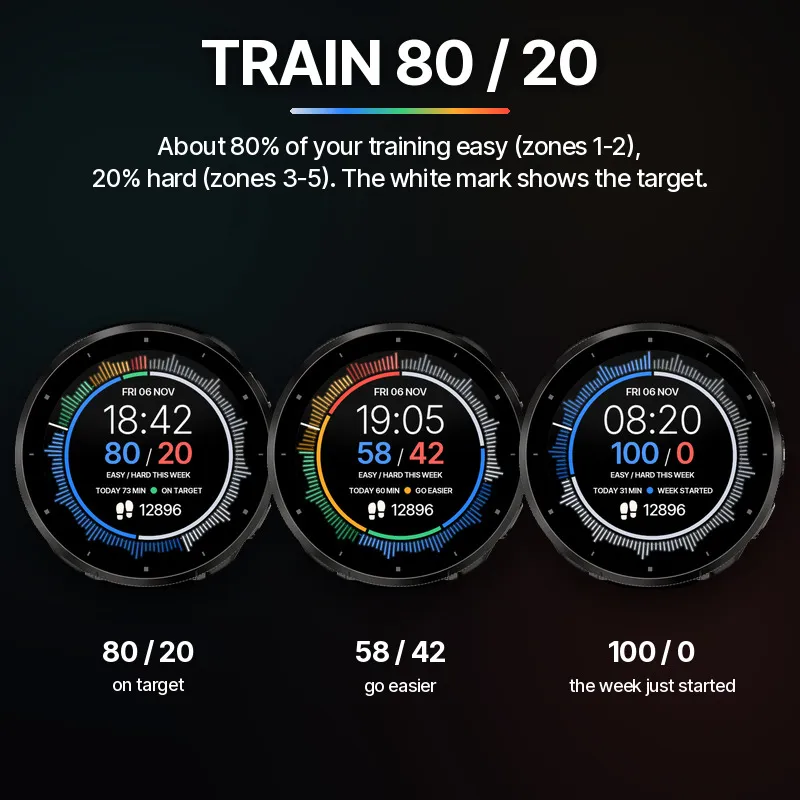
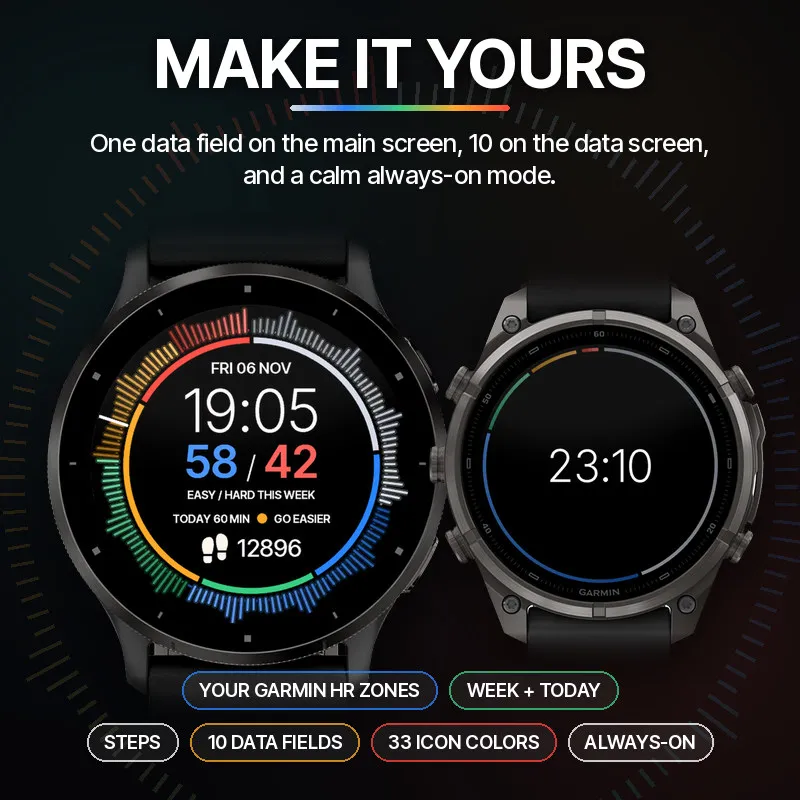
Zone Balance shows how you train this week, right on your wrist. Many runners and cyclists follow the 80 / 20 rule: about 80% of the training easy (heart-rate zones 1-2) and 20% hard (zones 3-5). Zone Balance shows your own split as a big number in the center, for example 80 / 20, and tells you if you are on target.
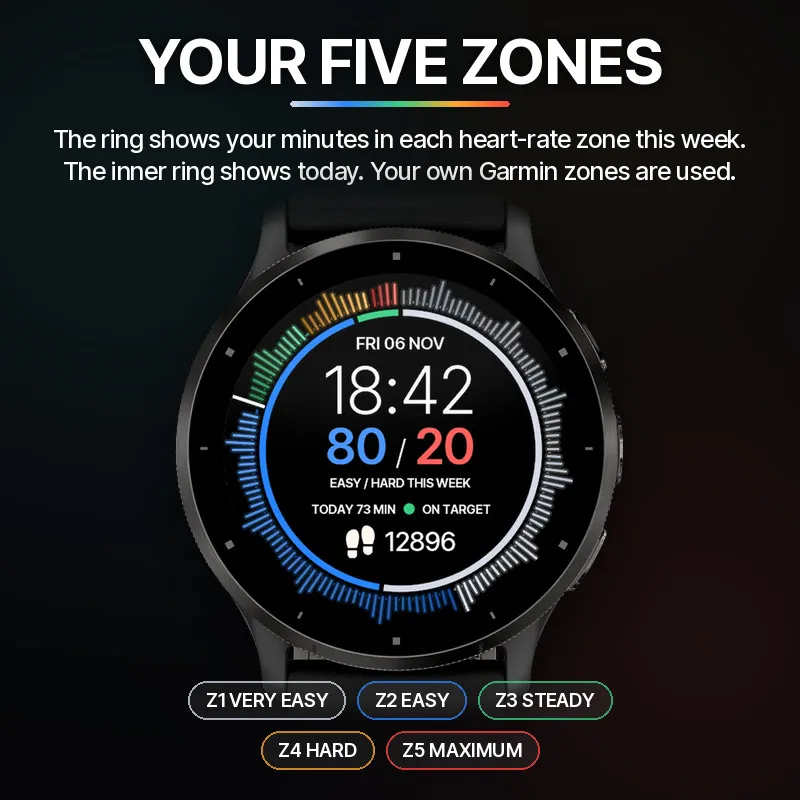
The ring around the watch face is your week in heart-rate zones. Each zone has its own color: silver for zone 1, blue for zone 2, green for zone 3, orange for zone 4 and red for zone 5. The more minutes you spend in a zone, the bigger its part of the ring. The bars rise like a heartbeat, and a white mark shows where 80% easy ends. The thin inner ring shows today's split.
Under the split you see today's training minutes and a status:
ON TARGET: about 80% or more of your week was easy.
GO EASIER: too much hard training this week, time for an easy day.
WEEK STARTED: less than an hour so far this week.
Zone Balance uses your own heart-rate zones from your Garmin settings, so the zones match the rest of your watch. The week starts on the first day of the week set on your watch.
How the minutes are counted: the watch face reads the heart-rate history of your watch and adds up the time in each zone. Your watch keeps only a few hours of history, so the minutes are counted while the watch face runs and caught up when you come back to it. The numbers are an estimate and can differ from the zone times Garmin shows for your activities.
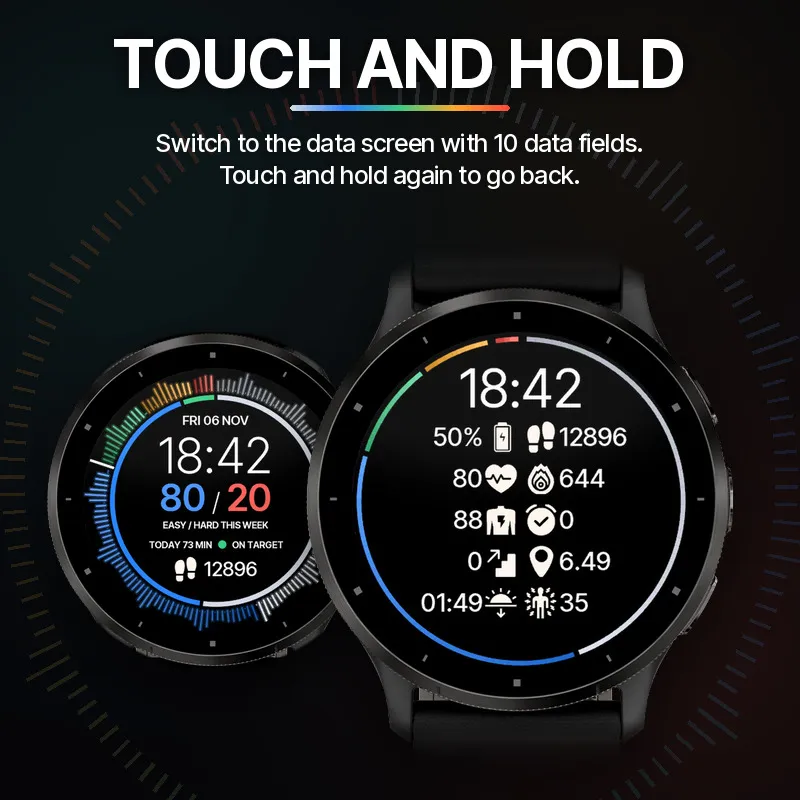
Below the status there is one data field of your choice (default: steps). Touch and hold the screen to switch to the data screen with 10 data fields. Touch and hold again to go back.
The always-on mode shows a thin, dimmed zone ring and the time.
If you have any feedback or requests, feel free to share them with us!
FITT Score:
Our innovative fitness metric combines your steps, active minutes, stress levels, and recovery status into a single score, giving you an instant snapshot of your daily fitness progress. Learn more about FITT Score calculation on our website.
https://wfb.app/fitt-score
Features:
Your easy / hard split this week (zones 1-2 vs. zones 3-5) against the 80 / 20 target
Ring of your minutes in heart-rate zones 1-5 this week, with heartbeat-style bars
Inner ring with today's zone split
Today's training minutes and a status: on target, go easier or week started
Uses your own Garmin heart-rate zones
The week starts on your watch's first day of the week
One data field on the main screen with 20 data types to choose from (default: steps)
Touch and hold to switch to the data screen
10 custom data fields with 20 data types to choose from
33 icon colors
7 date formats
Leading zero option for hours
On-device settings
AOD display
Data types for the data fields:
Hidden
Steps
Steps Goal %
Distance
Calories
Heart Rate
Active Minutes (Day)
Active Minutes (Week)
FITT Score
Body Battery (if available)
Stress Level (if available)
Breaths per Minute
Time to Recovery
Floors Climbed
Meters/Feet Climbed
Altitude
Battery %
Notifications
Weather Condition
Chance of Precipitation
Sunrise / Sunset
The watch face asks for access to your user profile only to read your heart-rate zones.
Keywords:
zone balance, heart rate zones, HR zones, 80/20, polarized training, easy hard, zone 2, zone 2 training, training balance, training load, running, cycling, triathlon, endurance, aerobic, intensity, heart rate, weekly training, fitness tracking, FITT Score, steps, calories, AOD display, Garmin, smartwatch, data-rich, watch face
更新記錄
More Echelon watch faces: https://echelon.im/garmin
螢幕截圖
支援語言(1)
相容機型(76)
Approach® S50
Approach® S70 (42mm)
Approach® S70 (47mm)
Approach® S72 - 43 mm
Approach® S72 - 47 mm
D2™ Air X10
D2™ Air X15
D2™ Mach 1
D2™ Mach 1 Pro
D2™ Mach 2
D2™ Mach 2 Pro
Descent™ G2
Descent™ MK3 - 43mm
Descent™ MK3i - 51mm
Enduro™ 2
Enduro™ 3
Enduro™ 4
epix™ (Gen 2)
epix™ (Gen 2)
epix™ Pro (42mm)
epix™ Pro (47mm)
epix™ Pro (51mm)
fēnix® 7X
fēnix® 7X
fēnix® 7X Pro
fēnix® 7X Pro No Wi-Fi
fēnix® 8 AMOLED (43mm)
fēnix® 8 AMOLED (47mm/51mm)
fēnix® 8 Pro
fēnix® 8 Solar (51mm)
fenix® 9 - 43 mm
fenix® 9 – 47 mm
fenix® 9 Pro - 43 mm
fenix® 9 Pro - 47 mm
fenix® 9 Pro - 51 mm
fenix® 9 Pro - Solar 51 mm
fēnix® E
Forerunner® 165
Forerunner® 165 Music
Forerunner® 170
Forerunner® 170 Music
Forerunner® 265
Forerunner® 265S
Forerunner® 570 - 42mm
Forerunner® 570 - 47mm
Forerunner® 70
Forerunner® 70
Forerunner® 965
Forerunner® 970
Instinct® 3 – 45 mm, AMOLED
Instinct® 3 – 50 mm, AMOLED
Instinct® Crossover AMOLED
MARQ® (Gen 2)
MARQ® Adventurer (Gen 3)
MARQ® Commander (Gen 2) – Carbon Edition
MARQ™ Aviator (Gen 2)
Mercedes-Benz Venu® 2
Mercedes-Benz Venu® 2
Mercedes-Benz Venu® 2S
Mercedes-Benz Venu® 2S
tactix® 7
tactix® 7 – AMOLED Edition
tactix® 8 – 47 mm, AMOLED
tactix® 8 – 51 mm, Solar
Venu® 2
Venu® 2
Venu® 2 Plus
Venu® 2 Plus
Venu® 2S
Venu® 2S
Venu® 3
Venu® 3S
Venu® 4 – 41 mm
Venu® 4 – 45 mm
vívoactive® 5
vívoactive® 6
最近指標趨勢
評分
評論
快照日期
2026-11-17 → 2026-11-26