功能說明
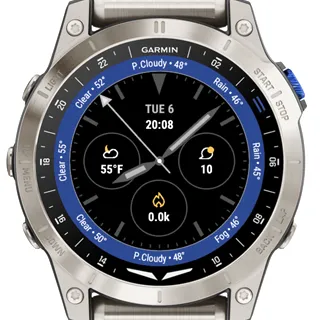
Weather Master Daytona - Ultimate 12-hour Weather Forecast Watch Face
Get ready for precision weather tracking right on your wrist with "Weather Master Daytona", the most dynamic and customizable watch face built for adventurers, aviators, runners, and everyday explorers.
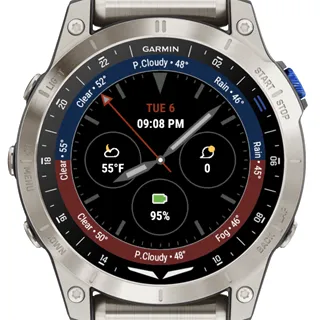
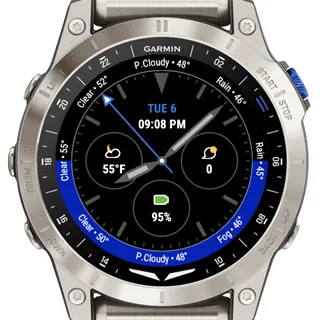
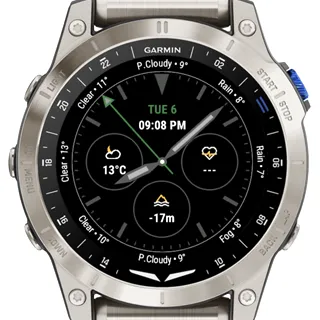
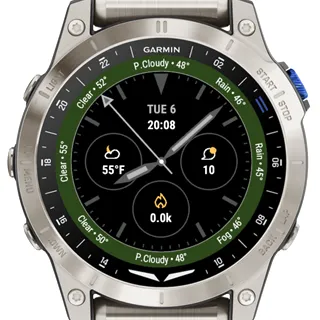
12-Hour Smart Bezel Weather Forecast
Track the next 12 hours of weather with a unique bezel-integrated design. Forecast icons (Clear, Cloudy, Rain, Snow, etc.) and real-time temperature data are displayed at key hour positions - a perfect match for outdoor activities.
Fully Customizable Data Fields
Choose up to 3 customizable data fields from a powerful list including:
- Altitude (ft/m)
- Battery Level
- Calories Burned
- Heart Rate (real-time)
- Steps Counter
- Notifications
- Temperature
Color Themes
Style your smart watch like a classic sports watch with themes like "Sprite", "Pepsi", "Batman", "Coke", and "Smurf". Each theme delivers vibrant contrast and high legibility.
How To Set Up
1. Install the watch face using ConnectIQ mobile app.
2. Open the ConnectIQ mobile app, follow "Device" - "My Watch Faces" - "Weather Master Daytona".
3. Tap "Settings".
4. Use "Units" to set Fahrenheit or Celcius units for temperature.
5. Use "Display" to set up a color theme.
6. Use "Time and TimeZone" to set a digital clock and 12 or 24 hour display.
7. Use "Data Layout" to display customizable data fields.
Compatible with Multiple Models
Optimized for Garmin smartwatches with support for weather data, sensors, and Connect IQ.
Tips
We would be ever so grateful if you would consider supporting the development and maintenance with your payment: https://www.paypal.com/ncp/payment/2UXWJSVZSPZNC
更新記錄
[1.0.6] - Initial watch face app release.
螢幕截圖
支援語言(1)
相容機型(62)
Approach® S50
Approach® S70 (42mm)
Approach® S70 (47mm)
D2™ Mach 1
D2™ Mach 1 Pro
Descent™ MK3 - 43mm
Descent™ MK3i - 51mm
Enduro™ 2
Enduro™ 3
epix™ (Gen 2)
epix™ (Gen 2)
epix™ Pro (42mm)
epix™ Pro (47mm)
epix™ Pro (51mm)
fēnix® 7
fēnix® 7
fēnix® 7 Pro
fēnix® 7 Pro – Solar Edition (No Wi-Fi®)
fēnix® 7S
fēnix® 7S
fēnix® 7S Pro
fēnix® 7X
fēnix® 7X
fēnix® 7X Pro
fēnix® 7X Pro No Wi-Fi
fēnix® 8 AMOLED (43mm)
fēnix® 8 AMOLED (47mm/51mm)
fēnix® 8 Solar (47mm)
fēnix® 8 Solar (51mm)
fenix® 9 - 43 mm
fenix® 9 – 47 mm
fēnix® E
Forerunner® 165
Forerunner® 165 Music
Forerunner® 255
Forerunner® 255 Music
Forerunner® 255S Music
Forerunner® 265
Forerunner® 265S
Forerunner® 955 Dual Power
Forerunner® 965
MARQ® (Gen 2)
MARQ® Commander (Gen 2) – Carbon Edition
MARQ™ Aviator (Gen 2)
Mercedes-Benz Venu® 2
Mercedes-Benz Venu® 2
Mercedes-Benz Venu® 2S
Mercedes-Benz Venu® 2S
tactix® 7
tactix® 7 – AMOLED Edition
tactix® 8 – 47 mm, AMOLED
tactix® 8 – 51 mm, Solar
Venu® 2
Venu® 2
Venu® 2 Plus
Venu® 2 Plus
Venu® 2S
Venu® 2S
Venu® 3
Venu® 3S
vívoactive® 5
vívoactive® 6
最近指標趨勢
評分
評論
快照日期
2026-10-27 → 2026-10-29