功能说明
Version 1.7.7
Improved reminder management, reliability and Connect IQ settings.
* Simplified reminder creation through Connect IQ with six dedicated Add sections.
* Added a Saved Alerts summary with the ability to delete selected reminders.
* Improved validation to prevent duplicate reminders and accidental changes.
* Improved scheduling reliability and recovery from interrupted saves.
* Preserved existing reminders, history, snoozes and saved preferences.
* Improved automatic refresh of reminder lists after changes.
Important NOTE : Open WristWise on your watch to process changes submitted through Connect IQ. Refresh the Connect IQ settings after updating. Check the USER MANUAL for more info.
WristWise is a private reminder, hydration and daily planning app built for Garmin users who want to stay on top of what matters without constantly reaching for their phone.
For training and endurance
Use WristWise during triathlons, long runs, cycling, hiking and demanding outdoor activities to remind yourself when it is time to take electrolytes, an energy gel, nutrition, protein or other planned supplies.
Create reminders around your own schedule so important nutrition and hydration intervals are harder to miss when you are focused on the activity.
For everyday life
WristWise is also designed for busy days.
Keep appointments, timed routines, calls, important tasks, birthdays, hydration and daily plans organised directly from your wrist.
Create one-time, daily, weekly, monthly and custom reminders, or build a simple Daily Plan to keep your day structured and visible.
Reminder actions
When something becomes due, WristWise keeps it simple:
Done
Snooze
Dismiss
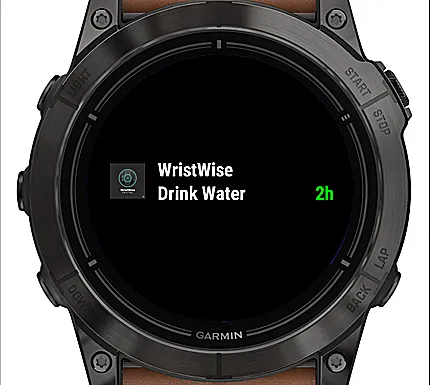
Overdue and upcoming reminders are clearly separated so you can immediately see what needs attention.
Hydration
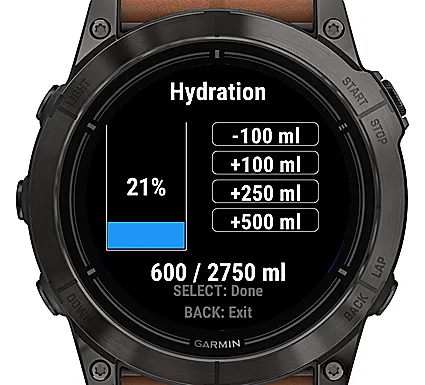
Track your daily water intake directly from the watch.
Set your hydration goal, configure reminder frequency and quickly record drinks throughout the day. WristWise automatically stops hydration reminders once your goal is reached.
Timed routines
Create scheduled reminders using daily, weekly, monthly or custom timed schedules.
Custom courses can be planned around a start time, repeat interval and duration, making them useful for supplements, nutrition, training routines or other recurring tasks.
Daily Plan
Build a simple timeline for your day and see upcoming tasks in chronological order alongside your existing reminders.
Useful for work, training, travel or any day where you need to keep multiple things under control.
Glance
Check WristWise without opening the full app.
See your overdue reminder count, earliest overdue reminder, next upcoming reminder and a live countdown.
Settings
WristWise can be configured directly from your Garmin watch and through the Connect IQ app settings, giving you flexibility to manage it from whichever is more convenient.
Private by design
Your reminders, history, hydration information and scheduling data stay locally on your Garmin device.
No account is required.
No cloud storage is required.
WristWise puts reminders, hydration, timed routines and daily planning together in one focused Garmin app, whether you are managing a demanding training session or simply keeping a busy day under control.
更新日志
WristWise User Manual
Quick Start:
Open WristWise. Press Select, hold Menu, or tap the main screen to open the menu. Choose Add Alert, select a type, follow the prompts, and confirm.
Main Screen:
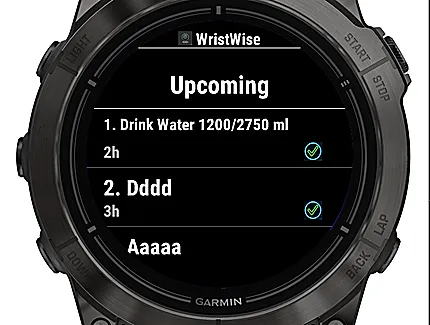
Overdue shows reminders awaiting action; Upcoming shows up to 10 events. Use Done or Snooze on an overdue row. On touchscreens, hold a row for more actions.
Main Menu:
The menu offers Add Alert, Upcoming, and System Health. Upcoming contains Active and Past / Done. Open an item to manage it. In Past / Done, press Menu and choose Delete All to delete all items in that list, including paused alerts.
Add Alert:
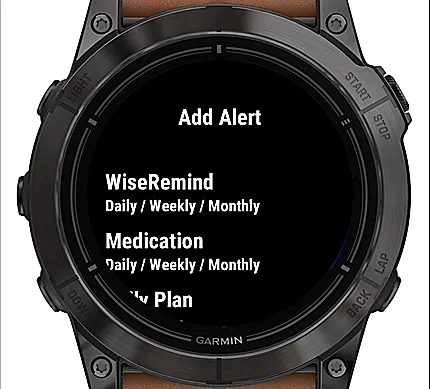
Choose Appointments, WiseRemind, Medication, Daily Plan, Hydration, or Yearly Reminders. Names can have up to 20 characters.
Appointments:
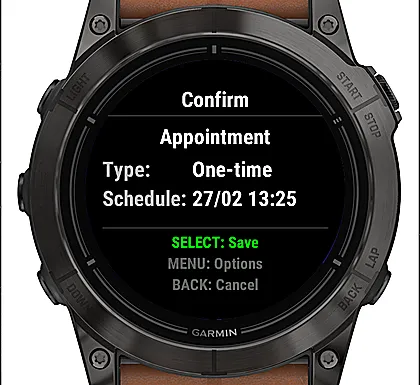
Set a one-time reminder using Today or Calendar. A passed time moves to tomorrow with Today, or next year with Calendar.
WiseRemind:
Choose Custom, Call, Security, or Billing. Schedule Custom Days from Monday through Sunday, Daily, Weekly, or Monthly. Billing can include a name and amount.
Medication:
Choose Custom, Daily, Weekly, or Monthly. For a Custom course, set the dose interval and duration; it starts when created.
Daily Plan:
Set or revise up to 3 days, with up to 10 entries per day. Repeat ON makes the day's entries weekly; OFF makes them one-time. Other recurring reminders appear for reference.
Hydration:
Only one non-completed hydration reminder is allowed. Choose Aggressive (120 minutes), Moderate (180 minutes), or Low (240 minutes). Use Water Intake to add or correct intake. Reminders stop at the goal until the next day; lowering intake below the goal lets them resume.
Yearly Reminders:
Add up to 10 birthdays. They repeat at 09:00 local time; 29 February birthdays move to 28 February in non-leap years.
Reminder Actions:
Done completes an occurrence; Snooze delays it by the configured interval; Dismiss skips it. Leaving without acting keeps it Overdue. Actions vary by reminder and screen.
Glance:
Shows the overdue count and earliest overdue reminder, plus the next reminder and countdown when available.
System Health:
Shows active and overdue usage, estimated storage, and recent auto-archives. Press Menu for Clear All History or Bulk Done Overdue.
Merged guide with the essential instructions for creating, managing, deleting and reloading reminders. It fits within the 1,700-character limit.
N13 WristWise: Connect IQ Settings Guide
IMPORTANT: Keep WristWise open on your watch when saving changes from Connect IQ. Saving on your phone alone does not mean the watch processed them.
After updating or if you have existing alerts:
1. Open WristWise on your watch, then reopen its settings in Connect IQ to refresh them.
2. If you already have alerts on the watch, enable Reload alerts from watch and tap Save while WristWise stays open.
3. Reopen Connect IQ settings and check Settings status: Last result from the watch. Check Upcoming on the watch to verify your alerts and times.
Add new items:
With WristWise open on your watch, use Add Item in Connect IQ settings for Appointments, Birthdays, WiseRemind, Medication, Medication Courses or Daily Plan. Enter details and Save. Reopen settings to check Last result from the watch.
Edit or delete:
Edit saved alerts on the watch. To delete an eligible alert by phone, enter its number under Settings status, enable Delete selected alert on Save, then Save. Do this separately from adding new items or changing hydration frequency. Hydration and completed alerts are managed on the watch.
Preferences:
Snooze, hydration and currency settings are available. Create a hydration reminder on the watch before changing its frequency by phone.
If settings are stale, use Reload alerts from watch, Save while WristWise is open and reopen settings. Reload discards unsaved drafts and the deletion selection, but keeps saved alerts.
截图
支持语言(1)
兼容机型(44)
Approach® S70 (42mm)
Approach® S70 (47mm)
Approach® S72 - 43 mm
Approach® S72 - 47 mm
D2™ Mach 1
D2™ Mach 1 Pro
D2™ Mach 2
D2™ Mach 2 Pro
Descent™ G2
Descent™ MK3 - 43mm
Descent™ MK3i - 51mm
Enduro™ 3
Enduro™ 4
epix™ (Gen 2)
epix™ (Gen 2)
epix™ Pro (42mm)
epix™ Pro (47mm)
epix™ Pro (51mm)
fēnix® 8 AMOLED (43mm)
fēnix® 8 AMOLED (47mm/51mm)
fēnix® 8 Pro
fēnix® 8 Solar (47mm)
fēnix® 8 Solar (51mm)
fenix® 9 - 43 mm
fenix® 9 – 47 mm
fenix® 9 Pro - 43 mm
fenix® 9 Pro - 47 mm
fenix® 9 Pro - 51 mm
fenix® 9 Pro - Solar 47 mm
fenix® 9 Pro - Solar 51 mm
fēnix® E
Forerunner® 570 - 42mm
Forerunner® 570 - 47mm
Forerunner® 965
Forerunner® 970
MARQ® (Gen 2)
MARQ® Adventurer (Gen 3)
MARQ® Commander (Gen 2) – Carbon Edition
MARQ™ Aviator (Gen 2)
tactix® 7 – AMOLED Edition
tactix® 8 – 47 mm, AMOLED
tactix® 8 – 51 mm, Solar
vívoactive® 5
vívoactive® 6
最近指标走势
评分
评论
快照日期
2026-10-27 → 2026-11-01