Beschrijving
Look at your watch and you know how long until report and what the TAF says for your arrival.
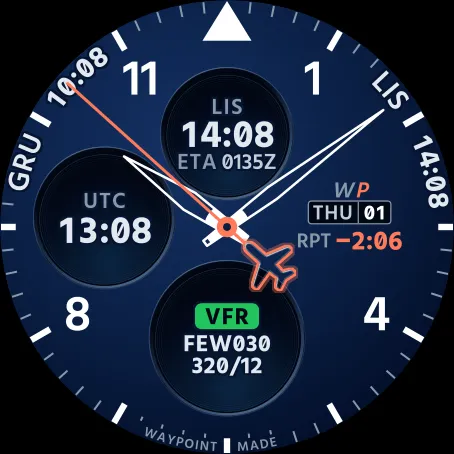
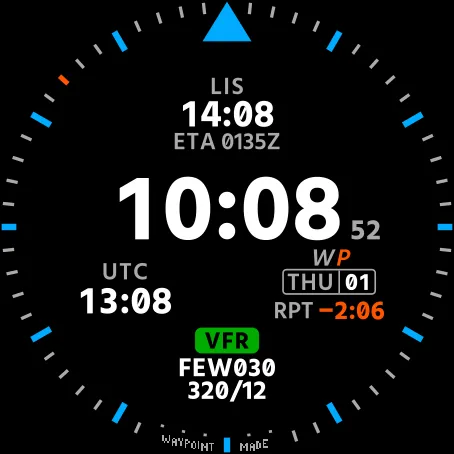
WayPoint Face is an analog watch face for airline pilots. It follows the roster you uploaded at mywpoint.com and counts down to your wake-up, pickup, report and push.
It needs the WayPoint app on the same watch. The app is free, in this store.
Wake up before the wake-up call and it says WAKE -0:20. On the crew bus, RPT -0:40. On the flight deck, PUSH -0:15. If the push is late it counts the delay: PUSH +0:07 in amber, red from 16 minutes. The watch does the counting, from the last roster it received, so it keeps working in airplane mode.
How it works
On a layover, note your wake-up and pickup at mywpoint.com and the dial counts down to each one. It doesn't ring, so keep your alarm.
Two hours before report at the latest, the top of the dial turns to your destination, with its local time and your ETA in UTC (ETA 0135Z). The bottom becomes the TAF for that time: flight category, ceiling or visibility, wind. A worse TEMPO or PROB within an hour of your ETA takes over, and the dial names it.
The rest of the time, the top is your base and its clock. The bottom is what comes next: a flight, a standby, training, days off. On standby it reads ON STBY 2:52 LEFT.
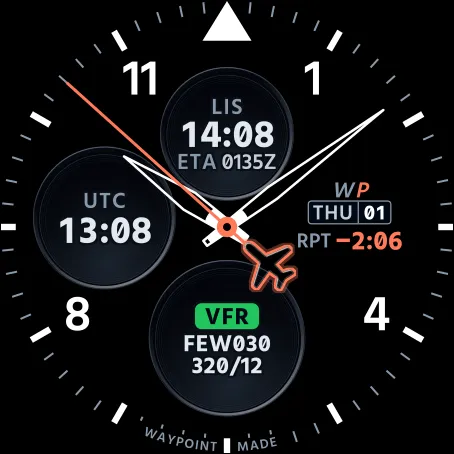
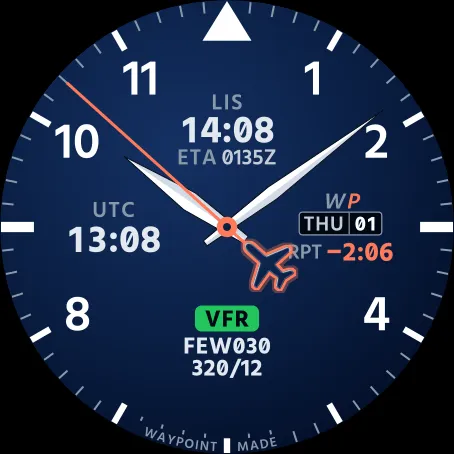
UTC is always on the left, with the battery level under it. The triangle at 12 points forward, like the aircraft symbol on your ND. The hands are skeleton hands, so you read the dial through them. The seconds hand has a small plane for a counterweight and runs while the watch is awake. Down at 6, in tiny print, WAYPOINT MADE. Made by a line pilot for the people he flies with.
Good to know
• Missing data shows as a dash. The face never guesses.
• A TAF six hours old or more shows its age in amber.
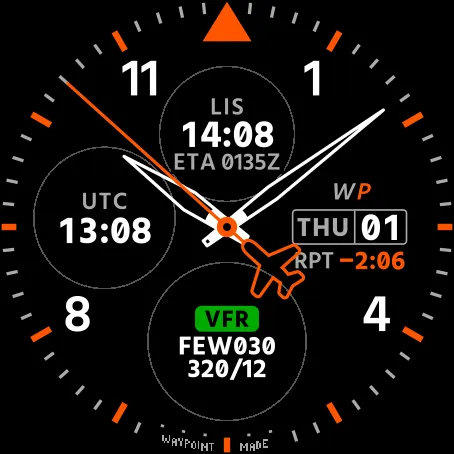
• On AMOLED watches, always-on dims the face: hands in outline, both times, the countdown and the TAF (or what comes next). No date, ETA or battery in that mode.
• English or Portuguese, following the watch language.
What you need
• The WayPoint app, version 1.2.0 or newer, on the same watch (search for WayPoint Crew Roster in this store). Pair it once: open it on the watch, press START and confirm the 6-digit code at mywpoint.com/watch.
• A free WayPoint account with your roster uploaded at mywpoint.com. Nothing is imported from your airline. If the roster changes, upload the new one.
• Garmin Connect on your phone. The app refreshes through it about every 30 minutes.
Without the app, or before pairing, the face shows the time, UTC, the date and the battery, with dashes in the flight fields.
Settings
On the watch (watch face menu, Customize) or in Garmin Connect.
• Bkgd. Color: Navy (default) or Black.
• Right field: Countdown + date (default) or Date only.
Compatible watches
• fēnix 7, 7 Pro, 7X, 7X Pro, fēnix E
• fēnix 8 AMOLED 43/47/51mm, 8 Pro 47/51mm, 8 Solar 47/51mm
• fēnix 9 43/47/51mm, 9 Pro 43/47/51mm, 9 Pro Solar 47/51mm
• epix (Gen 2), epix Pro (Gen 2) 42/47/51mm
• tactix 7, 7 AMOLED, tactix 8 AMOLED 47/51mm, 8 Solar 51mm
• quatix 7, 7X Solar, 7 Sapphire and 7 Pro, quatix 8 47/51mm, 8 Pro 47/51mm
• MARQ (Gen 2) incl. Aviator
• D2 Air X10, X15, D2 Mach 1, 1 Pro, 2 and 2 Pro
• Forerunner 170, 170 Music, 265, 265S, 570 42/47mm, 955, 965 and 970
• Venu 2, 2S, 2 Plus, 3, 3S, Venu 4 41/45mm, vívoactive 6
• Enduro 2, 3
• Approach S70 42/47mm, Descent Mk3 43mm, Mk3i 43/51mm
Not supported: fēnix 7S, Forerunner 165 and 255, vívoactive 5, Instinct and others.
Privacy
Your flight number never appears on the dial. It isn't even sent to the face. Neither is your name, the crew list or the hotel. The face reads airports, duty codes, times, your wake-up and pickup and the arrival forecast from the WayPoint app, and sends nothing anywhere.
Privacy policy: https://mywpoint.com/privacy
Support: [email protected]
The TAF on the dial is a summary. Your official briefing and roster are the ones that count. WayPoint is an independent app, not affiliated with Garmin or with any airline.
Wat is nieuw
Now on the fēnix 7S and fēnix 7S Pro. Returning to the face from a menu or after changing a setting now shows the whole face at once, with no empty circles.
Schermafbeeldingen
Ondersteunde talen (2)
Compatibele toestellen (72)
Approach® S70 (42mm)
Approach® S70 (47mm)
D2™ Air X10
D2™ Air X15
D2™ Mach 1
D2™ Mach 1 Pro
D2™ Mach 2
D2™ Mach 2 Pro
Descent™ MK3 - 43mm
Descent™ MK3i - 51mm
Enduro™ 2
Enduro™ 3
epix™ (Gen 2)
epix™ (Gen 2)
epix™ Pro (42mm)
epix™ Pro (47mm)
epix™ Pro (51mm)
fēnix® 7
fēnix® 7
fēnix® 7 Pro
fēnix® 7 Pro – Solar Edition (No Wi-Fi®)
fēnix® 7S
fēnix® 7S
fēnix® 7S Pro
fēnix® 7X
fēnix® 7X
fēnix® 7X Pro
fēnix® 7X Pro No Wi-Fi
fēnix® 8 AMOLED (43mm)
fēnix® 8 AMOLED (47mm/51mm)
fēnix® 8 Pro
fēnix® 8 Solar (47mm)
fēnix® 8 Solar (51mm)
fenix® 9 - 43 mm
fenix® 9 – 47 mm
fenix® 9 Pro - 43 mm
fenix® 9 Pro - 47 mm
fenix® 9 Pro - 51 mm
fenix® 9 Pro - Solar 47 mm
fenix® 9 Pro - Solar 51 mm
fēnix® E
Forerunner® 170
Forerunner® 170 Music
Forerunner® 265
Forerunner® 265S
Forerunner® 570 - 42mm
Forerunner® 570 - 47mm
Forerunner® 955 Dual Power
Forerunner® 965
Forerunner® 970
MARQ® (Gen 2)
MARQ® Commander (Gen 2) – Carbon Edition
MARQ™ Aviator (Gen 2)
Mercedes-Benz Venu® 2
Mercedes-Benz Venu® 2
Mercedes-Benz Venu® 2S
Mercedes-Benz Venu® 2S
tactix® 7
tactix® 7 – AMOLED Edition
tactix® 8 – 47 mm, AMOLED
tactix® 8 – 51 mm, Solar
Venu® 2
Venu® 2
Venu® 2 Plus
Venu® 2 Plus
Venu® 2S
Venu® 2S
Venu® 3
Venu® 3S
Venu® 4 – 41 mm
Venu® 4 – 45 mm
vívoactive® 6