Beschrijving
ITR DELTA - the dot-matrix watch face you design yourself.
THIS WATCHFACE IS EXTREMELY CUSTOMIZABLE. ANY DESIGN IS POSSIBLE.
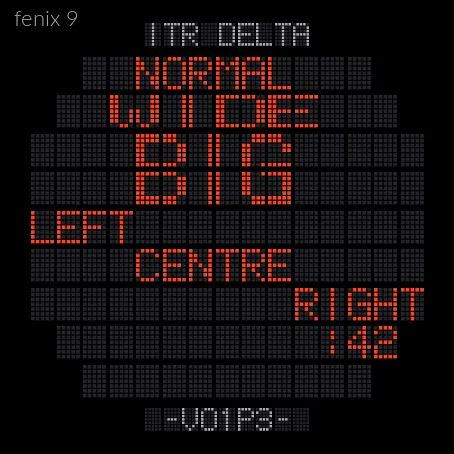
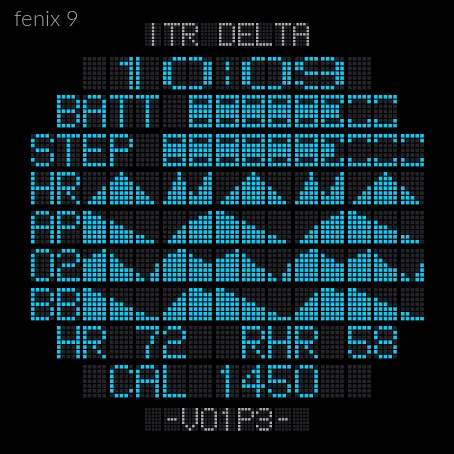
ITR DELTA is a pure dot-matrix watch face: the whole round screen is a grid of 5x7 dot characters. Nine rows are yours: type a short "Custom" string in the settings and the row shows exactly what you wrote.
WHAT YOU CAN PUT IN A ROW
- Text, in any layout: left, centre or right aligned, per row
- Time, date, weekday, AM/PM, and GMT time (with your own GMT offset)
- Heart rate, resting heart rate, steps, calories, Body Battery, SpO2, pressure, temperature, watch battery
- Bar gauges and history graphs (heart rate, pressure, SpO2, Body Battery)
- Wide letters and big 2x2 letters for the time or any text
- Simple calculations, e.g. a second time zone: LON $02{($k + 15) % 24}:$02m
QUICK START
Open the watch face settings in Garmin Connect and edit Custom1 ... Custom9 (one per row).
$h:$m shows the time, e.g. 10:09
$W $02M-$02D shows TUE 11-24
HR $3H shows the heart rate
BATT (GAUGE, 8, $A) battery bar gauge
HR (GRAPH, 5, $H) heart rate graph
(BIG, $02h:$02m) big time
"$" + a letter inserts a value, "$|" is a flexible blank, and text outside the codes is shown as typed (upper case; the font has 0-9, A-Z and : - % . / + ( ) , ! ? = ' * # _).
The full list of codes and examples (with the default settings):
https://github.com/developitrjp/itr_delta_custom_line
A web checker is also available: type your strings and see how the rows will look, right in your browser.
https://developitrjp.github.io/itr_delta_custom_line/custom_checker.html
Need ideas? The design gallery shows designs made with the checker; open one in the checker and make it your own.
https://developitrjp.github.io/itr_delta_custom_line/gallery.html
Design code: press "Copy design code" in the checker or the gallery, paste it into the last setting (Design code) in Garmin Connect, save, and after the next sync the nine rows, alignments and colour are filled in.
AI CAN HELP
Not sure how to write a row? Give the manual above to an AI assistant (Claude, ChatGPT, Gemini ...) and tell it what you want to see, e.g. "Custom3: New York time". It writes the string; paste it into the setting. The manual has a section for AI assistants.
ALSO
- Two fonts: DELTA FONT (the default, a new hand-made 5x7 font) and Classic (the original look). Choose with "Font" in the watch face settings in Garmin Connect, or in the watch's own Customize menu.
- Colour: Cyan / Yellow / Red / Orange
- Always-on display: the rows that show the time as grey outlines (a big time also keeps the row below it)
- Row 1 to 9 defaults show a ready-made layout, so it works well before you change anything
- Colour: Cyan / Yellow / Red / Orange
- Always-on display: the rows that show the time as grey outlines (a big time also keeps the row below it)
- Row 1 to 9 defaults show a ready-made layout, so it works well before you change anything
Weather values (temperature) need the watch to have weather data. Some values update every minute or every few minutes, not every second.
Wat is nieuw
V01P5
- New: DELTA FONT, a new hand-made dot font, now the default. The original look is still there as "Classic": choose it with Font in the settings or in the watch's Customize menu.
- New: UNIX time code ($u) for rows, e.g. $u shows the seconds since 1970.
V01P4
- New: Design code. Copy a whole design from the web checker or the gallery, paste it into the new Design code setting, and the nine rows, alignments and colour are filled in after the next sync.
- A value that is not available yet shows dashes as wide as its field (----).
- A value with a fixed width stops at all 9s instead of growing wider.
- Always-on display: the row under a big time is shown too.
- MIP watches: brighter Cyan.
- Design gallery and per-row Copy buttons on the web checker.
Schermafbeeldingen
Ondersteunde talen (2)
Compatibele toestellen (57)
D2™ Mach 1 Pro
Enduro™ 2
epix™ (Gen 2)
epix™ (Gen 2)
epix™ Pro (42mm)
epix™ Pro (47mm)
epix™ Pro (51mm)
fēnix® 6
fēnix® 6
fēnix® 6 Dual Power
fēnix® 6 Pro
fēnix® 6 Pro
fēnix® 6 Pro Dual Power
fēnix® 6 Pro Solar
fēnix® 6 Solar
fēnix® 6S
fēnix® 6S
fēnix® 6S Dual Power
fēnix® 6S Pro
fēnix® 6S Pro
fēnix® 6S Pro Dual Power
fēnix® 6S Pro Solar
fēnix® 6S Solar
fēnix® 6X Pro
fēnix® 6X Pro
fēnix® 7
fēnix® 7
fēnix® 7 Pro
fēnix® 7 Pro – Solar Edition (No Wi-Fi®)
fēnix® 7S
fēnix® 7S
fēnix® 7S Pro
fēnix® 7X
fēnix® 7X
fēnix® 7X Pro
fēnix® 8 AMOLED (43mm)
fēnix® 8 AMOLED (47mm/51mm)
fēnix® 8 Pro
fenix® 9 - 43 mm
fenix® 9 – 47 mm
fenix® 9 Pro - 43 mm
fenix® 9 Pro - 47 mm
fenix® 9 Pro - 51 mm
fēnix® E
Forerunner® 165
Forerunner® 165 Music
Forerunner® 265
Forerunner® 265S
Forerunner® 570 - 42mm
Forerunner® 570 - 47mm
Forerunner® 965
Forerunner® 970
quatix® 6
quatix® 6X
tactix® 7
tactix® 7 – AMOLED Edition
tactix® 8 – 47 mm, AMOLED
Recente trend
Beoordeling
Reviews
Snapshot-datums
2026-11-26 → 2026-11-28