Descripción
BETA. Parent Pace is new and still being tested, so the numbers may change as real runs come in.
Setup guide: parentpace.app/setup/garmin
Questions, feedback and stroller-run chat: the Strava club at strava.com/clubs/parentpace, or [email protected]
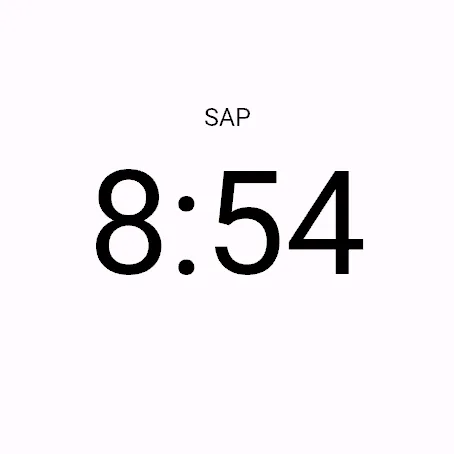
Pushing a running stroller up a hill is hard work, and your pace doesn’t show it. Parent Pace shows SAP, stroller-adjusted pace: what your effort is worth on flat ground without the stroller.
It corrects your pace for the slope, the way grade-adjusted pace (GAP) does, then for the stroller. The stroller adds about 7% on the flat, and more as the hill gets steeper and the load gets heavier compared with you.
SETTING UP
On the watch, copy your Run activity and name it Stroller Run. Any activity with “Stroller” in its name shows SAP.
Install Parent Pace. When the watch asks to set it up, tick Stroller Run and your other running activities, such as Run. On those it shows plain grade-adjusted pace, labelled PP GAP.
In the Connect IQ app, open Parent Pace’s settings, pick your stroller from the list or type its weight, and enter your children’s weights. Weights follow your watch, pounds or kilograms.
Two strollers, or different children on different days? Fill in Setup 2 or 3, then copy Stroller Run and put the setup’s word in its name, such as Double Stroller Run.
After you sync, Garmin Connect shows the Parent Pace charts and averages. On a stroller run it also shows the load you pushed, and each lap shows its stroller-adjusted pace and the setup you used.
WHAT IT NEEDS, AND WHAT IT DOESN’T DO YET
A watch with a barometric altimeter. The slope comes from it.
Your weight set in your Garmin profile.
PP GAP should read close to your watch’s own GAP.
Walking works, but the hill correction is built for running. A walking mode is planned; email [email protected] to register interest.
Stroller runs are slower at the same heart rate, which can pull Garmin’s VO2 max estimate down a little. To keep them out, copy Trail Run instead of Run and turn off Record VO2 Max. Strava then files those runs as trail runs.
ANONYMOUS DATA, OFF BY DEFAULT
If you turn on “Share anonymous data” in the settings, the field sends one short summary at the end of each run: a random ID, your watch model and the app version, the run date, the activity type (such as running or walking) and whether you pushed a stroller, your weight and the stroller and child weights and whether they were in pounds or kilograms, the stroller model and setup you used, how long and how far you ran, and your speed and heart rate grouped by slope. It never contains your name, email, Garmin account, GPS or route. It goes through your phone to the developer’s server and is used to improve the stroller formula. Your solo runs give it a baseline to compare your stroller runs against.
Turn sharing off at any time, and use “Reset anonymous ID” to delete what was sent.
Data sharing is not supported on older Garmin watches, such as the fēnix 6 Pro and Forerunner 945.
Privacy policy: parentpace.app/privacy
How the numbers are worked out: parentpace.app/how-it-works
Novedades
Now runs on older watches: fēnix 5 Plus and 6 Pro series, Forerunner 645 Music, 745, 945 and 945 LTE, MARQ Gen 1, and Descent Mk2 and Mk2 S. Data sharing is not supported on these. The stroller list adds the Thule Chariot Cross 2 and Sport 2, single and double, and the Lite Double, each weighed with Thule’s jogging kit.
Capturas
Idioma compatible (1)
Dispositivos compatibles (131)
Approach® S70 (42mm)
Approach® S70 (47mm)
Approach® S72 - 43 mm
Approach® S72 - 47 mm
D2™ Air X10
D2™ Air X15
D2™ Mach 1
D2™ Mach 1 Pro
D2™ Mach 2
D2™ Mach 2 Pro
Descent™ G2
Descent™ MK2
Descent™ MK2
Descent™ Mk2S
Descent™ Mk2S
Descent™ MK3 - 43mm
Descent™ MK3i - 51mm
Enduro™ 2
Enduro™ 3
Enduro™ 4
epix™ (Gen 2)
epix™ (Gen 2)
epix™ Pro (42mm)
epix™ Pro (47mm)
epix™ Pro (51mm)
fēnix® 5 Plus
fēnix® 5 Plus
fēnix® 5S Plus
fēnix® 5S Plus
fēnix® 5X Plus
fēnix® 5X Plus
fēnix® 6 Pro
fēnix® 6 Pro
fēnix® 6 Pro Dual Power
fēnix® 6 Pro Solar
fēnix® 6S Pro
fēnix® 6S Pro
fēnix® 6S Pro Dual Power
fēnix® 6S Pro Solar
fēnix® 6X Pro
fēnix® 6X Pro
fēnix® 7
fēnix® 7
fēnix® 7 Pro
fēnix® 7 Pro – Solar Edition (No Wi-Fi®)
fēnix® 7S
fēnix® 7S
fēnix® 7S Pro
fēnix® 7X
fēnix® 7X
fēnix® 7X Pro
fēnix® 7X Pro No Wi-Fi
fēnix® 8 AMOLED (43mm)
fēnix® 8 AMOLED (47mm/51mm)
fēnix® 8 Pro
fēnix® 8 Solar (47mm)
fēnix® 8 Solar (51mm)
fenix® 9 - 43 mm
fenix® 9 – 47 mm
fenix® 9 Pro - 43 mm
fenix® 9 Pro - 47 mm
fenix® 9 Pro - 51 mm
fenix® 9 Pro - Solar 47 mm
fenix® 9 Pro - Solar 51 mm
fēnix® E
ForeAthlete 645 Music
ForeAthlete 745
Forerunner® 165
Forerunner® 165 Music
Forerunner® 170
Forerunner® 170 Music
Forerunner® 255
Forerunner® 255 Music
Forerunner® 255S
Forerunner® 255S Music
Forerunner® 265
Forerunner® 265S
Forerunner® 570 - 42mm
Forerunner® 570 - 47mm
Forerunner® 645 Music
Forerunner® 745
Forerunner® 945
Forerunner® 945
Forerunner® 945 LTE
Forerunner® 955 Dual Power
Forerunner® 965
Forerunner® 970
Instinct® 3 – 45 mm, AMOLED
Instinct® 3 – 50 mm, AMOLED
Instinct® Crossover AMOLED
MARQ® (Gen 2)
MARQ® Adventurer (Gen 3)
MARQ® Commander (Gen 2) – Carbon Edition
MARQ™ Adventurer
MARQ™ Adventurer
MARQ™ Athlete
MARQ™ Athlete
MARQ™ Aviator
MARQ™ Aviator
MARQ™ Aviator (Gen 2)
MARQ™ Captain
MARQ™ Captain
MARQ™ Commander
MARQ™ Commander
MARQ™ Driver
MARQ™ Driver
MARQ™ Expedition
MARQ™ Expedition
MARQ™ Golfer
MARQ™ Golfer
Mercedes-Benz Venu® 2
Mercedes-Benz Venu® 2
Mercedes-Benz Venu® 2S
Mercedes-Benz Venu® 2S
quatix® 6
quatix® 6X
tactix® 7
tactix® 7 – AMOLED Edition
tactix® 8 – 47 mm, AMOLED
tactix® 8 – 51 mm, Solar
Venu® 2
Venu® 2
Venu® 2 Plus
Venu® 2 Plus
Venu® 2S
Venu® 2S
Venu® 3
Venu® 3S
Venu® 4 – 41 mm
Venu® 4 – 45 mm
Venu® X1
Tendencia reciente
Valoración
Reseñas
Fechas de instantáneas
2026-10-27 → 2026-11-04