Beskrivelse
ORBIT SPORT
Watch a day with ORBIT + settings guide: https://garmin.aleksander.pro/?style=sport&lang=en#day
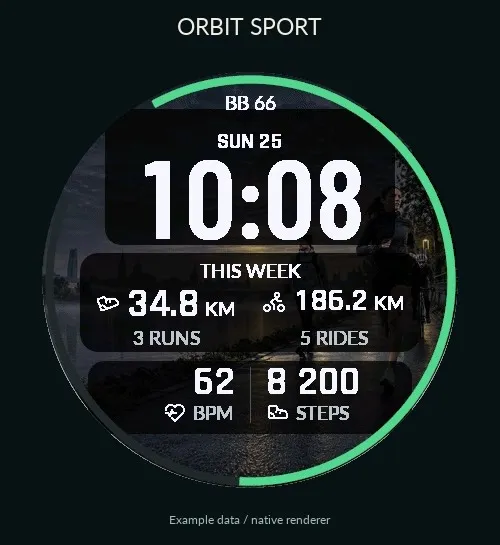
Your training week. Clear at a glance.
See your week take shape without searching through widgets. ORBIT SPORT pairs a bold clock with your running and cycling progress, heart rate and daily steps. Sport-inspired artwork adds character, while dark translucent panels keep the data in focus. Prefer a plain background? Switch the artwork off.
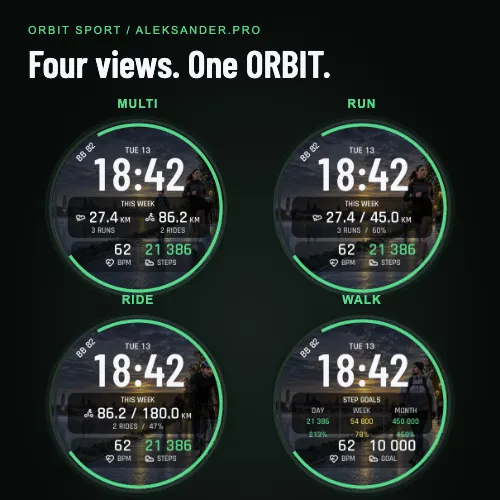
Four profiles in one watch face
- MULTI: weekly running and cycling distance, with activity counts from the history available on your watch. A sport with no weekly distance disappears; one active sport is centred.
- RUN: your running distance this week, a configurable weekly goal and progress percentage.
- RIDE: your cycling distance this week, a configurable weekly goal and progress percentage.
- WALK: daily, weekly and monthly steps with goal progress. Heart rate and your Garmin daily step goal sit below, without repeating the day's step count.
Clear signals, considered timing
Choose Body Battery, daily step progress or monthly step progress for the outer ring. Progress can exceed 100%: 450,000 steps against a 300,000 goal is 150%, with an additional arc showing the excess.
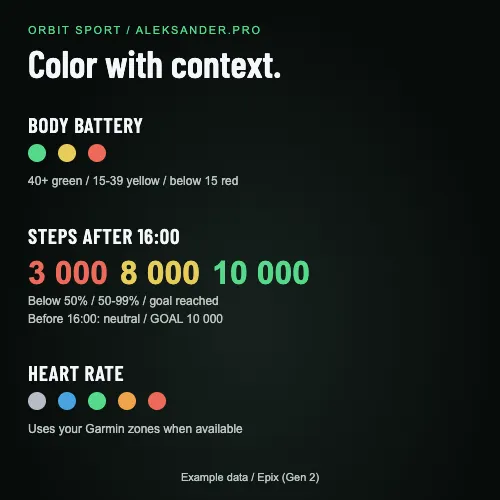
Body Battery is green from 40, yellow at 15-39 and red below 15. Daily steps turn green as soon as you reach the goal set on your watch, at any time of day. Below your goal, steps stay white before 16:00; from 16:00 they are red below 50% and yellow at 50-99%. Heart-rate colours use your available generic Garmin heart-rate zones.
With artwork enabled, a subtle translucent wave represents the available Garmin stress reading. It is visual context, not a training instruction or a health warning. Turn the artwork off to use a plain black background without the wave.
Make it yours
Select ORBIT in the watch-face menu and choose Customize. You can also use Settings in Connect IQ.
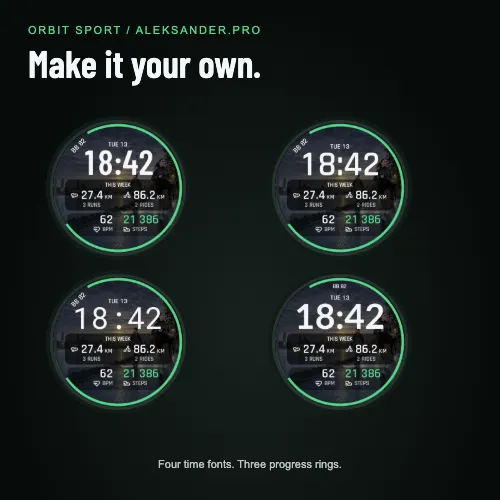
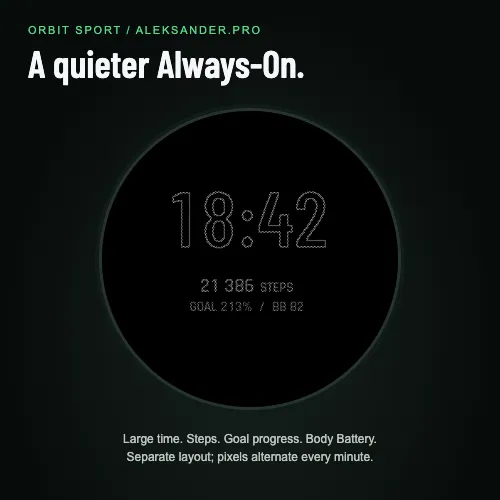
Four clock styles, kilometres or miles, selectable profiles and ring, weekly running and cycling goals, weekly and monthly step goals, and controls to hide running or cycling in MULTI. The dedicated Always-On view shows time, daily steps, goal progress and Body Battery on a simpler black screen.
Night view
Customize / Night view: Auto - ORBIT hours (default 23:00-07:00; adjustable), Garmin hours, Off or On now. Night view keeps a gray clock, steps and optional Body Battery pads on wake. Garmin's own sleep face is separate.
Compatibility and data
Builds for 60 round-watch SDK profiles with Connect IQ 5.2.0+. Families: epix (Gen 2) and Pro, compatible fenix 7 and later models, Forerunner, Venu, vivoactive, MARQ and selected specialist watches. Check your model in the compatibility list. AMOLED/MicroLED show artwork; devices without advanced blending show a precomposed image and stress line. MIP uses a black background without photographs or a stress surface. Reduced Always-On is for AMOLED/MicroLED. Settings are available in English and Polish; short dial labels are in English.
The daily step goal comes from your watch. Weekly and monthly goals are set in ORBIT and are not Garmin Connect Challenges. Weekly distance uses the values available on your watch; activity counts may omit training recorded on another device. An asterisk marks incomplete weekly or monthly step history. Missing readings appear as unavailable, rather than invented zeroes. ORBIT displays watch data and does not record workouts.
All four profiles are included in this product. There is no ORBIT subscription, separate user account or licence-code setup. The Connect IQ listing shows the purchase price and Garmin's applicable refund terms.
Help: https://garmin.aleksander.pro/support.html
Privacy: https://garmin.aleksander.pro/privacy.html
Contact: [email protected]
Independent watch face by aleksander.pro. Garmin and Connect IQ are trademarks of their respective owners.
Compatibility / Kompatybilność: https://garmin.aleksander.pro/#compatibility
Nyheder
The weekly training backdrop now hides automatically when MULTI has no visible running or cycling data. It returns with the first workout. Backgrounds remain behind visible daily metrics and goal profiles.
Skærmbilleder
Understøttede sprog (2)
Kompatible enheder (73)
Approach® S72 - 43 mm
Approach® S72 - 47 mm
D2™ Air X15
D2™ Mach 1
D2™ Mach 1 Pro
D2™ Mach 2
D2™ Mach 2 Pro
Enduro™ 2
Enduro™ 3
Enduro™ 4
epix™ (Gen 2)
epix™ (Gen 2)
epix™ Pro (42mm)
epix™ Pro (47mm)
epix™ Pro (51mm)
fēnix® 7
fēnix® 7
fēnix® 7 Pro
fēnix® 7 Pro – Solar Edition (No Wi-Fi®)
fēnix® 7S
fēnix® 7S
fēnix® 7S Pro
fēnix® 7X
fēnix® 7X
fēnix® 7X Pro
fēnix® 7X Pro No Wi-Fi
fēnix® 8 AMOLED (43mm)
fēnix® 8 AMOLED (47mm/51mm)
fēnix® 8 Pro
fēnix® 8 Solar (47mm)
fēnix® 8 Solar (51mm)
fenix® 9 - 43 mm
fenix® 9 – 47 mm
fenix® 9 Pro - 43 mm
fenix® 9 Pro - 47 mm
fenix® 9 Pro - 51 mm
fenix® 9 Pro - Solar 47 mm
fenix® 9 Pro - Solar 51 mm
fēnix® E
Forerunner® 165
Forerunner® 165 Music
Forerunner® 170
Forerunner® 170 Music
Forerunner® 255
Forerunner® 255 Music
Forerunner® 255S
Forerunner® 255S Music
Forerunner® 265
Forerunner® 265S
Forerunner® 570 - 42mm
Forerunner® 570 - 47mm
Forerunner® 70
Forerunner® 70
Forerunner® 955 Dual Power
Forerunner® 965
Forerunner® 970
Instinct® 3 – 45 mm, AMOLED
Instinct® 3 – 50 mm, AMOLED
Instinct® Crossover AMOLED
MARQ® (Gen 2)
MARQ® Adventurer (Gen 3)
MARQ® Commander (Gen 2) – Carbon Edition
MARQ™ Aviator (Gen 2)
tactix® 7
tactix® 7 – AMOLED Edition
tactix® 8 – 47 mm, AMOLED
tactix® 8 – 51 mm, Solar
Venu® 3
Venu® 3S
Venu® 4 – 41 mm
Venu® 4 – 45 mm
vívoactive® 5
vívoactive® 6