Beskrivelse
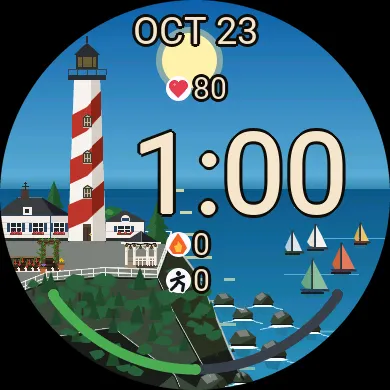
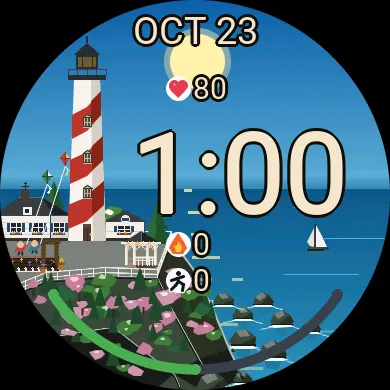
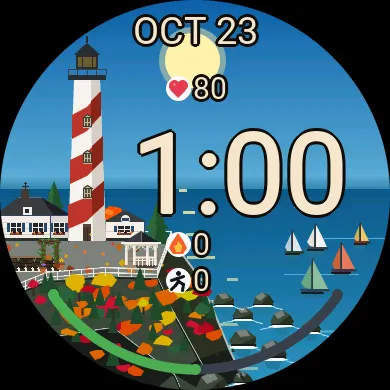
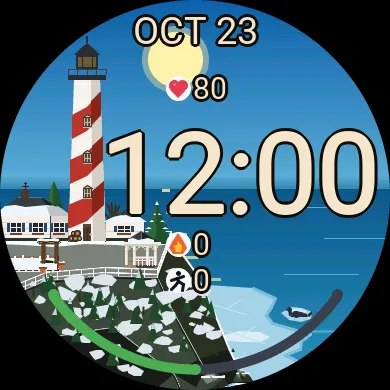
Lightkeeper is a dynamic, scenic watch face. An illustrated New England lighthouse stands on its cliff above the sea, and the whole scene lives and changes with the hours. Through the day: the sky brightens at dawn, brightens to golden hour, turns to dusk, and settles into a starry night with a crescent moon and the lighthouse lamp glowing. Look at your wrist in the morning, at noon and at midnight and you see three different pictures.
Through the year: spring gardens in bloom, summer sails, autumn leaves and pumpkins, and snow-covered winters. After 10:30 pm the scene settles into an elegant line drawing that is battery efficient.
FREE:
- The full illustrated scene, following the time of day and the seasons
- The after-10:30 pm line drawing
- Time, date, heart rate, calories, steps and a battery gauge
- Chimney smoke when you have notifications waiting
LIGHTKEEPER PRO: $3, one-time purchase
Upgrade the free face you already have. There is nothing to reinstall: enter a code and the Pro features switch on within a minute.
- Live weather in the scene: rain, thunderstorms, rolling cloud, snow and blizzards and rough seas, all following your real forecast, plus a weather and temperature reading
- Eight more text colours: coral red, peach orange, butter yellow, mint green, aqua, sky blue, lavender and rose pink
- Choose your readings and their order: weather, heart rate, calories, steps, distance, floors, active minutes, battery or notifications, or leave a row empty
- More reasons for the chimney to smoke: phone connected or disconnected, low battery, step goal reached, time to move, or Do Not Disturb
- Halloween and Christmas scenes
- The lightkeeper himself, if you want him: fishing, gardening, raking, shovelling and tending the lamp through the day and the seasons
HOW TO UPGRADE (about 2 minutes)
1. Install Lightkeeper and set it as your watch face.
2. In the Garmin Connect app, open Lightkeeper's settings. In the Lightkeeper Pro section, set "Row Below Clock" to "Watch ID (for unlocking)" and save. This one works before you upgrade. A 6-digit number appears on your watch.
3. Buy Lightkeeper Pro at https://buymeacoffee.com/gilliuminc/e/590360 and enter that 6-digit Watch ID at checkout.
4. Your unlock code is emailed to you automatically, usually within a few minutes. If it is not in your inbox, check your junk folder. Enter the code under "Unlock Code" in the same settings and save. Pro switches on within a minute. Then set the row back to whatever you like, and switch on "Show the Lightkeeper" if you want him.
Every Pro setting is marked "(Pro)" in the settings, so you can see exactly what is included before you buy. Without a code they simply have no effect, and the free face keeps working as normal.
Each code works on one watch. If you reinstall the face, enter the same code again. Getting a new watch? Email me its new Watch ID and I'll send a replacement code.
Nyheder
First release.
Skærmbilleder
Understøttet sprog (1)
Kompatible enheder (57)
Approach® S50
Approach® S70 (42mm)
Approach® S70 (47mm)
D2™ Air X10
D2™ Air X15
D2™ Mach 1
D2™ Mach 1 Pro
D2™ Mach 2
D2™ Mach 2 Pro
Descent™ G2
Descent™ MK3 - 43mm
Descent™ MK3i - 51mm
epix™ (Gen 2)
epix™ (Gen 2)
epix™ Pro (42mm)
epix™ Pro (47mm)
epix™ Pro (51mm)
fēnix® 8 AMOLED (43mm)
fēnix® 8 AMOLED (47mm/51mm)
fēnix® 8 Pro
fēnix® E
Forerunner® 165
Forerunner® 165 Music
Forerunner® 170
Forerunner® 170 Music
Forerunner® 265
Forerunner® 265S
Forerunner® 570 - 42mm
Forerunner® 570 - 47mm
Forerunner® 70
Forerunner® 70
Forerunner® 965
Forerunner® 970
Instinct® 3 – 45 mm, AMOLED
Instinct® 3 – 50 mm, AMOLED
Instinct® Crossover AMOLED
MARQ® (Gen 2)
MARQ® Commander (Gen 2) – Carbon Edition
MARQ™ Aviator (Gen 2)
Mercedes-Benz Venu® 2
Mercedes-Benz Venu® 2
Mercedes-Benz Venu® 2S
Mercedes-Benz Venu® 2S
tactix® 7 – AMOLED Edition
tactix® 8 – 47 mm, AMOLED
Venu® 2
Venu® 2
Venu® 2 Plus
Venu® 2 Plus
Venu® 2S
Venu® 2S
Venu® 3
Venu® 3S
Venu® 4 – 41 mm
Venu® 4 – 45 mm
vívoactive® 5
vívoactive® 6
Seneste målingsudvikling
Bedømmelse
Anmeldelser
Datoer for øjebliksbilleder
2026-11-04 → 2026-11-05