Beskrivelse
/!\ There is a bug issue opened, '\' are removed from parameters... Details here: https://forums.garmin.com/developer/connect-iq/i/bug-reports/backslashes-removed-in-parameters-1021277512
╭───
≡ General description
╰─
APICall is a widget for calling HTTP URLs throught Bluetooth via Smartphone or directly with WiFi/LTE for compatible devices.
Typical usage is for calling REST API of IOT devices, home automation boxes - domotics (Fibaro, eedomus, jeedom, zipa, vera, ...) or others things via ifttt.com, zapier ...
If you like it, give me a beer here ;o)
→ https://paypal.me/apicall
→ Bitcoin : bc1quuyugk3czzpp4zcr2j9kln4ju6hd9z27ef3y09
Garmin limits this description to 4 000 chars, the complete documentation is here :
https://apicall.dumesnil.net
╭───
≡ Usage
╰─
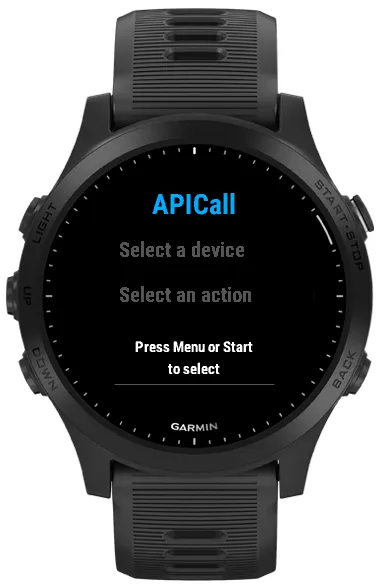
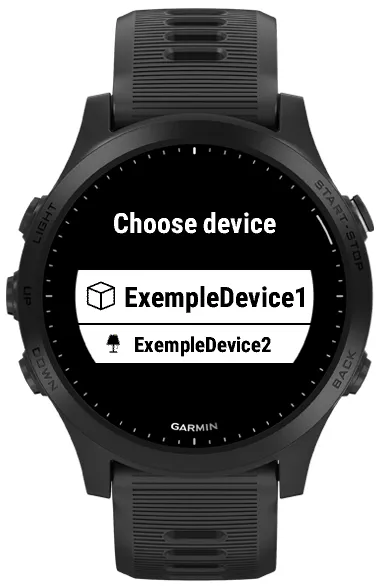
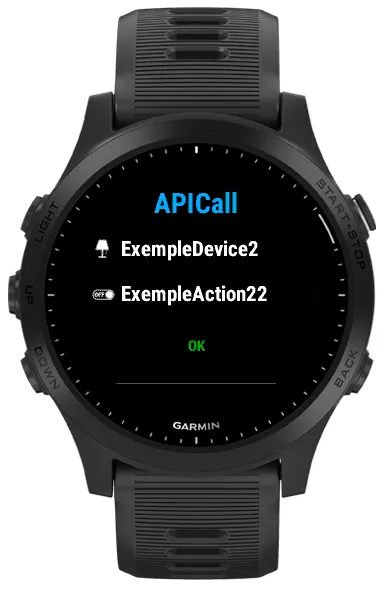
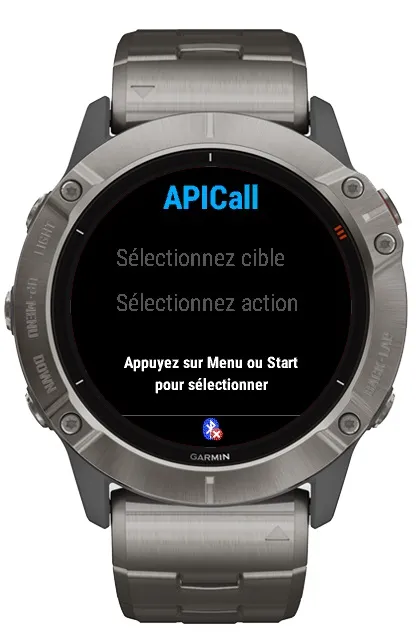
When you launch widget, press START or MENU. Select a device then an action, then press START button to launch. "OK" or "KO" with the HTML error code is displayed.
Press MENU to select a new device/action.
Note :
‣ "START" can be START button and/or a "tap" on screen for touch watches.
‣ "MENU" can be a long press on UP button, on bottom right button (Vivoactive 4), on the screen (touch watches)…
╭───
≡ Configuration
╰─
⤇ The configuration is done in settings menu in Garmin ConnectIQ application. There is 36 lines that have to be set as a JSON string like :
» Example (basic) : {deviceName:"Gate", actionName:"Open", url:"http://my.url?to=open"}
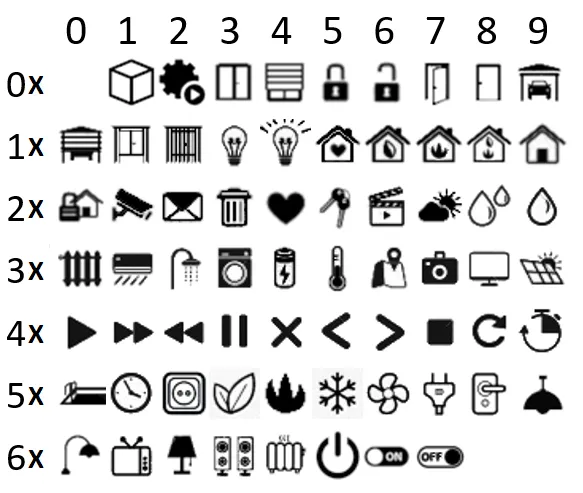
» Example (with icons and autonext) : {deviceName:"Cinema", deviceIcon:7, autonext:true, actionName:"TV", actionIcon:11, url:"http://my.url?tv=on"}
• deviceName [mandatory] :
‣ Type : string
‣ Description : Set the name of the device to which the action belongs. It permit to group some actions under a same device.
• deviceIcon [optionnal] :
‣ Type : integer
‣ Default : 1
‣ Description : Icon to be displayed next to the name of the device.
• autonext [optionnal] :
‣ Type : boolean [true|false]
‣ Default : false
‣ Description : When launching an action, the next action of the device is automatically selected.
• actionName [mandatory] :
‣ Type : string
‣ Description : Name of the action
• actionIcon [optionnal] :
‣ Type : integer
‣ Default : 2
‣ Description : Icon to be displayed next to the name of the action.
• url [mandatory] :
‣ Type : string
‣ Description : URL to be launched
• autolaunch [optionnal] :
‣ Type : boolean [true|false]
‣ Default : false
‣ Description : Applies to the action. The action is launched immediatly after selection. Can work with autonext.
• method [optionnal] :
‣ Type : string
‣ Default : "GET"
‣ Description : ["GET"|"POST"|"PUT"], set the HTTP request type.
• POSTcontent [optionnal] :
‣ Type : string
‣ Default : ""
‣ Description : Send as request content with all method (GET, POST and PUT). It must contain a JSON type string. Be carreful to escape the " in the content if necessary. Exemple to send {"args":["3"]} : {POSTcontent:"{"args":["3"]}"}.
• resDisplay [optionnal] :
‣ Type : string
‣ Default : ""
‣ Description : Put a JSON path to fetch the element to display. If not defined, only the message OK or KO + error code is displayed as return. If "text", the response is displayed as it is (pay attention to the length of the response…) Ex : if result is {"myres":"xxx"}, xxx is displayed with resDisplay:"myres".
Ex : if result is {"myres":["id":"xxx", "id":"yyy"]}, xxx is displayed with resDisplay:"myres[0].id".
• media [optionnal] :
‣ Type : string
‣ Default : ""
‣ Description : ["BT"|"WIFI-LTE"], force to launch the request through a specific media. If not set, default behavior is BT if connected, else Wifi/LTE.
• headers [optionnal] :
‣ Type : string
‣ Default : "{}"
‣ Description : This option permit to set custom http headers. The main usage is to set the "Content-Type" and "Authorization" headers. Garmin do some checks that prevent to send everything you want, and these checks are unfortunately not documentated... To use the option, you need to configure
Nyheder
╭───
≡ Note
╰─
You can find the complete documentation and manual here :
https://apicall.dumesnil.net
⊕⊕⊕ WARNING ⊕⊕⊕
Several users report me some issues when configuring or upgrading from garminExpress. Please prefer use connectIQ.
For supported watches which only have 60kb of memory, namely :
‣ fenix5, quatix5, fenix5s, fenixChronos
‣ forerunner245, forerunner645, forerunner935
‣ venu
‣ vivoactive3
Note: "music" versions are not affected.
You can configure about 8 to 15 actions on these watches depending on their complexity, then memory is full. If a reverse bleu triangle appears, try to limit the number of configured actions.
⊕ ⊕ ⊕ ⊕ ⊕ ⊕ ⊕ ⊕ ⊕
╭───────────────
1.7.3 :
Add support of fēnix9, Forerunner® 70/170, Approach® S72, D2™ Mach 2, Enduro™ 4
╭───────────────
1.7.2 :
Add support of Egde 550, 850 & MTB, fēnix®8pro, Venu®4 & 1x
╭───────────────
1.7.1 :
Add support of Forerunner® 570 and 970
╭───────────────
1.7.0 :
Change SDK major release. From 7.3 to 8.1
Bug fix when using more than 10 devices or 10 actions on a same device.
Add support of Descent™ G2, Mk1, Instinct® 3 Amoled (45 and 50mm), Vìvoactive® 6, Approach® S50
╭───────────────
1.6.0 : Change SDK major release from 6.4 to 7.3.
╭───────────────
1.5.2 : Add support of Fēnix® 7pro-nonwifi) , 7Xpro-nonwifi, Forerunner® 165, 165m, Descent™ Mk3
1.5.1 : Fix an issue with the headers option, "Content-type" was not correctly handled. Add vivoactive5.
1.5.0 : Change SDK major release from 4.2 to 6.4. Add Venu® 3/3S support.
╭───────────────
Older version release notes are avalaible on the web site.
Skærmbilleder
Understøttede sprog (2)
Kompatible enheder (224)
Approach® S50
Approach® S70 (42mm)
Approach® S70 (47mm)
Approach® S72 - 43 mm
Approach® S72 - 47 mm
Captain Marvel
Captain Marvel
D2™ Air
D2™ Air X10
D2™ Air X15
D2™ Delta
D2™ Delta PX
D2™ Delta S
D2™ Mach 1
D2™ Mach 1 Pro
D2™ Mach 2
D2™ Mach 2 Pro
Darth Vader™
Darth Vader™
Descent™ G2
Descent™ Mk1
Descent™ Mk1
Descent™ MK2
Descent™ MK2
Descent™ Mk2S
Descent™ Mk2S
Descent™ MK3 - 43mm
Descent™ MK3i - 51mm
Edge® 1030
Edge® 1030
Edge® 1030 Plus
Edge® 1030 Plus
Edge® 1030, Bontrager
Edge® 1040
Edge® 1040
Edge® 1050
Edge® 520 Plus
Edge® 520 Plus
Edge® 530
Edge® 530
Edge® 540
Edge® 550
Edge® 830
Edge® 830
Edge® 840
Edge® 850
Edge® Explore
Edge® Explore 2
Edge® MTB
Enduro™
Enduro™
Enduro™ 2
Enduro™ 3
Enduro™ 4
epix™ (Gen 2)
epix™ (Gen 2)
epix™ Pro (42mm)
epix™ Pro (47mm)
epix™ Pro (51mm)
fēnix® 5
fēnix® 5
fēnix® 5 Plus
fēnix® 5 Plus
fēnix® 5S
fēnix® 5S
fēnix® 5S Plus
fēnix® 5S Plus
fēnix® 5X
fēnix® 5X
fēnix® 5X Plus
fēnix® 5X Plus
fēnix® 6
fēnix® 6
fēnix® 6 Dual Power
fēnix® 6 Pro
fēnix® 6 Pro
fēnix® 6 Pro Dual Power
fēnix® 6 Pro Solar
fēnix® 6 Solar
fēnix® 6S
fēnix® 6S
fēnix® 6S Dual Power
fēnix® 6S Pro
fēnix® 6S Pro
fēnix® 6S Pro Dual Power
fēnix® 6S Pro Solar
fēnix® 6S Solar
fēnix® 6X Pro
fēnix® 6X Pro
fēnix® 7
fēnix® 7
fēnix® 7 Pro
fēnix® 7 Pro – Solar Edition (No Wi-Fi®)
fēnix® 7S
fēnix® 7S
fēnix® 7S Pro
fēnix® 7X
fēnix® 7X
fēnix® 7X Pro
fēnix® 7X Pro No Wi-Fi
fēnix® 8 AMOLED (43mm)
fēnix® 8 AMOLED (47mm/51mm)
fēnix® 8 Pro
fēnix® 8 Solar (47mm)
fēnix® 8 Solar (51mm)
fenix® 9 - 43 mm
fenix® 9 – 47 mm
fenix® 9 Pro - 43 mm
fenix® 9 Pro - 47 mm
fenix® 9 Pro - 51 mm
fenix® 9 Pro - Solar 47 mm
fenix® 9 Pro - Solar 51 mm
fēnix® Chronos
fēnix® Chronos
fēnix® E
First Avenger
First Avenger
ForeAthlete 245
ForeAthlete 245 Music
ForeAthlete 55
ForeAthlete 645
ForeAthlete 645 Music
ForeAthlete 745
ForeAthlete 935
Forerunner® 165
Forerunner® 165 Music
Forerunner® 170
Forerunner® 170 Music
Forerunner® 245
Forerunner® 245
Forerunner® 245 Music
Forerunner® 245 Music
Forerunner® 255
Forerunner® 255 Music
Forerunner® 255S
Forerunner® 255S Music
Forerunner® 265
Forerunner® 265S
Forerunner® 55
Forerunner® 55
Forerunner® 570 - 42mm
Forerunner® 570 - 47mm
Forerunner® 645
Forerunner® 645 Music
Forerunner® 70
Forerunner® 70
Forerunner® 745
Forerunner® 935
Forerunner® 945
Forerunner® 945
Forerunner® 945 LTE
Forerunner® 955 Dual Power
Forerunner® 965
Forerunner® 970
Instinct® 3 – 45 mm, AMOLED
Instinct® 3 – 50 mm, AMOLED
Instinct® Crossover AMOLED
MARQ® (Gen 2)
MARQ® Commander (Gen 2) – Carbon Edition
MARQ™ Adventurer
MARQ™ Adventurer
MARQ™ Athlete
MARQ™ Athlete
MARQ™ Aviator
MARQ™ Aviator
MARQ™ Aviator (Gen 2)
MARQ™ Captain
MARQ™ Captain
MARQ™ Commander
MARQ™ Commander
MARQ™ Driver
MARQ™ Driver
MARQ™ Expedition
MARQ™ Expedition
MARQ™ Golfer
MARQ™ Golfer
Mercedes-Benz Venu®
Mercedes-Benz Venu®
Mercedes-Benz Venu® 2
Mercedes-Benz Venu® 2
Mercedes-Benz Venu® 2S
Mercedes-Benz Venu® 2S
quatix® 6
quatix® 6X
Rey™
Rey™
tactix® 7
tactix® 7 – AMOLED Edition
tactix® 8 – 47 mm, AMOLED
tactix® 8 – 51 mm, Solar
Venu®
Venu®
Venu® 2
Venu® 2
Venu® 2 Plus
Venu® 2 Plus
Venu® 2S
Venu® 2S
Venu® 3
Venu® 3S
Venu® 4 – 41 mm
Venu® 4 – 45 mm
Venu® Sq.
Venu® Sq.
Venu® Sq.
Venu® Sq.
Venu® Sq. 2
Venu® Sq. 2 Music
Venu® Sq. Music
Venu® Sq. Music
Venu® Sq. Music
Venu® Sq. Music
Venu® X1
vívoactive® 3
vívoactive® 3
vívoactive® 3 Music
vívoactive® 3 Music
vívoactive® 3 Music
vívoactive® 4
vívoactive® 4
vívoactive® 4S
vívoactive® 4S
vívoactive® 5
vívoactive® 6
Seneste målingsudvikling
Bedømmelse
Anmeldelser
Datoer for øjebliksbilleder
2026-10-27 → 2026-10-30