Beskrivelse
♥If you like this app, please leave a ⭐️⭐️⭐️⭐️⭐️ review, it helps a lot!♥
√you can test the full functions of this watch face in 1 hour.After 1 hour,there will show "trial mode"√
if you want to remove “trial mode” on the watch face,please donate about 3.5 US dollars to get the unlock code ;
when donating,you MUST leave a note to tell me the “Device code” which is shown in the top of the watchface settings page。donation link
【https://www.paypal.me/378092305】
the unlock code will be permanently valid,whenever you reinstall it or update it。
it only needs to donate again when you change to another device or the motherboard of the watch is broken。
--------------------------------------------
Instructions to show the FULL weather information:
1,after installing this watch face,remember to get your GPS data successfully(most new models support to get GPS data from your phone);
2,go to watch face settings,input your own openweathermap appid to the “input weather key”,you can get your own openweather key by signing up on the https://openweathermap.org/;
3,save the settings ;
------------------------------------------------------------------
if there is problem of showing weather data please do as the followings:
1,Completely exit the connectIQ app from the background of the mobile phone
2,turn off and on the Bluetooth of the mobile phone
3, turn on the mobile phone positioning, give the garmin connect app positioning permission, ensure that the built in weather widget is displayed normally,
4,open the connect app to synchronize, and then wait 7 minutes;
-----------------------------------------------------------------------------------
if you want to show AQI data;
1. input http://www.iqair.com/auth/signup in the browser address bar to register successfully, and then verify your identity in your mailbox;
2. input https://www.iqair.com/Dashboard/api in the browser address bar and login is successfully, and then click +NEW KEY;
3. Select Community in the select a plan drop-down menu, click CREATE;
4. In the key position, it is your AirVisual key,copy that and input it to the" input AQI key" in the watchface settings page.and wait in 7 minutes。
--------------------------------------------------------------------
usage of Other options:
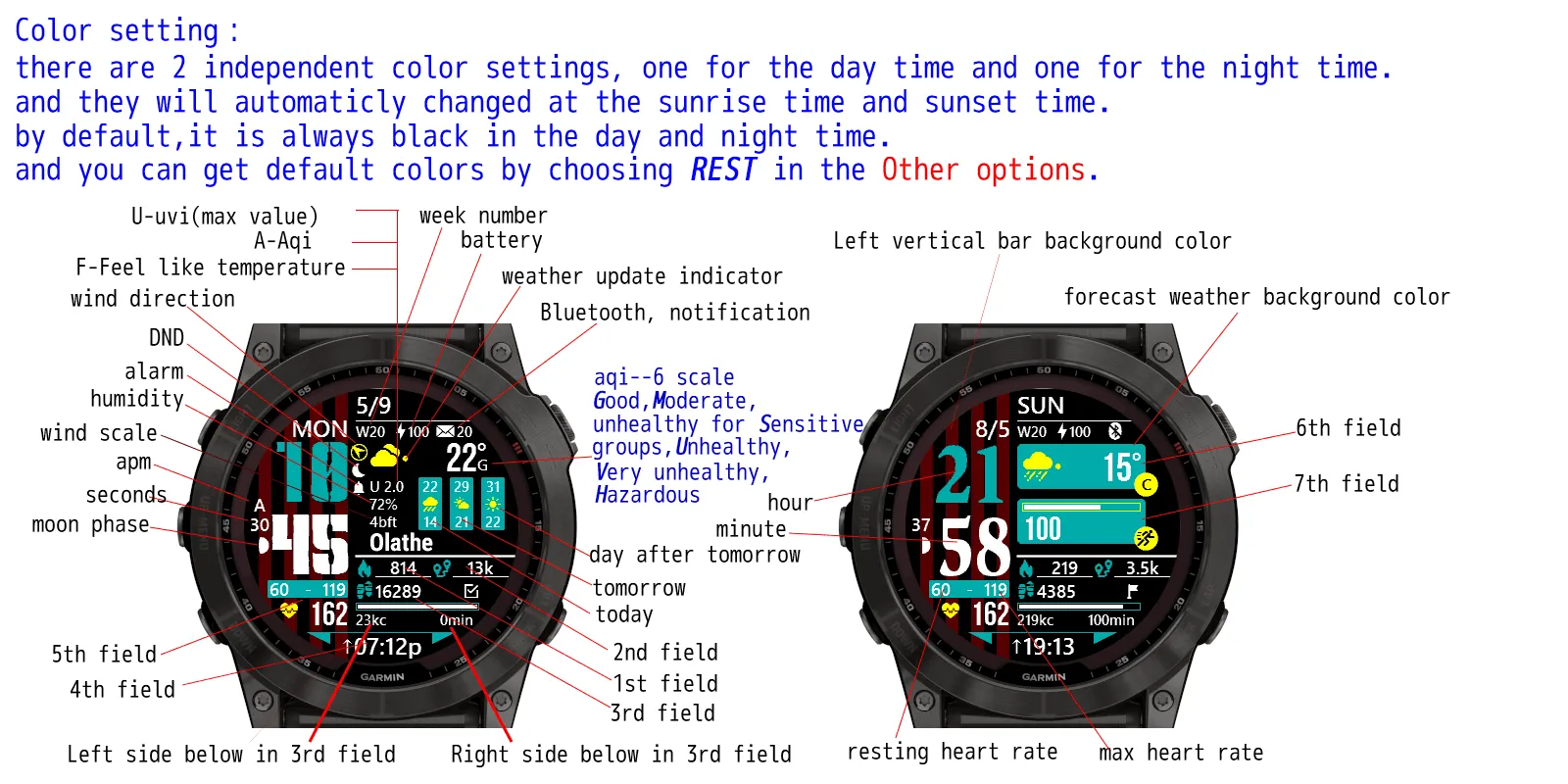
For example, right now this watch face is setted to Show 0 leading hour by default.
and you choose "Show 0 leading hour OR not" and save it. then this watch face will be setted not to Show 0 leading hour.
and if you again choose "Show 0 leading hour OR not" and save it. then this watch face will be setted to Show 0 leading hour.
After each save action , you need to go back and re-enter the settings screen.
Nyheder
please rate it if you like it,it will support me to creat more apps。thank you sincerely!
1,the weekday will show in a lot of local languages。if you want to add other language support please contact me。
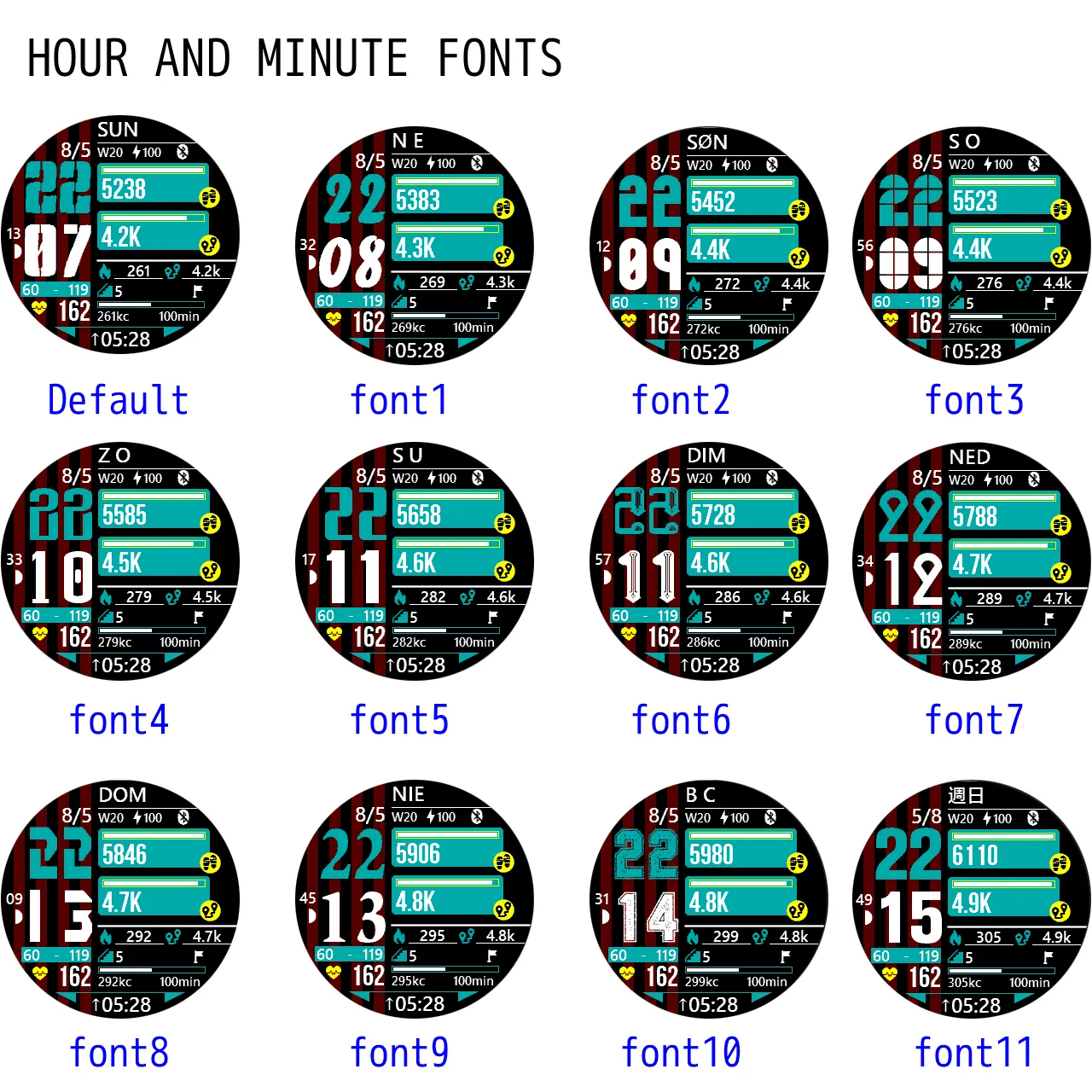
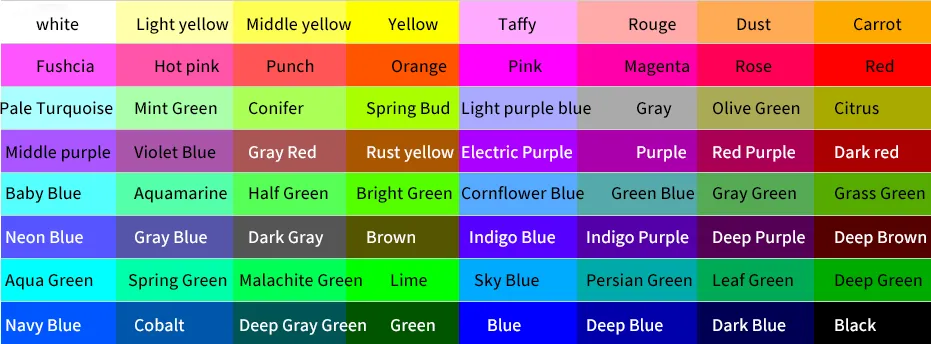
2,it build in 12 time fonts for you to customize,and the color is fully configured。
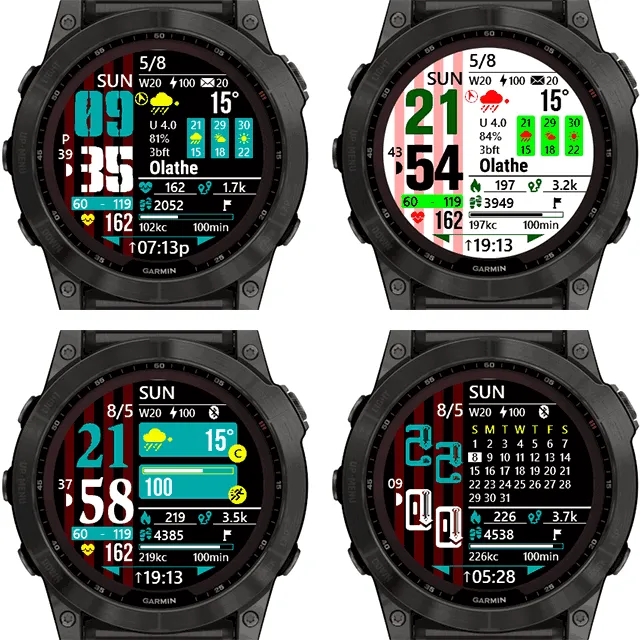
3,full weather data and forecast data,include uvi,feellike temperature and AQI data;
4,a lot of data to make your own customization,if you don't like weather data,you can set to turn it off;
---------------------------------------------------------------------------------------------------------------------------------------------
V1.2.5
------add new devices support;
V1.2.3
------add new devices support;
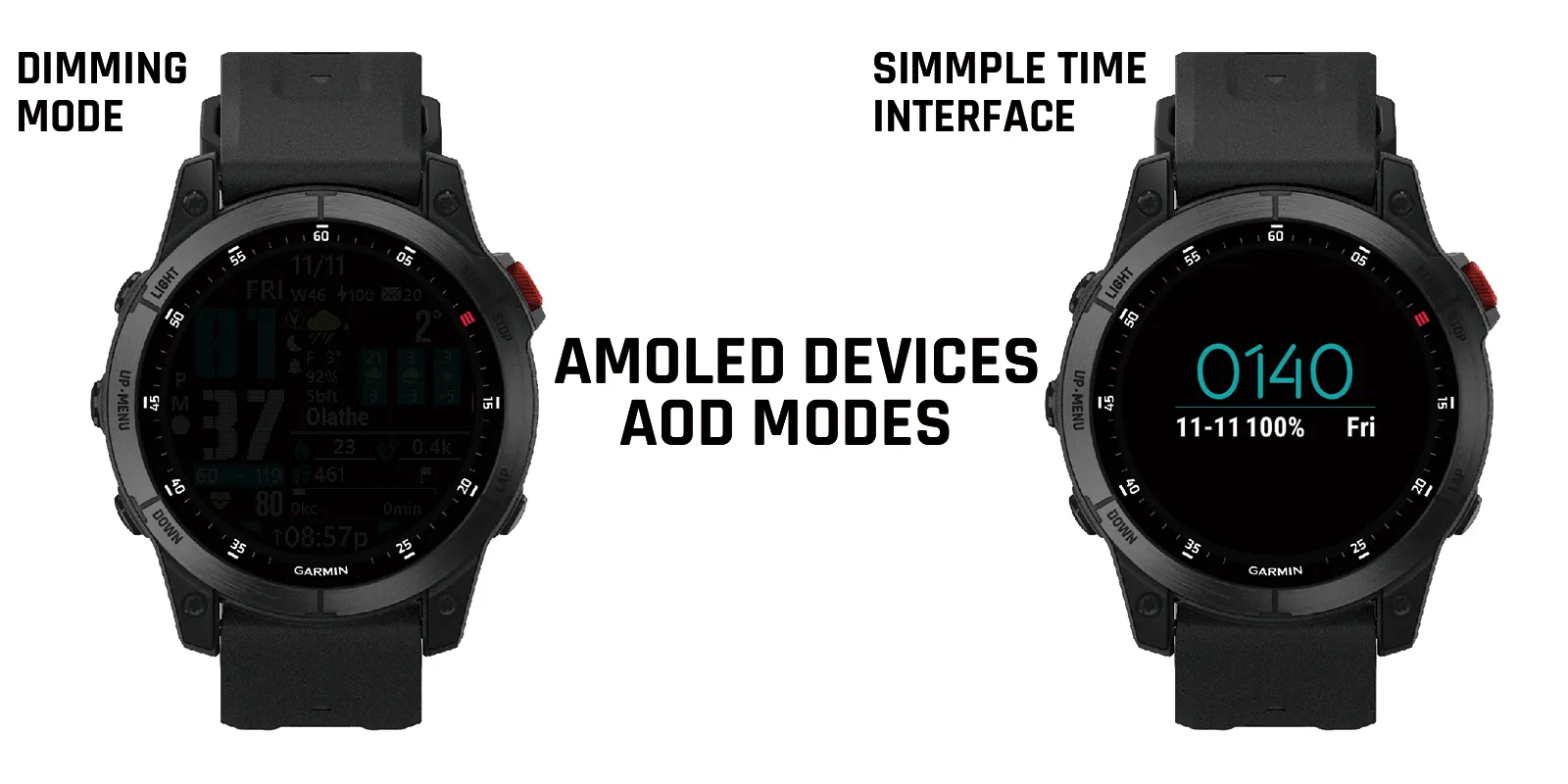
------improve dimming mode for amoled devices;
v1.1.7
------fix bug of week number;
v1.1.6
------fix some AOD issues on some amoled devices;
------sensor temperature change to have decimals;
v1.1.2
------add language support of greek;
v1.1.0
------for amoled devices ,add 2 AOD modes(dimming mode,simple time interface);
v1.0.9
-----add language of bulgarian;
------add marq2 support;
v1.0.7
------because of the change of openweathemap api,the UVI data will be not available。if it is available again in the futureI will add it back;
v1.0.6
------add forerunner255、955support;
v1.0.2
------add language support of Norwegian 、Slovenian ;
Skærmbilleder
Understøttet sprog (1)
Kompatible enheder (158)
Approach® S62
Approach® S62
Approach® S70 (42mm)
Approach® S70 (47mm)
D2™ Air
D2™ Air X10
D2™ Charlie
D2™ Charlie
D2™ Delta
D2™ Delta PX
D2™ Delta PX
D2™ Delta S
D2™ Mach 1
D2™ Mach 1 Pro
Darth Vader™
Darth Vader™
Descent™ Mk1
Descent™ Mk1
Descent™ MK2
Descent™ MK2
Descent™ Mk2S
Descent™ Mk2S
Descent™ MK3 - 43mm
Descent™ MK3i - 51mm
Enduro™
Enduro™
Enduro™ 2
Enduro™ 3
epix™ (Gen 2)
epix™ (Gen 2)
epix™ Pro (42mm)
epix™ Pro (47mm)
epix™ Pro (51mm)
fēnix® 5
fēnix® 5
fēnix® 5 Plus
fēnix® 5 Plus
fēnix® 5S Plus
fēnix® 5S Plus
fēnix® 5X
fēnix® 5X
fēnix® 5X Plus
fēnix® 5X Plus
fēnix® 6
fēnix® 6
fēnix® 6 Dual Power
fēnix® 6 Pro
fēnix® 6 Pro
fēnix® 6 Pro Dual Power
fēnix® 6 Pro Solar
fēnix® 6 Solar
fēnix® 6S
fēnix® 6S
fēnix® 6S Dual Power
fēnix® 6S Pro
fēnix® 6S Pro
fēnix® 6S Pro Dual Power
fēnix® 6S Pro Solar
fēnix® 6S Solar
fēnix® 6X Pro
fēnix® 6X Pro
fēnix® 7
fēnix® 7
fēnix® 7 Pro
fēnix® 7 Pro – Solar Edition (No Wi-Fi®)
fēnix® 7S
fēnix® 7S
fēnix® 7S Pro
fēnix® 7X
fēnix® 7X
fēnix® 7X Pro
fēnix® 7X Pro No Wi-Fi
fēnix® 8 AMOLED (43mm)
fēnix® 8 AMOLED (47mm/51mm)
fēnix® 8 Solar (47mm)
fēnix® 8 Solar (51mm)
fenix® 9 - 43 mm
fenix® 9 – 47 mm
fēnix® E
First Avenger
First Avenger
ForeAthlete 245
ForeAthlete 245 Music
ForeAthlete 645
ForeAthlete 645 Music
ForeAthlete 745
ForeAthlete 935
Forerunner® 165
Forerunner® 165 Music
Forerunner® 245
Forerunner® 245
Forerunner® 245 Music
Forerunner® 245 Music
Forerunner® 255
Forerunner® 255 Music
Forerunner® 265
Forerunner® 265S
Forerunner® 645
Forerunner® 645 Music
Forerunner® 745
Forerunner® 935
Forerunner® 945
Forerunner® 945
Forerunner® 945 LTE
Forerunner® 955 Dual Power
Forerunner® 965
MARQ® (Gen 2)
MARQ® Commander (Gen 2) – Carbon Edition
MARQ™ Adventurer
MARQ™ Adventurer
MARQ™ Athlete
MARQ™ Athlete
MARQ™ Aviator
MARQ™ Aviator
MARQ™ Aviator (Gen 2)
MARQ™ Captain
MARQ™ Captain
MARQ™ Commander
MARQ™ Commander
MARQ™ Driver
MARQ™ Driver
MARQ™ Expedition
MARQ™ Expedition
MARQ™ Golfer
MARQ™ Golfer
Mercedes-Benz Venu®
Mercedes-Benz Venu®
Mercedes-Benz Venu® 2
Mercedes-Benz Venu® 2
Mercedes-Benz Venu® 2S
Mercedes-Benz Venu® 2S
quatix® 6
quatix® 6X
tactix® 7
tactix® 7 – AMOLED Edition
tactix® 8 – 47 mm, AMOLED
Venu®
Venu®
Venu® 2
Venu® 2
Venu® 2 Plus
Venu® 2 Plus
Venu® 2S
Venu® 2S
Venu® 3
Venu® 3S
vívoactive® 3
vívoactive® 3
vívoactive® 3
vívoactive® 3 Mercedes-Benz® Collection
vívoactive® 3 Mercedes-Benz® Collection
vívoactive® 3 Music
vívoactive® 3 Music
vívoactive® 3 Music
vívoactive® 4
vívoactive® 4
vívoactive® 5
vívolife
Seneste målingsudvikling
Bedømmelse
Anmeldelser
Datoer for øjebliksbilleder
2026-10-27 → 2026-10-28