功能说明
Cobalt Anvil — Every hour, struck on cobalt.
Get FREE matching wallpapers for your phone and desktop at watchfaces.teccy.us, plus all our other Teccy designs.
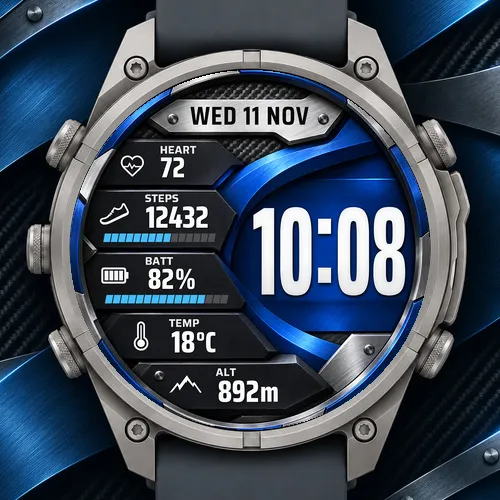
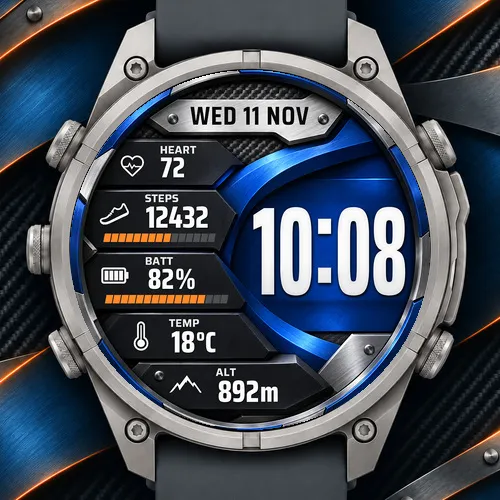
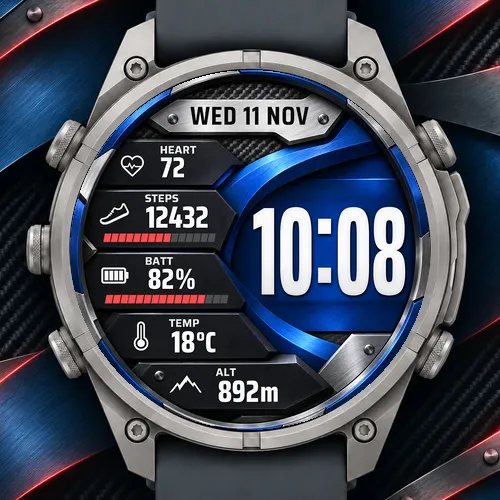
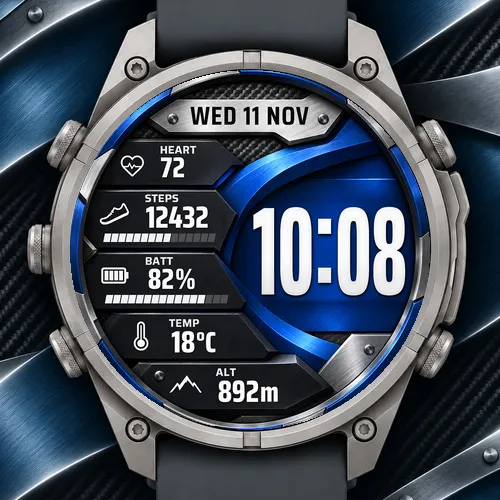
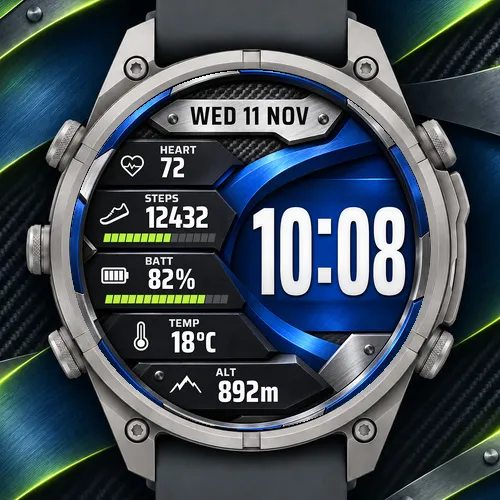
Curved blades of brushed cobalt-blue metal sweep across riveted steel plates and dark carbon fibre. The date sits on a steel plate at the top, five plates on the left show heart rate, steps, battery, temperature and altitude, and a large white time stands on the cobalt at the right.
Pick an accent color and only the lit progress segments change: the cobalt blades, steel plates, carbon fibre, white time and text always stay the same.
Features
- Large white digital time, 12-hour or 24-hour following your watch setting, with a leading zero
- Date with weekday, day and month, in your watch language
- 5 customizable data fields: Steps, Heart rate, Battery, Calories, Distance, Floors, Active minutes, Body Battery, Stress, Altitude, Temperature or Off
- Segmented progress bars: steps toward your daily goal and battery level
- Temperature from the weather on your phone or from your watch's sensor (your choice)
- 5 accent colors: Anvil Blue (default), Ember Orange, Volt Lime, Signal Red, Steel White
- Battery icon drains level by level, turns red below 20% and blinks at 10% or less
- Always-On mode in two styles, Classic or Big numbers, with three brightness levels; it shifts every minute
- 36 languages
How to customize
Long-press the watch face (or open Connect IQ on your phone) and choose Customize.
Compatibility
Made for 44 round AMOLED Garmin watches. Some data depends on your watch's sensors and your phone; unavailable values show two dashes.
Every hour, struck on cobalt.
Designed and crafted with care by Teccy.
更新日志
1.0.0 — First release
- Brushed cobalt blades and riveted steel with a large white time
- 5 customizable data fields with steps and battery progress bars
- 5 accent colors, Always-On mode in two styles and 36 languages
截图
支持语言(1)
兼容机型(57)
Approach® S50
Approach® S70 (42mm)
Approach® S70 (47mm)
Approach® S72 - 43 mm
Approach® S72 - 47 mm
D2™ Air X10
D2™ Air X15
D2™ Mach 1
D2™ Mach 1 Pro
D2™ Mach 2
D2™ Mach 2 Pro
Descent™ MK3 - 43mm
Descent™ MK3i - 51mm
epix™ (Gen 2)
epix™ (Gen 2)
epix™ Pro (42mm)
epix™ Pro (47mm)
epix™ Pro (51mm)
fēnix® 8 AMOLED (43mm)
fēnix® 8 AMOLED (47mm/51mm)
fēnix® 8 Pro
fenix® 9 - 43 mm
fenix® 9 – 47 mm
fenix® 9 Pro - 43 mm
fenix® 9 Pro - 47 mm
fenix® 9 Pro - 51 mm
fēnix® E
Forerunner® 170
Forerunner® 170 Music
Forerunner® 265
Forerunner® 265S
Forerunner® 570 - 42mm
Forerunner® 570 - 47mm
Forerunner® 965
Forerunner® 970
MARQ® (Gen 2)
MARQ® Adventurer (Gen 3)
MARQ® Commander (Gen 2) – Carbon Edition
MARQ™ Aviator (Gen 2)
Mercedes-Benz Venu® 2
Mercedes-Benz Venu® 2
Mercedes-Benz Venu® 2S
Mercedes-Benz Venu® 2S
tactix® 7 – AMOLED Edition
tactix® 8 – 47 mm, AMOLED
Venu® 2
Venu® 2
Venu® 2 Plus
Venu® 2 Plus
Venu® 2S
Venu® 2S
Venu® 3
Venu® 3S
Venu® 4 – 41 mm
Venu® 4 – 45 mm
vívoactive® 5
vívoactive® 6
最近指标走势
评分
评论
快照日期
2026-11-17 → 2026-11-29