功能说明
- - - - - - - - - - - - - - -
BALANCE BEGINS WITH TWO.
One ring for each thing you care about today, drawn as a vesica, the shape sacred geometry has used for centuries to represent balance. Clean, quiet, simple. Nothing more, nothing less.
Free for 24 hours, then $1.99+. Details below.
- - - - - - - - - - - - - - -
THE RINGS
- Two rings, the left and the right, overlapping in the middle
- Their two values sit in one row under the rings
- Each ring fills toward a goal or across its scale
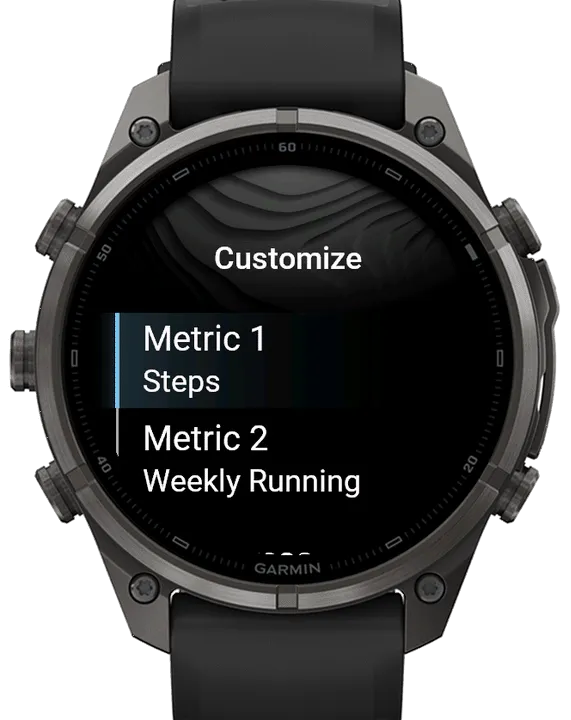
- Pick each ring from 21 metrics: Steps, Body Battery, Battery, Stress, Floors, Intensity Minutes, Move Bar, Weekly Running, a Countdown and more
- Floors Down, Push Distance, Weekly Running, Weekly Cycling and a Countdown fill toward a value you set; the rest use the goals and scales already on your watch
- Move Bar can fill either way: normal, or inverted so it is full when you have kept moving
- In the menu, choose from 3 goal animations
- The rings default to Steps and Weekly Running
- - - - - - - - - - - - - - -
TOUCH AND HOLD / LONG-PRESS
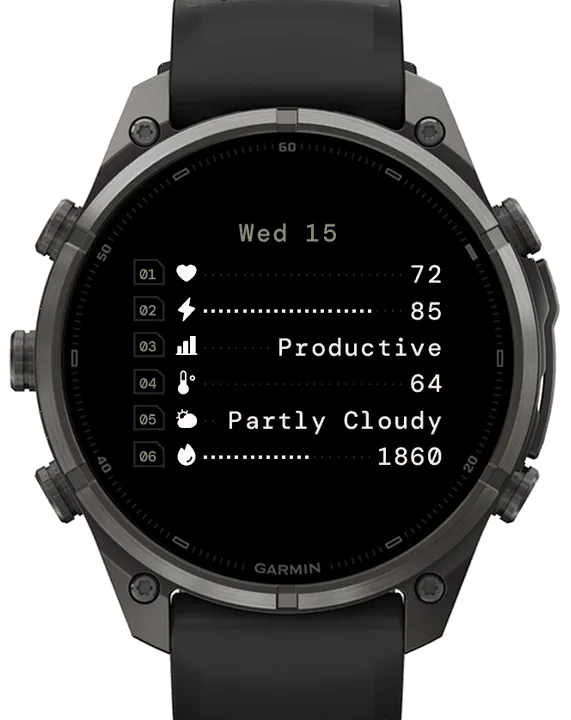
- Touch and hold the watch face to see six more metrics, each with its icon
- In the menu, you can select the duration of the long-press screen for 5, 8 or 10 seconds, your choice
- Pick each of the six from 56: Heart Rate, Body Battery, Training Status, the Weather, Calories and more
- In the menu, Show Progress sets which rows fill: All That Fill, (the 21 metrics with a goal or a scale); Goals Only, or No rows to fill
- The six metrics default to Heart Rate, Body Battery, Training Status, Weather Temp, Conditions and Calories
- The date sits at the top, with options to show the month or not, and put the day or the month first
- - - - - - - - - - - - - - -
ALWAYS-ON DISPLAY
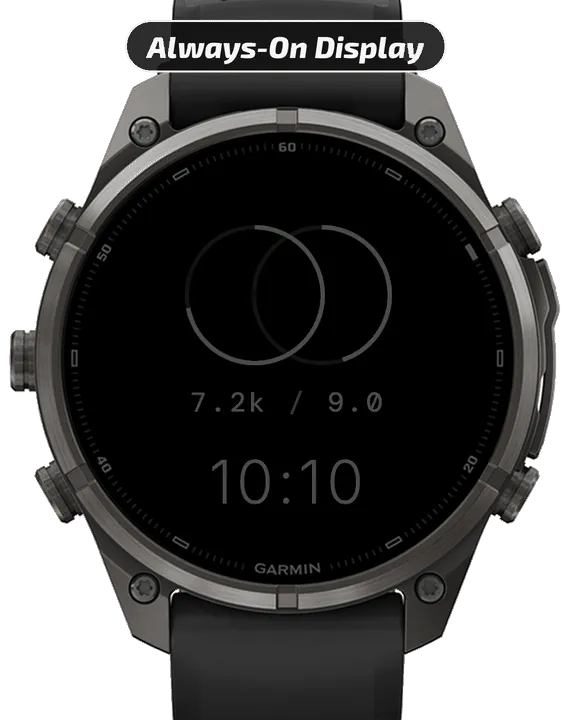
- On AMOLED watches the whole watch face stays with your wrist down, dimmed, shifting slightly each minute to protect the screen
- - - - - - - - - - - - - - -
MORE DETAILS
- Set everything on the watch, or in the Connect IQ app on your phone
- A countdown's dates are set on the watch; the phone can pick the countdown metric but cannot set its dates
- Weekly Running and Weekly Cycling are Garmin's own weekly totals, counted from the first day of the week set on your watch
- Push Distance and Pushes need a watch with wheelchair mode
- Animations play in the moments after you raise your wrist, as Garmin allows
- If you see "--", it means Garmin has no current data for that metric
- Each metric's Status line, in the Connect IQ app Settings, says what the watch face is showing, or when a metric is not available on your watch
- - - - - - - - - - - - - - -
24-HOUR FREE TRIAL, THEN $1.99+
When the trial ends, scan the QR code on your watch, pay through Ko-fi and follow the steps. Keep your watch connected to your phone so it can check for your purchase. Once confirmed, it unlocks within 5 minutes.
- - - - - - - - - - - - - - -
QUESTIONS OR IDEAS?
Use the Contact Developer button on this page to Email Me. If something isn't quite right, reach out before you leave a review. Feedback like yours is what makes each update better!
- - - - - - - - - - - - - - -
HELLO WORLD.
Thank you for being here. I make watch faces for everyday wear, mostly ones I couldn't find in the store. If one has been worth more to you than what you paid, a donation toward a post-run recovery meal is a lovely way to say so :)
https://ko-fi.com/watchlab
- - - - - - - - - - - - - - -
TAGS
minimal, digital, symmetry, harmony, duality, equilibrium, modern, piscis, lens, intersection
- - - - - - - - - - - - - - -
截图
支持语言(1)
兼容机型(67)
Approach® S72 - 43 mm
Approach® S72 - 47 mm
D2™ Air X15
D2™ Mach 1
D2™ Mach 1 Pro
D2™ Mach 2
D2™ Mach 2 Pro
Enduro™ 2
Enduro™ 3
Enduro™ 4
epix™ (Gen 2)
epix™ (Gen 2)
epix™ Pro (42mm)
epix™ Pro (47mm)
epix™ Pro (51mm)
fēnix® 7
fēnix® 7
fēnix® 7 Pro
fēnix® 7 Pro – Solar Edition (No Wi-Fi®)
fēnix® 7S
fēnix® 7S
fēnix® 7S Pro
fēnix® 7X
fēnix® 7X
fēnix® 7X Pro
fēnix® 7X Pro No Wi-Fi
fēnix® 8 AMOLED (43mm)
fēnix® 8 AMOLED (47mm/51mm)
fēnix® 8 Pro
fēnix® 8 Solar (47mm)
fēnix® 8 Solar (51mm)
fenix® 9 - 43 mm
fenix® 9 – 47 mm
fenix® 9 Pro - 43 mm
fenix® 9 Pro - 47 mm
fenix® 9 Pro - 51 mm
fenix® 9 Pro - Solar 47 mm
fenix® 9 Pro - Solar 51 mm
fēnix® E
Forerunner® 165
Forerunner® 165 Music
Forerunner® 170
Forerunner® 170 Music
Forerunner® 265
Forerunner® 265S
Forerunner® 570 - 42mm
Forerunner® 570 - 47mm
Forerunner® 70
Forerunner® 70
Forerunner® 955 Dual Power
Forerunner® 965
Forerunner® 970
MARQ® (Gen 2)
MARQ® Adventurer (Gen 3)
MARQ® Commander (Gen 2) – Carbon Edition
MARQ™ Aviator (Gen 2)
tactix® 7
tactix® 7 – AMOLED Edition
tactix® 8 – 47 mm, AMOLED
tactix® 8 – 51 mm, Solar
Venu® 3
Venu® 3S
Venu® 4 – 41 mm
Venu® 4 – 45 mm
Venu® X1
vívoactive® 5
vívoactive® 6
最近指标走势
评分
评论
快照日期
2026-10-27 → 2026-11-03