功能说明
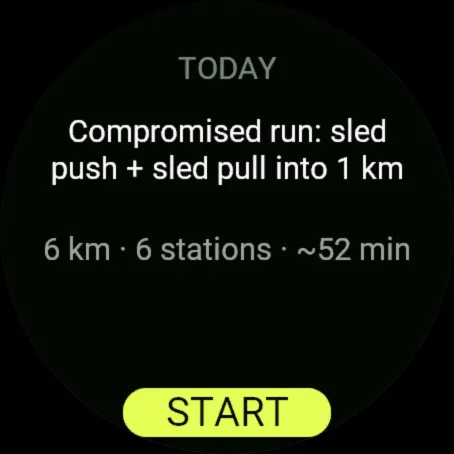
Rivo runs today's session from your Rivo training plan on your Garmin watch.
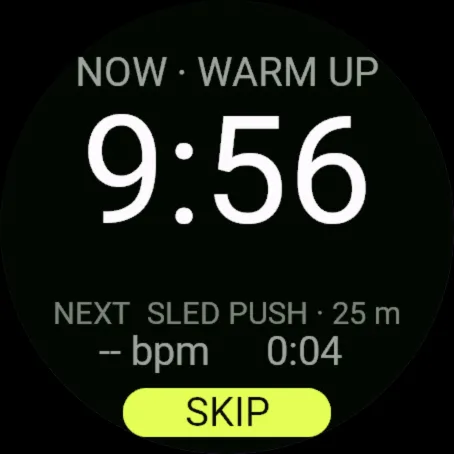
Before you start, the watch fetches today's session from your plan and keeps it. The session itself runs offline:
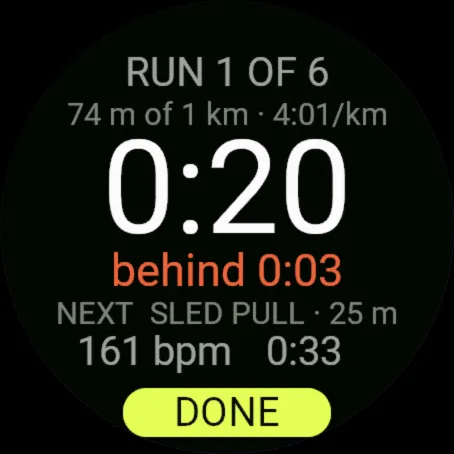
- Runs: your distance from the watch's own GPS, with ahead or behind against your target pace.
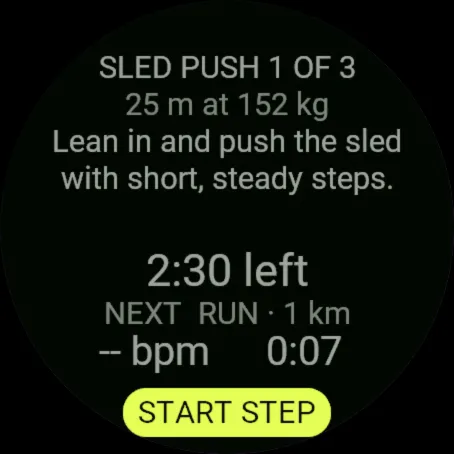
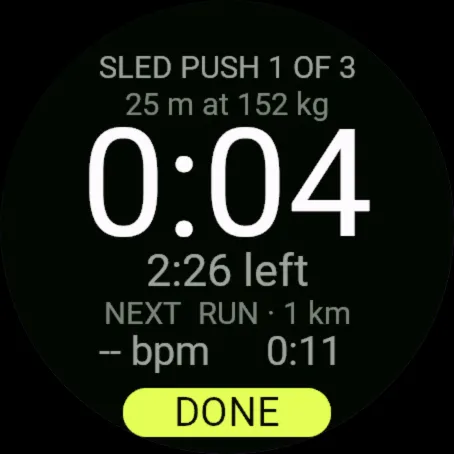
- Stations and lifts: the movement, distance or reps and load on screen; you end each one with the lap key.
- Warm-up, rests and cool-down: timers that end themselves.
- Heart rate and the total time stay on screen. Missed a lap press? The menu fixes it.
When you finish, the activity is saved on your watch and the session is sent back to Rivo through your phone's Garmin Connect app; if there is no connection it waits on the watch and is sent the next time you open Rivo. Rivo scores it against your plan, and measured 1 km repeats update your Number (your predicted HYROX finish time).
What you need:
- The Rivo app on iPhone (free to download). Training sessions come from the Rivo Plan, a subscription in that app with a 14-day free trial.
- Pair once: in the Rivo iPhone app open You, Your devices, Pair a Garmin. The phone shows a six-digit code; enter it on the watch (UP/DOWN change a digit, START moves on).
Open beta: tested on the Connect IQ simulator, not yet on every watch. If something breaks, use Report a problem in the watch app's menu, or write to [email protected].
Not affiliated with or endorsed by HYROX or Upsolut Sports. HYROX is a registered trademark of its owner.
更新日志
The lap key ends a step and starts the next in one press; START pauses and resumes. A session that cannot be sent yet stays on the watch until it can, and a session sent days late still counts. Plain-word messages instead of error codes. 27 more watches, including Forerunner 165, 265S and 570, fēnix 7S/7X, fēnix 8 Pro, fēnix E, epix Pro, Enduro 3, Venu 2S/3S and vívoactive 5/6.
截图
支持语言(1)
兼容机型(56)
D2™ Mach 1 Pro
Enduro™ 2
Enduro™ 3
epix™ (Gen 2)
epix™ (Gen 2)
epix™ Pro (42mm)
epix™ Pro (47mm)
epix™ Pro (51mm)
fēnix® 7
fēnix® 7
fēnix® 7 Pro
fēnix® 7 Pro – Solar Edition (No Wi-Fi®)
fēnix® 7S
fēnix® 7S
fēnix® 7S Pro
fēnix® 7X
fēnix® 7X
fēnix® 7X Pro
fēnix® 7X Pro No Wi-Fi
fēnix® 8 AMOLED (43mm)
fēnix® 8 AMOLED (47mm/51mm)
fēnix® 8 Pro
fēnix® 8 Solar (47mm)
fēnix® 8 Solar (51mm)
fēnix® E
Forerunner® 165
Forerunner® 165 Music
Forerunner® 255
Forerunner® 255 Music
Forerunner® 255S
Forerunner® 255S Music
Forerunner® 265
Forerunner® 265S
Forerunner® 570 - 42mm
Forerunner® 570 - 47mm
Forerunner® 955 Dual Power
Forerunner® 965
Forerunner® 970
Mercedes-Benz Venu® 2
Mercedes-Benz Venu® 2
Mercedes-Benz Venu® 2S
Mercedes-Benz Venu® 2S
tactix® 7
tactix® 7 – AMOLED Edition
tactix® 8 – 47 mm, AMOLED
tactix® 8 – 51 mm, Solar
Venu® 2
Venu® 2
Venu® 2 Plus
Venu® 2 Plus
Venu® 2S
Venu® 2S
Venu® 3
Venu® 3S
vívoactive® 5
vívoactive® 6
最近指标走势
评分
评论
快照日期
2026-10-27 → 2026-11-01