功能说明
Alpha release - something I developed for myself and thought the community might like?
Please give constructive feedback and comments which will help improve the widget
How it works
Open the widget and it will use Garmin weather data by default to find your location and show information for the closest ski resort.
Within the app settings, you can override the auto selected resort by use of a UUID code.
Resort codes can be found here :- https://snow.extreme-media.co.uk/resorts - found in the header image of your chosen resort
This was made as a personal project and comes with no promises or guarantees.
Be kind, I will hopefully maintain and improve the widget throughout the year.
If you like the widget, or have constructive feedback let me know [email protected]
donate me coffee @ https://www.buymeacoffee.com/leeEv or paypal at [email protected]
Ski resort weather and conditions widget
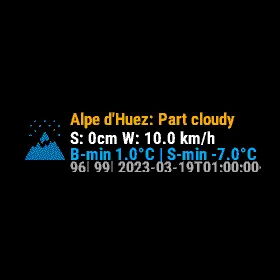
Glance view shows
1. chosen resort hourly conditions (cached for next 40 hours)
2. Snow fall forecast
3. wind speed
4. Base minimum temp & Summit minimum temp
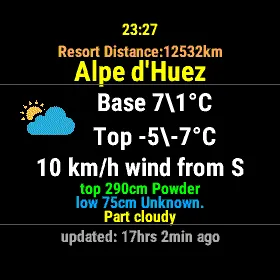
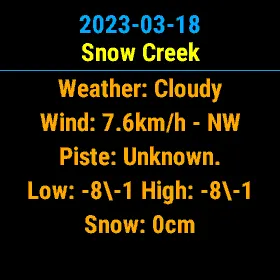
Main view screen1 shows.
1. resort name
2. distance from your location
3. Weather condition icon and summary
4. base and summit temp high/low
5. wind speed and direction
6. Snow depth for base and sumit along with conditions and resort heights
7. Last time/date conditions were updated from resort feed
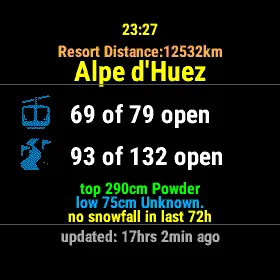
Main screen 2 (up/down)
3. number of lifts open/max
4. number of runs open/max
5. snowfall in last 72hours (if any)
Screen 3
Resort contact Number
Lift open - close times
resort status (open/closed)
Resort Season start/end dates
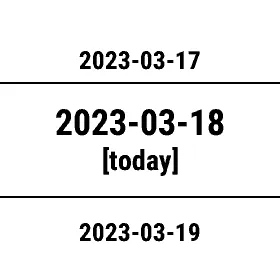
Weekly View (press triangle /select from main screen)
this will show ~8 days 1 week future of weather forecast data
press triangle/select again to view the forecast summary.
Settings:
On watch settings allow refresh data and turn on the resort (uuid) override (set via connectIQ phone app)
App version can be shown and on watch cached data can be deleted (if any issues)
Garmin connect settings
Allow you to set a data refresh interval ( refresh on widget open, 1, 2, 4, 8 and 1 day (recommended)
UUID override: UUID can be found by searching for your chosen resort at https://snow.extreme-media.co.uk/resorts - found in the header image of your chosen resort
choose to use Garmin weather or GPS location.
Option to show some additional debug information.
Options to wipe cached data on widget start (change "wipe data" from no to yes)
as i said its started as a personal project and a work in progress
I am NOT a professional or paid developer!
更新日志
EM Snow 1.8.10
A new look
- All three pages are redesigned: bigger text on every screen, the same colours as before, and small icons for snow, wind, depth, lifts, runs, phone, opening hours and the season.
- Lifts and runs have new icons: a gondola, and a piste with a flag.
- Snow depth is shown on a depth stake. On the large screens the altitude and the snow surface sit beside the temperatures.
- The pages now go in order as you press down: the weather, then lifts and runs, then phone and opening times.
- The grey divider lines are gone.
- A long resort name now steps down to a smaller size before it is shortened, on the pages, the glance and the week view.
- The glance has a new layout, with a snowflake by the new snow and wind lines by the wind. It shows the same information as before.
Always up to date
- Background updates are now on by default, every 4 hours. If yours was set to "Never", it is switched to every 4 hours once; you can change it in the widget's settings in Garmin Connect.
- Each background update now saves the whole forecast: the next 37 hours, the week and the resort's report. The glance and the widget are fresh without opening the widget.
- The fresh-powder alert now works: when the snow of the last 72 hours reaches your threshold, the watch offers to open the widget (once a day).
Units
- Wind speed now follows your watch's distance setting, so the UK setting (Celsius and miles) shows mph.
Your location
- Choose your location in the widget's settings in Garmin Connect.
- With a resort chosen by its code, the distance to the resort is shown again. It comes from your watch's last position, or, failing that, the position from Garmin weather or the last one the widget saved. Anything but a recent position is marked with ~ as approximate. The distance is worked out on the watch; nothing extra is sent.
Smaller watches
- The fenix 6 and 6S, Forerunner 245, Enduro, Descent G1 and Venu Sq now have the full 37 hours and the whole week too, with memory to spare, and no longer run out of memory when the forecast arrives.
Fixes
- A bad or missing value from the server shows as -- instead of stopping the widget.
- "Clear data" now clears what is on screen too.
- Fixes for three rare crashes.
- The "show time" setting has been removed.
EM Snow 1.8.5
- Sharper weather icons on the larger AMOLED screens (416, 454 and 448x486 pixels).
- Line widths now scale with the screen size.
- The glance text now fits the glance width and clears the curved bezel on round fenix 8 screens.
- Fixes for the last update: an old place's forecast can no longer come back after you change place, and the background refresh is always set up once a forecast arrives.
1.8.4: you now choose where EM Snow gets your location: Garmin weather (your phone’s location), Watch GPS, or a resort code you set.
If you already use EM Snow and had not set a resort code, it asks you once to choose when you next open it. Until you do, nothing that says where you are is sent.
With a resort code, only the resort is sent, never your position.
What’s new in 1.8.3
Older watches without glances (such as the fēnix 5 series): press START to see all the screens, including lifts and resort info, then use up and down to move between them. A small mark beside the START button shows where to press.
changed versioning
What’s new in 1.8.2
Now works on 27 more watches, including the fēnix 9 range, fēnix 7S Pro, Venu 2 and 2S, Venu Sq family, Approach, D2, Descent G2, Enduro 3, Forerunner 170, 255S Music and 645 Music, and vívoactive 3 Music.
Honest “updated” time: see exactly how old the data is. It turns orange after 6 hours and red after 24.
New avalanche badge, easier to read. An old rating now greys out after 6 hours and disappears after 48, so it never looks current when it isn’t.
Fixed: the summit and base low temperatures were swapped on the weather screen.
Temperatures and wind now show as whole numbers. Fahrenheit and mph users now see their units everywhere.
T
截图
支持语言(1)
兼容机型(160)
Approach® S50
Approach® S70 (42mm)
Approach® S70 (47mm)
D2™ Air
D2™ Air X10
D2™ Air X15
D2™ Mach 1
D2™ Mach 1 Pro
D2™ Mach 2
D2™ Mach 2 Pro
Descent™ G1
Descent™ G1
Descent™ G2
Descent™ MK2
Descent™ MK2
Descent™ Mk2S
Descent™ Mk2S
Descent™ MK3 - 43mm
Descent™ MK3i - 51mm
Enduro™
Enduro™
Enduro™ 2
Enduro™ 3
epix™ (Gen 2)
epix™ (Gen 2)
epix™ Pro (42mm)
epix™ Pro (47mm)
epix™ Pro (51mm)
fēnix® 5 Plus
fēnix® 5 Plus
fēnix® 5S Plus
fēnix® 5S Plus
fēnix® 5X Plus
fēnix® 5X Plus
fēnix® 6
fēnix® 6
fēnix® 6 Dual Power
fēnix® 6 Pro
fēnix® 6 Pro
fēnix® 6 Pro Dual Power
fēnix® 6 Pro Solar
fēnix® 6 Solar
fēnix® 6S
fēnix® 6S
fēnix® 6S Dual Power
fēnix® 6S Pro
fēnix® 6S Pro
fēnix® 6S Pro Dual Power
fēnix® 6S Pro Solar
fēnix® 6S Solar
fēnix® 6X Pro
fēnix® 6X Pro
fēnix® 7
fēnix® 7
fēnix® 7 Pro
fēnix® 7 Pro – Solar Edition (No Wi-Fi®)
fēnix® 7S
fēnix® 7S
fēnix® 7S Pro
fēnix® 7X
fēnix® 7X
fēnix® 7X Pro
fēnix® 7X Pro No Wi-Fi
fēnix® 8 AMOLED (43mm)
fēnix® 8 AMOLED (47mm/51mm)
fēnix® 8 Solar (47mm)
fēnix® 8 Solar (51mm)
fenix® 9 - 43 mm
fenix® 9 – 47 mm
fenix® 9 Pro - 43 mm
fenix® 9 Pro - 47 mm
fenix® 9 Pro - 51 mm
fenix® 9 Pro - Solar 47 mm
fenix® 9 Pro - Solar 51 mm
fēnix® E
ForeAthlete 245
ForeAthlete 245 Music
ForeAthlete 645 Music
ForeAthlete 745
Forerunner® 165
Forerunner® 165 Music
Forerunner® 170
Forerunner® 170 Music
Forerunner® 245
Forerunner® 245
Forerunner® 245 Music
Forerunner® 245 Music
Forerunner® 255
Forerunner® 255 Music
Forerunner® 255S
Forerunner® 255S Music
Forerunner® 265
Forerunner® 265S
Forerunner® 570 - 42mm
Forerunner® 570 - 47mm
Forerunner® 645 Music
Forerunner® 745
Forerunner® 945
Forerunner® 945
Forerunner® 945 LTE
Forerunner® 955 Dual Power
Forerunner® 965
Forerunner® 970
MARQ™ Adventurer
MARQ™ Adventurer
MARQ™ Athlete
MARQ™ Athlete
MARQ™ Aviator
MARQ™ Aviator
MARQ™ Aviator (Gen 2)
MARQ™ Captain
MARQ™ Captain
MARQ™ Commander
MARQ™ Commander
MARQ™ Driver
MARQ™ Driver
MARQ™ Expedition
MARQ™ Expedition
MARQ™ Golfer
MARQ™ Golfer
Mercedes-Benz Venu®
Mercedes-Benz Venu®
Mercedes-Benz Venu® 2
Mercedes-Benz Venu® 2
Mercedes-Benz Venu® 2S
Mercedes-Benz Venu® 2S
quatix® 6
quatix® 6X
tactix® 7
tactix® 7 – AMOLED Edition
tactix® 8 – 47 mm, AMOLED
tactix® 8 – 51 mm, Solar
Venu® 2
Venu® 2
Venu® 2 Plus
Venu® 2 Plus
Venu® 2S
Venu® 2S
Venu® 3
Venu® 3S
Venu® 4 – 41 mm
Venu® 4 – 45 mm
Venu® Sq.
Venu® Sq.
Venu® Sq.
Venu® Sq.
Venu® Sq. 2 Music
Venu® Sq. Music
Venu® Sq. Music
Venu® Sq. Music
Venu® Sq. Music
Venu® X1
vívoactive® 3 Music
vívoactive® 3 Music
vívoactive® 4
vívoactive® 4
vívoactive® 4S
vívoactive® 4S
vívoactive® 5
vívoactive® 6
最近指标走势
评分
评论
快照日期
2026-10-27 → 2026-11-02