功能说明
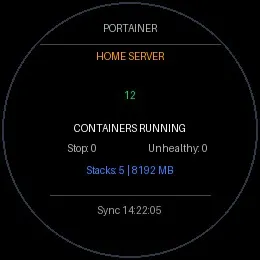
Portainer Monitor brings live deployment status and container health checks straight to your Garmin watch. Designed as a lightweight, quick-glance companion for self-hosted home servers and homelabs running
Portainer Community Edition.
Key Features:
• Real-Time Container Health: Instant visibility into running, stopped, and unhealthy container counts.
• Environment & Stack Overview: Displays active Portainer environment name, running stack count, and host memory allocation.
• Instant Sync: Press SELECT (or START) on the watch to trigger an immediate live refresh.
• Battery & Data Optimised: Uses lightweight API snapshot queries to ensure minimal data usage and fast rendering on 260×260 displays.
Requirements & Setup:
1. Requires a running instance of Portainer CE reachable by your phone (via LAN, Wi-Fi, WireGuard, or Tailscale).
2. After installing, open the Garmin Connect Mobile app on your phone and navigate to:
My Device → Applications → Portainer → Settings
3. Enter your Portainer Server URL (e.g. http://100.88.127.35/portainer) and your Portainer Access Token (generated under My account → Access tokens).
截图

支持语言(1)
兼容机型(5)
最近指标走势
评分
评论
快照日期
2026-10-27 → 2026-11-02