功能说明
MTBRouter lets you report trail conditions from your wrist while you ride, with no phone in your hand. It is the watch companion for the MTBRouter trail map at https://mtbrouter.com
WHAT IT DOES
- Tag a spot (fallen tree, mud, washout, closed section and more) at your current GPS position with a few taps.
- Record a stretch: tap Start stretch where it begins and End stretch where it ends, and the path between them is saved.
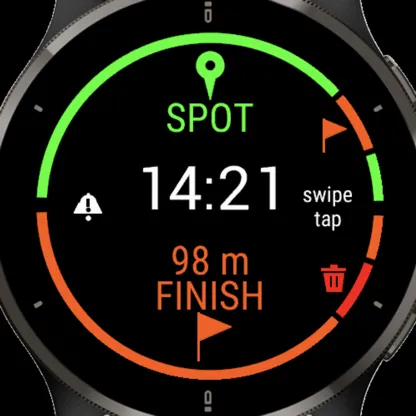
- See GPS status in colour, so you know when the position is good enough to report.
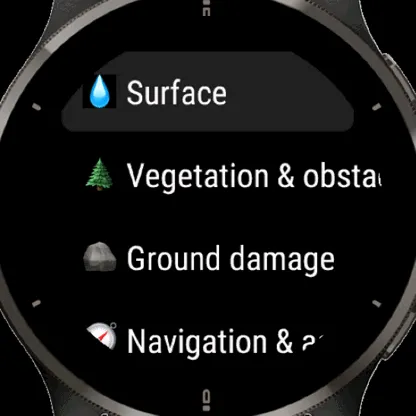
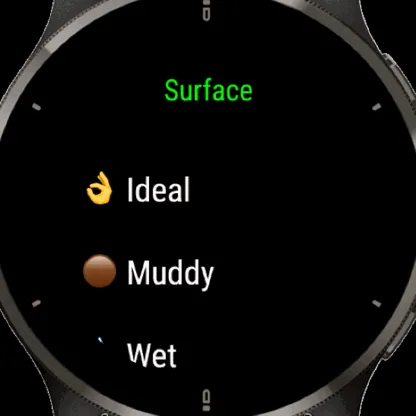
- Choose from tag lists ordered from most to least used, so common tags are one tap away.
- Check your own published reports on the watch.
NOTHING IS PUBLISHED FROM THE WATCH
Every report goes into a private review list. Later, in the MTBRouter web app (https://mtbrouter.com), you check the place, adjust the tag, line or note, and then publish or discard it. This avoids wrong reports from a bad GPS fix or a mistap.
SETUP
1. Install the app.
2. Open it and start pairing. It shows a short code.
3. Enter the code in the MTBRouter web app (https://mtbrouter.com), under your profile, in Settings, in the "Garmin watch" section.
4. The watch receives its own access token within a few seconds. You can revoke it at any time in the web app.
You need a free MTBRouter account to use the app. Create it at https://mtbrouter.com
PERMISSIONS AND PRIVACY
- Positioning: to save the location of each report.
- Activity recording (Fit): ride mode keeps the app alive when the screen sleeps.
- Communications: to send reports to the MTBRouter server.
Reports and the device token are sent only to the MTBRouter server you pair with. No data is shared with third parties, and there are no ads.
Privacy policy: https://mtbrouter.com/privacy
SUPPORT
Contact the developer by email from this page.
更新日志
Version 0.4.6
- Idle reminder: if you stand still for a while (15 min inside 50 m by default), the watch vibrates and the home screen shows IDLE, so the app does not drain the battery for nothing. Settings, Idle reminder: on/off, time (5-60 min) and radius (25-100 m).
Version 0.4.5
- Better battery life: the alert check runs only while Alerts are on and checks less often when no reported spot is near. With Alerts off nothing syncs.
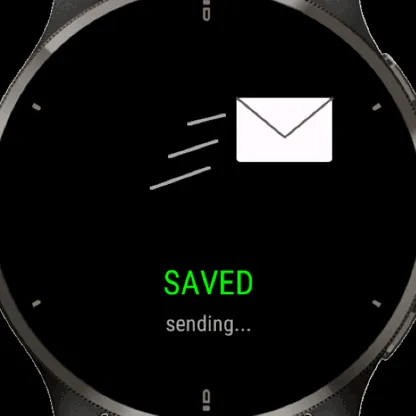
- One phone-link icon on the home screen: turning = sending or downloading, red with ! = a problem, yellow with a number = reports waiting to send, green = up to date.
- Not paired? The home screen shows a red NOT PAIRED button: tap it to pair. Reports made meanwhile are kept and sent after pairing.
- The Send screen shows what you are sending (the tag) and lets you pick where I tapped or here, now. Spots can be discarded there too.
Version 0.4.2
- Statuses change every day, so with Alerts on the watch downloads the reports around you again once a day, on the first GPS fix of the day. Settings, Alerts, Sync now downloads at once and shows how many statuses came in.
- A revoked or expired pairing is noticed: the watch asks you to pair again instead of silently showing no alerts. A failed download is retried.
Version 0.4.1
- Square-screen watches (Venu Sq, Venu Sq 2): the home screen and the trail alert screen have their own layout, with the button lines and icons on the right edge, a smaller clock and a bigger report icon.
Version 0.4.0
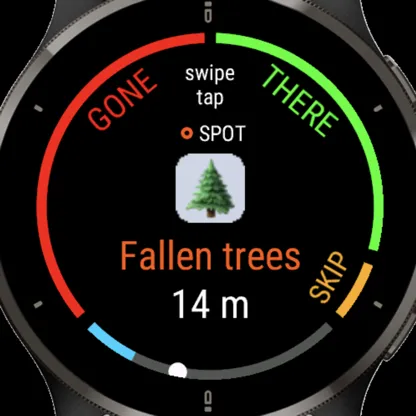
- Trail alerts: the watch downloads the reports around you once, then warns before a reported spot or stretch and asks "still there?" (swipe or tap a side, upper button, or skip with Back). Turn it on in the Alerts menu in Settings or in the Garmin Connect app.
- New home screen: spot on top, route at the bottom, status icons for GPS, alerts and waiting reports, a clock (and optionally date, temperature and bearing).
- The upper button repeats your last action, the lower button opens Settings (or discards a running route).
- Reports now carry at most 3 tags.
- Vibration cues for GPS found, saved, sent and errors.
Version 0.3.1
- Back on the home screen opens Settings; Back (or a right swipe) in Settings closes the app.
- Swipe left on the home screen also opens Settings.
First beta
- Spot and stretch reports with GPS status colours.
- Tag lists ordered by how often each tag is used.
- Pairing with a short code, and private review before publishing.
- My reports screen.
- Smoother, lighter status list scrolling.
Get the app: https://apps.garmin.com/apps/16a97fc2-c6ac-4abe-b157-0620c73ec874
截图
支持语言(1)
兼容机型(213)
Approach® S50
Approach® S62
Approach® S62
Approach® S70 (42mm)
Approach® S70 (47mm)
Approach® S72 - 43 mm
Approach® S72 - 47 mm
D2™ Air
D2™ Air X10
D2™ Air X15
D2™ Charlie
D2™ Delta
D2™ Delta PX
D2™ Delta PX
D2™ Delta S
D2™ Mach 1
D2™ Mach 1 Pro
D2™ Mach 2
D2™ Mach 2 Pro
Descent™ G1
Descent™ G1
Descent™ G2
Descent™ Mk1
Descent™ Mk1
Descent™ MK2
Descent™ MK2
Descent™ Mk2S
Descent™ Mk2S
Descent™ MK3 - 43mm
Descent™ MK3i - 51mm
Enduro™
Enduro™
Enduro™ 2
Enduro™ 3
Enduro™ 4
epix™ (Gen 2)
epix™ (Gen 2)
epix™ Pro (42mm)
epix™ Pro (47mm)
epix™ Pro (51mm)
fēnix® 5
fēnix® 5
fēnix® 5 Plus
fēnix® 5 Plus
fēnix® 5S
fēnix® 5S
fēnix® 5S Plus
fēnix® 5S Plus
fēnix® 5X
fēnix® 5X
fēnix® 5X Plus
fēnix® 5X Plus
fēnix® 6
fēnix® 6
fēnix® 6 Dual Power
fēnix® 6 Pro
fēnix® 6 Pro
fēnix® 6 Pro Dual Power
fēnix® 6 Pro Solar
fēnix® 6 Solar
fēnix® 6S
fēnix® 6S
fēnix® 6S Dual Power
fēnix® 6S Pro
fēnix® 6S Pro
fēnix® 6S Pro Dual Power
fēnix® 6S Pro Solar
fēnix® 6S Solar
fēnix® 6X Pro
fēnix® 6X Pro
fēnix® 7
fēnix® 7
fēnix® 7 Pro
fēnix® 7 Pro – Solar Edition (No Wi-Fi®)
fēnix® 7S
fēnix® 7S
fēnix® 7S Pro
fēnix® 7X
fēnix® 7X
fēnix® 7X Pro
fēnix® 7X Pro No Wi-Fi
fēnix® 8 AMOLED (43mm)
fēnix® 8 AMOLED (47mm/51mm)
fēnix® 8 Pro
fēnix® 8 Solar (47mm)
fēnix® 8 Solar (51mm)
fenix® 9 - 43 mm
fenix® 9 – 47 mm
fenix® 9 Pro - 43 mm
fenix® 9 Pro - 47 mm
fenix® 9 Pro - 51 mm
fenix® 9 Pro - Solar 47 mm
fenix® 9 Pro - Solar 51 mm
fēnix® Chronos
fēnix® Chronos
fēnix® E
ForeAthlete 245
ForeAthlete 245 Music
ForeAthlete 55
ForeAthlete 645
ForeAthlete 645 Music
ForeAthlete 745
ForeAthlete 935
Forerunner® 165
Forerunner® 165 Music
Forerunner® 170
Forerunner® 170 Music
Forerunner® 245
Forerunner® 245
Forerunner® 245 Music
Forerunner® 245 Music
Forerunner® 255
Forerunner® 255 Music
Forerunner® 255S
Forerunner® 255S Music
Forerunner® 265
Forerunner® 265S
Forerunner® 55
Forerunner® 55
Forerunner® 570 - 42mm
Forerunner® 570 - 47mm
Forerunner® 645
Forerunner® 645 Music
Forerunner® 70
Forerunner® 70
Forerunner® 745
Forerunner® 935
Forerunner® 945
Forerunner® 945
Forerunner® 945 LTE
Forerunner® 955 Dual Power
Forerunner® 965
Forerunner® 970
Instinct® 2
Instinct® 2
Instinct® 2S
Instinct® 2S
Instinct® 2X
Instinct® 3 – 45 mm, AMOLED
Instinct® 3 – 45 mm, Solar
Instinct® 3 – 50 mm, AMOLED
Instinct® 3 – 50 mm, Solar
Instinct® Crossover
Instinct® Crossover AMOLED
Instinct® E – 40 mm
Instinct® E – 45 mm
MARQ® (Gen 2)
MARQ® Adventurer (Gen 3)
MARQ® Commander (Gen 2) – Carbon Edition
MARQ™ Adventurer
MARQ™ Adventurer
MARQ™ Athlete
MARQ™ Athlete
MARQ™ Aviator
MARQ™ Aviator
MARQ™ Aviator (Gen 2)
MARQ™ Captain
MARQ™ Captain
MARQ™ Commander
MARQ™ Commander
MARQ™ Driver
MARQ™ Driver
MARQ™ Expedition
MARQ™ Expedition
MARQ™ Golfer
MARQ™ Golfer
Mercedes-Benz Venu® 2
Mercedes-Benz Venu® 2
Mercedes-Benz Venu® 2S
Mercedes-Benz Venu® 2S
quatix® 6
quatix® 6X
tactix® 7
tactix® 7 – AMOLED Edition
tactix® 8 – 47 mm, AMOLED
tactix® 8 – 51 mm, Solar
Venu®
Venu®
Venu® 2
Venu® 2
Venu® 2 Plus
Venu® 2 Plus
Venu® 2S
Venu® 2S
Venu® 3
Venu® 3S
Venu® 4 – 41 mm
Venu® 4 – 45 mm
Venu® Sq.
Venu® Sq.
Venu® Sq.
Venu® Sq.
Venu® Sq. 2
Venu® Sq. 2 Music
Venu® Sq. Music
Venu® Sq. Music
Venu® Sq. Music
Venu® Sq. Music
Venu® X1
vívoactive® 3
vívoactive® 3
vívoactive® 3
vívoactive® 3 Mercedes-Benz® Collection
vívoactive® 3 Mercedes-Benz® Collection
vívoactive® 3 Music
vívoactive® 3 Music
vívoactive® 3 Music
vívoactive® 4
vívoactive® 4
vívoactive® 4S
vívoactive® 4S
vívoactive® 5
vívoactive® 6
最近指标走势
评分
评论
快照日期
2026-10-27 → 2026-10-30