Beskrivelse
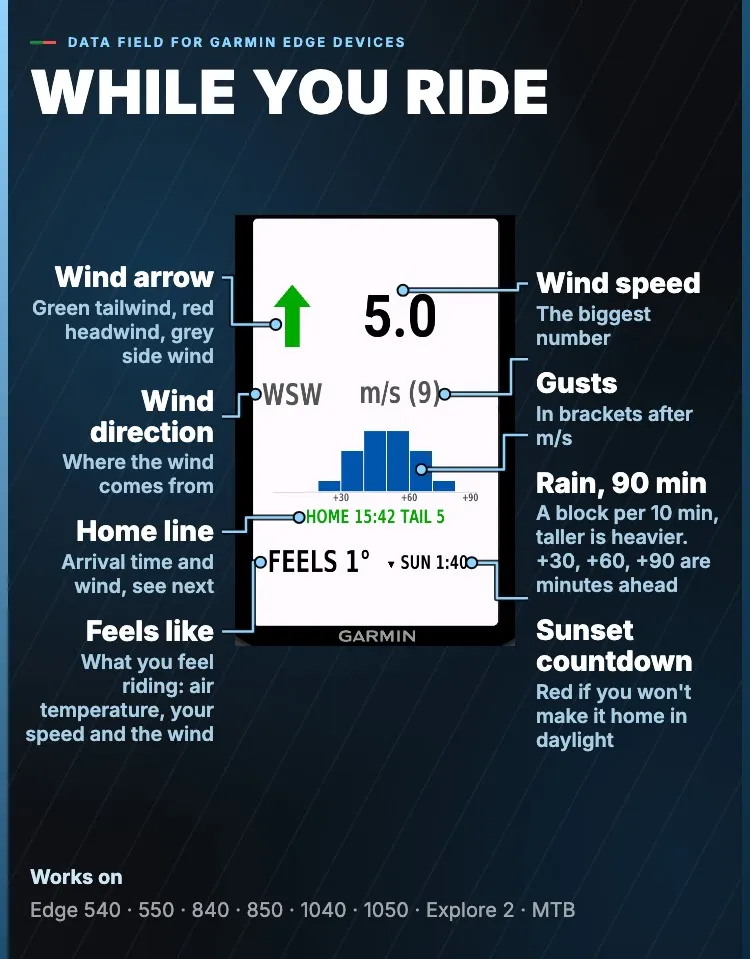
Put an arrow on the wind. Vind Ride is a data field for Garmin Edge cycling computers. One glance at your data screen shows which way the wind pushes you, when the rain arrives, how cold the ride really feels and what the wind does on the way home.
https://offoverdrive.com/vind-ride/da
WIND AGAINST YOUR HEADING
• The arrow is drawn against your riding direction, so you see at once whether the wind is with you. Green is tailwind within 45 degrees, red is headwind within 45 degrees, grey is side wind
• Wind speed is the largest number on the field, with gusts in brackets, in m/s, km/h, knots or Beaufort
• When you stand still, the field shows the compass direction the wind comes from
RAIN FOR THE NEXT 90 MINUTES
• A row of blocks, one for every 10 minutes. The taller the block, the heavier the rain
• Radar updates every 15 minutes in Norway, Sweden, Finland and eastern Denmark
WIND CHILL FROM YOUR OWN SPEED
• The weather's wind is combined with the wind you make by riding, so FEELS is the cold you meet on the road
• The standard wind chill formula is used at 10°C or below with about 5 km/h of wind over you. Otherwise the air temperature is shown
WIND ON THE WAY HOME
• Arrival time and the wind then, on one line: HOME 15:40 HEAD 7 is home about 15:40 with a 7 m/s headwind (TAIL is a tailwind)
• With a course, home is the destination, otherwise the start. The wind is the forecast for your arrival time
WIND SHIFT AHEAD
• Shown only when the wind turns 45 degrees or more, or changes 3 m/s or more, within 3 hours: SHIFT 17:00 W 8 is a west wind, 8 m/s, at 17:00
HOME BEFORE DARK
• A countdown to sunset sits next to the FEELS number. It turns red when your time home is longer than the daylight left
• TURN BY 15:31 is the latest time to turn and still be home before sunset, or before a time you choose. Pop-ups warn ten minutes ahead and at turn time, following the Edge's alert setting
• Switch it on in the Connect IQ app: sunset or a fixed time, margin 0, 15 or 30 min, and home in a straight line or the same way you came. Without a course it assumes the same way back
SAVED WITH YOUR RIDE
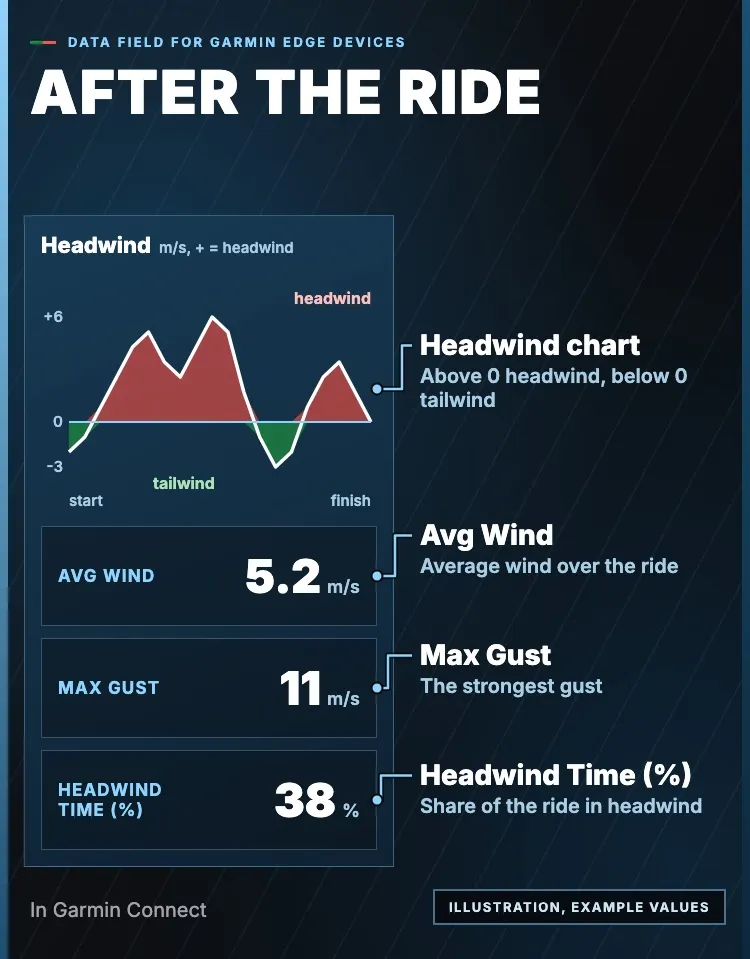
• Wind, gusts, wind angle and feels-like are saved with your activity as graphs, including the Headwind graph (m/s, plus is headwind)
• Garmin Connect also shows Avg Wind, Max Gust and Headwind Time (%)
FOR YOUR EDGE
Vind Ride runs on Edge 530, 540, 550, 830, 840, 850, 1030, 1030 Plus, 1040, 1050, Explore 2 and MTB. Add it to a data screen in your ride profile. On the Edge it is called Vind. It follows your screen's background, light or dark.
ROUTE PLANNER ON THE WEB
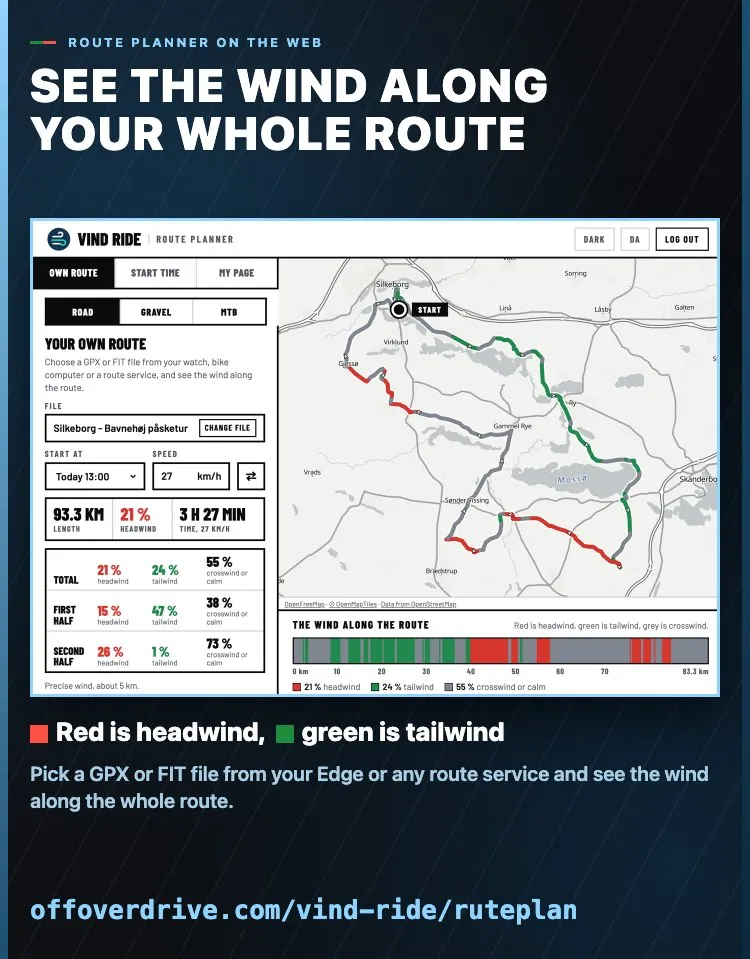
Pick a GPX or FIT file at offoverdrive.com/vind-ride/ruteplan and see the wind along the whole route, red headwind and green tailwind. Free account: 5 routes a day. With a subscription or trial you get precise wind, send the numbers to your Edge, save routes and calculate 200 routes a day. Works in every country.
TRY IT FREE
Download Vind Ride free and use it on every ride for 7 days. After that it costs $9.99 or 89 kr. a year through Stripe at offoverdrive.com/buy. The field shows a code before the ride and in its settings. Enter the code at offoverdrive.com/buy, and the field unlocks by itself within 15 minutes.
WHAT IT NEEDS
• Your phone nearby with the Garmin Connect app running, and a GPS fix, so the field knows where to ask
• Fresh weather every 15 minutes as soon as your ride screen is open
• Your position leaves your device only as a grid cell about 5 km across. No account and no ads
• Switch off the anonymous usage log with Share anonymous usage in the Connect IQ app
Read more about Vind Ride: offoverdrive.com/vind-ride
Credit:
• Weather data from MET Norway (CC BY 4.0)
• Sunrise and sunset are calculated with the NOAA General Solar Position Calculations
CC BY 4.0 licence: https://creativecommons.org/licenses/by/4.0/
Garmin, Edge, Connect IQ and Garmin Connect are trademarks of Garmin Ltd. or its subsidiaries and are used here only to describe compatible devices.
Nyheter
Now also runs on Edge 530, 830, 1030 and 1030 Plus.
Skjermbilder
Støttede språk (2)
Kompatible enheter (17)
Siste måleutvikling
Vurdering
Omtaler
Datoer for øyeblikksbilder
2026-10-27 → 2026-11-02