Beskrivelse
SETTINGS ON THE WATCH
Hold UP, pick Watch Face, select Flapboard Lite, press START, then
Customize. The menu is drawn in the style of the board: a short How it
works guide and the falling flaps switch.


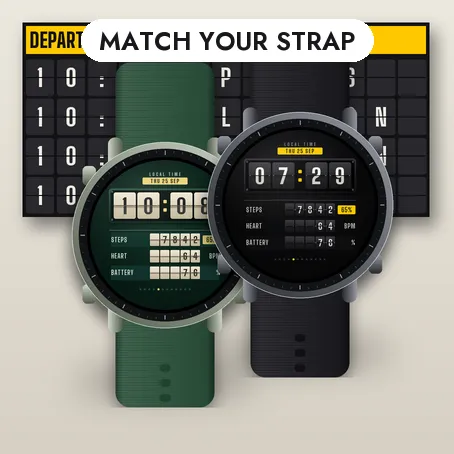
A SPLIT-FLAP BOARD ON YOUR WRIST
The time sits on four large flaps with a lit upper half, a shaded lower
half, a hinge gap and two pivots. When a digit changes, the old flap
falls. Four rows below: steps with your goal percentage, heart rate, watch
battery and the next sunrise or sunset. Twelve lights count the seconds.
If your watch has no value, the flaps show -- rather than a made-up
number. A separate always-on design on a black screen shifts slightly
every minute.

THE FULL VERSION

Flapboard has five boards, three typefaces, a choice of twelve data for
each of the four rows, and a Goal log with your streaks. Press and hold
Flapboard Lite to see this list on the watch.
MORE FACES BY THE SAME DEVELOPER
Flapboard, the full version of this face, plus Waymark, Caliber,
Reefside, Orbiter, Step Garden Skies and Slimmy Gochi
Pro. Search their names in the store.
COMMUNITY
News, previews of the next faces and requests:
reddit.com/r/GarminWatchfacesTJ
Compatible with Garmin AMOLED watches listed on this page. English only.
Free, no ads on the face. Nothing leaves the watch.
Nyheter
Bigger text everywhere. The date is now almost twice as large: the LOCAL
TIME label is gone and the date pill takes its place. The three rows are
about 20 percent larger (flaps, digits, labels and units) and the time
digits grow too. New setting: always-on digits, Thin or one of the three typefaces (Condensed, Geometric,
Technical), on the watch and in Garmin Connect.
Skjermbilder
Støttet språk (1)
Kompatible enheter (52)
Approach® S50
Approach® S70 (42mm)
Approach® S70 (47mm)
D2™ Air X10
D2™ Air X15
D2™ Mach 1
D2™ Mach 1 Pro
D2™ Mach 2
D2™ Mach 2 Pro
Descent™ G2
Descent™ MK3 - 43mm
Descent™ MK3i - 51mm
epix™ (Gen 2)
epix™ (Gen 2)
epix™ Pro (42mm)
epix™ Pro (47mm)
epix™ Pro (51mm)
fēnix® 8 AMOLED (43mm)
fēnix® 8 AMOLED (47mm/51mm)
fēnix® 8 Pro
fēnix® E
Forerunner® 165
Forerunner® 165 Music
Forerunner® 265
Forerunner® 265S
Forerunner® 570 - 42mm
Forerunner® 570 - 47mm
Forerunner® 965
Forerunner® 970
Instinct® 3 – 45 mm, AMOLED
Instinct® 3 – 50 mm, AMOLED
MARQ® (Gen 2)
MARQ® Commander (Gen 2) – Carbon Edition
MARQ™ Aviator (Gen 2)
Mercedes-Benz Venu® 2
Mercedes-Benz Venu® 2
Mercedes-Benz Venu® 2S
Mercedes-Benz Venu® 2S
tactix® 7 – AMOLED Edition
tactix® 8 – 47 mm, AMOLED
Venu® 2
Venu® 2
Venu® 2 Plus
Venu® 2 Plus
Venu® 2S
Venu® 2S
Venu® 3
Venu® 3S
Venu® 4 – 41 mm
Venu® 4 – 45 mm
vívoactive® 5
vívoactive® 6