Beskrivelse
VGLA Lite Slave is a Connect IQ data field for Edge 130/130 Plus. Combine metrics in one field and record virtual gear tooth-count candidates in FIT.
Choose 4/6/8 cells or Power Graph + 2 Cells. Assign each cell; text size/labels adapt to the field area. Use full-screen or beside VGLA Lite PD Analysis/PCH Alert Lite in a two-field layout. Metrics depend on data received by Edge.
[130 Edition VGLA Configurator]
https://toabcycling.org/VGLA_Configurator_130.html
Free Japanese/English browser editor for all 29 settings: Normal/Workout pages, metrics, FTP, graph, drivetrain and HR/cadence inversion. Includes previews and JSON backup.
Apply settings:
1. Edit, generate and copy the complete VGLS6 code.
2. Paste into Slave's "Receive Settings Code" in Garmin Connect Mobile; save and sync.
3. Display Slave on Edge.
4. Reopen mobile settings and check "Receive Result" for "Applied: settings".
Mobile settings: code input/result only. Edit in Configurator. To reapply, clear/save/sync first. Invalid codes keep settings. Keep JSON backups. VGLS1-5 supported. Device/mobile labels: English. Regular VGLA codes are incompatible.
[Display and Workouts]
Normal/Workout layouts and metrics are independent. 130 Plus can auto-switch on workout detection and show NOW/NEXT target power. Auto Remaining follows time/distance end conditions and holds during pauses. Other conditions/unavailable data show "--". FTP-based targets require FTP.
[Virtual Gears and FIT Recording]
Using configured chainrings, cassette, wheel circumference and Edge Speed/Cadence, Slave calculates inner/outer rear-tooth candidates. GEAR I/O shows both; single-side displays and single chainrings are supported.
A FIT Developer Field stores front teeth and both rear candidates regardless of display selection. Stops, coasting, missing data, speed below 5.4 km/h or cadence below 20 rpm invalidate rear candidates; old values are not retained. Parallel hypotheses do not confirm front selection or shift events. Recording intervals depend on Edge's FIT mode.
[Power and Graph]
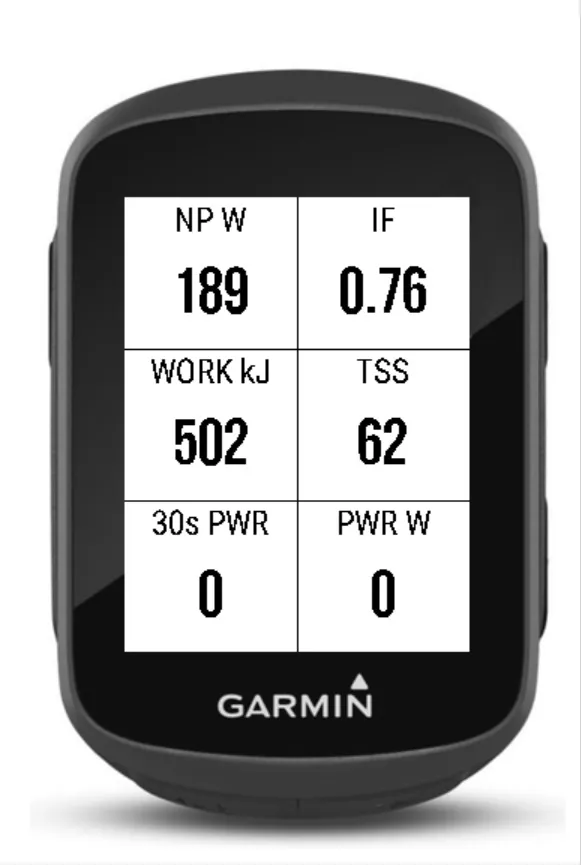
Edge-native power feeds 30s Average Power, Normalized Power (NP), Intensity Factor (IF), Training Stress Score (TSS) and Work (kJ). FTP=0 disables IF/TSS; 30s Power/NP/Work do not require FTP. 30s Power/NP/IF/TSS show "--" until the initial 30-second window is ready. Accumulation pauses with the activity timer and clears on activity reset.
The graph shows about two minutes, with 3s/10s averaging and a 100-1000 W maximum.
[HR/Cadence Inversion]
Current HR cells invert at/above the upper threshold. Cadence uses a low threshold/range: 80/20 inverts 61-80 rpm, excluding 60 or below and zero. Threshold=0 disables inversion. Averages are unaffected.
[Other Metrics]
Clock, activity/elapsed/lap timers, activity/lap distance, current/average speed, HR, cadence and power; grade, altitude, ascent, Edge battery and Off.
[Cycling Data Analyzer]
https://toabcycling.org/analyzer/analyzer.html
Review FIT gear candidates in the free compatible Analyzer; assign inner/outer intervals or explicitly run estimation.
TOAB Cycling CONNECT IQ APPS
https://toabcycling.org/
[Getting Started]
Add Slave to your profile's data screen, apply its code, connect sensors to Edge and start recording.
[Compatibility and Data]
Uses Edge-native data. PD Analysis does not share directly received Power/Cadence. Without Edge-native power, power metrics/graph are unavailable. Gears need Edge Speed/Cadence.
NP/IF/TSS/30s Power/Work are not added as Developer Fields. Power calculations may differ from Garmin or other services. Gear candidates may differ from actual gears; not every shift is guaranteed to be recorded. Prioritize road safety and traffic rules.
Editing/analysis run in-browser. No settings, FITs, ride data or results are sent to VGLA servers. Online maps use external map services.
[Devices]
Edge 130/130 Plus. Workouts: 130 Plus only. Minimum Connect IQ API: 3.1.0.
Nyheter
What's New
v0.1.35
- Updated power-zone graph fills with monochrome patterns inspired by the Edge 130 climb display.
- Five intensity levels: outline, sparse dots, diagonal lines, dense hatching, and solid black.
- Applied to "1 Graph + 2 Cells" and "1 Graph + 4 Cells" on normal and workout pages.
- Matched the 130 Configurator previews and zone legend to the device's graph patterns.
- Reduced memory use during graph rendering and clock display.
- Preserved FTP zone thresholds, 3/10-second averaging, numeric fonts, saved settings, VGLS8 codes, and the gear-candidate FIT format.
v0.1.19
- Added simplified HCRPP route and target power displays driven by activity distance: remaining distance, average gradients for the current and next 1 km sections, and target power.
- Added "1 Route + 2 Cells", "1 Route + 4 Cells", and "4 Cells + 1 Route".
- Added GPX, FIT, and V3 JSON import in the 130 Configurator. Edit routes, power intervals, and distance messages using the route overview and elevation profile.
- Added full-field popups for distance messages and target power changes, with separate visibility, duration, sound, and tone settings. Added a repeat interval for message sounds.
- Target power popup numbers use the largest font that fits the assigned display area.
- Shows "ROUTE COMPLETE" at the finish, then changes all three route values to "--".
- On Edge 130 Plus, resumes the route at the current activity distance after a workout.
- Improved half-screen graph numeric fonts and memory management. Updated settings codes to VGLS8 while preserving saved settings and the gear-candidate FIT format.
Route notes:
- Routes advance by activity distance, up to 25 km.
- Up to 6 target power intervals, including FREE, and 10 messages. Route names, gradients, intervals, and messages share capacity; available entries and text length depend on the content.
- Use VGLS8 codes from the updated 130 Configurator. Import VGLS1-7 codes into the Configurator and export as VGLS8.
Earlier updates (summary)
v0.1.18
- Added "1 Graph + 4 Cells" for normal and workout pages.
- Improved split-layout labels and numeric font sizes, reduced settings-save memory use, and preserved settings and FIT compatibility.
v0.1.17
- Added virtual inner/outer gear candidates, single-chainring support, and FIT developer-field recording even when gear cells are hidden.
- Invalidates stale candidates when stopped, coasting, or data is missing.
- Added heart-rate and cadence inversion thresholds and automatic workout time/distance remaining.
- Moved all 29 settings to the Configurator with two mobile settings fields. Fixed settings application and improved persistence and memory use.
v0.1.11
- Added "Power Graph + 2 Cells", 3/10-second averaging, graph limits, and an FTP reference line.
- Added a separate workout page, automatic switching, step targets, and remaining time/distance.
- Added bulk settings-code reception, validation, recovery, and memory improvements.
v0.1.6
- Added 30-second average power, NP, IF, TSS, and Work (kJ).
- Added FTP settings; FTP 0 disables IF/TSS. Set TSS as the default fourth cell and reorganized settings.
General notes:
- Workout features require Edge 130 Plus.
- Virtual gears are tooth-count candidates assuming either chainring, not detected front positions or confirmed shifts.
- Gear display/recording requires Edge speed and cadence data. Recording frequency follows the device's FIT recording mode.
- Power metrics and graphs require native Edge power data. No data is shared with PD Analysis.
- For FIT analysis, use a compatible version of Cycling Data Analyzer.
Skjermbilder
Støttede språk (2)
Kompatible enheter (4)
Siste måleutvikling
Vurdering
Omtaler
Datoer for øyeblikksbilder
2026-10-30 → 2026-11-26