説明


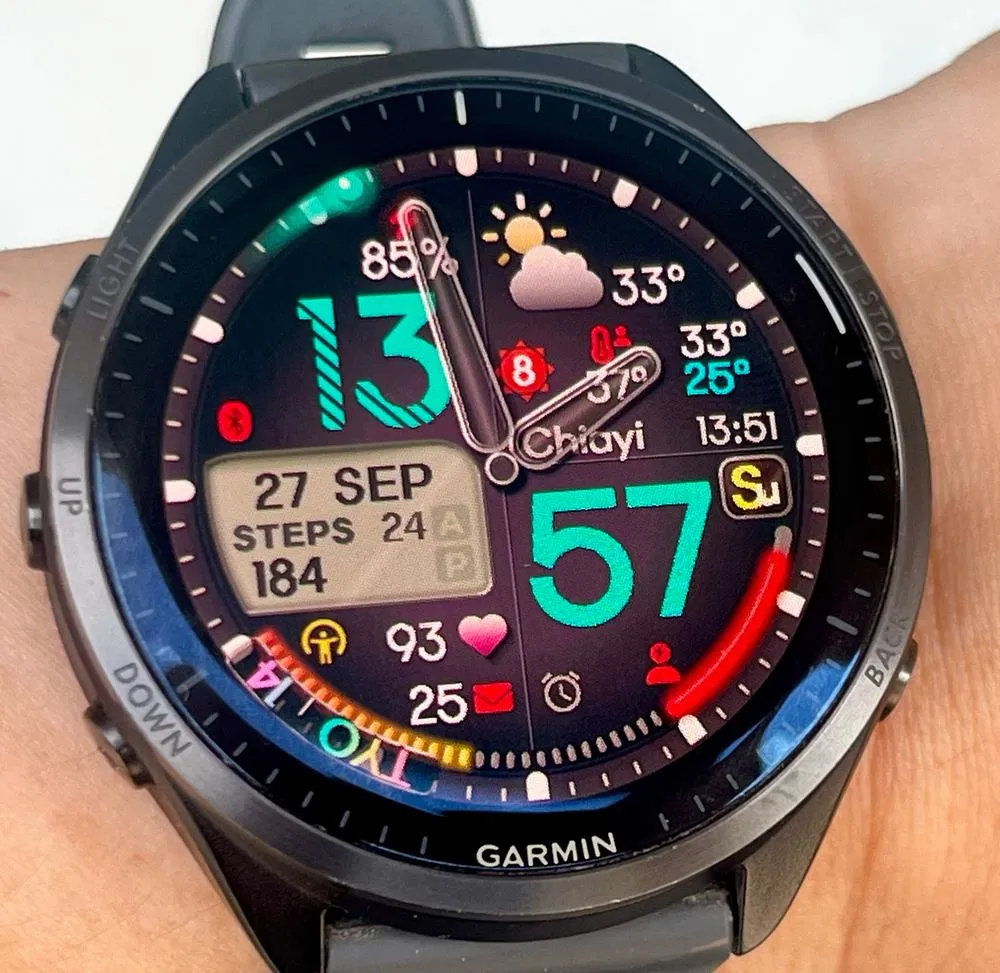
GraceZS is an analog-digital watch face built around light and movement.
Raise your wrist and it wakes up: the battery ring breathes, the heart icon
beats twice, the left gauge fills in one segment at a time, and a small glowing
orb drifts around the dial marking the seconds. At the top, under a curved
glass lens, a second time zone sits on the rim like a real GMT bezel.
A watch face to look at, not only to read.
FREE 5-DAY TRIAL, THEN US$4.99 ONCE
Everything is unlocked for five days. No account, no card, nothing to enter.
Wear it in your own light before deciding.
To keep it, buy an unlock code at https://gracezs.scandi9.com or from the watch:
1) Open Connect IQ on your phone.
2) ON THE WATCH, open this watch face's settings, press "Buy unlock code".
3) Accept the phone prompt; pay by PayPal or card.
4) ON THE WATCH, close and reopen the settings: look for "Unlocked".
If not, paste the emailed code in the app's "Unlock code".
What stops working after day five is listed under PRICING below.
WHAT YOU GET
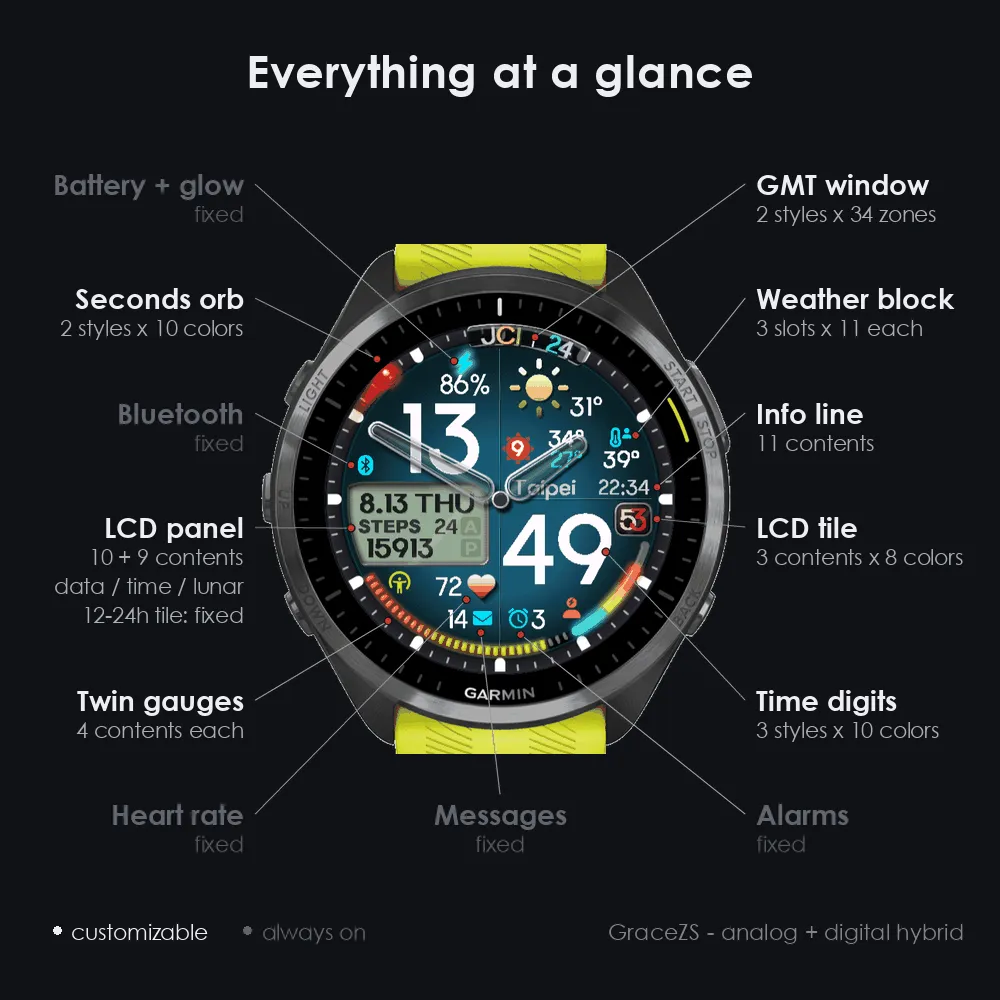
- Analog hands with continuously lit rims, over a layered dial
- Two configurable gauges: Body Battery, stress, steps, calories or floors
- Weather row: temperature, rain chance, UV, high/low, plus three
configurable slots and an info field
- Left LCD panel with two pages: date, lunar date, steps/pushes, distance,
calories, floors, respiration, or a second/third time zone
- World clock with 34 cities and automatic daylight saving
- Right LCD: seconds, date or weekday
- Six dial colors, independent colors for hours, minutes, text, icons and gauges
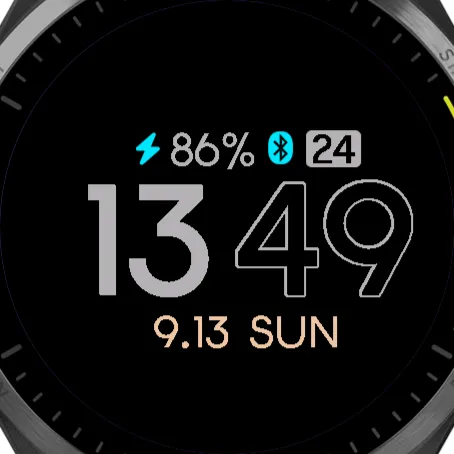
- Three digit styles: solid, outline and hatched
- Always-On Display with a low-brightness layout
- Full customization in the phone app
SETTINGS GUIDE
The phone app shows names only; every setting is explained here:
https://gracezs.scandi9.com/guide
PRICING - PLEASE READ BEFORE INSTALLING
This watch face is free to download and includes a 5-day trial.
It keeps running after the trial ends, but these stop working until you enter
an unlock code:
- The seconds orb (all styles).
- The left LCD panel. Both rows are taken over to show "TRIAL / ENDED" and
your device code, so you lose everything it can display: the date, lunar
date, steps/pushes, distance, calories, floors, respiration, the second and
third time zones (the 34-city world clock), and its A/B pages.
- The right LCD panel is fixed to seconds. Date and weekday are not available.
- The weather row is fixed to its first page.
- All four long-press shortcuts.
Everything else keeps working: the analog hands, the large digital hours and
minutes, the weather row itself, both gauges, all dial and colour
customization, and the Always-On Display - which still shows the date.
Unlocking is permanent and tied to one watch; updating or reinstalling does
not affect it. Another watch needs its own code.
If the watch shows BAD CODE, that code is for a different watch - email
[email protected] with your order number.
REFUNDS
No refunds. The 5-day free trial gives you full access to every single feature
before you pay anything, so please make sure the watch face works on your watch
during the trial. Unlock codes cannot be revoked once issued.
WEATHER AND LOCATION
Temperature, rain, UV and high/low come from Garmin's own weather
service and need no setup. The city name and air quality index are optional
and use OpenWeatherMap, which needs your own free API key (entered in the
phone app); without one the city name shows "--". Using those two sends your
watch's coordinates to OpenWeatherMap. Nothing else leaves your watch.
Privacy policy: https://privacy.scandi9.com
REQUIREMENTS
- Bluetooth connection to your phone for weather and location
- Connect IQ 5.1.0 or later
SUPPORT
Email [email protected] - the only support channel.
更新履歴
What's new in 1.1.1
- Left LCD backlight: a new setting under Colors in the phone app lights up the left panel in one of 8 colors, keeping its depth and glass and making the text easier to read.
- Signature is the backlight default and keeps the original look, so nothing changes until you pick a color.
- Support for more watches: three newly released models can now install GraceZS. Check the compatible devices list on this page to see if yours is included.
- Version info: the last row of the watch's settings menu now shows which GraceZS version is installed.
- If the backlight option looks empty in the phone app right after updating, the face stays on Signature; pick a color and save once.
What's new in 1.1.0
- Wheelchair mode: when your watch is set to wheelchair mode, the Steps and Distance cells show your pushes and push distance, and the Steps/Pushes goal % gauge counts pushes toward the new Daily push goal setting.
- New gauge option: Floors goal %.
- Two new settings: Daily floors goal and Daily push goal (wheelchair).
- Buying on the watch: if the settings menu is open when your unlock code arrives, it now switches to Unlocked right away.
- After updating: if you don't see the changes, restart your watch once. If the two new goal fields look empty in the phone app, the watch face uses 10 floors and 1,000 pushes until you type your own.
スクリーンショット
対応言語(1)
対応デバイス(43)
Approach® S70 (42mm)
Approach® S70 (47mm)
Approach® S72 - 43 mm
Approach® S72 - 47 mm
D2™ Air X15
D2™ Mach 1
D2™ Mach 1 Pro
D2™ Mach 2
D2™ Mach 2 Pro
Descent™ MK3 - 43mm
Descent™ MK3i - 51mm
epix™ (Gen 2)
epix™ (Gen 2)
epix™ Pro (42mm)
epix™ Pro (47mm)
epix™ Pro (51mm)
fēnix® 8 AMOLED (43mm)
fēnix® 8 AMOLED (47mm/51mm)
fēnix® 8 Pro
fenix® 9 - 43 mm
fenix® 9 – 47 mm
fenix® 9 Pro - 43 mm
fenix® 9 Pro - 47 mm
fenix® 9 Pro - 51 mm
fēnix® E
Forerunner® 170
Forerunner® 170 Music
Forerunner® 265
Forerunner® 570 - 42mm
Forerunner® 570 - 47mm
Forerunner® 965
Forerunner® 970
MARQ® (Gen 2)
MARQ® Adventurer (Gen 3)
MARQ® Commander (Gen 2) – Carbon Edition
MARQ™ Aviator (Gen 2)
tactix® 7 – AMOLED Edition
tactix® 8 – 47 mm, AMOLED
Venu® 3
Venu® 3S
Venu® 4 – 41 mm
Venu® 4 – 45 mm
vívoactive® 6