説明
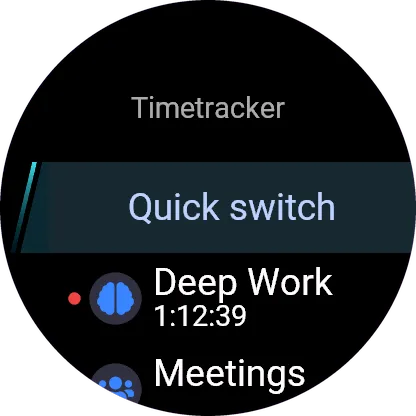
Timetracker for Garmin: start, stop and switch your time tracking from your wrist, in sync with Timetracker on your phone, computer and the web.
To use it you need a Timetracker account. Create one for free at https://timetracker.live, in the web app or in the Timetracker app for Android, iPhone, Windows, macOS or Linux. Then connect your watch and track your time on the activities you create in the app.
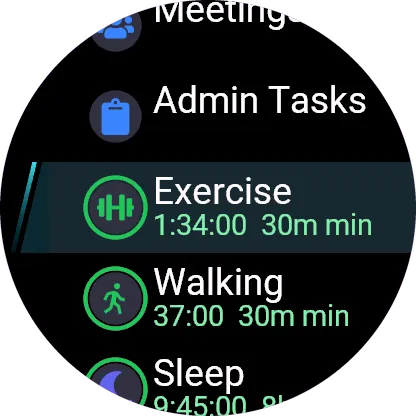
- See what is running and for how long, and stop it with one press
- Your activities in one list with today's time and goals; pick one to switch to it
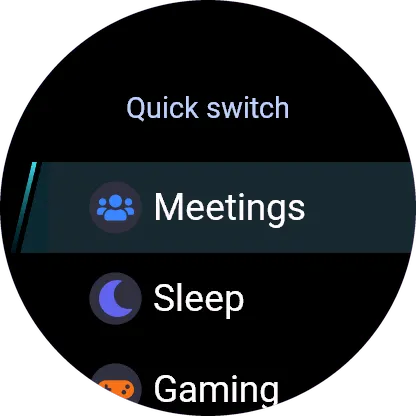
- Quick switch puts the activities you are most likely to want right at the top
- A glance shows the running activity without opening the app
- Keeps working without a connection: changes made offline are sent when the watch is back in touch
- Follows changes you make on your phone or computer
Activities are created and edited in the Timetracker app; the watch shows them and tracks time on them.
Signing in takes no typing: the watch shows a short code, you approve it at timetracker.live/watch on your phone or computer, where you are signed in to your account.
The watch app is part of Timetracker Premium, which you can try free for a week in the Timetracker app. Timetracker itself is free on Android, iPhone, Windows, macOS, Linux and the web; Premium adds the watch apps and more.
Emoji graphics by Twemoji (Twitter, Inc. and other contributors), licensed under CC-BY 4.0.
更新履歴
The app now speaks your account's language. Bug fixes and improvements.
スクリーンショット
対応言語(1)
対応デバイス(58)
D2™ Air X15
D2™ Mach 1 Pro
Enduro™ 2
epix™ (Gen 2)
epix™ (Gen 2)
epix™ Pro (42mm)
epix™ Pro (47mm)
epix™ Pro (51mm)
fēnix® 7
fēnix® 7
fēnix® 7 Pro
fēnix® 7 Pro – Solar Edition (No Wi-Fi®)
fēnix® 7S
fēnix® 7S
fēnix® 7S Pro
fēnix® 7X
fēnix® 7X
fēnix® 7X Pro
fēnix® 7X Pro No Wi-Fi
fēnix® 8 AMOLED (43mm)
fēnix® 8 AMOLED (47mm/51mm)
fēnix® 8 Pro
fēnix® 8 Solar (47mm)
fēnix® 8 Solar (51mm)
fenix® 9 - 43 mm
fenix® 9 – 47 mm
fenix® 9 Pro - 43 mm
fenix® 9 Pro - 47 mm
fenix® 9 Pro - 51 mm
fenix® 9 Pro - Solar 47 mm
fenix® 9 Pro - Solar 51 mm
fēnix® E
Forerunner® 165
Forerunner® 165 Music
Forerunner® 255
Forerunner® 255 Music
Forerunner® 255S
Forerunner® 255S Music
Forerunner® 265
Forerunner® 265S
Forerunner® 570 - 42mm
Forerunner® 570 - 47mm
Forerunner® 955 Dual Power
Forerunner® 965
Forerunner® 970
Instinct® 3 – 45 mm, AMOLED
Instinct® 3 – 50 mm, AMOLED
tactix® 7
tactix® 7 – AMOLED Edition
tactix® 8 – 47 mm, AMOLED
tactix® 8 – 51 mm, Solar
Venu® 3
Venu® 3S
Venu® 4 – 41 mm
Venu® 4 – 45 mm
Venu® X1
vívoactive® 5
vívoactive® 6
最近の指標推移
評価
レビュー
スナップショット日付
2026-10-27 → 2026-11-21