Descrizione
Zonda is a weather watch face for Garmin Instinct that picks what matters and shows it. No menus, no reaching for your phone: one look at the wrist.
I made it for myself, because I couldn't find a face that shows the weather well and still has all the data and an easy-to-read clock. I named it after the zonda, a wind – I wanted a bit of fresh air among other faces.
I can't stand laggy faces – you press a button and wait a second for anything to move. So this one is as fast as I could make it. It may differ slightly from the stock faces, but I did everything to make the delay unnoticeable.
IT DECIDES FOR YOU
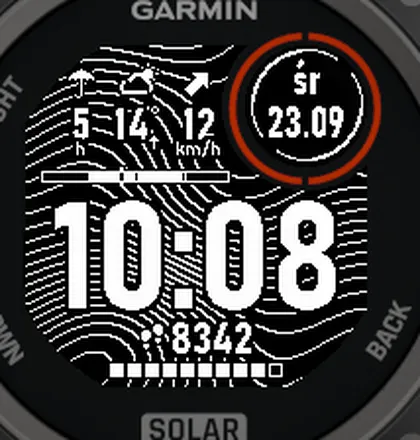
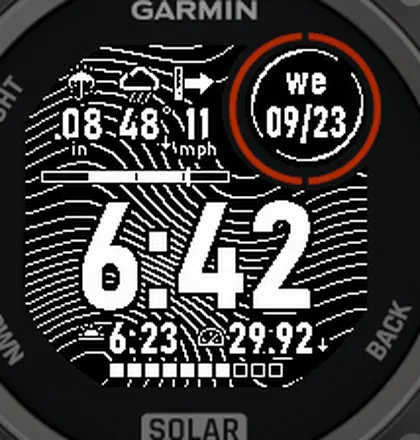
• One weather field that always shows what matters right now. Rain coming? Hours until it starts. No rain? The UV index with a sunscreen hint. If not, the next high or low, so you see where the temperature is heading.
• A trend arrow under the temperature: warming up or dropping.
• Sunrise or sunset. You never change it. Plus a daylight bar, so you see how much light is left.
• Pressure with a rising or falling arrow, so you can see the weather turning.
• Weather older than 3 hours gets a mark showing the age of the data, so you know the forecast is stale.
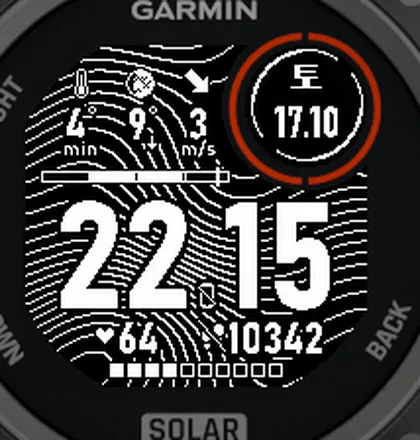
• Goal reached? The icon of steps, floors or intensity minutes is struck through.
• At night the moon in its current phase replaces the sun.
ALWAYS ON THE DISPLAY
• main time (24-hour or 12-hour format, as on a watch),
• current weather, wind direction with an arrow and strength indicator, rainfall forecast,
• day of the week and date in a window, plus notifications where required,
• one or two fields at the bottom (steps, heart rate, Body Battery and others) and a bar with 10 squares: battery level or goal progress.
WHERE THE WEATHER COMES FROM
From your phone, not from a sensor on your wrist: Garmin weather, or the free Open-Meteo forecast (rain amount, UV, a longer forecast). You choose the source in the face settings.
BATTERY
My measurement with the Battery Metrics app on an Instinct 3: about 3.8% per day on average, with the phone connected, no workouts, and phone notifications and the other Bluetooth defaults left on. Your result will depend on the watch, the settings and how you use it.
LANGUAGES
Translated into 11 languages. Nothing annoys like unclear options in the settings, exotic units of measurement or day names in a foreign language.
WATCHES
Instinct 3 Solar 45 / 50 mm, Instinct E 45 mm, Instinct 2 / 2 Solar / Dual Power / dēzl, Instinct 2X Solar, Descent G1.
Instinct 3 and E get everything above and any order of three weather fields. Instinct 2, 2X and Descent G1 have much less memory, so not everything fits there and some features are trimmed. The most important ones stay: the automatic field, the trend arrow, rain, wind, the clock and the bottom fields. UV there comes only from Open-Meteo. I tested it on a real Instinct 3 Solar 45 mm; the other watches only in the simulator.
PERMISSIONS
• Location – sunrise and sunset, the moon and the Open-Meteo forecast; GPS is never turned on.
• Background and Communications – only to download the Open-Meteo forecast through your phone.
• Sensor history – only for Body Battery and the pressure trend.
With Open-Meteo, your coordinates rounded to about 1 km are sent to api.open-meteo.com. I don't collect any data.
The watch face is the full version and will always be free. Want something changed? Write to me via “Contact Developer” on this page. If you like the face, a 5-star rating will really make my day.
The first version was inspired by a watch face photo from r/Garmininstinct.
Novità
3.2
• “Automatic” shows the next high or low of the temperature instead of today's high/low; separate “high” and “low” fields.
• Trend arrow under the temperature, pointing the same way as “Automatic”.
• A storm instead of an umbrella in “Rain in…”.
• A mark on old weather data.
• Sunrise/sunset (whichever is next) as a bottom field.
• A second time zone as a bottom field, half-hour offsets too (e.g. +5:30).
• Pressure trend.
• A struck-through icon when a goal is reached.
• Instinct 2/2X and Descent G1 get only the trend arrow and the next high/low; none of the other additions, no wind gauge and no Beaufort scale (not enough memory), the rest unchanged.
3.1
• “Automatic” field, rain amount, sunscreen hint at UV, name Zonda.
3.0
• Weather fields of your choice (rain in…, high/low, UV, humidity), more data from Open-Meteo.
2.7
• Notifications in the subscreen and bottom fields, wind gauge hidden in light wind.
2.6
• Two bottom fields, new field values, goal bar, Korean and Russian, phone in the colon, exclamation mark in strong wind.
2.5
• Wind strength gauge behind the arrow.
2.4
• Moon at night, new languages, fixed day names.
2.3
• Choice of bottom field and wind unit, feels-like temperature, date format, phone-disconnected sign.
2.2
• Settings in the Connect IQ app, weather from Open-Meteo.
2.1
• New weather icons and background, faster drawing.
2.0
• Several times faster, daylight bar, English version, new watches.
1.x
• First version, step icon.
Screenshot
Lingue supportate (2)
Dispositivi compatibili (6)
Andamento recente
Valutazione
Recensioni
Date snapshot
2026-10-27 → 2026-10-29