Beschreibung
The next version will be released on Friday 30 October 2026.
I made this face for myself, because I couldn't find one that shows the weather nicely and still has all the data and an easy-to-read clock. I called it Zonda, after a wind – I wanted it to bring a bit of fresh air among the other faces. I'm sharing it because it's easier for me to put it in the store and install it from my phone than to run around with a cable.
On the face:
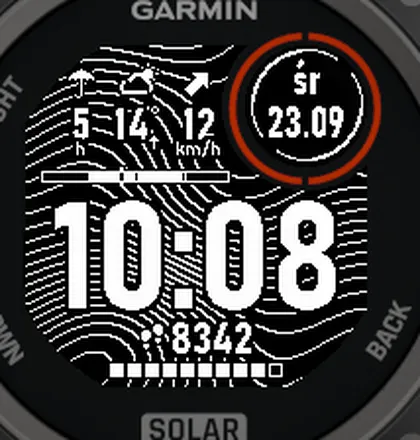
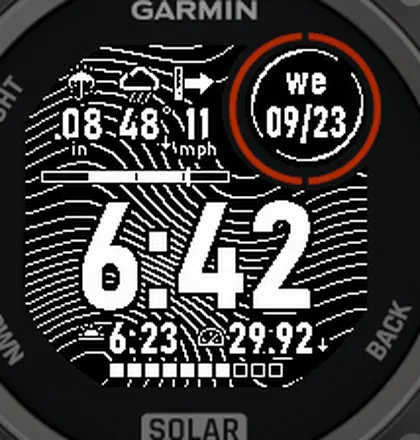
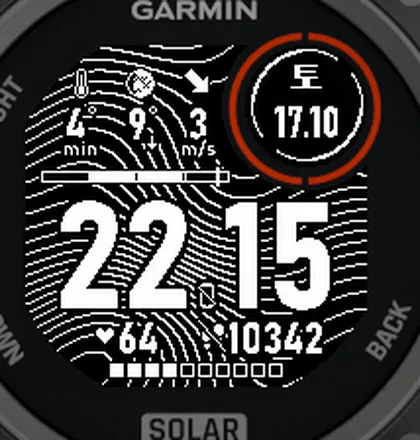
• a big clock (24- or 12-hour, as set on your watch),
• weather in three fields of your choice: icon and temperature (at night the moon in its current phase), wind with an arrow and a strength gauge, chance of rain with an umbrella, hours or days until rain (while it rains: how much, with Open-Meteo), today's high/low, UV index (with a rough sunscreen hint: 30+ or 50+), humidity – or Automatic: rain soon, otherwise UV when it matters, otherwise high/low,
• a daylight bar with the current time, so you can see how long until sunset,
• day of the week and date in the subscreen,
• one or two fields at the bottom (steps, heart rate, Body Battery, pressure and more) and a 10-segment bar: battery or progress towards a goal,
• a phone-disconnected sign in the colon of the clock,
• notifications: an envelope with their number or dots by the day of the week (optional).
In the settings (Connect IQ app on your phone) you can choose, among others, the weather fields, the weather source (Garmin or the free Open-Meteo), the wind unit, the bottom fields and bar, and the date format. The face works in 11 languages, depending on the watch language.
On Instinct 3 and Instinct E you can set all three weather fields in any order. Older watches (Instinct 2, 2X, Descent G1) don't have enough memory for that, so there you choose the first field, weather and wind stay in the other two, and the UV index comes only from Open-Meteo.
Permissions:
• Location – sunrise and sunset, the moon and the Open-Meteo forecast; GPS is never turned on.
• Background and Communications – only to download the Open-Meteo forecast through your phone.
• Sensor history – only for Body Battery.
With Open-Meteo, your coordinates rounded to about 1 km are sent to api.open-meteo.com. I don't collect any data.
I don't add settings just in case: each one takes up space and has to be translated into 11 languages. Want a new setting or another language? Write to me via “Contact Developer” on this page.
The face is free and will stay free – that's my rule. But if you like it, a 5-star rating will really make my day.
The first version was inspired by a watch face photo from r/Garmininstinct.
Neuerungen
3.1
• New weather field “Automatic” – the default for the first field: hours until rain when it's due within 12 h; otherwise the UV index when it's 3 or more; otherwise today's high/low.
• New default layout: automatic, weather, wind. On Instinct 2/2X and Descent G1 you now choose the first field (weather and wind in the others).
• “Rain in…” while it rains: with Open-Meteo the amount (mm or inches per hour), with Garmin weather “0 h” (instead of a percentage).
• A rough sunscreen hint under the UV index: “30+” from UV 3, “50+” from UV 6 (not medical advice).
• Fixes: “Rain in…” no longer crashes the face on Instinct 2/2X and Descent G1 (out of memory), the face uses less memory, Open-Meteo works without Garmin weather too, thinner outline on small captions.
• Name on the watch: Zonda.
3.0
• Weather fields of your choice (rain in…, high/low, UV, humidity), more data from Open-Meteo.
2.7
• Notifications in the subscreen and bottom fields, wind gauge hidden in light wind.
2.6
• Two bottom fields, new field values, goal bar, Korean and Russian, phone in the colon, exclamation mark in strong wind.
2.5
• Wind strength gauge behind the arrow.
2.4
• Moon at night, new languages, fixed day names.
2.3
• Choice of bottom field and wind unit, feels-like temperature, date format, phone-disconnected sign.
2.2
• Settings in the Connect IQ app, weather from Open-Meteo.
2.1
• New weather icons and background, faster drawing.
2.0
• Several times faster, daylight bar, English version, new watches.
1.x
• First version, step icon.
Screenshots