Leírás
Strength Timer turns your Forerunner 55 into a proper gym companion. The FR55 has no built-in Strength profile, so this app fills the gap: one screen, one button, and your workout saves to Garmin Connect as a Strength Training activity.
WHAT YOU SEE
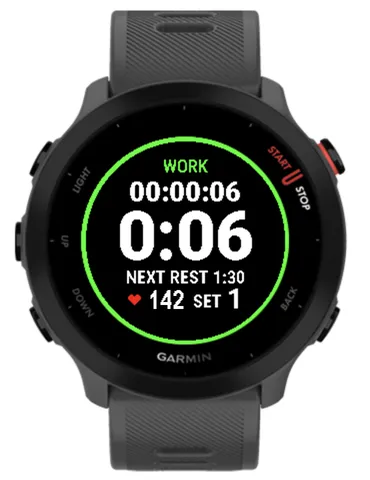
- Total workout time (pauses not counted)
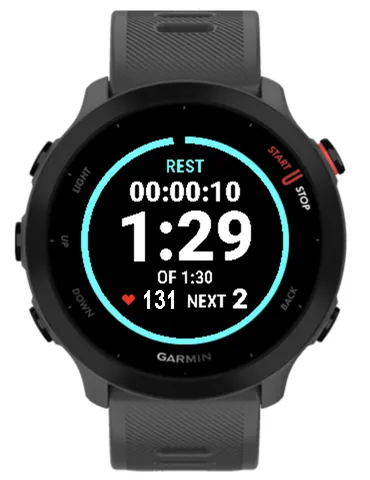
- Set timer (counts up) or rest timer (counts down)
- Live heart rate
- Current set number
HOW IT WORKS
1. Press START to begin. Heart rate is already warm on the Ready screen.
2. Finish a set, press BACK/LAP. Rest starts.
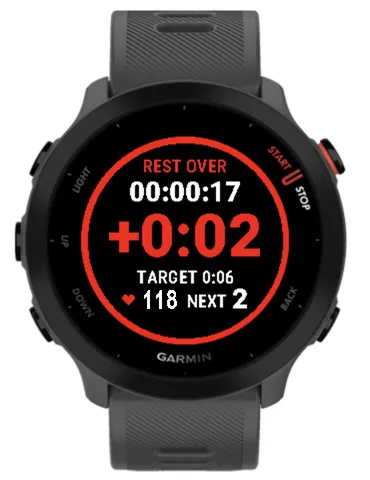
3. Rest runs out, watch vibrates. Overtime counts up as +0:00 so you know how long you really rested.
4. Press BACK/LAP, or shake your wrist, to start the next set.
Rest never auto-starts the next set, so your set times stay accurate.
QUICK REST CONTROL
- Ready/Work: UP/DOWN picks the rest preset (0:30, 1:00, 1:30, 2:00, 3:00, 4:00, 5:00). Your choice is remembered.
- During rest: UP/DOWN adds or removes 15 seconds, no menu needed.
SHAKE TO START
When rest is over, shake your wrist to begin the next set. Hands full of chalk or a barbell? No button needed.
PAUSE, SAVE, SUMMARY
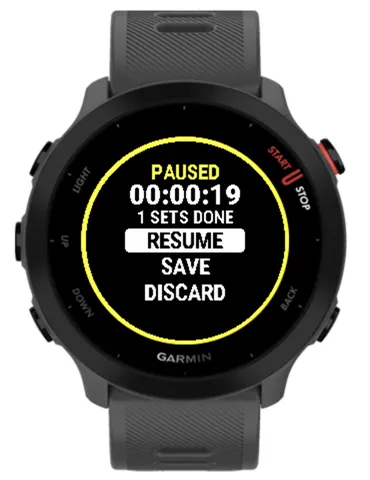
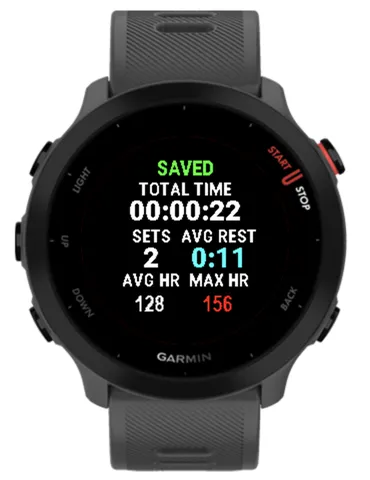
Press START to pause. Resume, save, or discard (discard always asks to confirm). After saving you get a summary: total time, sets, average rest, average and max heart rate.
GARMIN CONNECT
Each set and each rest is recorded as a lap. Activity type is Strength Training. No GPS, so battery use stays low.
DESIGNED FOR FR55
Big numbers, color-coded phases (green work, blue rest, red overtime, yellow paused), plus text labels so it reads without color. Always-on friendly.
NOT INCLUDED (yet)
Reps, weights, exercise names, and the native Garmin Connect set table. Sets are stored as laps.
PERMISSIONS
- Sensor: read heart rate and wrist motion (shake)
- FIT: save the activity to Garmin Connect
No data leaves your watch except the activity you save.
Újdonságok
v1.3.0
- Buzz during the end of rest: the watch gives a medium buzz on each of the last 5 seconds of rest, so you know the next set is coming without looking.
- Easier install (for developers): the install script now copies the app straight to a watch connected over USB.
- Plan workouts on your phone: you can define workouts in the app settings in Garmin Connect, and the watch reads them from there. If a setting has bad values, the watch ignores them instead of crashing.
- Workout picker: choose a saved plan on the watch before you start. If a plan can't be read, the watch shows an error screen.
- Plan mode: the watch takes you through each step of the plan in order. It shows plan labels on the ready and workout screens.
- Timed sets: time-based sets show a countdown ring on screen.
- Skip and finish: the pause menu can skip to the next step. After the last set, a complete menu lets you save the workout.
- Fixes:
- Long exercise names are cut to fit the screen width.
- "REC FAILED" is now shown on the plan READY screen.
- Laps are no longer recorded twice or in the wrong place when you skip or finish a workout.
- Long plan lists no longer trip the watch's time limit (watchdog).
Képernyőképek
Támogatott nyelv (1)
Kompatibilis eszközök (3)
Legutóbbi metrikatrend
Értékelés
Vélemények
Pillanatkép-dátumok
2026-10-27 → 2026-10-30