Leírás
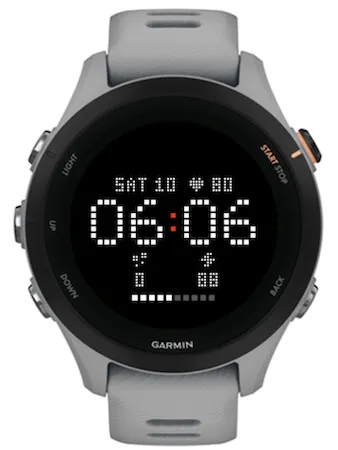
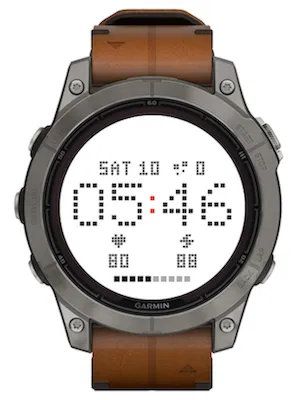
Pix is a minimalist dot-matrix watch face for round MIP Garmin watches. Every digit, letter and icon is drawn from square dots on a single grid, so the whole screen looks like one LED matrix. The face is black and white, with one accent colour that you choose.
DAY MODE
- Large HH:MM time in the centre, with the colon in your accent colour
- 12 or 24 hour format follows your watch settings
- Weekday and date above the time (for example SAT 10)
- Three slots for your metrics: one next to the date, two below the time
- Battery shown as a bar of 10 squares at the bottom
- No seconds, so the screen redraws only once a minute and saves battery
SLOT METRICS
Each slot can show any of these:
- Steps
- Heart rate
- Body Battery
- Sunrise / sunset (shows the next event: sunrise before dawn, sunset during the day)
- Notifications
- Floors climbed
- Calories
- Empty
Defaults: heart rate next to the date, steps and Body Battery below the time.
If a value is not available yet (for example no heart rate reading or no location for sunrise), the slot shows -- instead.
NIGHT MODE
At night Pix hides the time and all data and shows a still dot-matrix crescent moon with a single accent star. While the moon is shown, the watch face does not read heart rate, steps or any other sensor, so it does almost no work overnight.
Glance at your watch at night and only the time appears, in dim grey on black so it does not dazzle you in the dark. When the glance ends, the moon returns.
Night mode is always dark, even if you use the light theme during the day.
Night mode can follow:
- Sleep + Do Not Disturb (default): your Garmin sleep schedule or Do Not Disturb, whichever is on
- Sleep only: the bedtime and wake time from your Garmin user profile (overnight windows such as 23:00 to 07:00 are supported)
- Do Not Disturb only: handy for naps, cinema or flights
- Off: always day mode
CUSTOMISATION
- Theme: Light (black on white, best in sunlight, default) or Dark (white on black)
- Accent: Red (default), Orange, Amber, Green, Cyan, Blue or Purple
- Any metric in any of the three slots
- Night mode source
Every combination stays readable. Changes apply right away, no restart needed.
HOW TO CHANGE SETTINGS
Open the Garmin Connect app on your phone, go to your watch, then Watch Faces (or Connect IQ apps), select Pix and tap Settings.
SUPPORTED WATCHES
fenix 7, 7S, 7X, 7 Pro, 7S Pro, 7X Pro (Solar and non-Wi-Fi versions), fenix 8 Solar 47mm and 51mm, fenix 9 Pro Solar 47mm and 51mm, Forerunner 255, 255S, 255 Music, 255S Music, Forerunner 955, Enduro 3.
The layout is tuned for 218, 240, 260 and 280 pixel round screens, so nothing is cut off at the edge.
PERMISSIONS
- Location: to calculate sunrise and sunset times
- Sensor history: to read Body Battery and heart rate history
- User profile: to read your sleep schedule for night mode
Feedback and ideas are welcome via the Contact Developer button.
Újdonságok
First release
Képernyőképek
Támogatott nyelv (1)
Kompatibilis eszközök (24)
Enduro™ 2
Enduro™ 3
fēnix® 7
fēnix® 7
fēnix® 7 Pro
fēnix® 7 Pro – Solar Edition (No Wi-Fi®)
fēnix® 7S
fēnix® 7S
fēnix® 7S Pro
fēnix® 7X
fēnix® 7X
fēnix® 7X Pro
fēnix® 7X Pro No Wi-Fi
fēnix® 8 Solar (47mm)
fēnix® 8 Solar (51mm)
fenix® 9 Pro - Solar 47 mm
fenix® 9 Pro - Solar 51 mm
Forerunner® 255
Forerunner® 255 Music
Forerunner® 255S
Forerunner® 255S Music
Forerunner® 955 Dual Power
tactix® 7
tactix® 8 – 51 mm, Solar