Description
SETUP REQUIRED — PLEASE READ BEFORE FIRST USE
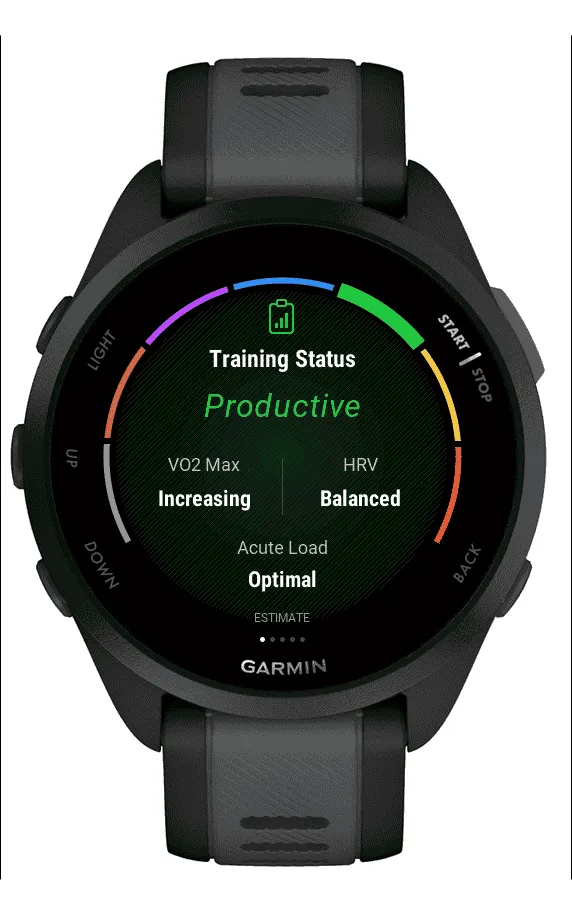
Training Status uses your training and wellness history to estimate your current training status. For cloud features, you need an Intervals.icu account and your own API key. No API key is included.
1. Prepare your data
• Sign in at https://intervals.icu and connect your data source in Settings.
• Check that your activities and wellness data are available there. Activities alone may not include HRV or VO2 Max history.
• Data availability depends on your connected service. This app cannot download information that is missing from your Intervals.icu account.
2. Get your personal API key
Open Intervals.icu → Settings → Developer Settings and generate or copy your API key. See the official API key guide.
Use your Intervals.icu API key, not your Garmin password. Never post your key in a review or support message.
3. Configure Training Status
On your phone, open the Connect IQ app, select Training Status and open its Settings.
• Intervals.icu athlete ID: leave this set to 0 to use the account belonging to your API key.
• Intervals.icu API key: paste your personal key.
• Save the settings and allow them to sync to your watch.
4. Run the first sync
Make sure your watch is connected to your phone, your phone has internet access and Garmin Connect can communicate with your watch.
Open Training Status on the watch. Press START, or tap the screen on supported touchscreen models, and select Sync now.
Check the Intervals.icu Sync page. “Synced” and a recent “Last download” confirm that a download completed. They do not necessarily mean that every metric has enough history.
WHEN WILL MY TRAINING STATUS APPEAR?
If sufficient history is already available, the app can calculate your status after the first successful sync. You do not need to wait a fixed number of days after installation.
• VO2 Max trend: requires at least two distinct measurement days in each of two consecutive seven-day periods, spanning at least seven days overall. The latest measurement must be no older than seven days. A current VO2 Max value alone is not enough to calculate a trend.
• HRV status: requires at least three days of HRV in the recent seven-day period and fourteen days in the preceding twenty-one-day baseline period.
• Acute Load: uses the available ATL/CTL training-load ratio.
TROUBLESHOOTING
• “Trend pending” / “No Data”: there is not enough recent VO2 Max history to calculate a trend. Check your imported history; repeatedly syncing cannot create missing measurements.
• HRV value without a status: more history may be needed to build your personal baseline.
• “Check key / access”: check your Intervals.icu API key and athlete ID, save the settings and sync again.
• “Connection unavailable” / phone or network error: check internet access and the watch’s connection to Garmin Connect, then retry.
• “No wellness data”: check that wellness records are available in Intervals.icu, not only activities.
Automatic sync runs when connectivity and watch scheduling allow. If data looks outdated, select Sync now.
ABOUT THE RESULTS
This app provides an independent estimate, not Garmin’s native Training Status or Firstbeat algorithm. Training status is based on VO2 Max trend and load balance. HRV is displayed separately and its classification is estimated from your imported history.
NEED HELP?
Use Contact Developer on the store listing. Include your watch model, app version, the exact sync message and a screenshot if possible. Never include your API key.
Nouveautés
Training Status now supports Czech, German and French alongside English and Spanish. The glance, readiness score, factor details, sync messages and settings follow your language selection.
Captures d'écran
Langue prise en charge (1)
Appareils compatibles (109)
Approach® S50
Approach® S70 (42mm)
Approach® S70 (47mm)
Captain Marvel
Captain Marvel
D2™ Air X10
D2™ Air X15
D2™ Mach 1
D2™ Mach 1 Pro
D2™ Mach 2
D2™ Mach 2 Pro
Darth Vader™
Darth Vader™
Descent™ G2
Descent™ MK3 - 43mm
Descent™ MK3i - 51mm
Enduro™ 2
Enduro™ 3
epix™ (Gen 2)
epix™ (Gen 2)
epix™ Pro (42mm)
epix™ Pro (47mm)
epix™ Pro (51mm)
fēnix® 7
fēnix® 7
fēnix® 7 Pro
fēnix® 7 Pro – Solar Edition (No Wi-Fi®)
fēnix® 7S
fēnix® 7S
fēnix® 7S Pro
fēnix® 7X
fēnix® 7X
fēnix® 7X Pro
fēnix® 7X Pro No Wi-Fi
fēnix® 8 AMOLED (43mm)
fēnix® 8 AMOLED (47mm/51mm)
fēnix® 8 Pro
fēnix® 8 Solar (47mm)
fēnix® 8 Solar (51mm)
fēnix® E
First Avenger
First Avenger
ForeAthlete 245 Music
ForeAthlete 745
Forerunner® 165
Forerunner® 165 Music
Forerunner® 170
Forerunner® 170 Music
Forerunner® 245 Music
Forerunner® 245 Music
Forerunner® 255
Forerunner® 255 Music
Forerunner® 255S
Forerunner® 255S Music
Forerunner® 265
Forerunner® 265S
Forerunner® 570 - 42mm
Forerunner® 570 - 47mm
Forerunner® 70
Forerunner® 70
Forerunner® 745
Forerunner® 945
Forerunner® 945
Forerunner® 945 LTE
Forerunner® 955 Dual Power
Forerunner® 965
Forerunner® 970
Instinct® 3 – 45 mm, AMOLED
Instinct® 3 – 50 mm, AMOLED
Instinct® Crossover AMOLED
MARQ® (Gen 2)
MARQ® Commander (Gen 2) – Carbon Edition
MARQ™ Aviator (Gen 2)
Mercedes-Benz Venu®
Mercedes-Benz Venu® 2
Mercedes-Benz Venu® 2
Mercedes-Benz Venu® 2S
Mercedes-Benz Venu® 2S
Rey™
Rey™
tactix® 7
tactix® 7 – AMOLED Edition
tactix® 8 – 47 mm, AMOLED
tactix® 8 – 51 mm, Solar
Venu®
Venu®
Venu® 2
Venu® 2
Venu® 2 Plus
Venu® 2 Plus
Venu® 2S
Venu® 2S
Venu® 3
Venu® 3S
Venu® 4 – 41 mm
Venu® 4 – 45 mm
Venu® Sq. 2
Venu® Sq. 2 Music
Venu® Sq. Music
Venu® Sq. Music
Venu® Sq. Music
Venu® Sq. Music
Venu® X1
vívoactive® 4
vívoactive® 4
vívoactive® 4S
vívoactive® 4S
vívoactive® 5
vívoactive® 6
Tendance récente
Note
Avis
Dates des instantanés
2026-11-13 → 2026-11-30