Popis
- - - - - - - - - - - - - - -
ONE GOAL. ONE LAP.

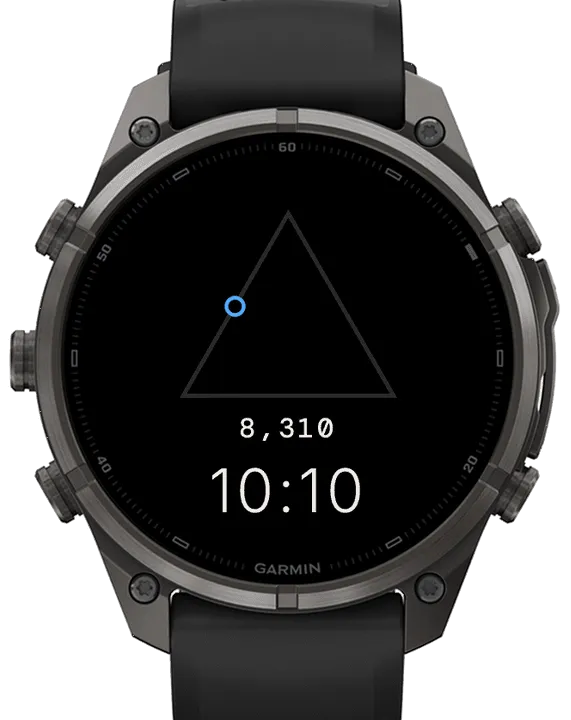
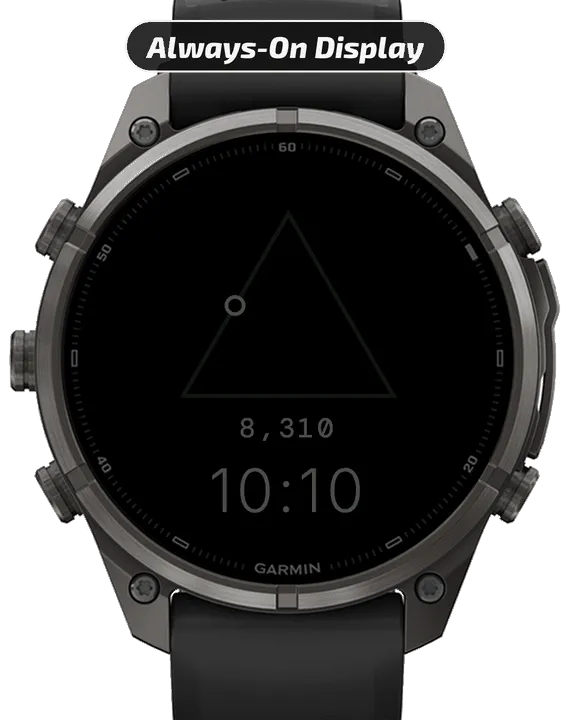
Some days feel a little empty until you've done the one thing you set out to do. Traveler keeps that one thing in view: a small traveler walks the sides of a triangle as you get closer to your goal, hollow the whole way, until the goal is met and it becomes fulfilled.
Free for 24 hours, then $1.99+. Details below.
- - - - - - - - - - - - - - -
THE TRAVELER
- One goal, one traveler: it sets out from the top of the triangle and walks clockwise, round each corner, as the goal fills
- The value sits under the triangle, written out in full, with the time below it
- Pick the goal from ten: Steps, Floors, Floors Down, Intensity Minutes, Pushes, Push Distance, Move Bar, Weekly Running, Weekly Cycling and a Countdown
- Floors Down, Push Distance, Weekly Running, Weekly Cycling and a Countdown walk toward a value you set; the rest use the goals already on your watch
- Move Bar can fill either way: normal, or inverted so it is full when you have kept moving
- The traveler metric defaults to Steps
- - - - - - - - - - - - - - -
COLOR
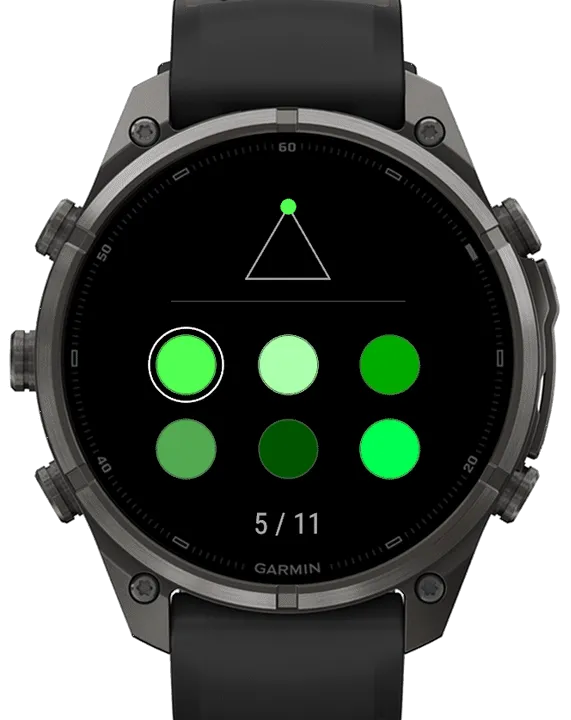
- Pick the traveler's color from 63 on the watch; the rest of the watch face stays black, white and gray
- - - - - - - - - - - - - - -
TOUCH AND HOLD / LONG-PRESS
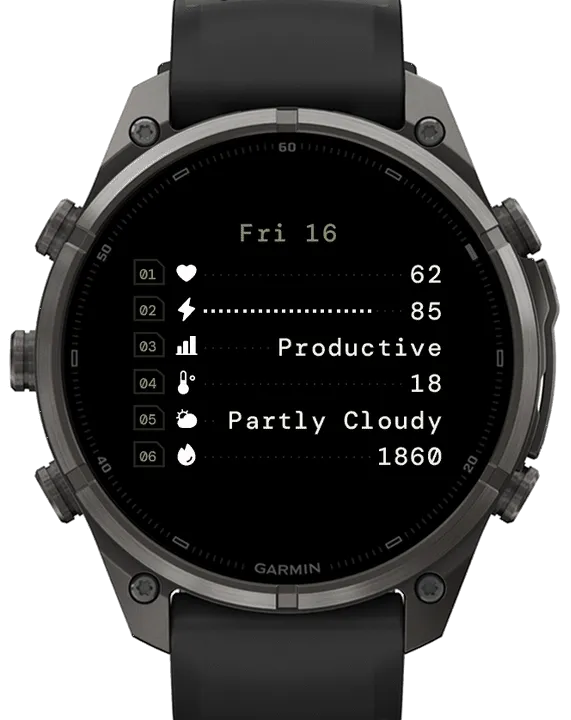
- Touch and hold the watch face to see six more metrics, each with its icon, for as long as you choose: 5, 8 or 10 seconds
- Pick each of the six from 56: Heart Rate, Body Battery, Training Status, the Weather, Calories and more
- The date sits at the top, with options to show the month or not, and put the day or the month first
- - - - - - - - - - - - - - -
ALWAYS-ON DISPLAY
- On AMOLED watches the whole watch face stays with your wrist down, dimmed, shifting slightly each minute to protect the screen
- - - - - - - - - - - - - - -
MORE DETAILS
- Set everything on the watch, or in the Connect IQ app on your phone; the traveler's color is set on the watch
- A countdown's dates are set on the watch; the phone can pick the countdown metric but cannot set its dates
- Weekly Running and Weekly Cycling are Garmin's own weekly totals, counted from the first day of the week set on your watch
- Push Distance and Pushes need a watch with wheelchair mode
- Animations play in the moments after you raise your wrist, as Garmin allows
- If you see "--", it means Garmin has no current data for that metric
- Each metric's Status line, in the Connect IQ app Settings, says what the watch face is showing, or when a metric is not available on your watch
- - - - - - - - - - - - - - -
24-HOUR FREE TRIAL, THEN $1.99+
When the trial ends, scan the QR code on your watch, pay through Ko-fi and follow the steps. Keep your watch connected to your phone so it can check for your purchase. Once confirmed, it unlocks within 5 minutes.
- - - - - - - - - - - - - - -
QUESTIONS OR IDEAS?
Use the Contact Developer button on this page to Email Me. If something isn't quite right, reach out before you leave a review. Feedback like yours is what makes each update better!
Design-wise, Traveler is happy being exactly what it is, a simple idea, kept simple on purpose. There are no plans for new colors or extra features. As new watch models are released by Garmin, Traveler will be maintained to work on those too. Any bugs that turn up will be fixed as well.
- - - - - - - - - - - - - - -
HELLO WORLD.
Thank you for being here. I make watch faces for everyday wear, mostly ones I couldn't find in the store. If one has been worth more to you than what you paid, a donation toward a post-run recovery meal is a lovely way to say so :)
https://ko-fi.com/watchlab
- - - - - - - - - - - - - - -
TAGS
minimal, triangle, geometric, goals, progress, journey, traveler, simple, clean, digital
- - - - - - - - - - - - - - -
Snímky obrazovky
Podporovaný jazyk (1)
Kompatibilních zařízení (66)
Approach® S72 - 43 mm
Approach® S72 - 47 mm
D2™ Air X15
D2™ Mach 1
D2™ Mach 1 Pro
D2™ Mach 2
D2™ Mach 2 Pro
Enduro™ 2
Enduro™ 3
Enduro™ 4
epix™ (Gen 2)
epix™ (Gen 2)
epix™ Pro (42mm)
epix™ Pro (47mm)
epix™ Pro (51mm)
fēnix® 7
fēnix® 7
fēnix® 7 Pro
fēnix® 7 Pro – Solar Edition (No Wi-Fi®)
fēnix® 7S
fēnix® 7S
fēnix® 7S Pro
fēnix® 7X
fēnix® 7X
fēnix® 7X Pro
fēnix® 7X Pro No Wi-Fi
fēnix® 8 AMOLED (43mm)
fēnix® 8 AMOLED (47mm/51mm)
fēnix® 8 Pro
fēnix® 8 Solar (47mm)
fēnix® 8 Solar (51mm)
fenix® 9 - 43 mm
fenix® 9 – 47 mm
fenix® 9 Pro - 43 mm
fenix® 9 Pro - 47 mm
fenix® 9 Pro - 51 mm
fenix® 9 Pro - Solar 47 mm
fenix® 9 Pro - Solar 51 mm
fēnix® E
Forerunner® 165
Forerunner® 165 Music
Forerunner® 170
Forerunner® 170 Music
Forerunner® 265
Forerunner® 265S
Forerunner® 570 - 42mm
Forerunner® 570 - 47mm
Forerunner® 70
Forerunner® 70
Forerunner® 955 Dual Power
Forerunner® 965
Forerunner® 970
MARQ® (Gen 2)
MARQ® Commander (Gen 2) – Carbon Edition
MARQ™ Aviator (Gen 2)
tactix® 7
tactix® 7 – AMOLED Edition
tactix® 8 – 47 mm, AMOLED
tactix® 8 – 51 mm, Solar
Venu® 3
Venu® 3S
Venu® 4 – 41 mm
Venu® 4 – 45 mm
Venu® X1
vívoactive® 5
vívoactive® 6