รายละเอียด
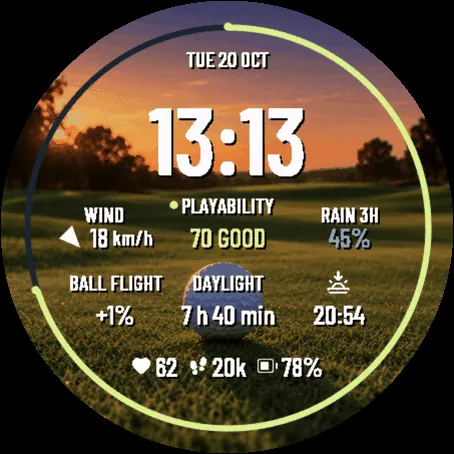
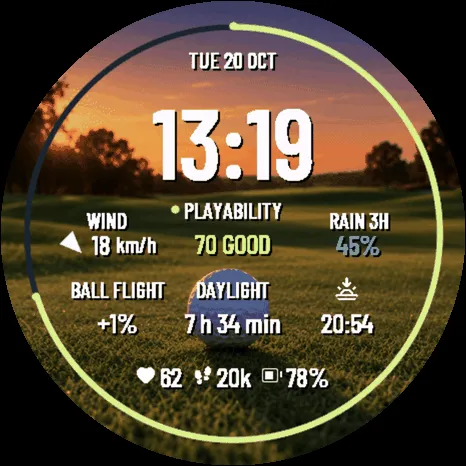
Golf Caddie Golden Hour answers the question you ask before you play — how will the
course be today — set on a course at golden hour: the sun dropping behind the trees,
long shadows across the fairway and the flag against an orange sky.
It is made for the after-work round. The face counts down the daylight left to the
minute and shows the sunset time beside it, both worked out on the watch for where
you are: one glance and you know whether nine holes still fit. Set "Outer ring" to
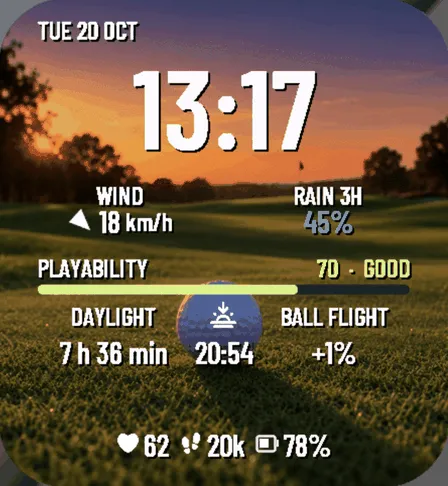
"Daylight left" in Settings and the ring — the bar, on rectangular watches — empties
as the evening goes.
It is Golf Caddie with a new scene. Every reading and every setting is the same, so
if you already own Golf Caddie, this one only adds the view:
https://apps.garmin.com/apps/94b3584f-3a38-4d5d-92a5-fc91eaeb7296
AT A GLANCE
• Wind speed and a direction arrow that points where the wind is BLOWING TO — the
way a golfer needs it, not the way a forecast draws it
• Rain probability for the next three hours, the length of half a round
• Playable daylight left, counted down to the minute: do nine more holes fit?
• Sunset time beside it — the two numbers that decide the last tee of the day
• Playability index 0-100 combining wind, rain, temperature and light, with a
colour you can read without stopping
• Ball flight adjustment from air density: hot or thin air means extra carry.
Course altitude and temperature both count, on every supported watch
• Heart rate, steps and watch battery
IS TODAY A GOLF DAY?
That is the question the playability index answers, and it is why this face exists.
One number from 0 to 100 folds wind, rain, temperature and remaining daylight into a
single reading, with a colour you take in without stopping. A glance at your wrist and
you know whether to book eighteen, squeeze nine in after work, or give the course a
miss and spend an hour at the driving range.
The rest of the face is there to back that number up: the wind you will be playing
into, how likely the rain is over the next three hours, how much light is left before
the last tee, and how much further the ball will carry in today's air.
Weather comes from Garmin Connect, so the watch needs to have synced with your phone
recently. When the reading gets old the face dims it and marks it with a "~" instead
of pretending it is fresh.
ONE FACE, MEASURED FOR YOUR WATCH
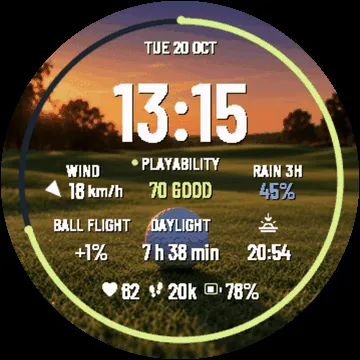
Every supported watch shows the same eleven readings. Nothing is cut because your
model is smaller: what changes is only how much room each one gets. The face measures
its own screen and lays out the rows from the real height of its own type, so a 360 px
watch reads as cleanly as a 454 px one. Round watches carry the playability ring;
rectangular ones turn it into a bar. The ring shows playability by default, or
daylight left if you prefer, from Settings.
NOTHING LEAVES YOUR WATCH
No network permissions, no background service, no account. It cannot send your data
anywhere because it cannot talk to anything.
Rather keep the watch face you already use? Golf Weather, by the same maker, brings
wind, rain and daylight to your watch's glance list, with the same sunset and ball
flight calculation:
https://apps.garmin.com/apps/5b073308-47ba-4188-bada-62d556890563
The same face, with the same readings and settings, also comes with another scene.
Golf Caddie Links, on a links by the sea:
https://apps.garmin.com/apps/59d19168-5a23-47b4-acbe-a68100665a4a
Golf Caddie Alpine, on a high mountain course:
https://apps.garmin.com/apps/e3961b8d-76d1-4130-b981-621234f6a79e
Heart rate icon: Solar Icon Set by 480 Design - CC BY 4.0
(https://creativecommons.org/licenses/by/4.0/), recoloured, filled and rasterised.
Steps icon: Ionicons by Ionic - MIT.
Typeface: Barlow Condensed by Jeremy Tribby - SIL Open Font License 1.1.
บันทึกการอัปเดต
First release: Golf Caddie on a course at golden hour. Same readings and settings as Golf Caddie 1.2.1.
ภาพหน้าจอ
ภาษาที่รองรับ (9)
อุปกรณ์ที่รองรับ (66)
Approach® S50
Approach® S70 (42mm)
Approach® S70 (47mm)
Approach® S72 - 43 mm
Approach® S72 - 47 mm
D2™ Air X10
D2™ Air X15
D2™ Mach 1
D2™ Mach 1 Pro
D2™ Mach 2
D2™ Mach 2 Pro
Descent™ G2
Descent™ MK3 - 43mm
Descent™ MK3i - 51mm
epix™ (Gen 2)
epix™ (Gen 2)
epix™ Pro (42mm)
epix™ Pro (47mm)
epix™ Pro (51mm)
fēnix® 8 AMOLED (43mm)
fēnix® 8 AMOLED (47mm/51mm)
fēnix® 8 Pro
fenix® 9 - 43 mm
fenix® 9 – 47 mm
fenix® 9 Pro - 43 mm
fenix® 9 Pro - 47 mm
fenix® 9 Pro - 51 mm
fēnix® E
Forerunner® 165
Forerunner® 165 Music
Forerunner® 170
Forerunner® 170 Music
Forerunner® 265
Forerunner® 265S
Forerunner® 570 - 42mm
Forerunner® 570 - 47mm
Forerunner® 70
Forerunner® 70
Forerunner® 965
Forerunner® 970
Instinct® 3 – 45 mm, AMOLED
Instinct® 3 – 50 mm, AMOLED
MARQ® (Gen 2)
MARQ® Commander (Gen 2) – Carbon Edition
MARQ™ Aviator (Gen 2)
Mercedes-Benz Venu® 2
Mercedes-Benz Venu® 2
Mercedes-Benz Venu® 2S
Mercedes-Benz Venu® 2S
tactix® 7 – AMOLED Edition
tactix® 8 – 47 mm, AMOLED
Venu® 2
Venu® 2
Venu® 2 Plus
Venu® 2 Plus
Venu® 2S
Venu® 2S
Venu® 3
Venu® 3S
Venu® 4 – 41 mm
Venu® 4 – 45 mm
Venu® Sq. 2
Venu® Sq. 2 Music
Venu® X1
vívoactive® 5
vívoactive® 6