รายละเอียด
Garmin Edge computers are cycling machines first. They will not give you a clean way to capture paddling technique for later coaching review — and a full FIT session is not always what you want for a short technique block.
Paddle Stroke Sensor is the capture tool: a focused 60-second sample on a Garmin Edge or watch, uploaded to Paddle Stroke Lab for stroke shape, effort and side-balance analysis off the water.
It is not a second daily paddling computer. Paddle Stroke Power remains the training app and Garmin Connect activity. Sensor is for deliberate Lab takes — coaching, comparison and before/after checks — without turning every paddle into a Connect file.
WHY SENSOR EXISTS
Paddlers already own excellent Garmin hardware. Stock apps and activity types do not speak kayak, surfski, canoe or SUP technique. Sensor records the raw stroke story at 64 Hz and sends it to Lab, where the analysis mirrors Paddle Stroke Power — so the same language of rate, impulse, power, left/right, roll and shape follows you from the water to the desk.
Kayak, surfski, canoe and SUP. Coaches collecting comparable takes. Athletes checking shape between pieces.
EDGE
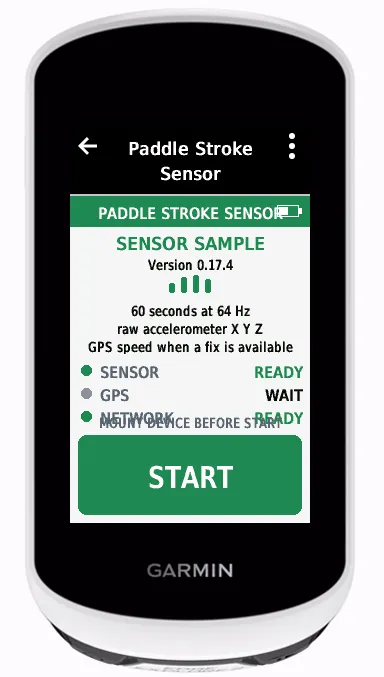
Mount face-up, top toward the bow — the way you would mount a phone on the boat. START and paddle. Raw accelerometer X, Y and Z at 64 Hz (~3840 samples per minute). Live GPS speed is copied onto those samples when available. After 60 seconds, review: upload to Lab, or reject and retry. Nothing posts until you choose UPLOAD.
UPLOAD SUCCESS shows a Lab QR to claim the device and open the sample. One tap returns to START. On failure: Try again or Discard. Edge takes are boat-mounted kayaking. Idle Menu opens Settings for Lab QR and claim details.
WATCH
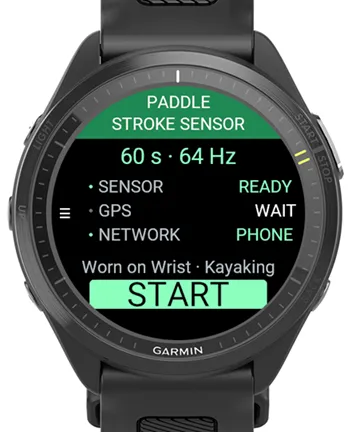
Settings before capture: Configuration (Mounted on boat or Worn on Wrist) and Activity Type (Kayaking, Canoeing or SUP). Wrong Configuration yields the wrong Lab analysis — check it when you change wrists or boats. START shows SENSOR, GPS, NETWORK and CLAIM. Recording shows live numbers; Settings → Lab link shows claim and last sample id as text on the round face.
COUNTDOWN
Settings → Countdown (default 5 s, range 0–15). Full-screen digit on Edge, watch and the phone recorder before capture starts — settle the mount, then go.
LAB
Stroke rate, impulse, power, left/right, roll, stroke shape, consistency and comparisons. Use Power on the water every day; use Sensor when you want a deliberate Lab take. Phone capture when no Garmin is in reach: https://spearers.com.au/pss/
Upload needs Wi-Fi or phone Bluetooth. Claim the device in Lab within 24 hours of recording a sample; unclaimed samples are deleted. Pre-claim uploads still attach to that device until then.
It does not write a FIT activity and does not upload to Garmin Connect. Not a medical device or calibrated power meter.
Built by The Spearers — a Brisbane paddling community. https://spearers.com.au/pss/
บันทึกการอัปเดต
1.4.2
• Product pin 1.4.2 aligned across Connect IQ and the phone companion (same AppVersion)
• Lab / phone assets use a single cache-bust pin (bump all together)
1.4.1
• Watch upload success opens the Lab link screen (UPLOADING SUCCESSFUL) with the Lab URL; tap returns to START
• Edge upload progress bar advances between chunks on the UPLOADING screen
1.4.0
• Thin watch takes keep Lab time honest: samples span the full 60 s and sample rate matches what was kept
• Columnar Lab uploads t/x/y/z[/v] plus paddlerKg/boatKg (schema 1.4)
1.3.8
• Watch Settings → Lab link shows the full Lab URL with claim and sample id in the query
1.3.7
• Edge countdown digit fills the screen
• Full-screen countdown digit on Edge, watch and phone before capture starts
• Settings → Countdown (default 5 s, range 0–15)
• Watch Settings → Lab link wraps the Lab URL on the round face
• Edge Settings → Lab QR after upload; idle Menu opens Settings on Edge
• Edge upload: UPLOADING → UPLOAD SUCCESS with Lab QR, or UPLOAD FAILED with Try again / Discard; success returns to START
• Larger CLAIM code on START
1.1.x
• Sample id is UTC time at START (YYYYMMDD-HHmmss)
• Production listing aligned with Paddle Stroke Power (55 Edge and watch products)
• Device labels use Connect IQ part numbers (edge:partNumber / watch:partNumber)
1.0.x
• Watch button and touch handling hardened, including hybrid-key START on FR965-class devices
ภาพหน้าจอ
ภาษาที่รองรับ (1)
อุปกรณ์ที่รองรับ (70)
D2™ Air X15
Descent™ MK3 - 43mm
Descent™ MK3i - 51mm
Edge® 1030
Edge® 1030
Edge® 1030 Plus
Edge® 1030 Plus
Edge® 1040
Edge® 1040
Edge® 1050
Edge® 530
Edge® 530
Edge® 540
Edge® 550
Edge® 830
Edge® 830
Edge® 840
Edge® 850
Edge® Explore 2
Edge® MTB
Enduro™ 2
Enduro™ 3
fēnix® 7
fēnix® 7
fēnix® 7 Pro
fēnix® 7 Pro – Solar Edition (No Wi-Fi®)
fēnix® 7S
fēnix® 7S
fēnix® 7S Pro
fēnix® 7X
fēnix® 7X
fēnix® 7X Pro
fēnix® 7X Pro No Wi-Fi
fēnix® 8 AMOLED (43mm)
fēnix® 8 AMOLED (47mm/51mm)
fēnix® 8 Pro
fēnix® 8 Solar (47mm)
fēnix® 8 Solar (51mm)
fenix® 9 - 43 mm
fenix® 9 – 47 mm
fenix® 9 Pro - 43 mm
fenix® 9 Pro - 47 mm
fenix® 9 Pro - 51 mm
fenix® 9 Pro - Solar 47 mm
fenix® 9 Pro - Solar 51 mm
ForeAthlete 745
Forerunner® 255
Forerunner® 255 Music
Forerunner® 255S
Forerunner® 255S Music
Forerunner® 265
Forerunner® 265S
Forerunner® 570 - 42mm
Forerunner® 570 - 47mm
Forerunner® 745
Forerunner® 945
Forerunner® 945
Forerunner® 945 LTE
Forerunner® 955 Dual Power
Forerunner® 965
Forerunner® 970
Instinct® 3 – 45 mm, AMOLED
Instinct® 3 – 50 mm, AMOLED
tactix® 7
tactix® 8 – 47 mm, AMOLED
tactix® 8 – 51 mm, Solar
Venu® 3
Venu® 3S
Venu® 4 – 41 mm
Venu® 4 – 45 mm
แนวโน้มตัวชี้วัดล่าสุด
คะแนน
รีวิว
วันที่ของสแนปช็อต
2026-10-27 → 2026-10-30