รายละเอียด
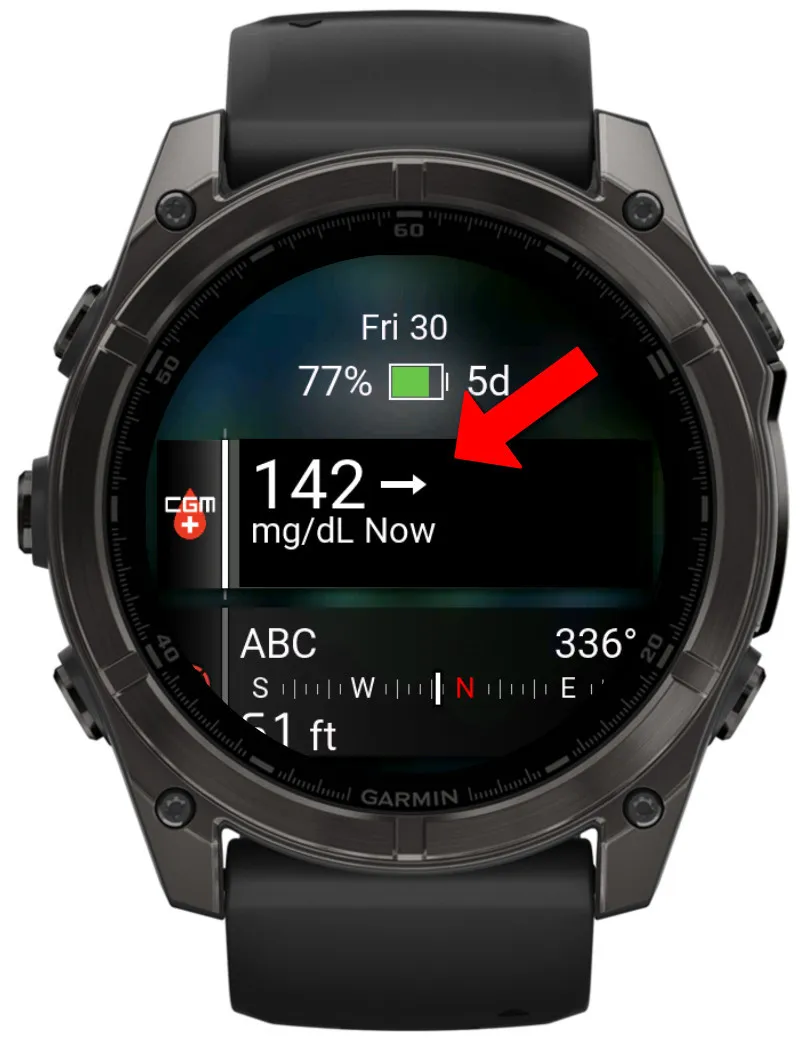
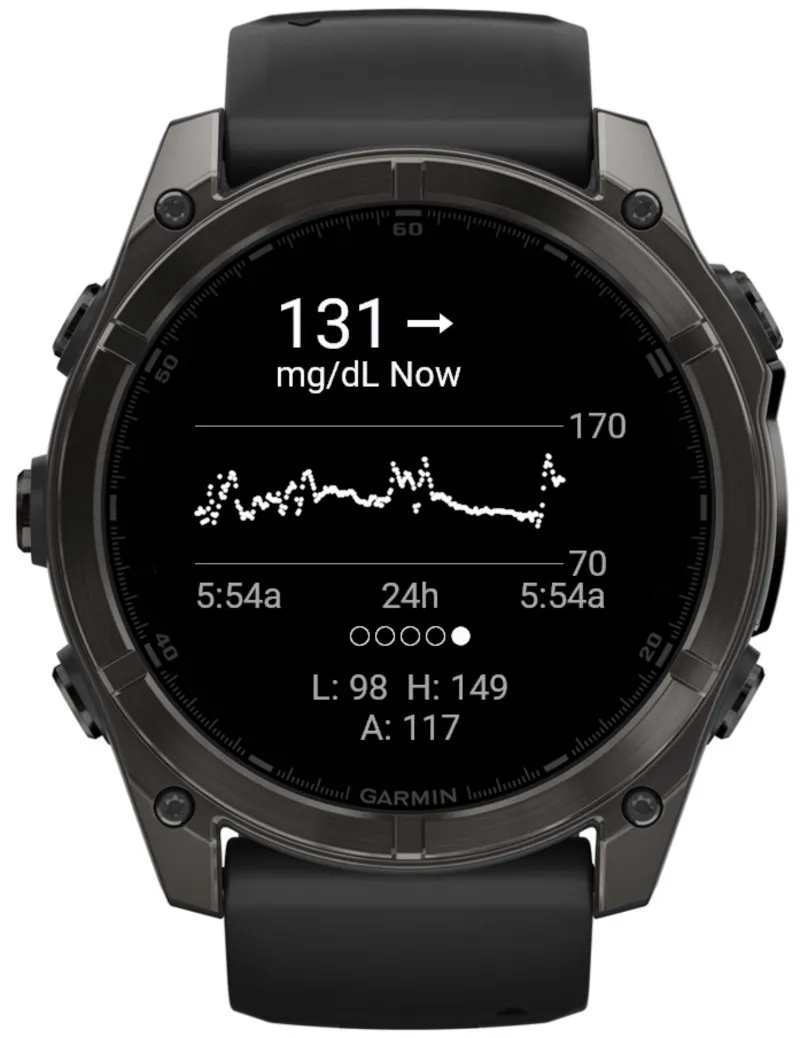
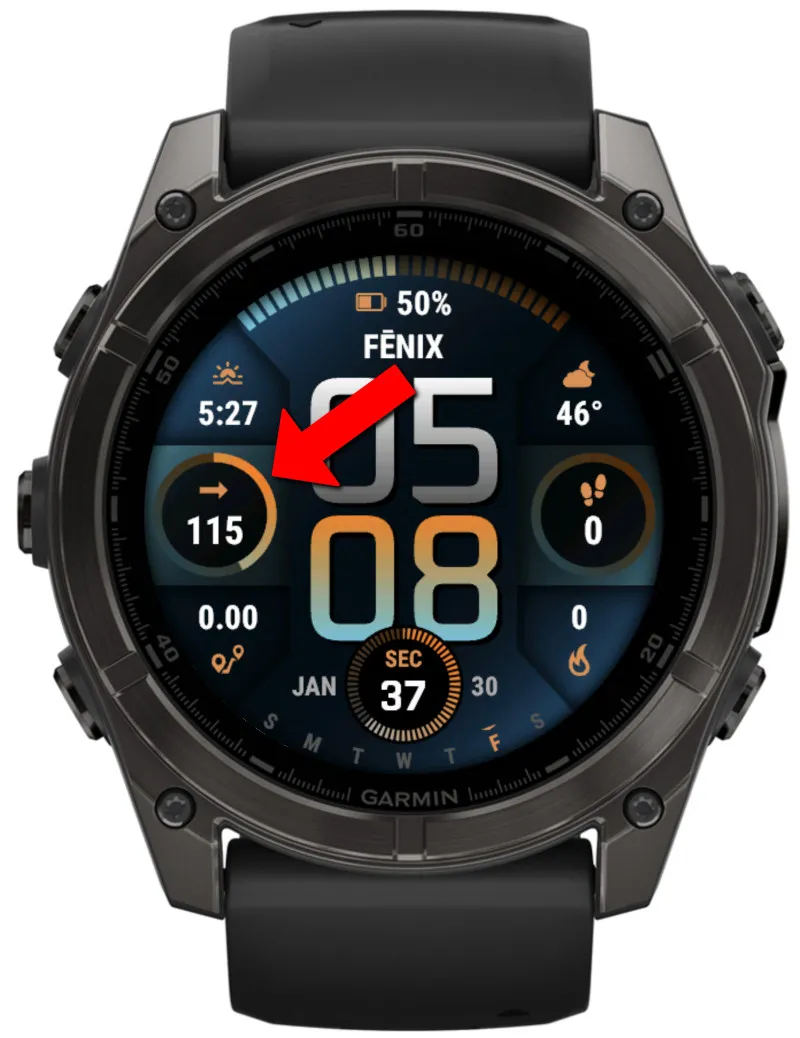
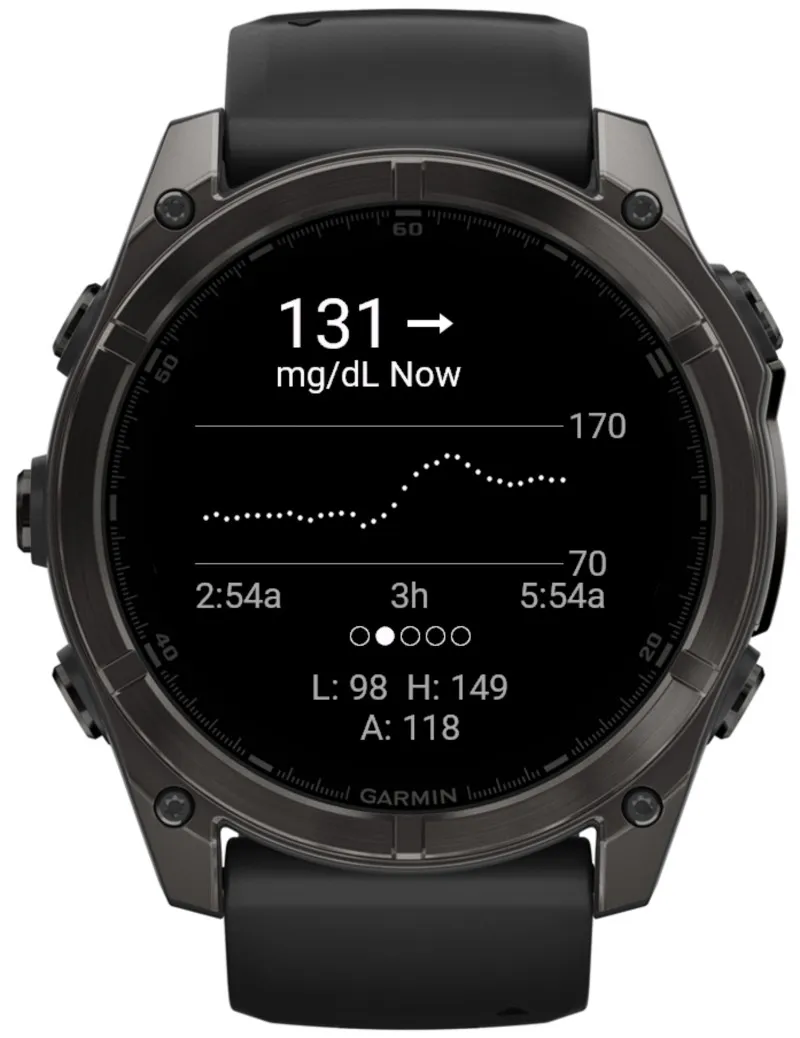
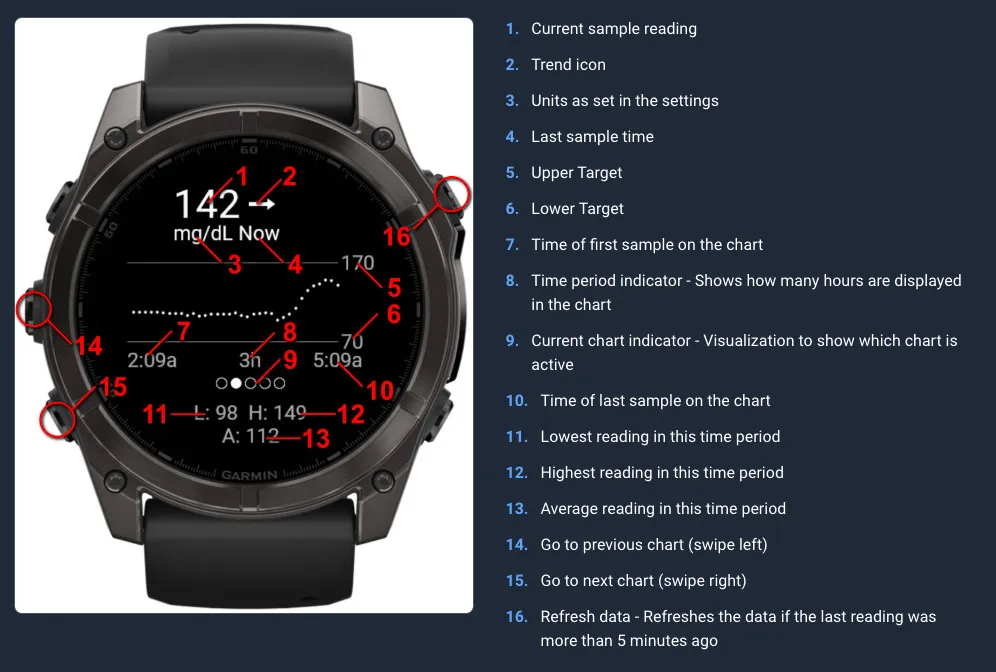
Display your Continuous Glucose Monitor (CGM) from Dexcom G6 or G7, Nightscout, Libre / LibreLinkup Abbott or xDrip+ in a glance/widget and on supported watchfaces.
⭐ IMPORTANT SETUP NOTE: Because this app connects to third-party services (Dexcom, Libre, etc.), it requires a few specific steps and takes about 10 minutes to set up. Please follow the installation links below for your specific CGM system to get it working!
⭐ INSTALLATION INSTRUCTIONS (Choose your system):
Dexcom: https://watchface.io/docs/cgm/dexcom-installation
Nightscout: https://watchface.io/docs/cgm/nightscout-installation
Libre: https://watchface.io/docs/cgm/libre-installation
xDrip+ / AAPS / Spike: https://watchface.io/docs/cgm/xdrip-installation
This app is made by a third party and is not associated with Dexcom or Abbott/Libre. Do not make medical desicions based on this app, or rely on the information shown by this app.
⭐ RESOURCES
How to install on a watchface: https://watchface.io/docs/cgm/display
FAQ: https://watchface.io/docs/cgm/faq
⭐ SEEING " ERROR: Missing Credentials "?
If you are seeing this error, the app has not been set up yet. Please follow the instructions above to set up the app. Sharing your data through Dexcom or LibreLinkup is required for this to work correctly.
⭐ Supported CGM systems:
- Dexcom G6
- Dexcom G7
- Dexcom ONE+
- Libre 1 / 2 / 3 (works best with Continuous monitoring, but manual scans are also supported)
- Nightscout
- xDrip
- AAPS
- Spike (ios only)
- Juggluco
⭐ Important Disclaimer
• NOT FOR MEDICAL DECISIONS: This app is for informational purposes only and should NOT be used to make medical decisions.
• Always verify readings: Confirm glucose values with your official Dexcom receiver or app before taking action.
• Emergency situations: In case of extreme glucose levels or medical emergencies, use your primary CGM device.
• Delayed data: Readings may be delayed by several minutes due to how often the app can sync.
• No liability: The developer assumes no responsibility for health outcomes related to the use of this app.
• Not affiliated: This app is not approved by, endorsed by, or affiliated with Dexcom, Abbott (Libre), or any other medical device company.
Info for developers who want to integrate this in their watchface or app:
https://watchface.io/docs/cgm/developer
บันทึกการอัปเดต
INSTALLATION INSTRUCTIONS (Choose your system):
Dexcom: https://watchface.io/docs/cgm/dexcom-installation
Nightscout: https://watchface.io/docs/cgm/nightscout-installation
Libre: https://watchface.io/docs/cgm/libre-installation
xDrip+ / AAPS / Spike: https://watchface.io/docs/cgm/xdrip-installation
FAQ: https://watchface.io/docs/cgm/faq
26.08.26
- Added support for all Fenix 9 devices
26.05.14
- Added support for FR70 and FR170
26.04.29
- Fixing some issues with Dexcom
26.04.23
- Fixed Instinct 3 Solar not sending data to watchface
26.04.14
- Optimisations for all systems
26.02.25
- Fixed issue with Libre for EU users. Thank you so much Jakob for you help!
26.02.19
- Fixed issue with Libre systems outside the US not being able to authenticate
26.02.08
- Added clear cache option in the menu
- Various small bugfixes
26.02.07
- Added 2 settings for max age of data. One to set data as stale (adding a "-" in front of the data on a watchface), and one to mark it as expired (will show -1 on watchface and will stripe out the value in the app itself)
- Added automatic conversion from mg/dL to mmol/l for the limits when user changes the unit, but not the targets
- Added more realistic looking test-data when using test mode
- Fixed an issue with Libre when data is stale causing out of memory issues
- Fixed new data not updating main app screen when the app is already open
- Fixed graph complication returning values in mg/dL only
- Added settings menu to show version
- Added Stale and expiration time to complications
- Optimized background process
26.02.02
- Better error handling
26.02.01
- Added xDrip+, AAPS, Juggluco and Spike support
ภาพหน้าจอ
ภาษาที่รองรับ (1)
อุปกรณ์ที่รองรับ (92)
Approach® S50
Approach® S70 (42mm)
Approach® S70 (47mm)
D2™ Air X10
D2™ Air X15
D2™ Mach 1
D2™ Mach 1 Pro
D2™ Mach 2
D2™ Mach 2 Pro
Descent™ G2
Descent™ MK3 - 43mm
Descent™ MK3i - 51mm
Enduro™ 2
Enduro™ 3
Enduro™ 4
epix™ (Gen 2)
epix™ (Gen 2)
epix™ Pro (42mm)
epix™ Pro (47mm)
epix™ Pro (51mm)
fēnix® 7
fēnix® 7
fēnix® 7 Pro
fēnix® 7 Pro – Solar Edition (No Wi-Fi®)
fēnix® 7S
fēnix® 7S
fēnix® 7S Pro
fēnix® 7X
fēnix® 7X
fēnix® 7X Pro
fēnix® 7X Pro No Wi-Fi
fēnix® 8 AMOLED (43mm)
fēnix® 8 AMOLED (47mm/51mm)
fēnix® 8 Pro
fēnix® 8 Solar (47mm)
fēnix® 8 Solar (51mm)
fenix® 9 - 43 mm
fenix® 9 – 47 mm
fenix® 9 Pro - 47 mm
fenix® 9 Pro - 51 mm
fenix® 9 Pro - Solar 47 mm
fenix® 9 Pro - Solar 51 mm
fēnix® E
Forerunner® 165
Forerunner® 165 Music
Forerunner® 170
Forerunner® 170 Music
Forerunner® 255
Forerunner® 255 Music
Forerunner® 255S
Forerunner® 255S Music
Forerunner® 265
Forerunner® 265S
Forerunner® 570 - 42mm
Forerunner® 570 - 47mm
Forerunner® 70
Forerunner® 70
Forerunner® 955 Dual Power
Forerunner® 965
Forerunner® 970
Instinct® 3 – 45 mm, AMOLED
Instinct® 3 – 45 mm, Solar
Instinct® 3 – 50 mm, AMOLED
Instinct® 3 – 50 mm, Solar
Instinct® Crossover AMOLED
MARQ® (Gen 2)
MARQ® Adventurer (Gen 3)
MARQ® Commander (Gen 2) – Carbon Edition
MARQ™ Aviator (Gen 2)
Mercedes-Benz Venu® 2
Mercedes-Benz Venu® 2
Mercedes-Benz Venu® 2S
Mercedes-Benz Venu® 2S
tactix® 7
tactix® 7 – AMOLED Edition
tactix® 8 – 47 mm, AMOLED
tactix® 8 – 51 mm, Solar
Venu® 2
Venu® 2
Venu® 2 Plus
Venu® 2 Plus
Venu® 2S
Venu® 2S
Venu® 3
Venu® 3S
Venu® 4 – 41 mm
Venu® 4 – 45 mm
Venu® Sq. 2
Venu® Sq. 2 Music
Venu® X1
vívoactive® 5
vívoactive® 6
แนวโน้มตัวชี้วัดล่าสุด
คะแนน
รีวิว
วันที่ของสแนปช็อต
2026-10-27 → 2026-11-02