รายละเอียด
Purchase here: https://nomadicdesigns.biz/buy/nomadic-max
Full details, screenshots & feature guide: https://nomadicdesigns.biz/nomadic-max
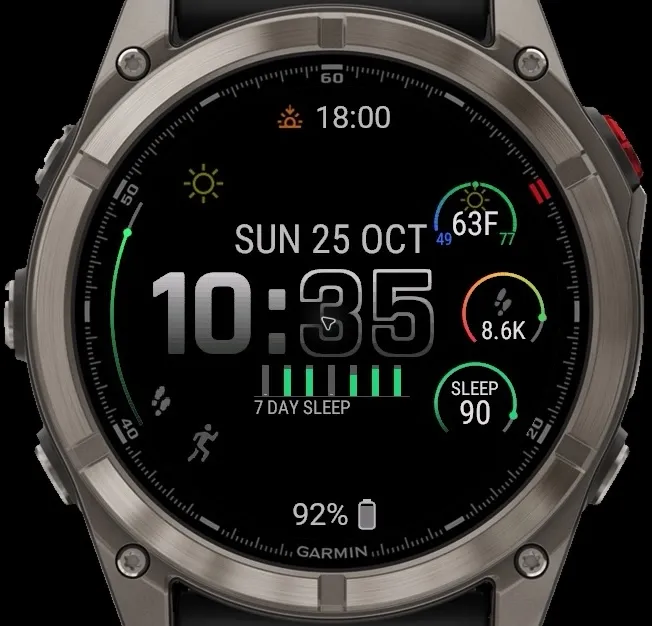
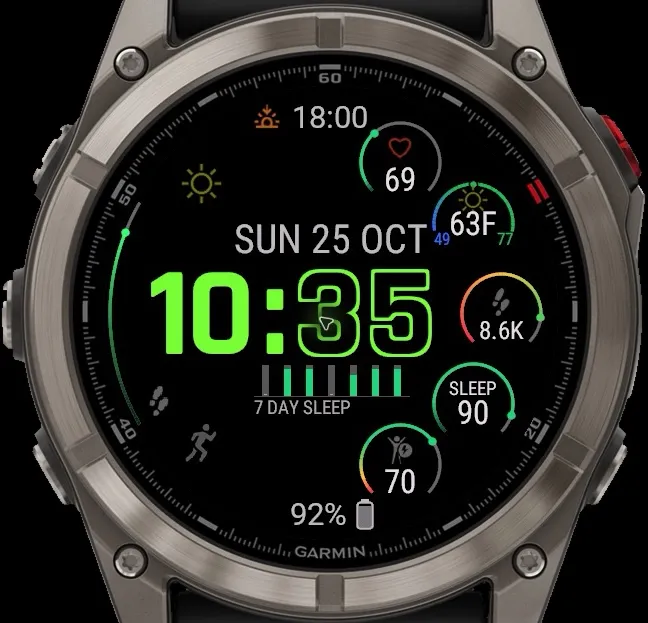
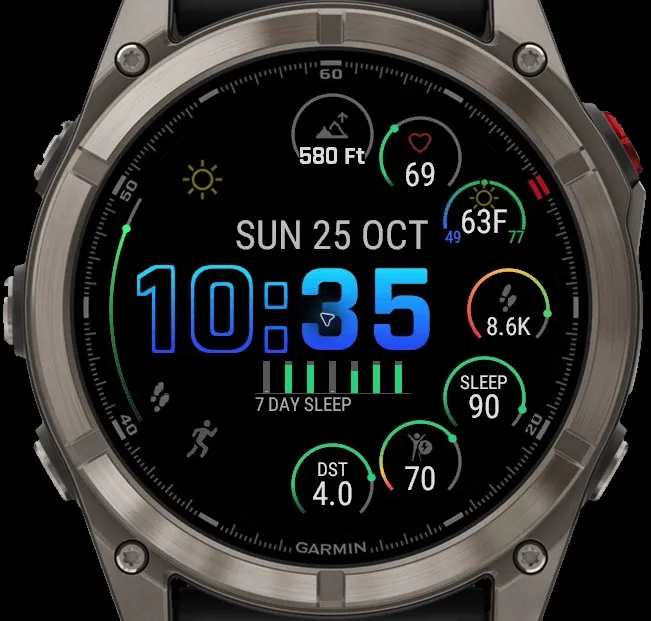
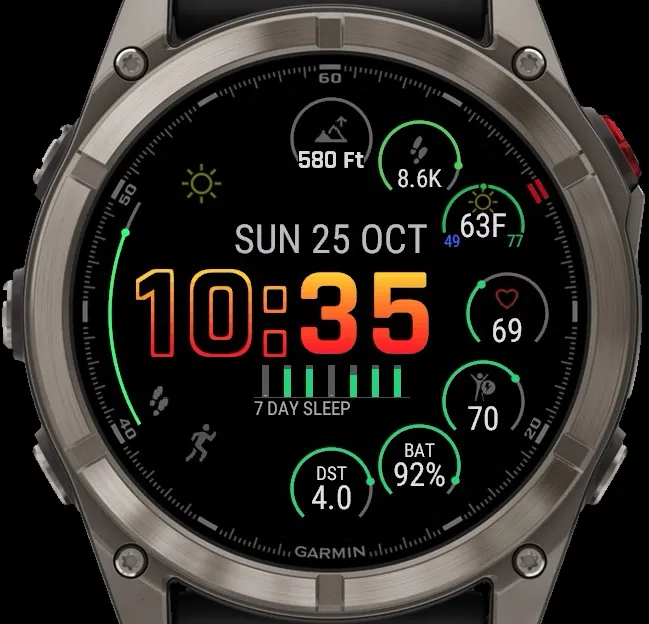
A bold, digital-first face with a colorful display, made for AMOLED devices. Oversized stacked time, color-rich open-arc gauges, and a dedicated full personal metrics page. You can read it at a glance and set it up the way you like.
Short YouTube video showing the different layouts and configurations - https://youtu.be/8FN4pNQFiGU
- Choose your weather source: Garmin Weather (default) or MET Norway, with no account or key. A small letter above the weather icon shows the source (G or N), and the face falls back to Garmin automatically if MET data is unavailable
- New Wind and Precipitation Forecast gauges, in metric or imperial, with smooth green-yellow-red color bands (snow and sleet count as precipitation)
- Optional horizontal time for the 2 and 3 gauge layouts (Settings -Time Style). Stacked remains the default
- Choose white, light gray or medium gray for the text under the time
- Larger steps icon and a medium-gray step-progress track
- Settings translated into 9 languages, plus memory and stability improvements
TIME
- Oversized stacked hour and minute numerals, or horizontal time on the 2 and 3 gauge layouts
- Solid, Gradient, or Gradient Outline styles for hour and minute separately
- Curated gradient palettes: Blaze, Blaze Reverse, Dusk, Bloom, Ember, plus Custom
- 12 or 24-hour, with seconds and AM/PM
MAIN FACE
- Gauge layouts with two, two plus date, three, five, and a MAX 7 gauge layout
- Touch the center of the watch face to cycle through all 5 layouts
- Open-arc gradient gauges that fade softly into a dark shade of their own color
- Weather gauge with a ring colored by temperature, from icy blue to hot red, and condition icons in Color or Gray
- Heart rate with a live HR graph, or swap the graph for the full date, step history, Today's Steps by Hour, pressure, or weather
- Seconds and AM/PM in the left column, with a weather shortcut above and a metrics shortcut below
- Bottom line: Battery (with estimated days left), Dual Time, Elevation, or Next Sunrise/Sunset
- Weather shortcut opens native Garmin Weather
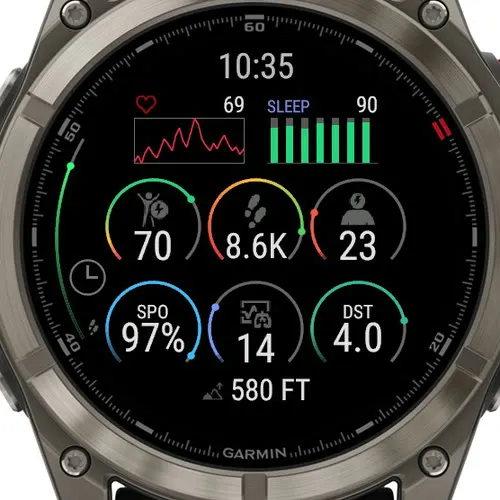
PERSONAL METRICS PAGE
- Six configurable gauges in two rows of three
- A clean digital clock up top, plus dual time and elevation below the gauges
- Two graphs: 6-hour Heart Rate, 7-day Steps, Calories, Active Minutes, Distance, or Today's Steps by Hour
- Tap any gauge to open its Garmin glance
- Data includes Steps, Calories, Active Minutes, Floors, Distance, Elevation, Heart Rate, Resting HR, Body Battery, Stress, Wind, Precipitation, and more
COLOR & STYLE
- Carefully curated color sets that work together
- Color or Monochrome gauges
- Separate color choices for HR, date, seconds and AM/PM, text under the time, icons, and circles
ALWAYS-ON DISPLAY
- Three AOD levels (MIN, PLUS, MAX) to balance looks and battery
LANGUAGES
Settings in English, Czech, Danish, Dutch, French, German, Italian, Norwegian, Polish, and Spanish. The on-face date follows your watch's language.
WEATHER DATA & PRIVACY
Weather comes from Garmin by default. Optional MET Norway data: The Norwegian Meteorological Institute, licensed CC BY 4.0. If you select MET Norway, your approximate location (about 1 km) and time zone are sent to our weather service to get a forecast; nothing identifies you, and nothing is sent with Garmin Weather. Details: https://nomadicdesigns.biz/privacy.html
FEEDBACK WELCOME
Your input shapes future updates. Send ideas, bugs, or screenshots through the contact form at nomadicdesigns.biz. We read every message.
Nomadic Designs - made for people on the move.
บันทึกการอัปเดต
V1.9 -Clearer graphs and refined layouts
- Taller, cleaner metrics-page graphs with duplicate labels removed.
- Narrower, taller graphs under the time, with readable names and clearer gray background tracks.
- Clear green history values, with red/yellow/green step progress against Garmin goals in goal-color styles.
- More reliable daily-history loading when individual readings are unavailable.
- Improved top-field clearance and stable three-gauge date/graph alignment—even when minute digits change.
V1.8 - v1.7
- Added BLAZE Orange, LIME and Red Chrome time gradients.
- Added a gray-background graph style with red, yellow and green progress bars.
- Moved Custom to the bottom of all time preset menus.
- Improved top datafield spacing in the five-gauge layout.
Existing color and graph options remain available; defaults are unchanged.
v1.6 - Added optional Optimize Battery Performance while preserving your display choices. New solid colored arcs, optional full gradients, selectable dark-gray/green graph bars, larger center touch target and responsive layout cycling. Includes background-only overrides, battery-use notes, Garmin profile HR-zone colors and slightly darker unused arcs.
Improved Sleep/gauge settings synchronization after delayed settings delivery.
Keep Metrics open until Time Page selected: the Metrics page stays selected through AOD and returns on wake until you switch back to the Time Page.
v1.5 - Added Sleep Score gauge and 7-day sleep history graph options. History builds over time while the face runs.
YouTube video showing the different configurations- https://youtu.be/8FN4pNQFiGU
v1.4 - Added Notifications as a selectable gauge with a centered count and green/yellow/red status arc. Touch targets now follow selected fields, including Notifications, and disappear when the top field is Off. Removed the Dark-Light-Dark time gradient options.
v1.3 - Added a configurable top field with Heart Rate, Notifications, Device Battery, Dual Time, Elevation, Next Sun Event, and Off. Notifications shows an envelope with the unread count and is also available in the footer. Off hides only the top display; heart-rate recording continues normally.
v1.2 - Added UV gauge, added option to keep metrics page on, bug fixes
v1.1a - minor icon alignment fix, added light-dark gray gradient time option as default. Added option to turn off the date above the time
v1.0 - Choose your weather source: Garmin Weather (default) or MET Norway, with no account or key. A small letter above the weather icon shows the source (G or N), with automatic fallback to Garmin. New Wind and Precipitation Forecast gauges in metric or imperial, with smooth green-yellow-red color bands. Optional horizontal time for the 2- and 3-gauge layouts (Settings Time Style). Choose white, light gray or medium gray for the text under the time. Settings are translated into 9 languages.
Weather data from Garmin by default. Optional MET Norway data: The Norwegian Meteorological Institute, CC BY 4.0. If you select MET Norway, an approximate location (about 1 km) and your time zone are sent to our weather service. Nothing is sent with Garmin Weather. nomadicdesigns.biz/privacy.html
ภาพหน้าจอ
ภาษาที่รองรับ (1)
อุปกรณ์ที่รองรับ (46)
Approach® S50
Approach® S70 (42mm)
Approach® S70 (47mm)
D2™ Air X15
D2™ Mach 1
D2™ Mach 1 Pro
D2™ Mach 2
D2™ Mach 2 Pro
Descent™ G2
Descent™ MK3 - 43mm
Descent™ MK3i - 51mm
epix™ (Gen 2)
epix™ (Gen 2)
epix™ Pro (42mm)
epix™ Pro (47mm)
epix™ Pro (51mm)
fēnix® 8 AMOLED (43mm)
fēnix® 8 AMOLED (47mm/51mm)
fēnix® 8 Pro
fenix® 9 - 43 mm
fenix® 9 – 47 mm
fenix® 9 Pro - 43 mm
fenix® 9 Pro - 47 mm
fenix® 9 Pro - 51 mm
fēnix® E
Forerunner® 165
Forerunner® 165 Music
Forerunner® 265
Forerunner® 570 - 42mm
Forerunner® 570 - 47mm
Forerunner® 965
Forerunner® 970
Instinct® 3 – 45 mm, AMOLED
Instinct® 3 – 50 mm, AMOLED
Instinct® Crossover AMOLED
MARQ® (Gen 2)
MARQ® Commander (Gen 2) – Carbon Edition
MARQ™ Aviator (Gen 2)
tactix® 7 – AMOLED Edition
tactix® 8 – 47 mm, AMOLED
Venu® 3
Venu® 3S
Venu® 4 – 41 mm
Venu® 4 – 45 mm
vívoactive® 5
vívoactive® 6