รายละเอียด

BEFORE BUYING, PLEASE NOTE THAT A WHITE WATCH FACE MAKES THE BLACK BEZEL AROUND YOUR DISPLAY MORE NOTICEABLE!
◆ FEATURE REQUEST OR ISSUE? Email us first at [email protected]. Emails reach us directly, while reviews can be missed and don't allow a conversation.
◆ Custom colors: https://tikks.io/colors/ ◆ Details: https://tikks.io/watch-faces/retro-watt/
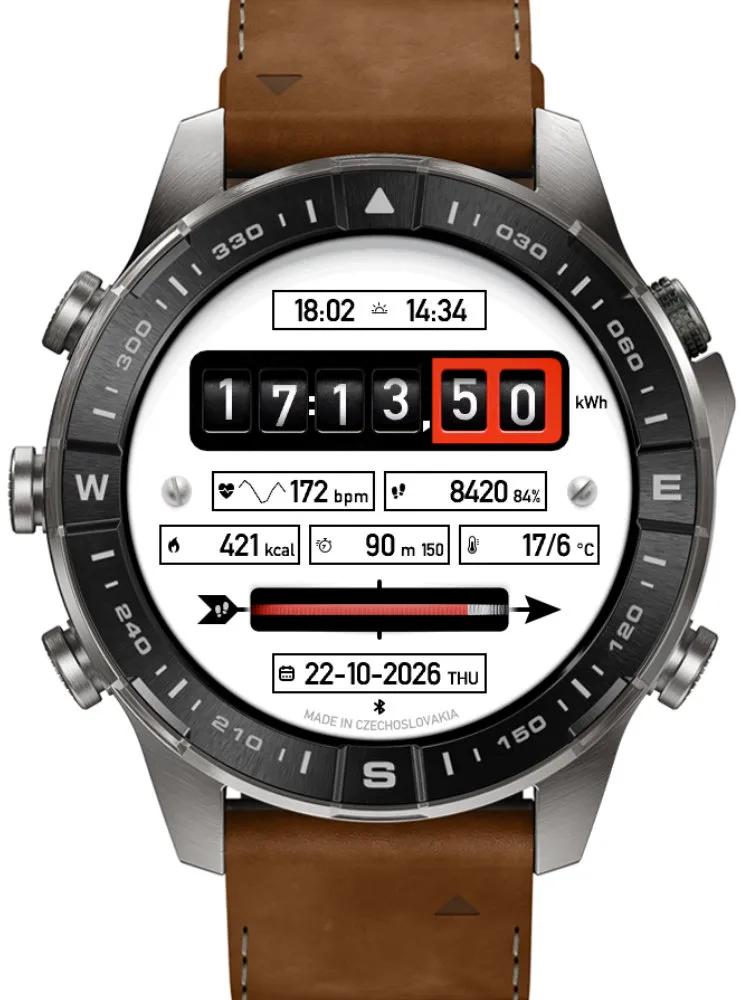
RetroWatt is a battery-optimized retro-inspired watch face for Garmin AMOLED devices, designed from the ground up for low power consumption with every element carefully optimized for efficiency, readability, and full-featured daily use.
◆ FEATURES
• Retro industrial-inspired design
• Light and dark theme
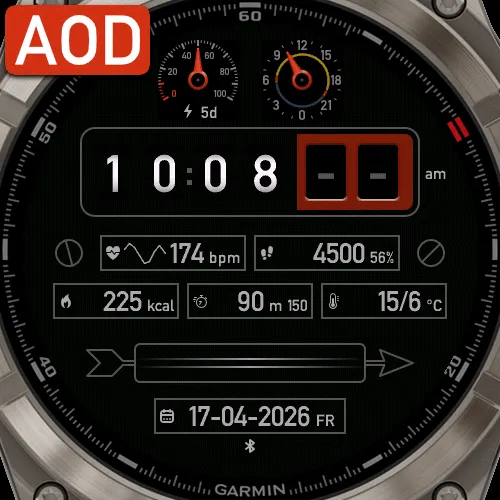
• Full AOD mode
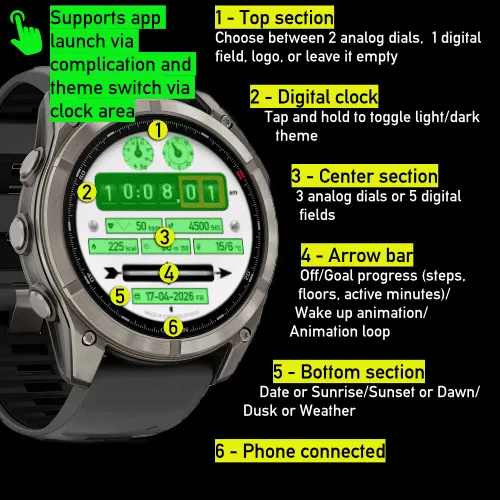
• Optional analog or digital indicators
• Theme switching directly on the clock via touch and hold
• Complication launch support via touch and hold
• 3 Animation modes: Once on wake (default) / Loop / Off
• Designed for a balanced mix of battery life and up-to-date data
• Connect IQ settings let you offset the displayed time by a set number of minutes. Alarms are unaffected.
◆ DATA FIELDS
Displayed data is now configured only on the watch.
Supports a wide range of data, depending on device capabilities:
• Steps
• Heart rate
• Battery
• Date
• Seconds
• 24h indicator
• Steps to goal
• Calories
• Distance
• Floors
• Move bar
• Active minutes today / week
• Body Battery
• Stress
• Pulse Ox
• Respiration
• Recovery
• VO2 Max (run / bike)
• Week number
• Alternate time zone
• Notifications
• Calendar
• Weekly running distance
• Weekly cycling distance
• Training status
• Altitude
• Temperature
• Feels like temperature
• Precipitation
• Humidity
• Wind
• UV index
• Pressure
• Sunrise / sunset
• Dawn / dusk
• Moon phase
• Solar input
• Weekly running time*
• Weekly cycling time*
* based on activities stored on the watch
◆ WEATHER
• OpenWeatherMap integration (optional)
• Personal API key required in phone settings
• API key: https://openweathermap.org/api
• Select OpenWeatherMap as the weather source
◆ INTERACTION
• Switch theme directly on the clock area with touch and hold
• Launch supported complications with touch and hold
• Flexible layout with selectable analog or digital indicators
◆ AOD
• Full Always-On Display mode
• Optimized for AMOLED devices
• Built to preserve readability while minimizing power usage
◆ NOTES
• Available functions may vary by device and sensor support
• Some weather features require proper OpenWeatherMap setup
• Under active development
◆ SUPPORT
• Discord support server (preferred): https://discord.gg/YkmjD4cTTw
• Ratings are appreciated
• If necessary, please contact support before leaving a negative review
retro, vintage, industrial, dashboard, instrument panel, hybrid, analog, digital, data-rich, info-rich, customizable, AMOLED, full AOD, always-on display, low power, battery efficient, optimized, weather, OpenWeatherMap, heart rate, HR, steps, Body Battery, stress, Pulse Ox, respiration, recovery, VO2 max, altitude, pressure, UV, wind, humidity, temperature, sunrise, sunset, dawn, dusk, moon phase, solar, complications, touch launch, Garmin
บันทึกการอัปเดต
Support and more:
Website: https://tikks.io
Discord: https://discord.gg/YkmjD4cTTw
Instagram: https://www.instagram.com/garminwatchface/
1.4.0
- Added support for Approach S72, MARQ (Gen 3), Forerunner 165, Forerunner 70, Descent G2, Approach S50 and vívoactive 5.
- Redesigned settings: phone settings are grouped like the watch menu and every data field can now be set from the phone.
- Refreshed the on-watch settings menu.
- Improved always-on updates: steps and other data refresh every minute.
- Improved weather, sunrise/sunset and sensor data accuracy, plus many smaller fixes.
1.3.0
- Added support for fēnix 9 AMOLED and Instinct 3 AMOLED watches
- Improved runtime efficiency and active/AOD transitions
1.2.3
- Added Tap Shortcuts setting to control or disable tap actions
1.2.1
- Improved performance, stability, and rendering compatibility for smoother, more fluid operation
- Added support for Approach S70 42mm + 47mm, D2 Mach 2 Pro, Forerunner 170/170 Music
- Added bottom text customization and clock suffix settings
- Updated background assets and refined animation/resource handling
1.1.0
- Added Weekly Run Time and Weekly Bike Time metrics (based on activities stored on the watch)
- Arrow Bar now supports daily goal progress and is now the default option
1.0.6
- Refined animation behavior and Always-On Display rendering
1.0.5
- Improved overall performance and stability
- Added an option to play the animation only once after waking from AOD (Default for new installs)
- Day names are now shown in a three-letter format
- Refined the date format for the small digital field
1.0.4
- Displayed data is now configured only on the watch; other settings remain in the phone app
- Slightly refined the layout for a more balanced and symmetrical look
- Improved weather data handling
- Reduced internal overhead for smoother overall performance
1.0.3
- Layout update for small screens
1.0.1
- Minor bug fix
1.0.0
- Initial public release
ภาพหน้าจอ
ภาษาที่รองรับ (1)
อุปกรณ์ที่รองรับ (52)
Approach® S50
Approach® S70 (42mm)
Approach® S70 (47mm)
Approach® S72 - 43 mm
Approach® S72 - 47 mm
D2™ Air X15
D2™ Mach 1
D2™ Mach 1 Pro
D2™ Mach 2
D2™ Mach 2 Pro
Descent™ G2
Descent™ MK3 - 43mm
Descent™ MK3i - 51mm
epix™ (Gen 2)
epix™ (Gen 2)
epix™ Pro (42mm)
epix™ Pro (47mm)
epix™ Pro (51mm)
fēnix® 8 AMOLED (43mm)
fēnix® 8 AMOLED (47mm/51mm)
fēnix® 8 Pro
fenix® 9 - 43 mm
fenix® 9 – 47 mm
fenix® 9 Pro - 43 mm
fenix® 9 Pro - 47 mm
fenix® 9 Pro - 51 mm
fēnix® E
Forerunner® 165
Forerunner® 165 Music
Forerunner® 170
Forerunner® 170 Music
Forerunner® 265
Forerunner® 570 - 42mm
Forerunner® 570 - 47mm
Forerunner® 70
Forerunner® 70
Forerunner® 965
Forerunner® 970
Instinct® 3 – 45 mm, AMOLED
Instinct® 3 – 50 mm, AMOLED
MARQ® (Gen 2)
MARQ® Adventurer (Gen 3)
MARQ® Commander (Gen 2) – Carbon Edition
MARQ™ Aviator (Gen 2)
tactix® 7 – AMOLED Edition
tactix® 8 – 47 mm, AMOLED
Venu® 3
Venu® 3S
Venu® 4 – 41 mm
Venu® 4 – 45 mm
vívoactive® 5
vívoactive® 6