Описание
This app lets you control your Athom Homey Pro presence state from your Garmin watch. You can use these presence changes to trigger Homey Flows.
𝗘𝗫𝗔𝗠𝗣𝗟𝗘𝗦
Examples of using presence changes in Homey Flows:
𝑮𝒐 𝒕𝒐 𝒃𝒆𝒅: Turn off the lights, lock the doors, turn off the TV, and more.
𝑾𝒂𝒌𝒆 𝒖𝒑: Open the curtains, turn on the lights, trigger other Flows, and more.
The app only changes your Homey presence state. Your Homey Flows determine what happens next.
𝗤𝗨𝗜𝗖𝗞 𝗔𝗖𝗖𝗘𝗦𝗦
Assign Homey Presence to a watch shortcut for quick access:
Settings → System → Shortcuts
Select a button or button combination, then select Homey Presence.
𝗦𝗘𝗧𝗨𝗣
To use the app, you need three things:
• Homey Cloud ID
• Homey User ID
• Homey API Key
I recommend doing the setup on a computer and temporarily saving these values in a text file for the Garmin Connect IQ app settings.
𝗖𝗟𝗢𝗨𝗗 𝗜𝗗 & 𝗨𝗦𝗘𝗥 𝗜𝗗
In the Homey Web App, go to:
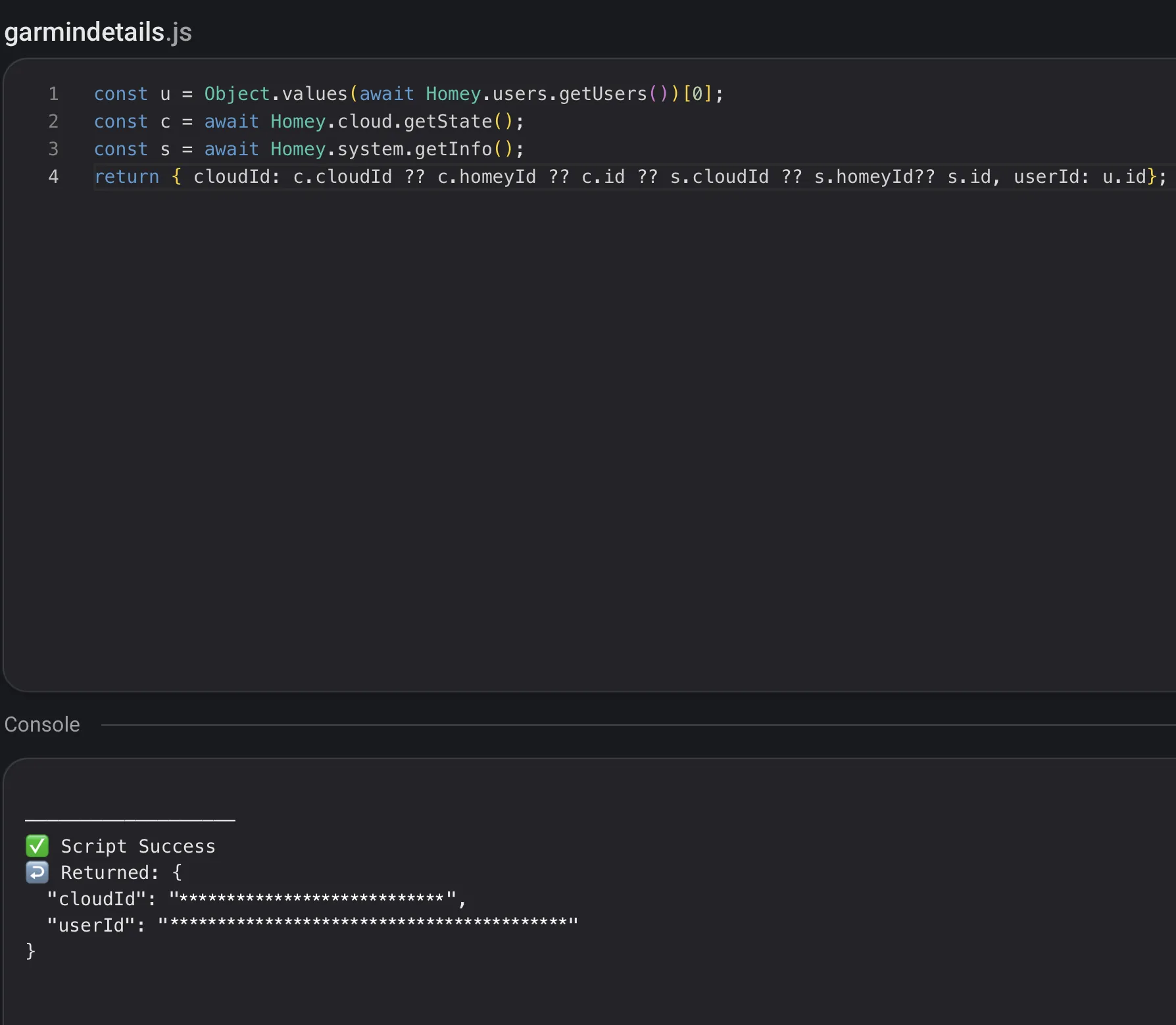
HomeyScript → Create a new script → Run (after adding the script)
const u = Object.values(await Homey.users.getUsers())[0];
const c = await Homey.cloud.getState();
const s = await Homey.system.getInfo();
return { cloudId: c.cloudId ?? c.homeyId ?? c.id ?? s.cloudId ?? s.homeyId ?? s.id, userId: u.id};
Copy the returned Cloud ID and User ID. You will need both in the Garmin app settings.
𝗔𝗣𝗜 𝗞𝗘𝗬
The API Key gives the Garmin app permission to access only the required parts of your Homey.
In the Homey Web App, go to:
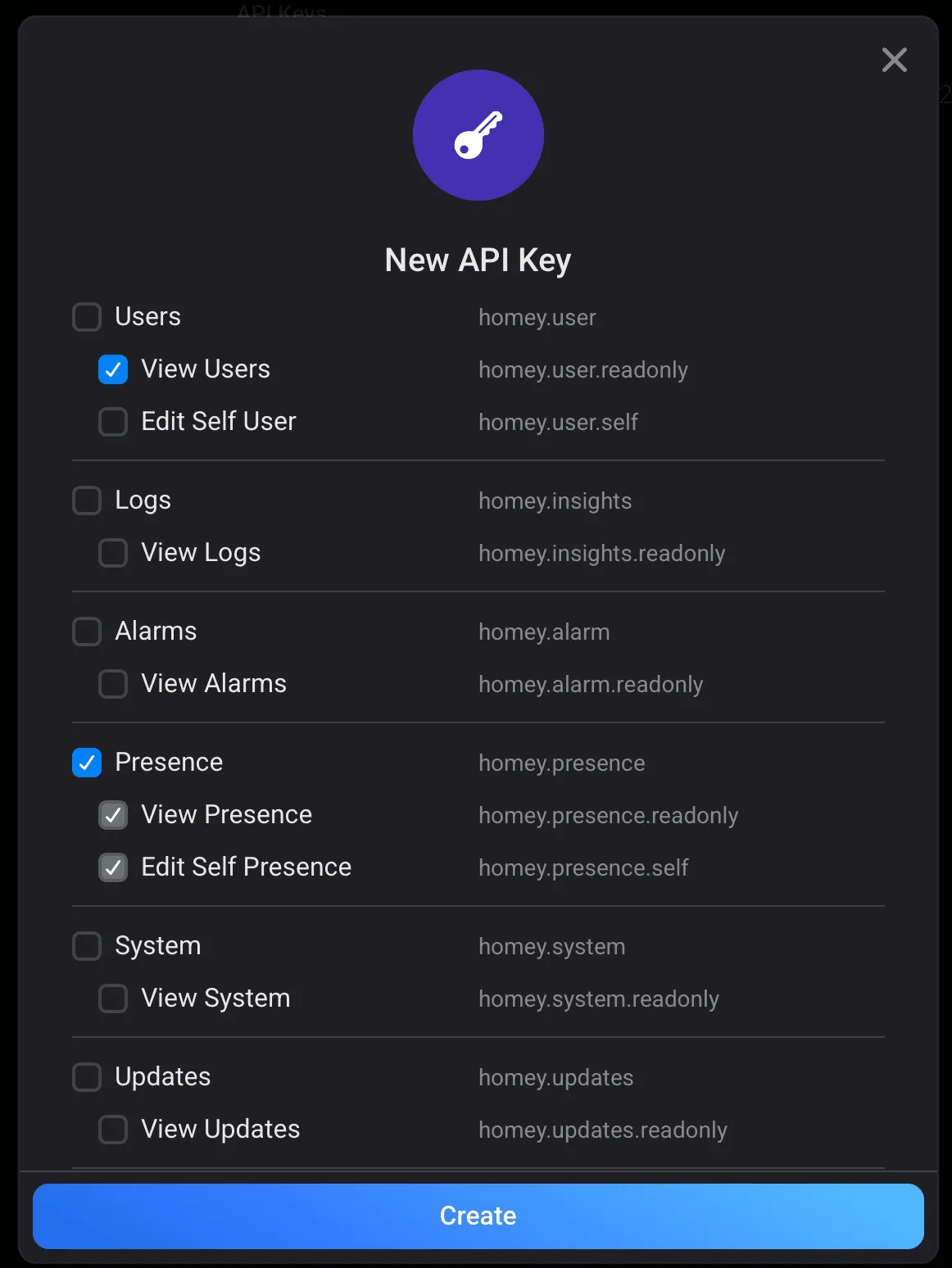
Settings → General → API Keys → New API Key
Name the key:
Garmin Presence Key
Grant only these permissions:
• Users → View Users
• Presence → View Presence
• Presence → Edit Self Presence
Create the key and copy it. Store it safely, as it provides access to the permissions listed above.
Enter the Cloud ID, User ID and API Key in the Garmin Connect IQ app settings for this app.
𝗛𝗢𝗠𝗘𝗬 𝗙𝗟𝗢𝗪
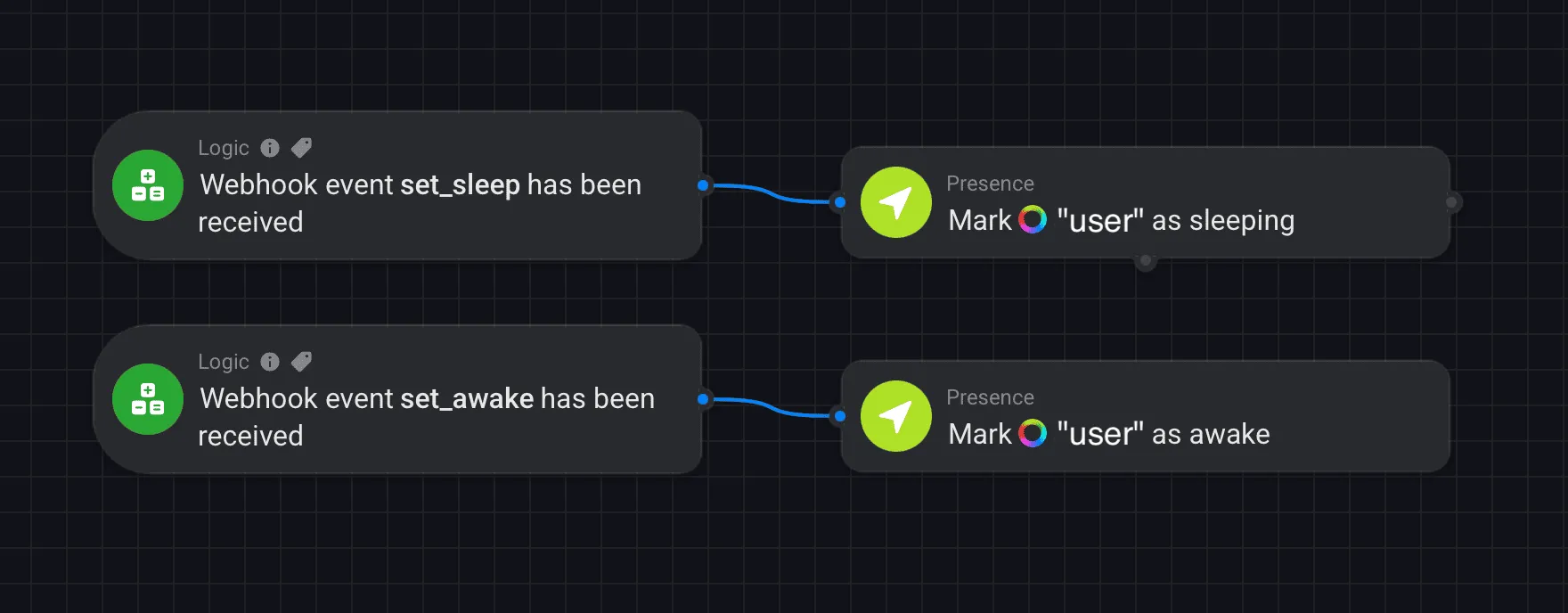
Finally, create an Advanced Flow that responds when your Garmin watch changes your presence state.
Open the Homey Web App and go to Flows.
Create a New Advanced Flow.
Add 2x trigger card:
When → Logic → Webhook event has been received
Set one event to:
set_sleep
Set the other to:
set_awake
Now add two action cards:
Then → Presence → Mark as Sleeping
Then → Presence → Mark as Awake
Select the correct Homey user in both Presence cards.
Connect:
set_sleep → Mark as Sleeping
set_awake → Mark as Awake
Save the Flow.
You can now use these presence changes to trigger any additional Homey automations you want, such as turning off lights when going to bed or opening the curtains when waking up.
𝗣𝗥𝗜𝗩𝗔𝗖𝗬
𝑌𝑜𝑢𝑟 𝐶𝑙𝑜𝑢𝑑 𝐼𝐷, 𝑈𝑠𝑒𝑟 𝐼𝐷 𝑎𝑛𝑑 𝐴𝑃𝐼 𝐾𝑒𝑦 𝑎𝑟𝑒 𝑠𝑡𝑜𝑟𝑒𝑑 𝑎𝑛𝑑 𝑢𝑠𝑒𝑑 𝑏𝑦 𝑡ℎ𝑒 𝐺𝑎𝑟𝑚𝑖𝑛 𝑎𝑝𝑝 𝑓𝑜𝑟 𝑦𝑜𝑢𝑟 𝐻𝑜𝑚𝑒𝑦 𝑐𝑜𝑛𝑛𝑒𝑐𝑡𝑖𝑜𝑛. 𝑇ℎ𝑒𝑦 𝑎𝑟𝑒 𝑛𝑜𝑡 𝑣𝑖𝑠𝑖𝑏𝑙𝑒 𝑡𝑜 𝑡ℎ𝑒 𝑎𝑝𝑝 𝑑𝑒𝑣𝑒𝑙𝑜𝑝𝑒𝑟.
𝗗𝗜𝗦𝗖𝗟𝗔𝗜𝗠𝗘𝗥
𝑇ℎ𝑖𝑠 𝑖𝑠 𝑎𝑛 𝑖𝑛𝑑𝑒𝑝𝑒𝑛𝑑𝑒𝑛𝑡 𝑡ℎ𝑖𝑟𝑑-𝑝𝑎𝑟𝑡𝑦 𝑎𝑝𝑝 𝑎𝑛𝑑 𝑖𝑠 𝑛𝑜𝑡 𝑎𝑓𝑓𝑖𝑙𝑖𝑎𝑡𝑒𝑑 𝑤𝑖𝑡ℎ, 𝑒𝑛𝑑𝑜𝑟𝑠𝑒𝑑 𝑏𝑦, 𝑜𝑟 𝑜𝑓𝑓𝑖𝑐𝑖𝑎𝑙𝑙𝑦 𝑠𝑢𝑝𝑝𝑜𝑟𝑡𝑒𝑑 𝑏𝑦 𝐴𝑡ℎ𝑜𝑚 𝐵.𝑉. (𝐻𝑜𝑚𝑒𝑦) 𝑜𝑟 𝐺𝑎𝑟𝑚𝑖𝑛 𝐿𝑡𝑑.
𝑈𝑠𝑒 𝑜𝑓 𝑡ℎ𝑖𝑠 𝑎𝑝𝑝 𝑟𝑒𝑞𝑢𝑖𝑟𝑒𝑠 𝑎𝑐𝑐𝑒𝑠𝑠 𝑡𝑜 𝑦𝑜𝑢𝑟 𝐻𝑜𝑚𝑒𝑦 𝑠𝑦𝑠𝑡𝑒𝑚 𝑡ℎ𝑟𝑜𝑢𝑔ℎ 𝑎𝑛 𝐴𝑃𝐼 𝑘𝑒𝑦. 𝑂𝑛𝑙𝑦 𝑔𝑟𝑎𝑛𝑡 𝑡ℎ𝑒 𝑝𝑒𝑟𝑚𝑖𝑠𝑠𝑖𝑜𝑛𝑠 𝑑𝑒𝑠𝑐𝑟𝑖𝑏𝑒𝑑 𝑎𝑏𝑜𝑣𝑒 𝑎𝑛𝑑 𝑘𝑒𝑒𝑝 𝑦𝑜𝑢𝑟 𝐴𝑃𝐼 𝑘𝑒𝑦 𝑝𝑟𝑖𝑣𝑎𝑡𝑒.
𝐻𝑜𝑚𝑒 𝑎𝑢𝑡𝑜𝑚𝑎𝑡𝑖𝑜𝑛 𝑎𝑐𝑡𝑖𝑜𝑛𝑠 𝑚𝑎𝑦 𝑓𝑎𝑖𝑙 𝑜𝑟 𝑏𝑒 𝑑𝑒𝑙𝑎𝑦𝑒𝑑 𝑑𝑢𝑒 𝑡𝑜 𝑛𝑒𝑡𝑤𝑜𝑟𝑘 𝑐𝑜𝑛𝑛𝑒𝑐𝑡𝑖𝑣𝑖𝑡𝑦, 𝑠𝑒𝑟𝑣𝑖𝑐𝑒 𝑎𝑣𝑎𝑖𝑙𝑎𝑏𝑖𝑙𝑖𝑡𝑦, 𝑑𝑒𝑣𝑖𝑐𝑒 𝑠𝑡𝑎𝑡𝑒, 𝑜𝑟 𝑜𝑡ℎ𝑒𝑟 𝑐𝑖𝑟𝑐𝑢𝑚𝑠𝑡𝑎𝑛𝑐𝑒𝑠. 𝐷𝑜 𝑛𝑜𝑡 𝑟𝑒𝑙𝑦 𝑜𝑛 𝑡ℎ𝑖𝑠 𝑎𝑝𝑝 𝑓𝑜𝑟 𝑠𝑒𝑐𝑢𝑟𝑖𝑡𝑦-𝑐𝑟𝑖𝑡𝑖𝑐𝑎𝑙, 𝑠𝑎𝑓𝑒𝑡𝑦-𝑐𝑟𝑖𝑡𝑖𝑐𝑎𝑙, 𝑜𝑟 𝑒𝑚𝑒𝑟𝑔𝑒𝑛𝑐𝑦 𝑓𝑢𝑛𝑐𝑡𝑖𝑜𝑛𝑠. 𝐴𝑙𝑤𝑎𝑦𝑠 𝑣𝑒𝑟𝑖𝑓𝑦 𝑖𝑚𝑝𝑜𝑟𝑡𝑎𝑛𝑡 𝑎𝑐𝑡𝑖𝑜𝑛𝑠, 𝑠𝑢𝑐ℎ 𝑎𝑠 𝑙𝑜𝑐𝑘𝑖𝑛𝑔 𝑑𝑜𝑜𝑟𝑠 𝑜𝑟 𝑠𝑤𝑖𝑡𝑐ℎ𝑖𝑛𝑔 𝑜𝑓𝑓 𝑝𝑜𝑡𝑒𝑛𝑡𝑖𝑎𝑙𝑙𝑦 ℎ𝑎𝑧𝑎𝑟𝑑𝑜𝑢𝑠 𝑑𝑒𝑣𝑖𝑐𝑒𝑠, 𝑖𝑛𝑑𝑒𝑝𝑒𝑛𝑑𝑒𝑛𝑡𝑙𝑦.
Список изменений
• Improved reliability during temporary Garmin and network connection issues.
• Added automatic retry handling when the watch temporarily loses communication with the phone or network.
• Improved webhook handling so Homey state is still verified after uncertain connection responses.
• General stability improvements.
Скриншоты

Поддерживаемый язык (1)
Совместимых устройства (62)
Approach® S50
Approach® S70 (42mm)
Approach® S70 (47mm)
D2™ Air X10
D2™ Air X15
D2™ Mach 1
D2™ Mach 1 Pro
D2™ Mach 2
D2™ Mach 2 Pro
Descent™ G2
Descent™ MK3 - 43mm
Descent™ MK3i - 51mm
epix™ (Gen 2)
epix™ (Gen 2)
epix™ Pro (42mm)
epix™ Pro (47mm)
epix™ Pro (51mm)
fēnix® 8 AMOLED (43mm)
fēnix® 8 AMOLED (47mm/51mm)
fēnix® 8 Pro
fenix® 9 - 43 mm
fenix® 9 – 47 mm
fenix® 9 Pro - 43 mm
fenix® 9 Pro - 47 mm
fēnix® E
Forerunner® 165
Forerunner® 165 Music
Forerunner® 170
Forerunner® 170 Music
Forerunner® 265
Forerunner® 265S
Forerunner® 570 - 42mm
Forerunner® 570 - 47mm
Forerunner® 70
Forerunner® 70
Forerunner® 965
Forerunner® 970
Instinct® 3 – 45 mm, AMOLED
Instinct® 3 – 50 mm, AMOLED
Instinct® Crossover AMOLED
MARQ® (Gen 2)
MARQ® Adventurer (Gen 3)
MARQ® Commander (Gen 2) – Carbon Edition
MARQ™ Aviator (Gen 2)
Mercedes-Benz Venu® 2
Mercedes-Benz Venu® 2
Mercedes-Benz Venu® 2S
Mercedes-Benz Venu® 2S
tactix® 7 – AMOLED Edition
tactix® 8 – 47 mm, AMOLED
Venu® 2
Venu® 2
Venu® 2 Plus
Venu® 2 Plus
Venu® 2S
Venu® 2S
Venu® 3
Venu® 3S
Venu® 4 – 41 mm
Venu® 4 – 45 mm
vívoactive® 5
vívoactive® 6
Динамика метрики за период
Рейтинг
Отзывы
Даты снимков
2026-10-27 → 2026-10-30