설명
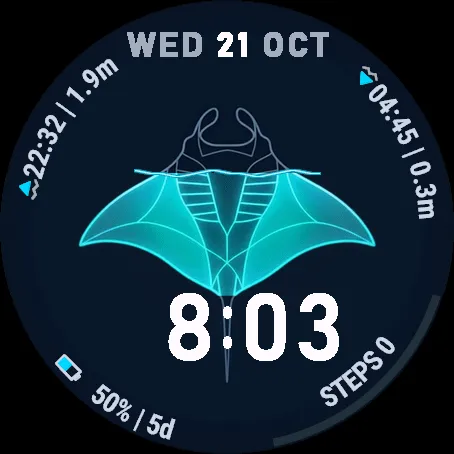
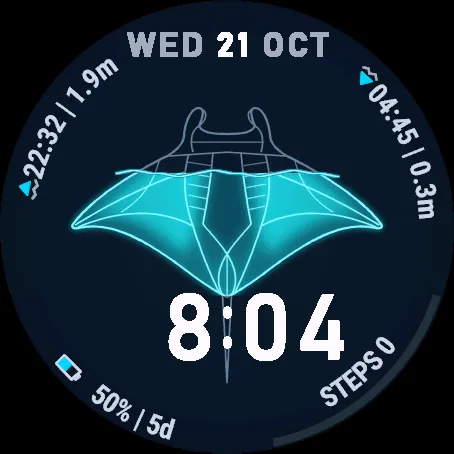
Manta Tide brings the pulse of the ocean straight to your wrist. Crafted for surfers, divers, sailors, and ocean lovers, this watch face blends detailed manta artwork with a live visual tide gauge: as the tide rises and falls at your local coast, a glowing wave dynamically submerges and reveals the manta along its exact silhouette.
TWO MANTA SPECIES & BUILT-IN 24H TIDE CHART
• 2 Selectable Manta Species: Switch between the Reef Manta (Mobula alfredi) and the Giant Oceanic Manta (Mobula birostris), with the dynamic wave contour tailored to each species.
• Built-in 24h Tide Widget: Long-press the tide arcs or the manta to open a full-screen 24h sinusoidal tide chart featuring a live "NOW" marker, tide trend (RISING / FALLING %), and upcoming High/Low tide schedule (H1/L1 & H2/L2).
• Touch Long-Press Shortcuts: Long-press any data field on screen to jump straight to its native Garmin glance/widget.
LIVE GLOBAL TIDES — NO API KEY REQUIRED
• Automatic global High Tide and Low Tide predictions displaying both time and estimated tide height.
• Dynamic water level bounded from the base of the tail to the cephalic fins.
• Smart Location: Automatic (uses recent GPS fix, last activity, or watch weather location) or Manual coordinates.
DEEP CUSTOMIZATION (On-Watch Menu & Garmin Connect IQ App)
• 2 Manta Species: Mobula alfredi (Reef) & Mobula birostris (Giant Oceanic).
• 7 Bioluminescent Wave Themes: Luminescent Cyan, Deep Ocean Blue, Emerald Green, Aqua Turquoise, Abyssal Violet, Reef Coral, and Solar Gold.
• 7 Font Color Palettes & 3 Font Sizes (Small, Normal, Large) with crisp radial vector text.
• 2 Tide Label Modes: Compact 1-line Vector Icons or 2-line HIGH / LOW TIDE text labels.
15 SELECTABLE DATA COMPLICATIONS (Left & Right Bottom Arcs)
Customize both bottom slots with a dynamic radial progress bar:
• Battery (% + remaining days) with dynamic vector battery icon
• Steps & Daily Goal Progress
• Heart Rate (bpm)
• Body Battery
• Stress Level
• Pulse Ox (SpO2)
• Calories
• Distance (km / mi)
• Floors Climbed
• Weekly Intensity Minutes
• Altitude / Elevation (m / ft)
• Respiration Rate
• Recovery Time
• Weight (kg / lb)
• Notifications
HOW TO USE (QUICK GUIDE)
1. Setting up your Tide Location:
• Auto Mode (Default): Automatically uses your latest GPS position from an activity or your phone's weather location without draining battery.
• Manual Mode: To track your favorite beach from anywhere, open the Garmin Connect IQ app - Manta Tide - Settings, set Location to "Manual", and enter decimal Latitude and Longitude (e.g., Lat: 28.1235, Lon: -15.4363).
2. Touch Long-Press Shortcuts (Touchscreen watches):
• Long-press High Tide, Low Tide, or the Manta : Opens the native Tide glance or the built-in 24h Tide Chart screen (long-press again to return to the watch face).
• Long-press the Date (top): Opens your Calendar / Events widget.
• Long-press the Bottom-Left or Bottom-Right metric: Opens the corresponding native Garmin widget (Battery, Steps, HR, Body Battery, Stress, SpO2, etc.).
3. Customizing Directly on the Watch:
• When selecting the watch face on your watch, press "Customize" (pencil icon) to change the manta species, wave color, font size/color, and complications right from your wrist.
4. Free Trial & Activation:
• Includes a 24-hour full-featured free trial. Once the trial ends, unlock lifetime access at kzl.io/code using the 5-digit code shown on your watch, or enter a VIP/promo code in the Connect IQ settings.
스크린샷
지원 언어 (1)
호환 기기 (75)
Approach® S70 (42mm)
Approach® S72 - 43 mm
D2™ Air
D2™ Mach 1 Pro
Descent™ MK2
Descent™ MK2
Descent™ MK3 - 43mm
Descent™ MK3i - 51mm
Enduro™ 2
Enduro™ 3
epix™ (Gen 2)
epix™ (Gen 2)
epix™ Pro (42mm)
epix™ Pro (47mm)
epix™ Pro (51mm)
fēnix® 6
fēnix® 6
fēnix® 6 Dual Power
fēnix® 6 Pro
fēnix® 6 Pro
fēnix® 6 Pro Dual Power
fēnix® 6 Pro Solar
fēnix® 6 Solar
fēnix® 6S
fēnix® 6S
fēnix® 6S Dual Power
fēnix® 6S Pro
fēnix® 6S Pro
fēnix® 6S Pro Dual Power
fēnix® 6S Pro Solar
fēnix® 6S Solar
fēnix® 6X Pro
fēnix® 6X Pro
fēnix® 7
fēnix® 7
fēnix® 7 Pro
fēnix® 7S
fēnix® 7S
fēnix® 7S Pro
fēnix® 7X
fēnix® 7X
fēnix® 7X Pro
fēnix® 8 AMOLED (43mm)
fēnix® 8 AMOLED (47mm/51mm)
fēnix® 8 Solar (47mm)
fēnix® 8 Solar (51mm)
fēnix® E
ForeAthlete 245 Music
Forerunner® 245 Music
Forerunner® 245 Music
Forerunner® 255
Forerunner® 265
Forerunner® 265S
Forerunner® 945
Forerunner® 945
Forerunner® 955 Dual Power
Forerunner® 965
Mercedes-Benz Venu® 2
Mercedes-Benz Venu® 2
Mercedes-Benz Venu® 2S
Mercedes-Benz Venu® 2S
quatix® 6
quatix® 6X
tactix® 7
tactix® 7 – AMOLED Edition
tactix® 8 – 47 mm, AMOLED
tactix® 8 – 51 mm, Solar
Venu® 2
Venu® 2
Venu® 2 Plus
Venu® 2 Plus
Venu® 2S
Venu® 2S
Venu® 3
Venu® 3S
최근 지표 추세
평점
리뷰
스냅샷 날짜
2026-10-29 → 2026-11-06