설명
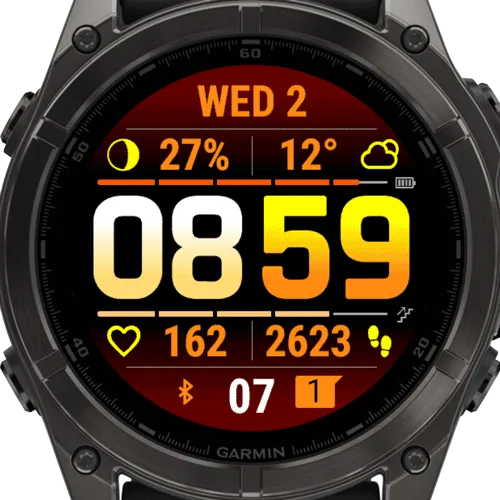
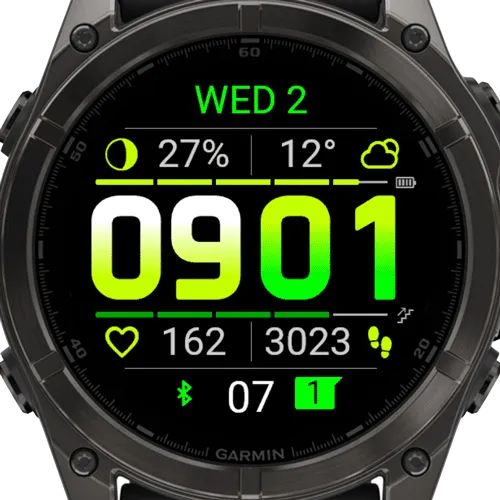
This is a NEW IQ vesion of the extremely poppular watch face BIG EASY! Here is the list of the new features:
- Option to save and restore User Color Themes (in Watch Face - Customize menu)
- New stock color themes
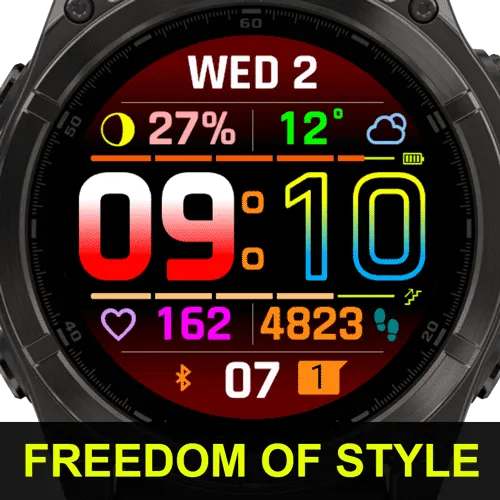
- 10 new colors + Custom colors option
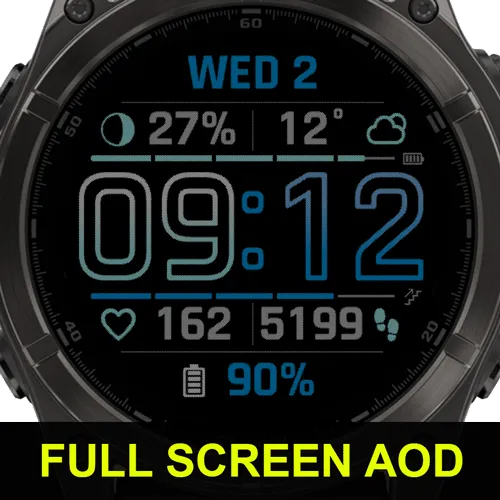
- Gradient time fonts (on AMOLED watches only)
- New gradient background options (on AMOLED watches only)
- Selectable and scalable metrics font (supported on newer watches only)
- Added metrics: UV, Wheelchair pushes, UV bar, High/Low weather teperature
- Added 3rd party complications support
More on the new features in the "What's New" section.
You can use the original BIG EASY app to test before you buy BIG EASY IQ. It doesn't have all the features, but it will give you an idea of the look and feel:
https://apps.garmin.com/apps/86ec352b-da01-4806-8972-770c6d32a5e8
From the developer of the Best Watch Face apps of 2022 and 2023. BIG EASY IQ is designed to MAXIMIZE TIME fonts with many weight and style font options. Color theme customization is taken to the MAX too - practically every element on the screen can be assigned the color you want - even a ":" colon in the time!
Hydration tracking from my new HYDRATE+ app (100% FREE):
https://apps.garmin.com/en-US/apps/b84b1447-8d16-4b7e-b412-597ab5ca6087
Touch screen functionality added to watches upgraded to System 6! Launch widgets directly from the watch face by long pressing them (payment required). Also, install "Universal App" and launch it by long pressing area to the left of TIME (free). Link to the Universal App:
https://apps.garmin.com/en-US/apps/da48442e-184c-49ba-9a6b-9d4a9d1ed60b
All metrics are also using the maximum font size possible. Also, Metrics can provide double information with the DUAL SCREEN option - switch to a second set of bars and metrics with a simple wrist gesture or long touch (System 6 firmware required).
The app supports 40+ different metrics - the list is too long to put it here. It also supports Open Weather, as well as Garmin Weather.
Questions about Weather, Units, Progress Bars, and more are covered in the FAQ shared by all "Glance" apps:
https://www.mobiledriveway.com/glance.html#faq
Please read the FAQ first - 90% of the questions I receive on a daily basis are answered there.
Here is FAQ dedicated to DUAL SCREEN feature. Wrist gesture works 100% of the time if you learn how to do it by following the instructions here:
https://www.mobiledriveway.com/glance_dual.html#dual
Video demonstrating wrist gesture: https://www.youtube.com/watch?v=TIFAli6Rp18
업데이트 노트
If you have questions or suggestions, please use this thread on Garmin forum (use your Garmin email ID to login):
https://forums.garmin.com/developer/connect-iq/f/showcase/279043/watchface-glance
More information on the new features:
- Selectable and scalable metrics font requires support of "Scalable fonts" by the device. You can check if your watch supports scalable fonts here:
https://developer.garmin.com/connect-iq/reference-guides/devices-reference/
Metrics font can be changed only through "Watch Face - Customize" menu on the watch. If your watch supports scalable fonts, you will see "METRICS FONT" option in that menu. If you don't see that option, then your watch doesn't support it.
List of fonts available on each device is different - you can see the ones supported by your watch in the refference guide above and in the menu.
If your watch supports scalable fonts, you can also change their size. By default the app chooses a safe size for metrics, but you can use "Metrics font size scale" option in app settings. By default the scale is 1.0, but you can overwrite it - for example, 1.1 makes the font bigger, 0.9 makes it smaller. On watches not supportin scalable fonts (like on Fenix 6) this parameter will have no effect.
v1.12 - 2026/10/19
- Added new watches
v1.1 - 2026/05/14
Big update with lots of promised features finally implemented!
- Support for Complications form 3rd party apps!!! Here are the steps to set it up:
+Install app/widget that publishes complications
+In BIG EASY IQ, go to Watch Face/Customize menu on your watch. Select "Custom Complication".
+In BIG EASY IQ settings on the phone, select metric "Custom COMPLICATION"
That is all. This is a generic approach that will work with any 3rd party complication (like Dexcom). However, it means that there is no special treatment of the returned value - it will be shown as is. Sometimes developers return a long string with lots of encoded data - obviously it will not look good. Ask from developers of your favorite apps to add complications with easy to read data in a glanceable format.
- Added support for Emojis in Custom Text (and in 3rd party complications, if they adhere to the rules below)! For emojis to be recognized, the first character in Custom Text must be an emoji (after that, there can be any characters). Due to Garmin limitation, it will use Garmin stock font, which can be different from the one chosen for the rest of the metrics. Also, Garmin stock font can't be curved, so even in rounded layut it still will be horizontal. Use at your own discretion.
- Added UV bar (works on watches that support UV metric)
- Added Weather Temperature High/Low metric. Works with Garmin Weather only.
- Moon bar is added back, just like in the original version ))
- Added new watches
1.01 (2025-04-16)
- Added UV next hour forecast metric (for supporting watches only)
스크린샷
지원 언어 (1)
호환 기기 (114)
Approach® S50
Approach® S70 (42mm)
Approach® S70 (47mm)
Approach® S72 - 43 mm
Approach® S72 - 47 mm
Captain Marvel
Captain Marvel
D2™ Air X10
D2™ Air X15
D2™ Mach 1
D2™ Mach 1 Pro
D2™ Mach 2
D2™ Mach 2 Pro
Darth Vader™
Darth Vader™
Descent™ G2
Descent™ MK2
Descent™ MK2
Descent™ MK3 - 43mm
Descent™ MK3i - 51mm
Enduro™ 2
Enduro™ 3
Enduro™ 4
epix™ (Gen 2)
epix™ (Gen 2)
epix™ Pro (42mm)
epix™ Pro (47mm)
epix™ Pro (51mm)
fēnix® 6
fēnix® 6
fēnix® 6 Dual Power
fēnix® 6 Pro
fēnix® 6 Pro
fēnix® 6 Pro Dual Power
fēnix® 6 Pro Solar
fēnix® 6 Solar
fēnix® 6X Pro
fēnix® 6X Pro
fēnix® 7
fēnix® 7
fēnix® 7 Pro
fēnix® 7 Pro – Solar Edition (No Wi-Fi®)
fēnix® 7S
fēnix® 7S
fēnix® 7S Pro
fēnix® 7X
fēnix® 7X
fēnix® 7X Pro
fēnix® 7X Pro No Wi-Fi
fēnix® 8 AMOLED (43mm)
fēnix® 8 AMOLED (47mm/51mm)
fēnix® 8 Pro
fēnix® 8 Solar (47mm)
fēnix® 8 Solar (51mm)
fenix® 9 - 43 mm
fenix® 9 – 47 mm
fenix® 9 Pro - 43 mm
fenix® 9 Pro - 47 mm
fenix® 9 Pro - 51 mm
fenix® 9 Pro - Solar 47 mm
fenix® 9 Pro - Solar 51 mm
fēnix® E
First Avenger
First Avenger
Forerunner® 165
Forerunner® 165 Music
Forerunner® 170
Forerunner® 170 Music
Forerunner® 255
Forerunner® 255 Music
Forerunner® 255S
Forerunner® 255S Music
Forerunner® 265
Forerunner® 265S
Forerunner® 570 - 42mm
Forerunner® 570 - 47mm
Forerunner® 70
Forerunner® 70
Forerunner® 955 Dual Power
Forerunner® 965
Forerunner® 970
Instinct® 3 – 45 mm, AMOLED
Instinct® 3 – 50 mm, AMOLED
Instinct® Crossover AMOLED
MARQ® (Gen 2)
MARQ® Adventurer (Gen 3)
MARQ® Commander (Gen 2) – Carbon Edition
MARQ™ Aviator (Gen 2)
Mercedes-Benz Venu®
Mercedes-Benz Venu® 2
Mercedes-Benz Venu® 2
Mercedes-Benz Venu® 2S
Mercedes-Benz Venu® 2S
quatix® 6
quatix® 6X
tactix® 7
tactix® 7 – AMOLED Edition
tactix® 8 – 47 mm, AMOLED
tactix® 8 – 51 mm, Solar
Venu® 2
Venu® 2
Venu® 2 Plus
Venu® 2 Plus
Venu® 2S
Venu® 2S
Venu® 3
Venu® 3S
Venu® 4 – 41 mm
Venu® 4 – 45 mm
Venu® Sq. 2
Venu® Sq. 2 Music
Venu® X1
vívoactive® 5
vívoactive® 6