Descrizione
Tide times at a glance, on a clean, dark watch face.
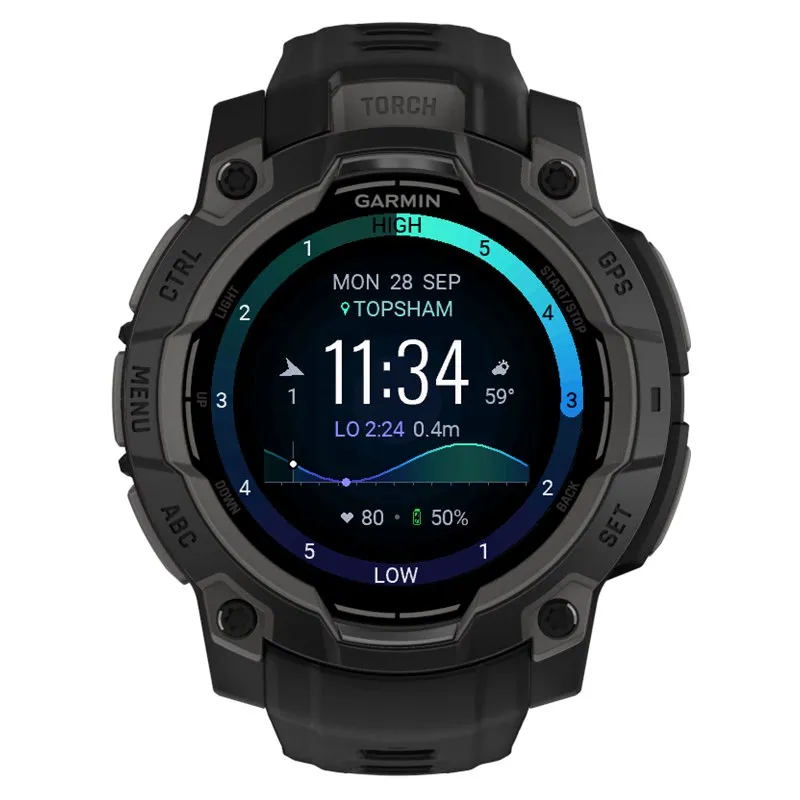
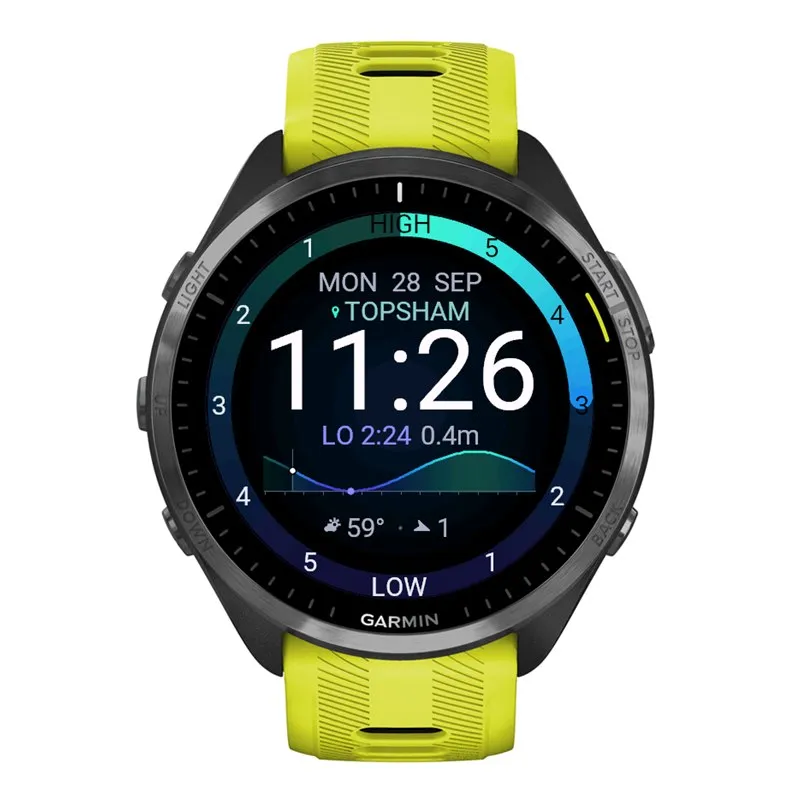
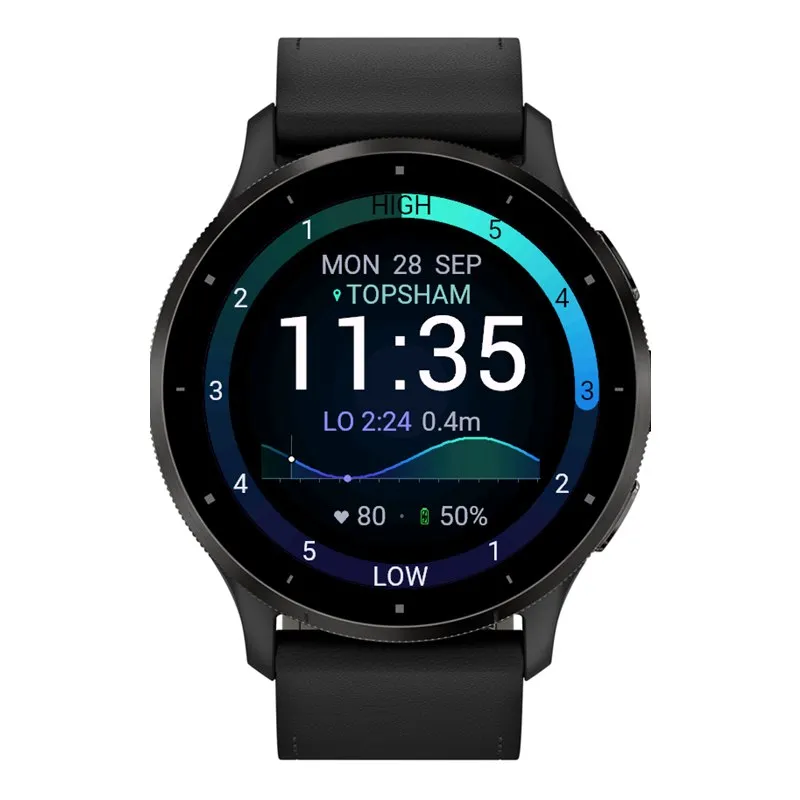
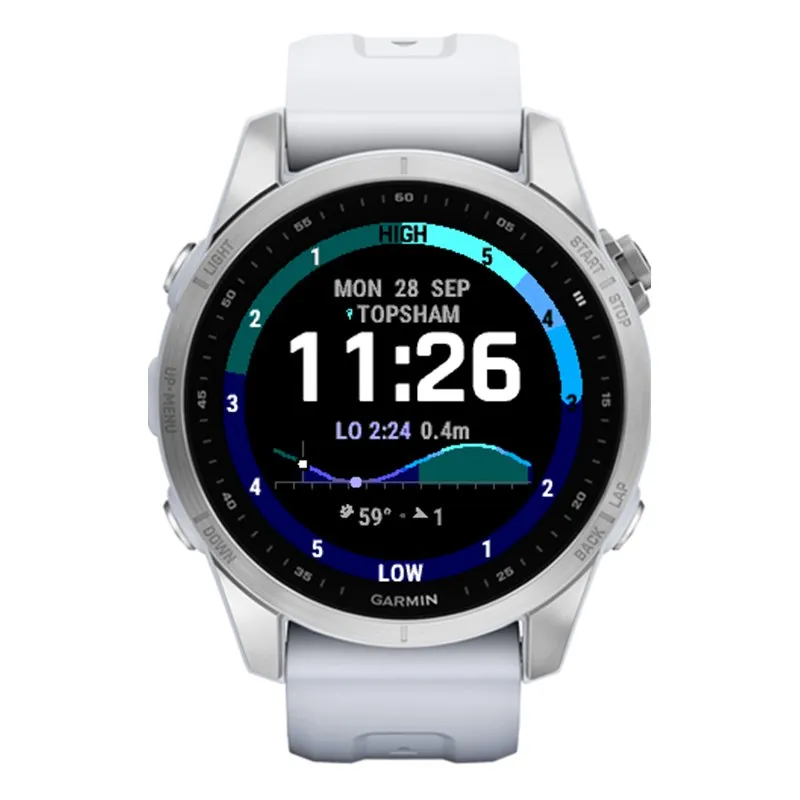
TideFace turns the bezel into a tide clock: HIGH at the top, LOW at the bottom, and a pointer showing exactly where you are between them. Below the time you get the next high or low tide with its time and height, plus a 14-hour tide curve so you can see the water rising and falling through the day.
WHAT'S ON THE FACE
- Tide-clock bezel counting the hours to the next high and low
- Next high or low tide: time and height
- 14-hour tide curve with a "now" marker
- Date, time and the name of your tide location
- Two data slots of your choice: heart rate (coloured by HR zone), battery, steps, calories, distance, floors, active minutes, Body Battery, stress, altitude, notifications, respiration, wind or weather
- Wind and weather beside the time on watches with room for them; on others you can put them in the data slots
- 7 colour themes: Ocean, Sunset, Reef, Lava, Twilight, Mono and Arctic
- Dim, burn-in-safe always-on mode for AMOLED watches
TIDE LOCATION
- GPS: tides for wherever you are. TideFace refreshes when you've moved about 5 km.
- Saved places: up to 8 places of your own, each with a name, latitude and longitude. Pick one on the watch under Customise, Tide location.
SETUP: YOUR FREE STORMGLASS KEY
TideFace gets its tide data from StormGlass.io. ***You need your own free API key***
1. Sign up for a free account at stormglass.io and copy your API key.
2. In the Connect IQ app on your phone, open TideFace, Settings and paste it into "StormGlass API key".
Until a key is entered, the face shows "Add StormGlass key".
Be patient with the first download. Garmin only lets watch faces go online in the background every few minutes, so after you add your key or change location the face shows "Loading tides" for a while. It usually takes about 5 minutes, but it can take up to 20 if the first try fails (for example, no phone connection or no GPS fix yet). Keep your phone nearby with Bluetooth on.
The free StormGlass plan allows 10 requests a day. Each request covers the last 12 hours and the next 3 days, so TideFace only downloads once a day per location, and it keeps the tides on the watch in between. If you do hit the daily limit (for example by changing location a lot), the face shows "Daily limit hit" and TideFace stops asking until the limit resets at midnight UTC. The tides it already has stay on the face.
MATCHING YOUR LOCAL TIDE TABLES
Tide heights depend on the level they're measured from (the datum). Choose the one that suits your area under "Tide heights measured from":
- Chart datum (default): mean sea level plus an offset you can set for each place
- LAT (lowest astronomical tide): the chart datum used by UK Admiralty charts and tide tables, and the easiest choice anywhere in the UK
- MLW / MLLW: mean low water / mean lower low water (MLLW is the US chart datum)
- MSL: mean sea level
- MHW / MHHW / HAT: useful for checking clearance under bridges and cables
For more localised tides, "Height adjustment" fine-tunes every height to match your local tide table. For example, if the face shows 0.1 m more than your table, set it to -0.1.
FREE TRIAL
Try TideFace free. When the trial ends, the face shows a short code: enter it at kzl.io/code to unlock it with a one-off payment by PayPal or card, handled by KiezelPay. There's no subscription.
PRIVACY
Your position, or your chosen saved place, is sent only to StormGlass to look up the tides. Nothing else leaves your watch.
Tide predictions are for general guidance only. Always check official tide tables before going on or near the water.
Novità
Version 1.1.1
- Free trial, then a one-off unlock: when the trial ends, the face shows a short code to enter at kzl.io/code (PayPal or card, handled by KiezelPay). No subscription.
- Fewer StormGlass calls: tides now download once a day per location instead of every 6 hours. Each download covers the next 3 days, so you'll rarely get anywhere near the free limit of 10 requests a day.
- Smarter when the limit is reached: if StormGlass says the daily quota is used up, TideFace stops asking and tries again after it resets at midnight UTC, instead of retrying every 15 minutes.
- Clearer messages instead of error numbers: "Daily limit hit", "Check StormGlass key" and "No connection".
- Wind and Weather are now options for the two data slots at the bottom. On watches with a large time font they're shown there instead of beside the time, so nothing overlaps.
Screenshot
Lingua supportata (1)
Dispositivi compatibili (170)
Approach® S50
Approach® S70 (42mm)
Approach® S70 (47mm)
Captain Marvel
Captain Marvel
D2™ Air
D2™ Air X10
D2™ Air X15
D2™ Mach 1
D2™ Mach 1 Pro
D2™ Mach 2
Darth Vader™
Darth Vader™
Descent™ G2
Descent™ MK2
Descent™ MK2
Descent™ Mk2S
Descent™ Mk2S
Descent™ MK3 - 43mm
Descent™ MK3i - 51mm
Enduro™
Enduro™
Enduro™ 2
Enduro™ 3
Enduro™ 4
epix™ (Gen 2)
epix™ (Gen 2)
epix™ Pro (42mm)
epix™ Pro (47mm)
epix™ Pro (51mm)
fēnix® 5 Plus
fēnix® 5 Plus
fēnix® 5S Plus
fēnix® 5S Plus
fēnix® 5X Plus
fēnix® 5X Plus
fēnix® 6
fēnix® 6
fēnix® 6 Dual Power
fēnix® 6 Pro
fēnix® 6 Pro
fēnix® 6 Pro Dual Power
fēnix® 6 Pro Solar
fēnix® 6 Solar
fēnix® 6S
fēnix® 6S
fēnix® 6S Dual Power
fēnix® 6S Pro
fēnix® 6S Pro
fēnix® 6S Pro Dual Power
fēnix® 6S Pro Solar
fēnix® 6S Solar
fēnix® 6X Pro
fēnix® 6X Pro
fēnix® 7
fēnix® 7
fēnix® 7 Pro
fēnix® 7 Pro – Solar Edition (No Wi-Fi®)
fēnix® 7S
fēnix® 7S
fēnix® 7S Pro
fēnix® 7X
fēnix® 7X
fēnix® 7X Pro
fēnix® 7X Pro No Wi-Fi
fēnix® 8 AMOLED (43mm)
fēnix® 8 AMOLED (47mm/51mm)
fēnix® 8 Pro
fēnix® 8 Solar (47mm)
fēnix® 8 Solar (51mm)
fenix® 9 - 43 mm
fenix® 9 – 47 mm
fenix® 9 Pro - 43 mm
fenix® 9 Pro - 47 mm
fenix® 9 Pro - 51 mm
fenix® 9 Pro - Solar 47 mm
fenix® 9 Pro - Solar 51 mm
fēnix® E
First Avenger
First Avenger
ForeAthlete 245
ForeAthlete 245 Music
ForeAthlete 645 Music
ForeAthlete 745
Forerunner® 165
Forerunner® 165 Music
Forerunner® 245
Forerunner® 245
Forerunner® 245 Music
Forerunner® 245 Music
Forerunner® 255
Forerunner® 255 Music
Forerunner® 255S
Forerunner® 255S Music
Forerunner® 265
Forerunner® 265S
Forerunner® 570 - 42mm
Forerunner® 570 - 47mm
Forerunner® 645 Music
Forerunner® 745
Forerunner® 945
Forerunner® 945
Forerunner® 945 LTE
Forerunner® 955 Dual Power
Forerunner® 965
Forerunner® 970
Instinct® 3 – 45 mm, AMOLED
Instinct® 3 – 50 mm, AMOLED
Instinct® Crossover AMOLED
MARQ® (Gen 2)
MARQ® Adventurer (Gen 3)
MARQ® Commander (Gen 2) – Carbon Edition
MARQ™ Adventurer
MARQ™ Adventurer
MARQ™ Athlete
MARQ™ Athlete
MARQ™ Aviator
MARQ™ Aviator
MARQ™ Aviator (Gen 2)
MARQ™ Captain
MARQ™ Captain
MARQ™ Commander
MARQ™ Commander
MARQ™ Driver
MARQ™ Driver
MARQ™ Expedition
MARQ™ Expedition
MARQ™ Golfer
MARQ™ Golfer
Mercedes-Benz Venu®
Mercedes-Benz Venu®
Mercedes-Benz Venu® 2
Mercedes-Benz Venu® 2
Mercedes-Benz Venu® 2S
Mercedes-Benz Venu® 2S
quatix® 6
quatix® 6X
Rey™
Rey™
tactix® 7
tactix® 7 – AMOLED Edition
tactix® 8 – 47 mm, AMOLED
tactix® 8 – 51 mm, Solar
Venu®
Venu®
Venu® 2
Venu® 2
Venu® 2 Plus
Venu® 2 Plus
Venu® 2S
Venu® 2S
Venu® 3
Venu® 3S
Venu® 4 – 41 mm
Venu® 4 – 45 mm
Venu® Sq. 2
Venu® Sq. 2 Music
Venu® Sq. Music
Venu® Sq. Music
Venu® Sq. Music
Venu® Sq. Music
Venu® X1
vívoactive® 3 Music
vívoactive® 3 Music
vívoactive® 4
vívoactive® 4
vívoactive® 4S
vívoactive® 4S
vívoactive® 5
vívoactive® 6
Andamento recente
Valutazione
Recensioni
Date snapshot
2026-10-27 → 2026-10-30