Descrizione
In fact, payment is not required immediately - you have three days to try and evaluate. These three days can be extended multiple times. After the end of the trial period, watch face will still work, but some functions will be disabled.
WEATHER API KEY INSTRUCTIONS:
1. Go to openweathermap.org and open a FREE account. Go to API Keys tab - Current Weather Data - Subscribe - FREE plan - Get API key.
2. Paste this 32-digit key in first option of app settings via Garmin Connect app on your phone. If you received the key on your computer, you can save it in your email draft and open it on your phone.
If you have problems, please use contact developer before leaving a review!
For Celsius / Fahrenheit just set your watch - Settings-System-Units-Temperature.
---
This is an advanced, fully configurable watch face with 3D display, thermometer-like scales, many settings including weather data, oxygen saturation, customizable date with ISO week and much more.
Settings in the following languages: english * Deutsch * français * español * italiana * Português * 中文 * русский
-
The following letters are used to display the date:
d - day number 1..31
D - day of the week (Sun, Mon etc)
m - month number 1..12
M - name of the month (Jan, Feb etc)
y - Two digits of the year 20
Y - Four digits of the year 2020
W - ISO week number
Other letters will appear in the date bar unchanged.
Leading zero will be displayed when setting its color to a different background color.
For example:
d M, D - 23 Jul, Tue
m / d / Y - 06 / 23.2020
m / d / y wW - 06/23/20 w26
*
To update the weather you need a connection to the phone, running on the phone Garmin Connect App (leave it on him start page) and the presence of the phone’s connection to the Internet.
To display the weather and correct the sunrise/sunset calculations of your area, you need to GPS lock - start any activity with GPS (running etc) outdoor and wait for "Green status".
After that, immediately return to watch face - current coordinates will be stored in memory.
Note that you will need to repeat this after changing your location, otherwise the sun times will reflect your last location.
*
Changing app settings in Garmin Express/GCM/CIQ Mobile Store: https://forums.garmin.com/developer/connect-iq/w/wiki/14/changing-your-app-settings-in-garmin-express-gcm-ciq-mobile-store
*
❗You can support my efforts to improve the application with a small donation:
https://pay-to-use.com/?app=22
Если рублями - напишите мне [email protected]
A standard PayPal or Stripe page will open for payment.
The intermediate page is needed so that the intermediary knows that the money is intended for me.
For this I will give you a code.
When I have the possibility to receive money without an intermediary, I will again introduce restrictions. The code will cancel for you.
Novità
WITHOUT YOUR REWIEW, I WILL NOT BE ABLE TO GET NEW USERS. NO NEW USERS ➟ NO PROGRESS ➟ NO NEW PROJECTS
PLEASE SUPPORT ME WITH A REWIEW IF YOU LIKE MY WORK. IT IS IMPORTANT. THANK YOU!
NOTE: Please do not leave suggestions, requests or bug reports in the reviews. Instead, please use the "Contact Developer" link on this page; I will endeavour to reply to everyone (add email for answer)
❗I recently got the possibility to accept donations:
https://pay-to-use.com/?app=22
For more information, read the description to end.
❗To solve the problem of not saving settings, you should:
- remove watch face, reboot the watch (turn off and on), install watch face again.
*
01.10.2024
SDK 7.3.1
- Added options for data fields:
Respiration value
Body battery
Stress level
Time to recovery
*
30.08.2024
Added new devices with SDK 7.3.0
*
01.08.2023
Fixed lower bar display
*
01.08.2023
Minor fixes
Added new devices with SDK 6.2.1:
When using the Russian language, you must enter the code in the last item of the settings - ask me about it.
*
21.03.2022
Due to the impossibility of receiving money, I temporarily make this application free. I will inform about the renewal of the paid version in advance. Paid codes will continue.
*
08.07.2021
Added "Weather source" option:
- OWM for fixed location
- OWM follows you
- Garmin weather
Small fix for the pressure trend.
SDK 4.0.4
*
29.04.2021
Added Garmin Venu2 series
SDK 4.0.1
*
27.04.2021
Fixed display of pressure trend
*
26.03.2021
Added support for new devices.
SDK 3.2.5
Now, to get weather data, you need to enter the API key from openweathermap.org in the first item of settings.
*
13.11.2020
Improved energy efficiency
Added support for Descent Mk2
Small alignments
*
22.10.2020
Added Bulgarian language in settings - thanks to Robertino
*
19.10.2020
Added option "Weather feels like temperature"
Added option "Pessure on sea level from weather"
Changed "Framed upper text" option to "Upper font frame color"
Changed "Framed center text" option to "Center font frame color"
Fixed display of fields without icons.
Fixed display of the top margin.
Minor alignments and fixes.
*
16.10.2020
Fixed fonts color filling for VENU.
Minor rendering alignment and fixes.
*
15.10.2020
First release
Screenshot
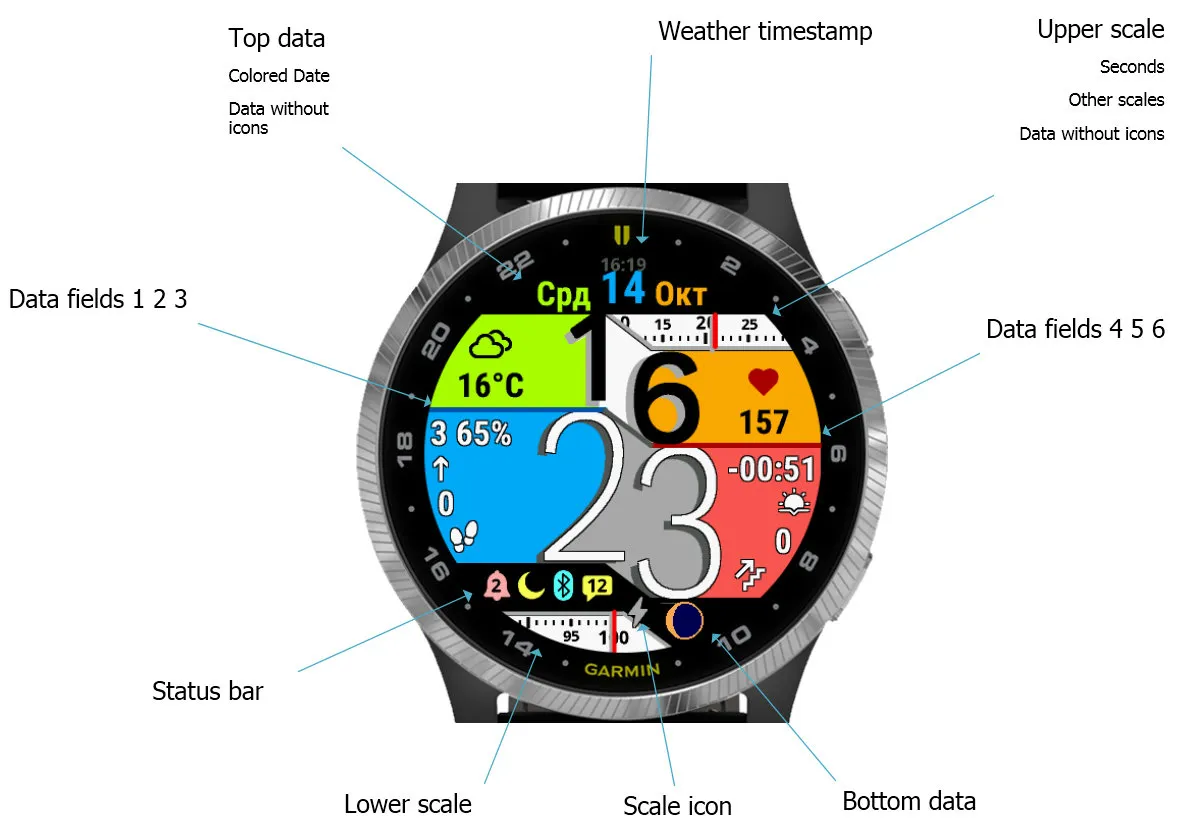
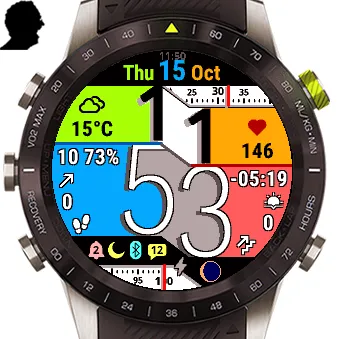
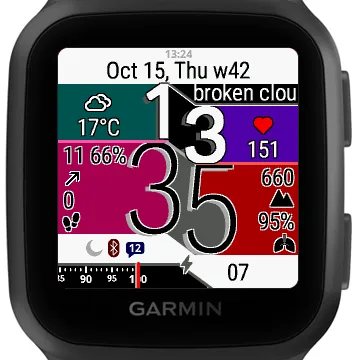
Lingua supportata (1)
Dispositivi compatibili (181)
Approach® S60
Approach® S60
Approach® S62
Approach® S62
Approach® S70 (42mm)
Approach® S70 (47mm)
Captain Marvel
Captain Marvel
D2™ Air
D2™ Air X10
D2™ Charlie
D2™ Charlie
D2™ Delta
D2™ Delta PX
D2™ Delta PX
D2™ Delta S
D2™ Mach 1
D2™ Mach 1 Pro
Darth Vader™
Darth Vader™
Descent™ Mk1
Descent™ Mk1
Descent™ MK2
Descent™ MK2
Descent™ Mk2S
Descent™ Mk2S
Descent™ MK3 - 43mm
Descent™ MK3i - 51mm
Enduro™
Enduro™
Enduro™ 2
Enduro™ 3
epix™ (Gen 2)
epix™ (Gen 2)
epix™ Pro (42mm)
epix™ Pro (47mm)
epix™ Pro (51mm)
fēnix® 5
fēnix® 5
fēnix® 5 Plus
fēnix® 5 Plus
fēnix® 5S
fēnix® 5S
fēnix® 5S Plus
fēnix® 5S Plus
fēnix® 5X
fēnix® 5X
fēnix® 5X Plus
fēnix® 5X Plus
fēnix® 6
fēnix® 6
fēnix® 6 Dual Power
fēnix® 6 Pro
fēnix® 6 Pro
fēnix® 6 Pro Dual Power
fēnix® 6 Pro Solar
fēnix® 6 Solar
fēnix® 6S
fēnix® 6S
fēnix® 6S Dual Power
fēnix® 6S Pro
fēnix® 6S Pro
fēnix® 6S Pro Dual Power
fēnix® 6S Pro Solar
fēnix® 6S Solar
fēnix® 6X Pro
fēnix® 6X Pro
fēnix® 7
fēnix® 7
fēnix® 7 Pro
fēnix® 7 Pro – Solar Edition (No Wi-Fi®)
fēnix® 7S
fēnix® 7S
fēnix® 7S Pro
fēnix® 7X
fēnix® 7X
fēnix® 7X Pro
fēnix® 7X Pro No Wi-Fi
fēnix® 8 AMOLED (43mm)
fēnix® 8 AMOLED (47mm/51mm)
fēnix® 8 Solar (47mm)
fēnix® 8 Solar (51mm)
fenix® 9 - 43 mm
fenix® 9 – 47 mm
fēnix® Chronos
fēnix® Chronos
fēnix® E
First Avenger
First Avenger
ForeAthlete 245
ForeAthlete 245 Music
ForeAthlete 645
ForeAthlete 645 Music
ForeAthlete 745
ForeAthlete 935
Forerunner® 165
Forerunner® 165 Music
Forerunner® 245
Forerunner® 245
Forerunner® 245 Music
Forerunner® 245 Music
Forerunner® 255
Forerunner® 255 Music
Forerunner® 255S
Forerunner® 255S Music
Forerunner® 265
Forerunner® 265S
Forerunner® 645
Forerunner® 645 Music
Forerunner® 745
Forerunner® 935
Forerunner® 945
Forerunner® 945
Forerunner® 945 LTE
Forerunner® 955 Dual Power
Forerunner® 965
MARQ® (Gen 2)
MARQ® Commander (Gen 2) – Carbon Edition
MARQ™ Adventurer
MARQ™ Adventurer
MARQ™ Athlete
MARQ™ Athlete
MARQ™ Aviator
MARQ™ Aviator
MARQ™ Aviator (Gen 2)
MARQ™ Captain
MARQ™ Captain
MARQ™ Commander
MARQ™ Commander
MARQ™ Driver
MARQ™ Driver
MARQ™ Expedition
MARQ™ Expedition
MARQ™ Golfer
MARQ™ Golfer
Mercedes-Benz Venu®
Mercedes-Benz Venu®
Mercedes-Benz Venu® 2
Mercedes-Benz Venu® 2
Mercedes-Benz Venu® 2S
Mercedes-Benz Venu® 2S
quatix® 6
quatix® 6X
Rey™
Rey™
tactix® 7
tactix® 7 – AMOLED Edition
tactix® 8 – 47 mm, AMOLED
tactix® 8 – 51 mm, Solar
Venu®
Venu®
Venu® 2
Venu® 2
Venu® 2 Plus
Venu® 2 Plus
Venu® 2S
Venu® 2S
Venu® 3
Venu® 3S
Venu® Sq.
Venu® Sq.
Venu® Sq.
Venu® Sq.
Venu® Sq. Music
Venu® Sq. Music
Venu® Sq. Music
Venu® Sq. Music
vívoactive® 3
vívoactive® 3
vívoactive® 3
vívoactive® 3 Mercedes-Benz® Collection
vívoactive® 3 Mercedes-Benz® Collection
vívoactive® 3 Music
vívoactive® 3 Music
vívoactive® 3 Music
vívoactive® 4
vívoactive® 4
vívoactive® 4S
vívoactive® 4S
vívoactive® 5
vívolife
Andamento recente
Valutazione
Recensioni
Date snapshot
2026-10-27 → 2026-11-02