Descrizione
Premium Tactical Watch Face — Advanced Metrics & Customization
For more information about the watch face, customization options, and custom color settings,
please visit:
https://tactical-metric-data-monitor.vercel.app
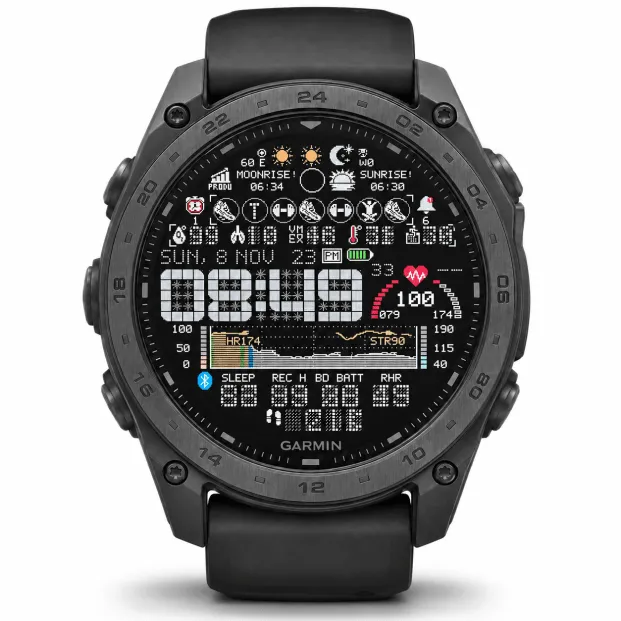
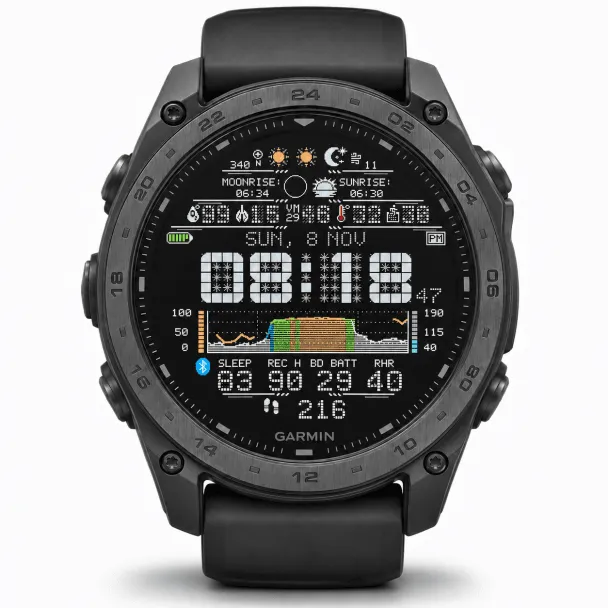
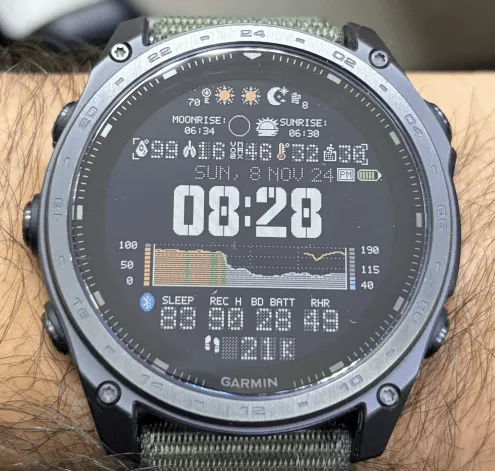
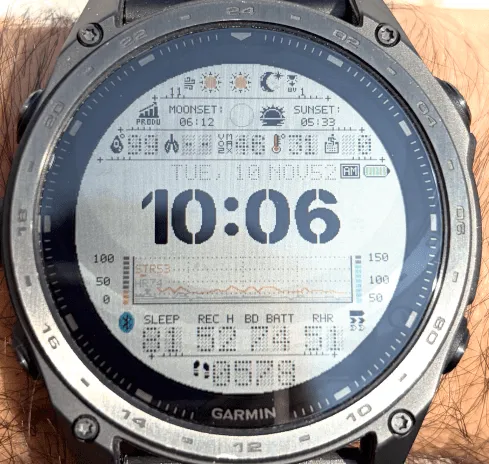
A highly customizable Garmin watch face combining tactical styling, advanced fitness data, detailed weather, activity history, and flexible layouts. Personalize the information you see, how it looks, and how it is displayed.
1. Smart Weather Forecast
Three dynamic icons show morning, noon, and night forecasts using hourly weather conditions: clear sun, clear moon and stars, partly cloudy sun or moon, cloudy/overcast, rain, snow, and thunderstorms. Customize the two surrounding weather fields independently for UV Index, wind speed, wind direction, and other supported data.
2. Moon, Sun & Training Status
View realistic moon phases and moonrise/moonset or sunrise/sunset times, with the option to display the next upcoming solar or lunar event. Dedicated sun and moon symbols make events easy to identify. A separate training status panel offers 8 unique icons with short status labels.
3. 7-Day Activity History
Strava-inspired weekly activity circles update as days pass, showing the activity with the longest recorded duration each day. Unique pixel-art icons represent running, strength/gym, swimming, cycling, and other activities; inactive days keep a default indicator. Show or hide the full activity row.
4. Time, Date & Progress Gauges
Choose from 4 distinctive digital time fonts with different sizes and positions, plus multiple date formats. Add side-panel ring or arc gauges in different styles, or use dual gauges to show two values at once. Assign Heart Rate, Body Battery, step goal, solar intensity, and other supported metrics. Gauge fill follows the selected value. Gauges can also be hidden.
5. Advanced Dual-Metric Graphs
Display two independently selected datasets using 7 graph styles, including lines, bars, lollipops, and other creative designs. Supported historical metrics include Heart Rate, Stress, barometric pressure, elevation, temperature, and Pulse Ox (SpO2). Mix metrics freely where data is available. Select 1-, 2-, 3-, or 4-hour history and customize the graph's minimum and maximum axis scales.
6. Independent Side Progress Bars
The graph's left and right vertical bars can each display a different metric, such as Body Battery, step goal, watch battery, or Stress, providing at-a-glance progress.
7. Custom Bottom Metrics & Indicators
Choose and arrange the bottom data fields to match your priorities. Integrated indicators include Move Bar, Bluetooth phone connection, alarm count, and notification count.
8. Colors & Personalization
Use Garmin Connect IQ settings to customize main time and metric text colors, their backgrounds, activity icons, weekly streak circles, and other interface elements. Create monochrome tactical themes or colorful combinations.
9. Direct On-Watch Settings
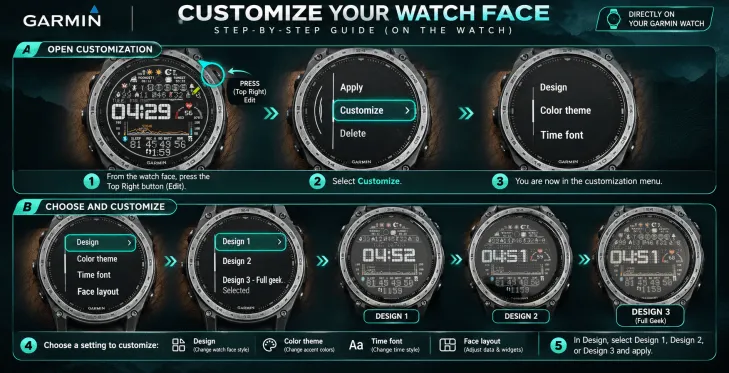
Change key appearance options directly on compatible Garmin watches, including watch-face layout, color theme, and digital time font. Additional settings remain available in Connect IQ.
IMPORTANT: Custom color personalization is currently in BETA. Some color combinations or options may still be refined. More features, improvements, and updates are coming soon.
For more information about the watch face, customization options, and custom color settings,
please visit:
https://tactical-metric-data-monitor.vercel.app
One watch face. Multiple designs. Your data, your layout, your style.
Note: Feature availability depends on Garmin device compatibility, sensors, connected services, and available data.
Novità
What's New — Version 1.2
Now compatiible with all MIP Solar 47MM
What's New — Version 1.1
Major Performance Update & New Customization Features
Version 1.1 brings significant performance improvements, new display options, additional color themes, and enhanced weather information.
• Up to 87% Faster Rendering: Major optimization of all seven HR/Stress graph styles, with up to 87% faster rendering in simulator benchmarks. Smoother screen redraws and improved responsiveness when returning from menus and system overlays.
• Optimized Performance & Efficiency: Improved graph caching and reduced unnecessary drawing operations to lower processing demands and improve overall efficiency.
• New 4-Metric Layout (3-3-3-3): Display four metrics with up to three digits each using a smaller font while maintaining a clean, balanced layout.
• Minimal Display Mode: Optional time-and-date-only display when inactive, automatically restoring your selected layout when the watch wakes.
• Automatic Temperature Units: Weather and watch temperature now follow your Garmin system setting (°C or °F).
• Improved Moon & Weather Display: Refined moon information, corrected nighttime weather icons, and improved three-slot forecasts with dominant weather summaries for completed periods.
• New Color Themes: Added Blue, Amber, and Amber & Blue themes for more personalization.
• Stability Improvements: Additional optimizations, bug fixes, and compatibility testing across supported Garmin devices.
Important Update Note: If your HR/Stress graphs appear different after updating, first try restarting your watch. If the issue persists, uninstalling and reinstalling the watch face may resolve it. Please note that reinstalling may reset your customized settings.
Thank you for your support!
Screenshot
Lingua supportata (1)
Dispositivi compatibili (19)
Enduro™ 2
Enduro™ 3
Enduro™ 4
fēnix® 7
fēnix® 7
fēnix® 7 Pro
fēnix® 7 Pro – Solar Edition (No Wi-Fi®)
fēnix® 7X
fēnix® 7X
fēnix® 7X Pro
fēnix® 8 Solar (47mm)
fēnix® 8 Solar (51mm)
fenix® 9 Pro - Solar 47 mm
fenix® 9 Pro - Solar 51 mm
Forerunner® 255
Forerunner® 255 Music
Forerunner® 955 Dual Power
tactix® 7
tactix® 8 – 51 mm, Solar
Andamento recente
Valutazione
Recensioni
Date snapshot
2026-11-11 → 2026-11-30