Descrizione
Tide and swell on one graph, so you can see what the swell is doing on any tide. Built for people who check the water before anything else.
SETUP IN 4 STEPS
Surf Local needs a free Stormglass API key. Without one it shows no surf data. Setup takes about 5 minutes and costs nothing.
1. Get your free key
Go to stormglass.io and sign up for the free plan. Copy the API key from your Stormglass dashboard.
2. Install the face
In the Connect IQ app on your phone, search for Surf Local and tap Install. Let your watch sync.
3. Add your key
In the Garmin Connect app go to Garmin Devices, your watch, Appearance, Watch Faces, Surf Local, Settings. Paste the key into Stormglass API key and tap Done. You can also do this in the Connect IQ app under your watch, Watch Faces, Surf Local, Settings.
4. Turn it on
On the watch, hold MENU, select Watch Face, scroll to Surf Local and select Apply.
Your phone needs to be nearby with Garmin Connect running. Wind, swell and tide arrive within about 5 minutes and the swell graph about 5 minutes after that. The place name at the bottom turns from amber to teal once the data is in.
If something goes wrong the place name turns amber and the bottom line says why. NO PHONE means the watch could not reach Garmin Connect on your phone. CHECK API KEY means the key is wrong or not pasted in full. DAILY LIMIT means the 10 free requests for the day are used. It picks up again by itself once the allowance resets.
WHAT THE FACE SHOWS
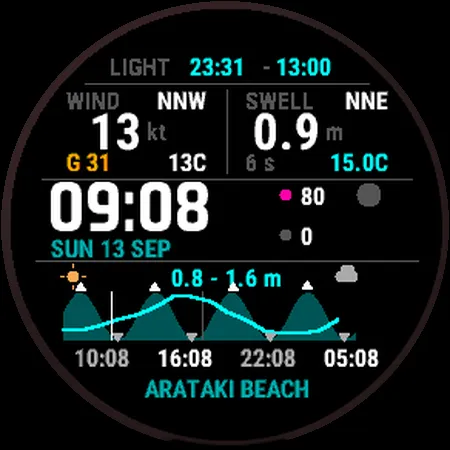
Top: battery, then first light and last light. First light is when you can see to paddle out, not sunrise.
Wind (left): speed and direction, with gust below it. The gust turns orange when it is well above the steady wind. Air temperature beside it.
Swell (right): height, direction, period and water temperature.
Middle: time, date, heart rate, steps and the moon. The moon is drawn as it looks from where you are, which tells you if you are on springs or neaps.
Graph: tide is the filled shape and swell is the line over it, so reading straight up from a tide gives you the swell at that tide. It starts at midnight and shows today and tomorrow, or today only if you prefer. A white line marks now. Every high and low has a marker and the next 4 tide times are listed underneath, white for high and grey for low. The swell range sits above the graph, with the Garmin weather for today on the left and tomorrow on the right.
Bottom: where the forecast is for. Teal means the data is current. Amber means it has not loaded yet or is old.
LOCATION
Surf Local names the nearest of 175 New Zealand surf breaks and coastal towns, offline. Outside NZ it shows your coordinates. A watch face cannot turn GPS on, so it uses the position your watch already has. After travelling, start any GPS activity for a minute and it will pick up the new spot. You can also lock it to one break in the settings.
SETTINGS
Stormglass API key, plus an optional second key
Swell height in metres or feet
Wind in knots, km/h or mph
Tide graph: today and tomorrow, or today only
Lock to a fixed location, with latitude and longitude
Refresh interval, 3 to 24 hours (6 is the default)
Distance moved before it fetches for a new place
Tide datum, MSL or LAT
Location label, to override the automatic name
Temperature and 12 or 24 hour time follow your watch settings.
STORMGLASS ALLOWANCE
The free plan allows 10 requests a day. Surf Local stays inside that. It refreshes every 6 hours, tracks what it has used and stops before the limit. Add a second free key and it switches over when the first runs out.
WATCHES
Fenix 7X, Fenix 7X Pro, Enduro 2 and tactix 7. Want it on a different Garmin? Mention your model in a review.
Without a phone connection the face still shows time, light, moon, battery, heart rate and steps. It also keeps the last surf data it fetched.
Not affiliated with Stormglass. Tide predictions are astronomical and do not account for weather. Use official sources where it matters.
Novità
Version 1.3.2
IMPROVED
If the swell forecast can't reach your phone, it now tries again every 15 minutes instead of giving up for the day. These retries don't use any of your daily requests.
When the phone link fails, the text above the graph shows the Garmin error number, for example OFFLINE 104.
Version 1.3.1
FIXED
The swell line and the swell range above the graph now show. Stormglass sends the forecast under a different heading to the tide data and the face was looking in the wrong place, so it threw every forecast away. This has been broken since the graph was added.
IMPROVED
When the place name turns amber, the bottom line now says why: NO PHONE, CHECK API KEY or DAILY LIMIT.
Changing units or the graph setting no longer uses any of your 10 daily requests.
If a refresh fails it tries again sooner, so the data does not go stale.
After updating, it fetches fresh data straight away.
Version 1.3.0
Thanks for the feedback in the reviews. This update covers it.
NEW
Battery icon and percentage at the top.
Swell height in metres or feet. New setting.
Tide graph can show today only, or today and tomorrow. New setting. The graph now always starts at midnight.
Wind in mph as well as knots and km/h.
Temperature and 12 or 24 hour time now follow your watch settings.
Now available on the Fenix 7X Pro.
IMPROVED
Moon is bigger with much stronger contrast, so the phase is easy to read. It is drawn with a proper crescent and the right way round for the southern hemisphere.
Tide times are now to the minute rather than rounded to the hour.
High tide markers no longer overlap the text above the graph.
After updating, the face fetches fresh data straight away.
FIXED
Wrong temperatures on watches set to Fahrenheit.
Version 1.2.0
FIXED - THE SWELL LINE NOW HAS A WAKE OF ITS OWN
The swell line and the swell range have been blank since the graph was introduced. The cause was structural, not a parsing detail.
The background service was making three web requests in a single wake: conditions, then tide, then the swell forecast. A Connect IQ background process gets roughly 30 seconds before it is terminated, and three round trips through the phone did not fit inside it. The first two landed, which is why wind, swell now and tide always worked, and the third was cut off before its callback could run. No error was ever recorded because the code that would have recorded it never executed.
The forecast is now fetched on its own background wake, five minutes after the conditions land, with the full time budget to itself. Daily request use is unchanged at 9 of the 10 the free Stormglass plan allows.
DAY TEMPERATURES
Low and high beside each weather icon, in white, reading as 11/18.
Version 1.1.2 and 1.1.1
Earlier attempts at the swell forecast. The response is now unwrapped the same way the working calls do it, the window matches the 48 hours the graph draws rather than 72, and the "fetched today" marker is only set once data actually arrives so a failed fetch retries instead of locking out until the next day. Larger moon phase icon.
Version 1.1.0
TIDE AND SWELL ON ONE GRAPH
The tide curve and the swell forecast share a single two day time axis. Read straight up from any tide and you get the swell at that tide. Tide is the filled shape, swell is the line over it.
EVERY HIGH AND LOW MARKED
Each turning point gets a marker on the graph, and the next four are labelled with their times, white for a high and grey for a low.
IT NAMES YOUR BREAK
A list of 175 New Zealand surf breaks and coastal towns is built into the app. The face names the nearest one to wherever your watch is, with no internet and no API request. Travel and it follows you. Outside New Zealand it shows your coordinates. Your own label in the settings still overrides it.
No API key is shipped with the app. Add your own in Garmin Connect.
Screenshot
Lingua supportata (1)
Dispositivi compatibili (6)
Andamento recente
Valutazione
Recensioni
Date snapshot
2026-10-27 → 2026-11-02