Kuvaus
TRY FREE FOR 3 DAYS — BUY ONLY IF YOU LIKE IT
Enjoy a 72-hour free trial from first launch. No payment is needed to try it. If you like it, buy a one-time $4.50 USD license to keep using it after the trial. If it is not for you, no purchase is required.
EGE WORD LOCATION — PREMIUM WATCH FACE
ANIMATED LOCATION • MOON PHASE • CUSTOMIZABLE DATA
BUY PREMIUM — $4.50 USD, one-time purchase for one watch:
https://egewatchface.com/products/terramark-navigator
HOW TO ACTIVATE
1. Install Ege Word Location and open its Connect IQ settings.
2. Copy Watch ID (send this to the developer). If it says Open watch face, then sync, open the face, sync and reopen Settings.
3. Buy your license at the link above and provide your Watch ID. If no ID field appears, email the Watch ID and Shopify order number to [email protected].
4. After payment and Watch ID verification, your watch-specific code is sent by email. Activation is manual, not instant.
5. Paste the complete code into Premium unlock code, save and sync.
TerraMark and Ege Word Location are the same watch-face design. One license covers either listing on the same watch; do not purchase twice.
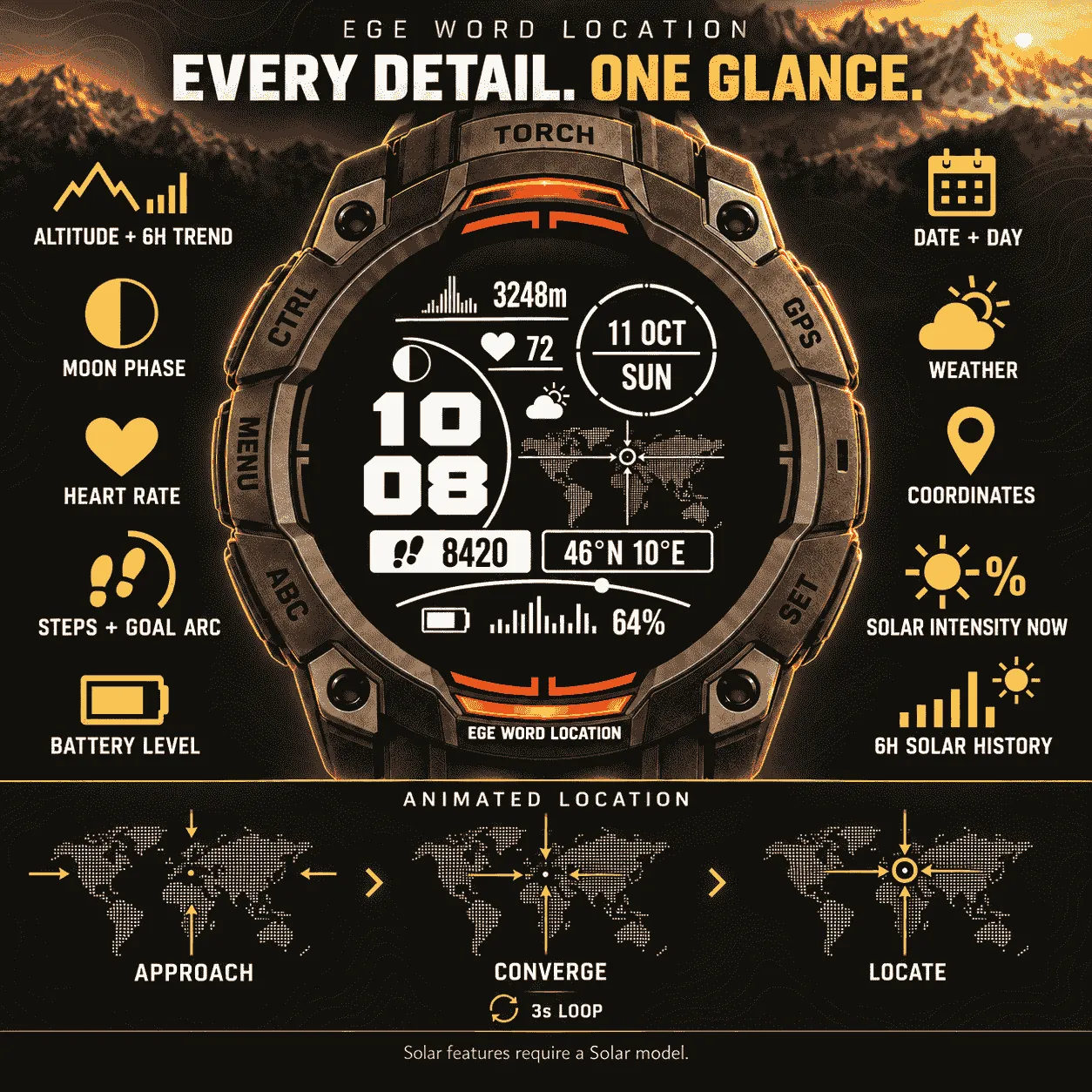
ANIMATED WORLD MAP

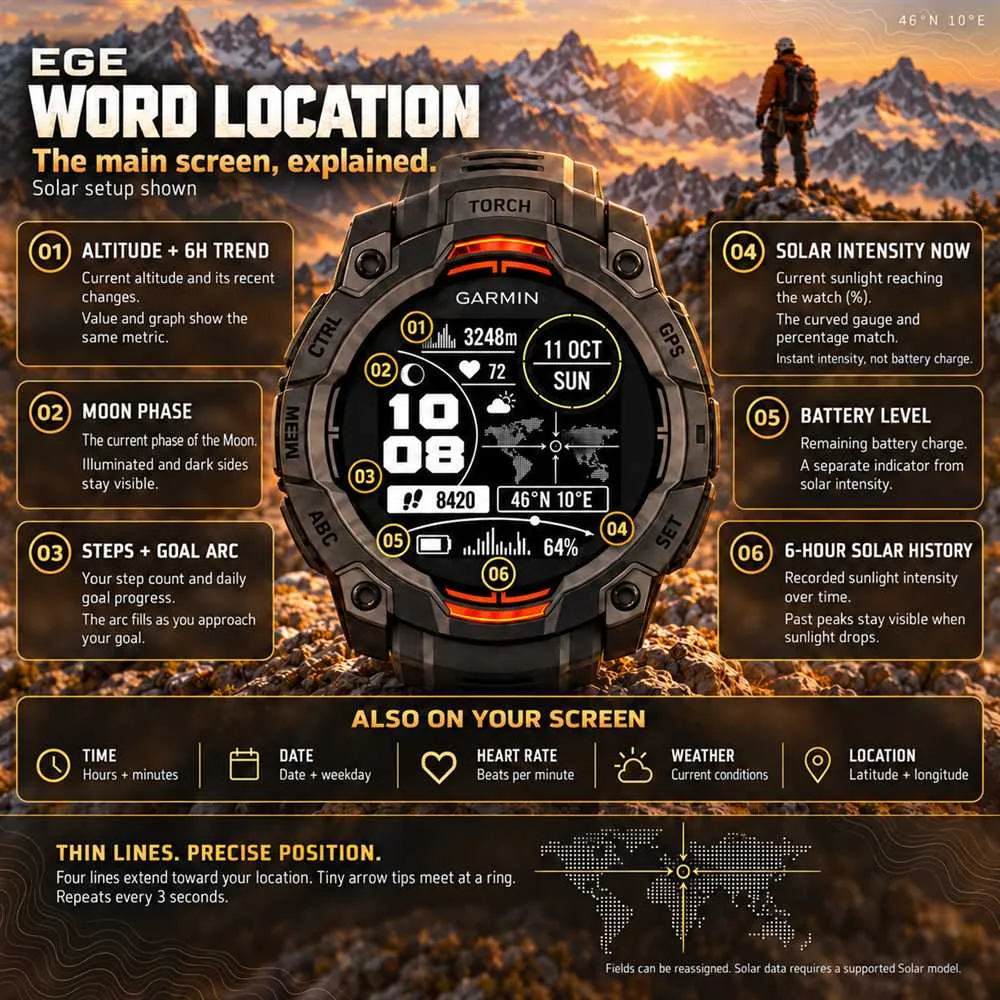
Four thin lines with arrow tips extend from four directions toward your position and meet at a ring. The cycle repeats every 3 seconds in the active display. Set Location animation to Off to keep the arrows fixed at your position. Latitude and longitude appear in a separate badge. Location is checked every 24 hours from available GPS/weather data; not continuous GPS or navigation.
MAIN DISPLAY
• Bold digital hours/minutes and a separate date circle.
• Moon phase showing its illuminated and dark portions.
• Altitude with a matching 6-hour graph, heart rate and weather.
• Activity badge with an icon and goal-progress arc.
• Current solar intensity, curved gauge and percentage on supported Solar watches.
• Battery indicator and a separate history graph.
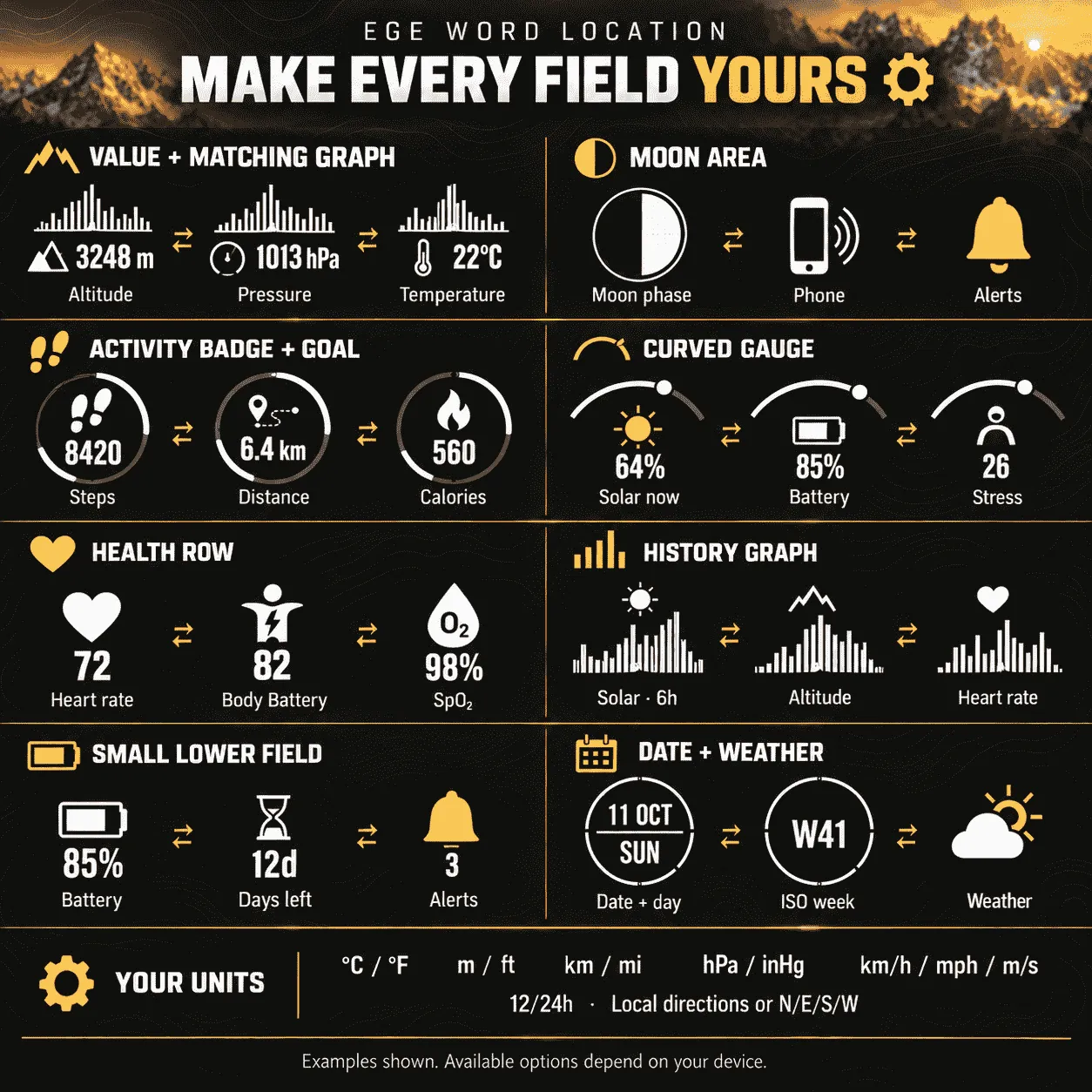
CHOOSE WHAT EACH AREA SHOWS
• Top value + matching graph: altitude, temperature, pressure, daily distance, feels-like temperature, humidity, wind, heart rate, stress or Body Battery. Value and graph always show the same metric.
• Health row: heart rate, stress, Body Battery, last SpO2, respiration or recovery time.
• Activity badge: steps, distance, calories, floors climbed, weekly intensity minutes, stress or Body Battery. The large arc can follow the badge or a separately selected goal/level.
• Lower curved gauge: current solar intensity, battery, Body Battery, stress or step goal. Battery readout: percent or estimated days remaining.
• Small lower field: battery icon, battery percent, days remaining, notifications or phone connection.
• Bottom graph: 6-hour solar intensity, stress, Body Battery, heart rate, pressure or altitude; or 24-hour battery history.
• Moon/weather areas: normal icon, phone connection, notifications or off.
• Date circle: date + weekday, date + ISO week or second time zone.
Presets: Automatic, Solar, Battery, Wellbeing and Outdoor.
SOLAR & HISTORY
Solar percentage measures current sunlight intensity, not battery charge. Solar history preserves the peak in each 5-minute interval over 6 hours. Earlier peaks remain after current intensity drops. Solar and some other histories accumulate while this face runs; earlier Garmin solar-widget history is not imported.
UNITS & SETTINGS
°C/°F • m/ft • km/mi • hPa/inHg • km/h, mph or m/s.
12/24-hour time, leading zero and local/international coordinate letters. Dates follow supported watch languages; settings are in English. The second time zone uses a fixed UTC offset.
DEVICE SUPPORT
Compatible Instinct 2/2S/2X, 3 Solar, 3 AMOLED, E and Crossover models: see Compatible Devices. Original Instinct/Instinct Solar are unsupported. Non-Solar models can use alternative fields. Data depends on device, sensors and permissions; unavailable values show --.
AMOLED low-power mode shows time/date only; animation runs in the active view.
Preview images use sample data.
Uutta
Location animation can be turned Off in Connect IQ settings. The four arrows and location ring stay fixed at the saved position, with no per-second map redraw in static mode.
Location is now checked once every 24 hours using available watch GPS/weather data. If no new location is available, the last saved position remains visible. This is not continuous GPS navigation.
Your existing animation preference, layout, Watch ID and Premium code are preserved.
Kuvakaappaukset