Beschreibung
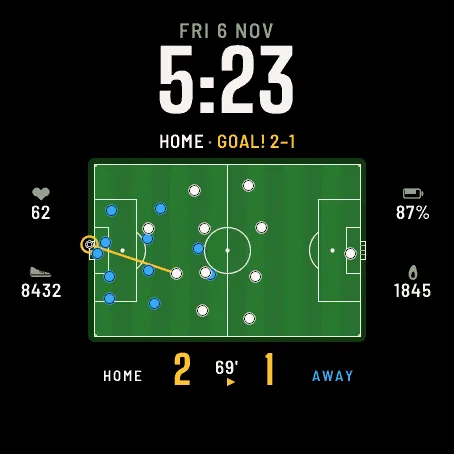
A football (soccer) match plays out on your wrist. A new match kicks off on every even hour (12, 2, 4, 6, 8 and 10, am and pm), and the clock is the match clock: the first half runs from the hour and the second half from the next hour, each 45 minutes plus 2 to 4 minutes of injury time. Every 30 seconds the team with the ball makes a play (a pass, a cross, a tackle, a shot, a corner, a free kick or a penalty) and the 22 players and the ball move on the pitch. The latest play sits above the pitch and the score, match minute and possession arrow below it, with the time and date at the top and four readings of your choice at the sides.
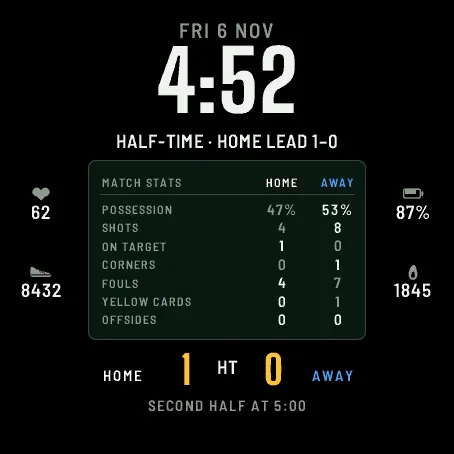
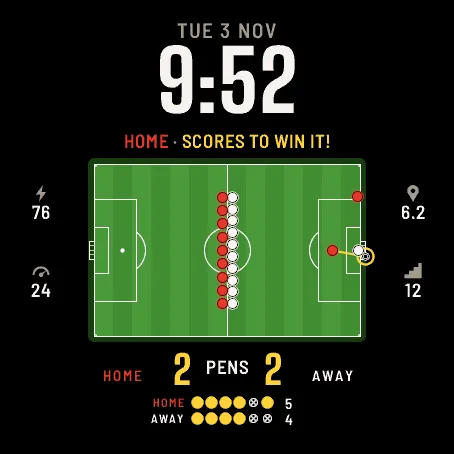
Every play is decided by a random number generator from real-match odds, and a match averages a little under three goals. If it's level in the second half both sides push for a winner, and if it's still level after 90 minutes there's a penalty shootout straight away (about one match in eight): one kick every 30 seconds, best of five, shown kick by kick, and if it's still level after five each the home side wins it in the sixth round. At half-time and full time the match stats take the pitch's place (possession, shots, shots on target, corners, fouls, yellow cards and offsides), with the score and when play restarts. Every watch with the face shows the same match at the same local time.
Settings:
- Pitch: Stadium, Night match, Classic or Mono
- Top left, Bottom left, Top right, Bottom right: battery, steps, heart rate, calories, Body Battery, stress, distance, floors climbed, active minutes, notifications, or off
- Shot marks: show or hide where this half's earlier shots were taken (gold dots goals, rings the rest); hidden at first
- Possession: show or hide a bar with each team's share of the ball so far; hidden at first
Works on 50 round Garmin AMOLED watches, including the Forerunner 970, 965, 570, 265 and 165, fēnix 8 and 9, epix Pro, Venu 2, 3 and 4, vívoactive 5 and 6, and Instinct 3 AMOLED.
The time follows your watch's 12 or 24-hour setting.
Settings can be changed in the Connect IQ app on your phone, or on the watch from the watch face's settings menu.
Month and weekday names are shown in English.
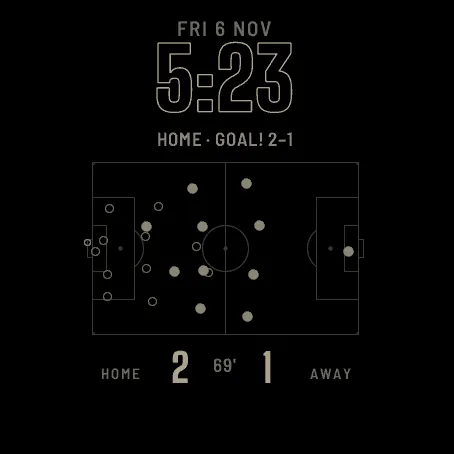
In always-on mode the face switches to a dim outline of the pitch and players that lights less than a tenth of the screen and shifts slightly every minute to protect the AMOLED display.
Found a bug or have an idea? Please use "Contact Developer" on this page – I read every message and fix things quickly. Reviews don't let me reply to you.
Enjoying it? A rating helps other people find it.
More from Digital-Mainspring:
• Hue Wash (free) – https://apps.garmin.com/apps/bc39d7a8-a16a-4820-bc4d-f20397357031
• Aurelius – https://apps.garmin.com/apps/8bd76e09-e8b1-4e90-95e7-426b10f5428d
• Home Planet – https://apps.garmin.com/apps/36386ea2-5ae9-4e7c-b560-ab82c5c13bec
All my faces: https://apps.garmin.com/developer/481b90cc-0e16-49c5-8153-7d73cd4b5476/apps
Instagram: @digitalmainspring
Screenshots
Unterstützte Sprache (1)
Kompatible Geräte (64)
Approach® S50
Approach® S70 (42mm)
Approach® S70 (47mm)
Approach® S72 - 43 mm
Approach® S72 - 47 mm
D2™ Air X10
D2™ Air X15
D2™ Mach 1
D2™ Mach 1 Pro
D2™ Mach 2
D2™ Mach 2 Pro
Descent™ G2
Descent™ MK3 - 43mm
Descent™ MK3i - 51mm
epix™ (Gen 2)
epix™ (Gen 2)
epix™ Pro (42mm)
epix™ Pro (47mm)
epix™ Pro (51mm)
fēnix® 8 AMOLED (43mm)
fēnix® 8 AMOLED (47mm/51mm)
fēnix® 8 Pro
fenix® 9 - 43 mm
fenix® 9 – 47 mm
fenix® 9 Pro - 43 mm
fenix® 9 Pro - 47 mm
fenix® 9 Pro - 51 mm
fēnix® E
Forerunner® 165
Forerunner® 165 Music
Forerunner® 170
Forerunner® 170 Music
Forerunner® 265
Forerunner® 265S
Forerunner® 570 - 42mm
Forerunner® 570 - 47mm
Forerunner® 70
Forerunner® 70
Forerunner® 965
Forerunner® 970
Instinct® 3 – 45 mm, AMOLED
Instinct® 3 – 50 mm, AMOLED
MARQ® (Gen 2)
MARQ® Adventurer (Gen 3)
MARQ® Commander (Gen 2) – Carbon Edition
MARQ™ Aviator (Gen 2)
Mercedes-Benz Venu® 2
Mercedes-Benz Venu® 2
Mercedes-Benz Venu® 2S
Mercedes-Benz Venu® 2S
tactix® 7 – AMOLED Edition
tactix® 8 – 47 mm, AMOLED
Venu® 2
Venu® 2
Venu® 2 Plus
Venu® 2 Plus
Venu® 2S
Venu® 2S
Venu® 3
Venu® 3S
Venu® 4 – 41 mm
Venu® 4 – 45 mm
vívoactive® 5
vívoactive® 6
Aktueller Trend
Bewertung
Rezensionen
Snapshot-Tage
2026-11-17 → 2026-11-28