Beschreibung
USD $1.00 one-time purchase for permanent access. Secure checkout via Pay-to-Use after downloading from Garmin Connect IQ. No subscription required.
PORCELAIN DREAMS | KYLKAL WATCH STUDIO
A little porcelain perfection for your wrist.
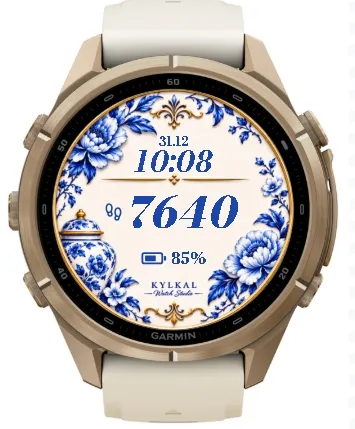
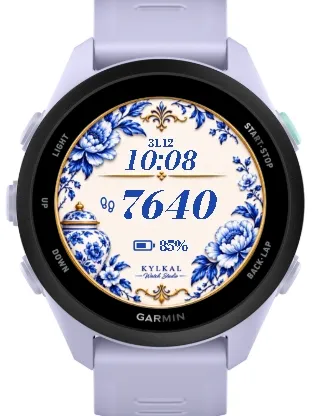
Introducing Porcelain Dreams, an elegant digital Garmin watch face inspired by timeless blue-and-white porcelain, delicate florals and classic vintage charm.
Featuring beautiful cobalt-blue botanical artwork, a soft ivory background, intricate gold detailing and sophisticated navy typography, Porcelain Dreams combines everyday functionality with effortless elegance.
FEATURES
- Elegant digital time display
- Clear date display
- Large, bold step counter
- Battery percentage indicator
- Beautiful blue-and-white porcelain artwork
- Delicate gold accents and decorative detailing
- Signature KYLKAL Watch Studio branding
Designed with simplicity and readability in mind, Porcelain Dreams makes your daily steps the centre of attention without compromising on style.
PURCHASE & ACTIVATION
1. Download Porcelain Dreams through Garmin Connect IQ.
2. Open the watch face on your Garmin device.
3. Scan the QR code displayed on your watch to complete your secure USD $1.00 purchase through Pay-to-Use.
4. Return to Garmin Connect IQ and open Porcelain Dreams under your installed watch faces.
5. Open Settings and check your activation code. It may populate automatically.
6. Allow several minutes for your watch face to activate and unlock.
If the payment screen remains visible after purchasing, try switching to another watch face and then switching back. If necessary, restart your device or reinstall the watch face.
PLEASE NOTE
Colours may vary slightly depending on your Garmin device and display settings.
Thank you for supporting KYLKAL Watch Studio.
A little everyday luxury, beautifully designed.
Screenshots
Unterstützte Sprache (1)
Kompatible Geräte (59)
Approach® S50
Approach® S70 (42mm)
Approach® S70 (47mm)
Approach® S72 - 43 mm
Approach® S72 - 47 mm
D2™ Air X10
D2™ Air X15
D2™ Mach 1
D2™ Mach 1 Pro
D2™ Mach 2
D2™ Mach 2 Pro
Descent™ G2
Descent™ MK3 - 43mm
Descent™ MK3i - 51mm
epix™ (Gen 2)
epix™ (Gen 2)
epix™ Pro (42mm)
epix™ Pro (47mm)
epix™ Pro (51mm)
fēnix® 8 AMOLED (43mm)
fēnix® 8 AMOLED (47mm/51mm)
fēnix® 8 Pro
fenix® 9 - 43 mm
fenix® 9 – 47 mm
fenix® 9 Pro - 43 mm
fenix® 9 Pro - 47 mm
fēnix® E
Forerunner® 165
Forerunner® 165 Music
Forerunner® 170
Forerunner® 170 Music
Forerunner® 265
Forerunner® 570 - 42mm
Forerunner® 570 - 47mm
Forerunner® 70
Forerunner® 70
Forerunner® 965
Forerunner® 970
Instinct® 3 – 45 mm, AMOLED
Instinct® 3 – 50 mm, AMOLED
Instinct® Crossover AMOLED
MARQ® (Gen 2)
MARQ® Adventurer (Gen 3)
MARQ® Commander (Gen 2) – Carbon Edition
MARQ™ Aviator (Gen 2)
Mercedes-Benz Venu® 2
Mercedes-Benz Venu® 2
tactix® 7 – AMOLED Edition
tactix® 8 – 47 mm, AMOLED
Venu® 2
Venu® 2
Venu® 2 Plus
Venu® 2 Plus
Venu® 3
Venu® 3S
Venu® 4 – 41 mm
Venu® 4 – 45 mm
vívoactive® 5
vívoactive® 6
Aktueller Trend
Bewertung
Rezensionen
Snapshot-Tage
2026-11-17 → 2026-11-28