Beschreibung
Pill Reminder PRO MAX helps you follow your medicine and supplement schedule. Check what is due next on a compatible Garmin watch with an AMOLED touchscreen and record each medicine individually.
SET UP ON YOUR PHONE
• Reminders 1–4. Select the hour, a minute in five-minute steps, and days of the week. Enter days as digits from 1 (Monday) to 7 (Sunday). For example, 135 means Monday, Wednesday, and Friday.
• Interval reminders 1–2. Set the first reminder date and time and enter a repeat interval in HH:MM, such as 08:00 for every eight hours. Future reminders are calculated from the scheduled start time, regardless of when you confirm a dose.
• Add up to four medicines per reminder. Names can contain up to 24 characters. Choose a separate colour for each half of the capsule icon.
• Enable the reminders you want, save the settings in Connect IQ, sync your watch, and open the app to apply the schedule.
HOW REMINDERS WORK
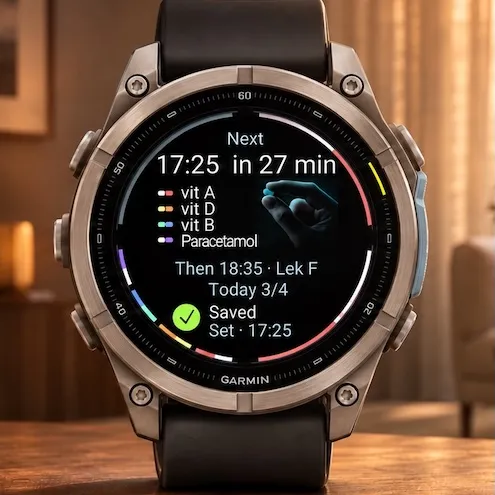
The main screen shows the next reminder time, a countdown, the medicine list, and the following reminder. The Garmin glance shows the time and first medicine in the next set. Reminders scheduled for the same time are grouped together. The main screen displays up to four names, and the confirmation menu shows the full set.
When the app is closed, Garmin can show a system prompt asking you to open it. The prompt follows your watch settings. In-app sound and vibration have separate switches. The reminder screen closes after about seven seconds. Opening the confirmation list pauses that countdown.
HOW TO RECORD MEDICINES TAKEN
1. Tap Confirm to open the set shown on screen. Use Today to select an earlier reminder from the same day.
2. Select the medicines you have taken, or use Select all if you have taken the full set. Tap a selected item again to clear it before saving.
3. Tap Save doses. The watch records only the medicines you selected for that scheduled time. If you leave the list before saving, the selections are discarded.
If you confirm two of four medicines, only two segments of the indicator are coloured. You can confirm the remaining medicines later in Today. The counter marks a set complete once all its medicines have been confirmed. On days with more than 12 scheduled times, use the Today list. The graphical indicator is hidden on those days. Confirmations are kept locally on the watch as a short-term record.
LIMITATIONS
Reminders follow the configured schedule, with no snooze or automatic repeat alerts. The watch system may delay notifications. A reminder may be skipped if the background event arrives more than five minutes late. After changing a schedule, check the new time on the watch and test a reminder.
This app is an organisational aid. For time-critical medicines, use an independent reminder as well and follow the instructions from your doctor or pharmacist.
Screenshots

Unterstützte Sprachen (2)
Kompatible Geräte (65)
Approach® S50
Approach® S70 (42mm)
Approach® S70 (47mm)
Approach® S72 - 43 mm
Approach® S72 - 47 mm
D2™ Air X10
D2™ Air X15
D2™ Mach 1
D2™ Mach 1 Pro
D2™ Mach 2
D2™ Mach 2 Pro
Descent™ G2
Descent™ MK3 - 43mm
Descent™ MK3i - 51mm
epix™ (Gen 2)
epix™ (Gen 2)
epix™ Pro (42mm)
epix™ Pro (47mm)
epix™ Pro (51mm)
fēnix® 8 AMOLED (43mm)
fēnix® 8 AMOLED (47mm/51mm)
fēnix® 8 Pro
fenix® 9 - 43 mm
fenix® 9 – 47 mm
fenix® 9 Pro - 43 mm
fenix® 9 Pro - 47 mm
fenix® 9 Pro - 51 mm
fēnix® E
Forerunner® 165
Forerunner® 165 Music
Forerunner® 170
Forerunner® 170 Music
Forerunner® 265
Forerunner® 265S
Forerunner® 570 - 42mm
Forerunner® 570 - 47mm
Forerunner® 70
Forerunner® 70
Forerunner® 965
Forerunner® 970
MARQ® (Gen 2)
MARQ® Adventurer (Gen 3)
MARQ® Commander (Gen 2) – Carbon Edition
MARQ™ Aviator (Gen 2)
Mercedes-Benz Venu® 2
Mercedes-Benz Venu® 2
Mercedes-Benz Venu® 2S
Mercedes-Benz Venu® 2S
tactix® 7 – AMOLED Edition
tactix® 8 – 47 mm, AMOLED
Venu® 2
Venu® 2
Venu® 2 Plus
Venu® 2 Plus
Venu® 2S
Venu® 2S
Venu® 3
Venu® 3S
Venu® 4 – 41 mm
Venu® 4 – 45 mm
Venu® Sq. 2
Venu® Sq. 2 Music
Venu® X1
vívoactive® 5
vívoactive® 6
Aktueller Trend
Bewertung
Rezensionen
Snapshot-Tage
2026-11-17 → 2026-11-29