Beschreibung
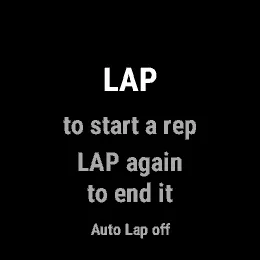
Add this to a data screen of your normal Garmin Run or Track Run. Press LAP when you start a rep and LAP again when you finish it. That is the whole interaction.
Turn Auto Lap off before you use it. A lap triggered by distance is read as a rep boundary, and the numbers become meaningless.
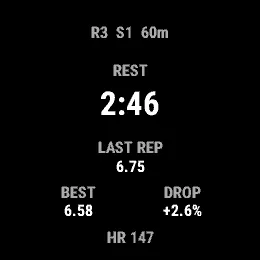
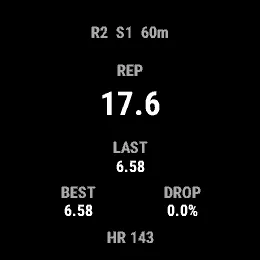
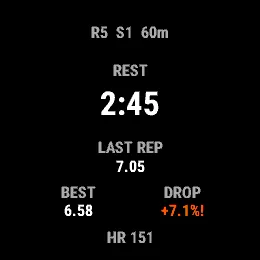
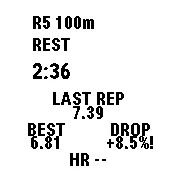
On one screen:
Rep and set. Sets are worked out from your recovery: rest longer than your set threshold and the next rep starts a new set.
Last rep, to 1/100 s. Taken at the lap boundary, so it is not limited by how often a data field can refresh.
Best rep of the session, and drop-off of your last rep against it. Amber past your threshold, red past twice it — with a ! and !! marker as well as colour, so it still reads on a monochrome watch.
Recovery countdown, with cues at 60, 30 and 10 seconds and on GO. Or set it to hold you until your heart rate drops to a figure you choose.
Heart-rate recovery: your heart rate at the end of the rep, less your heart rate 60 seconds into the recovery.
Live heart rate.
Afterwards, in Garmin Connect, your laps alternate rep and rest exactly as you pressed them, each carrying rep_index, set_index, is_rest, rep_time_ms, fatigue_index_pct, hr_recovery_60s and est_max_velocity_mps. Fatigue index and estimated maximum velocity are graphed. The activity summary carries your best rep, mean rep, total reps, total sets and final drop-off.
Rep times come from your LAP presses, not from GPS. This is an ordinary Garmin run: your timeline, map, heart-rate graph, Training Load, Training Status and VO2max are calculated by your watch exactly as they always are. A data field cannot read them and cannot change them.
Speed figures are estimated from 1 Hz GPS and are shown only for reps of 60 m or more, with a good enough fix. Below that you will see --, which is honest rather than unhelpful.
Settings, from the Garmin Connect app: rep distance (30–400 m), rest, set-rest threshold, drop-off thresholds, rest-until-heart-rate target, speed units, alerts on or off, and whether every lap is a rep.
Also from Vytera Labs: Rep Timer, Rest Countdown, Peak Speed, Stride Metrics. For a fully guided session with automatic timing, see the Vytera Sprint companion app. (Coming soon)
Neuerungen
First release.
Screenshots
Unterstützte Sprache (1)
Kompatible Geräte (47)
D2™ Mach 1 Pro
Enduro™ 2
Enduro™ 3
epix™ (Gen 2)
epix™ (Gen 2)
epix™ Pro (42mm)
epix™ Pro (47mm)
epix™ Pro (51mm)
fēnix® 7
fēnix® 7
fēnix® 7 Pro
fēnix® 7S
fēnix® 7S
fēnix® 7S Pro
fēnix® 7X
fēnix® 7X
fēnix® 7X Pro
fēnix® 8 AMOLED (43mm)
fēnix® 8 AMOLED (47mm/51mm)
fēnix® 8 Solar (47mm)
fēnix® 8 Solar (51mm)
Forerunner® 165
Forerunner® 165 Music
Forerunner® 255
Forerunner® 255 Music
Forerunner® 255S
Forerunner® 255S Music
Forerunner® 265
Forerunner® 265S
Forerunner® 570 - 42mm
Forerunner® 570 - 47mm
Forerunner® 955 Dual Power
Forerunner® 965
Forerunner® 970
Instinct® 3 – 45 mm, AMOLED
Instinct® 3 – 45 mm, Solar
Instinct® 3 – 50 mm, AMOLED
Instinct® 3 – 50 mm, Solar
tactix® 7
tactix® 7 – AMOLED Edition
tactix® 8 – 47 mm, AMOLED
tactix® 8 – 51 mm, Solar
Venu® 3
Venu® 3S
Venu® X1
vívoactive® 5
vívoactive® 6
Aktueller Trend
Bewertung
Rezensionen
Snapshot-Tage
2026-11-17 → 2026-11-26