Popis
PowerPeak Pro is a power-records data field for Edge® 1060, 1050, 1040, 850 and 550 bike computers: it shows your best average power for each duration, live during the ride, and tells you which records you are beating. Requires a power meter paired with your Edge®.
FOUR SCREENS, ONE TAP
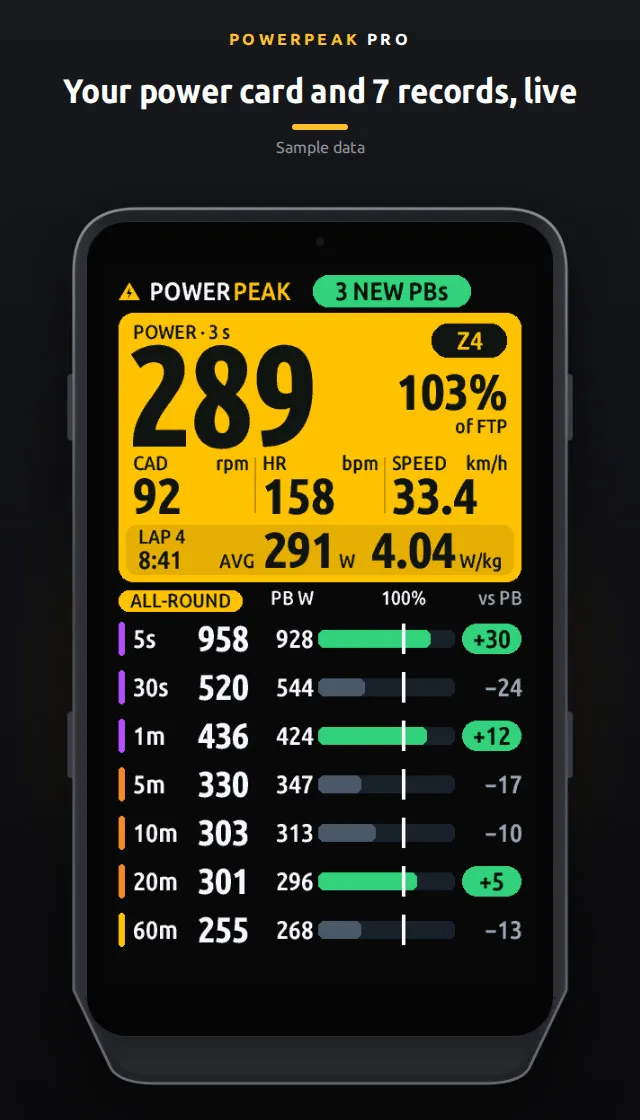
- Large: a big power card (watts in your zone color, % of FTP, cadence, heart rate, speed and the lap) plus a 7-row record table.
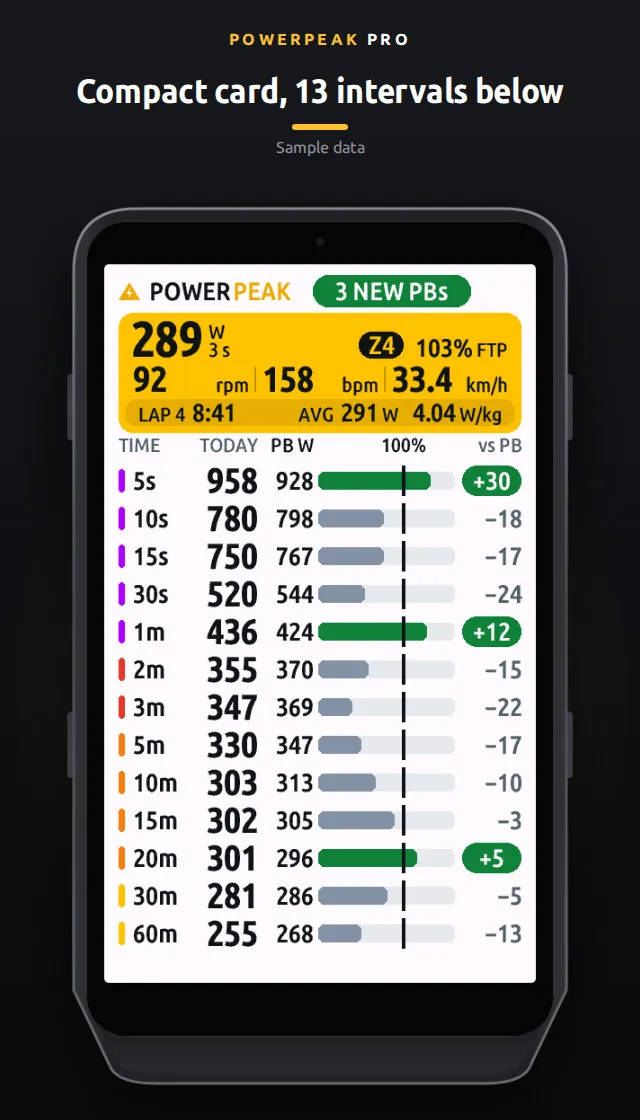
- Compact: a small card above 13 durations (11 on Edge® 850 and 550).
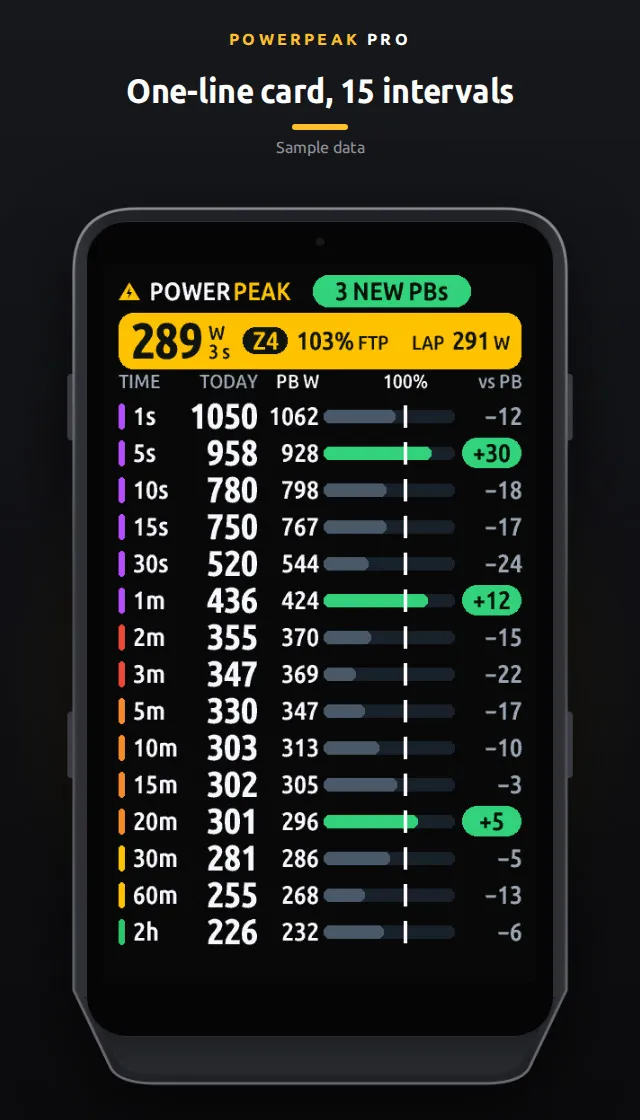
- Super-compact: the card in one line above 15 durations (13 on Edge® 850 and 550).
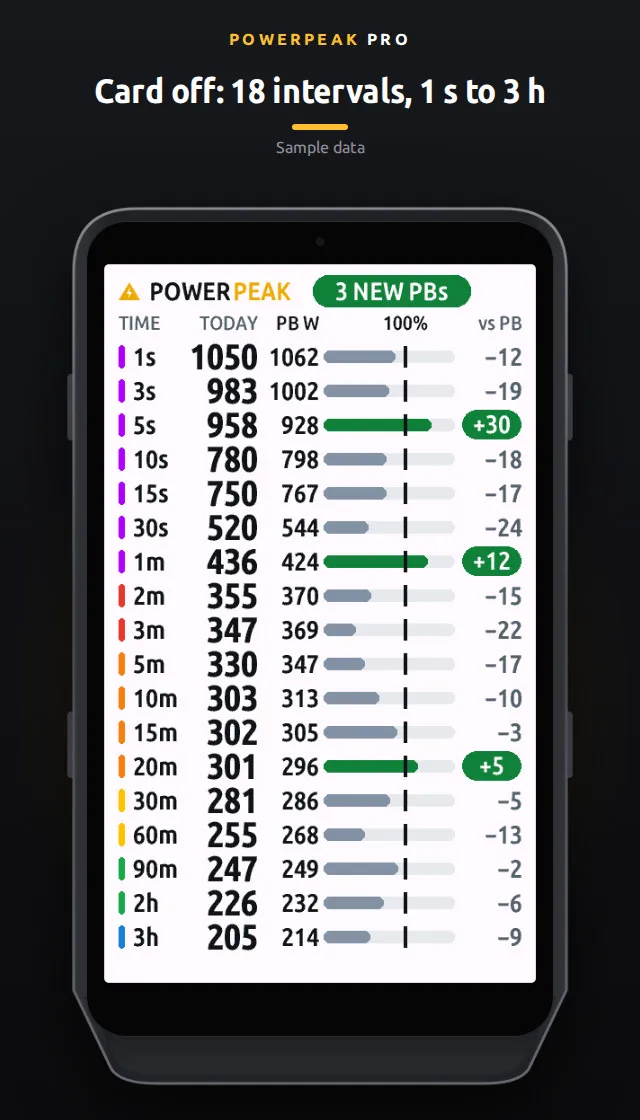
- Table only: no card, the full table with column titles, 18 durations (16 on Edge® 850 and 550).
On Edge® 1060, 1050, 1040 and 850, tap the top of the screen to move to the next screen: large, compact, super-compact, table only, then large again. While the timer is running, taps on the top and bottom of the screen reach the field; a tap in the middle opens the Edge's own timer overlay. Edge® 550 has no touchscreen: choose the screen in the settings ("Watt card"). Made for a full-page, one-field data screen.
With the large card, when your W′ (anaerobic reserve) drops below 70%, the band at the bottom of the card shows it next to the lap time and lap average.
INTERVAL SETS
- ALL-ROUND, SPRINT, CLIMBER (watts per kg when your weight is set, otherwise watts), ENDURANCE and CUSTOM.
- CUSTOM: pick your own from the 18 durations (1 s to 3 h). With the large card, tap the table to change set.
RECORDS
- For every duration: your personal best, a comparison bar, and a "+N" pill when you beat it. "NEW PBs" shows at the top. Optional beep on a new record.
- Type the records you already know in the settings, even before your first ride: a value above 0 becomes the record (even if lower than the one from your rides), 0 uses your best from rides; a ride that beats it updates it.
- Optional separate records for MTB, indoor, e-bike and cyclocross rides.
EFFORT SCREEN
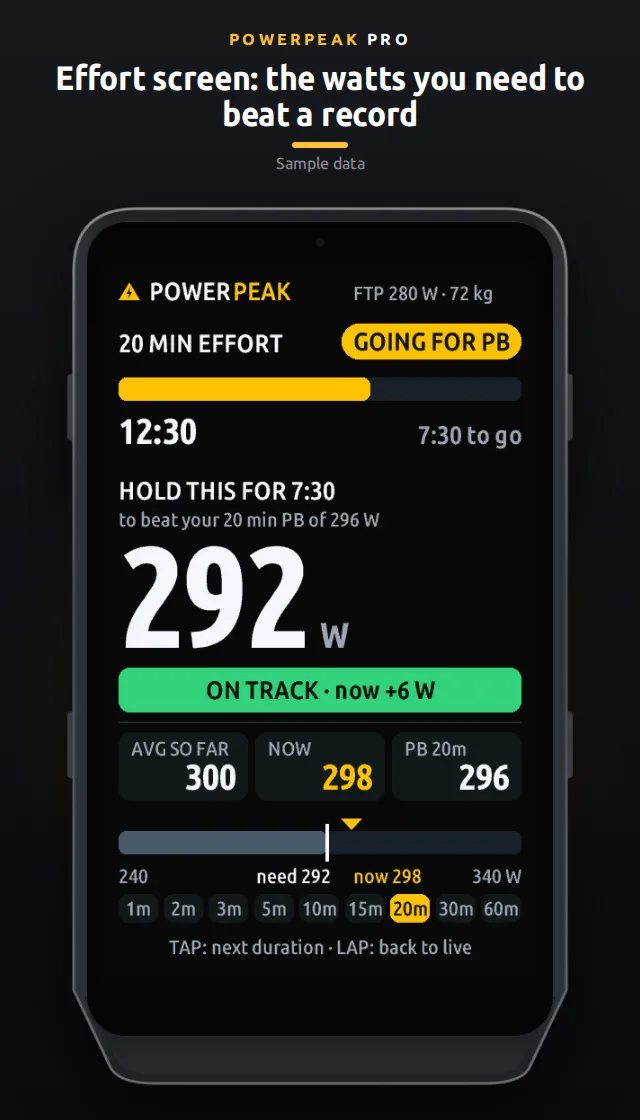
Press the lap button and it opens on the 1-minute record. It shows time elapsed and time left, the average watts you need from now to beat the record, whether you are on pace, your average so far, your watts now, the record and a pace bar. Tap the lower part of the screen to move to the next duration (1, 2, 3, 5, 10, 15, 20, 30, 60 min); without taps the duration climbs by itself as the effort goes on (on Edge® 550, which has no touchscreen, it always does). Press lap again to go back; it closes by itself after 60 minutes. As always, each press of the lap button also records a lap in your activity.
SETTINGS (in the Garmin Connect IQ app on your phone, one page each)
License, Display, Power, Intervals, three Custom set pages, Your PBs (watts), PB options and Erase all PBs. Open a page, change what you need, go back and tap Save. FTP and weight: from your Garmin user profile or typed in.
LICENSE AND TRIAL
Free to install and fully unlocked for 14 days. After the trial a license key is required to keep using it. Get it at https://www.powerpeak.app/pro/: €5.99 per year plus applicable taxes (annual subscription that renews automatically until you cancel) or €14.99 once plus applicable taxes (lifetime). One key covers up to 3 devices, and a PowerPeak Live key works too. Paste it in License, License key. Payments are handled by Lemon Squeezy, our merchant of record. Refunds: ask within 14 days of purchase at [email protected].
No account. We never receive your rides or records; the only network call is the license check (your license key and the device identifier).
Support: https://www.powerpeak.app/support.html
Privacy: https://www.powerpeak.app/privacy.html
Screenshots show sample data. PowerPeak Pro is an independent app and is not affiliated with, endorsed by, or sponsored by Garmin. Garmin® and Edge® are trademarks of Garmin Ltd. or its subsidiaries.
Co je nového
2.0.0 — PowerPeak 1060 is now PowerPeak Pro, for five Edge® models.
- Now on Edge® 1060, 1050, 1040, 850 and 550.
- Two new screens: super-compact (15 durations) and table only (18). A tap at the top now cycles large, compact, super-compact and table only (on Edge® 550, choose in the settings).
- New CUSTOM interval set: pick any of the 18 durations.
- New phone settings, one page each: License, Display, Power, Intervals, Custom set, Your PBs (watts), PB options, Erase all PBs.
- Your PBs (watts): all 18 records on one page; 0 uses your best from rides.
- License page: where to buy a key, and the app version next to the status.
Snímky obrazovky
Podporované jazyky (2)
Kompatibilních zařízení (6)
Nedávný trend metrik
Hodnocení
Recenze
Data snímků
2026-11-06 → 2026-11-09