Description
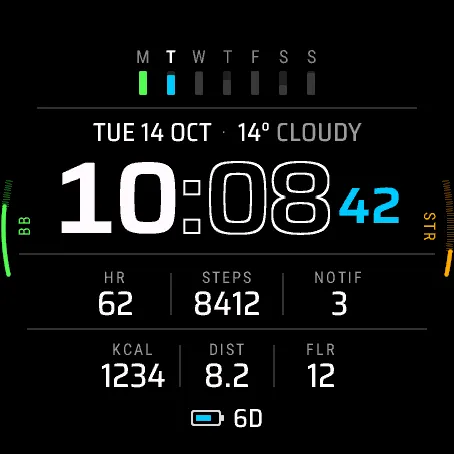
Seven days of steps in one strip, today highlighted, above a six-cell data grid.
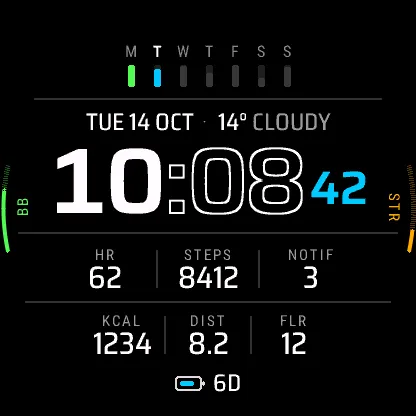
Week Grid is a data-rich digital face built around your activity history. The top is a 7 day steps history: a bar for each of the last seven days, with today lit up. It shows steps unless you switch it to intensity minutes or floors.
Below the strip:
- the date with the current temperature and conditions
- a large time with outlined minutes (accent seconds in active mode)
- a ruled 3 + 3 grid: heart rate, steps, notifications, calories, distance and floors to begin with
- a battery icon with days left (or percent, or nothing extra)
And on the sides, two gauges with their labels set along the curve, Body Battery™ and stress by default.
Every one of those can be swapped in the phone settings: left and right gauge, the week strip, the weather line, all six cells and the battery display. Most can be switched off. You can choose heart rate, resting heart rate, steps, distance, calories, floors, intensity minutes, weekly run and bike distance, recovery time, VO2 max, Body Battery™, stress, Pulse Ox, respiration, sleep score, battery, battery days, notifications, alarms, altitude, pressure, temperature, feels-like, humidity, wind, rain chance, weather, sunrise, sunset, daylight left, moon phase, solar intensity, ISO week or a second time zone, depending on the slot and the watch.
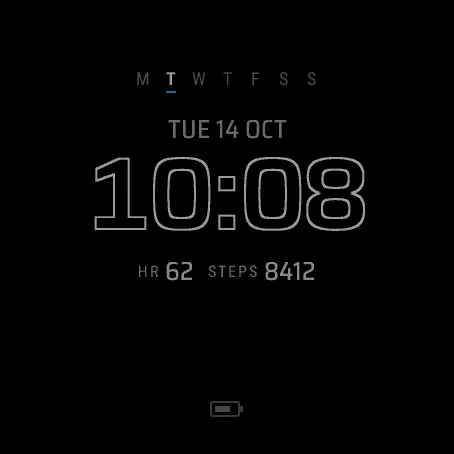
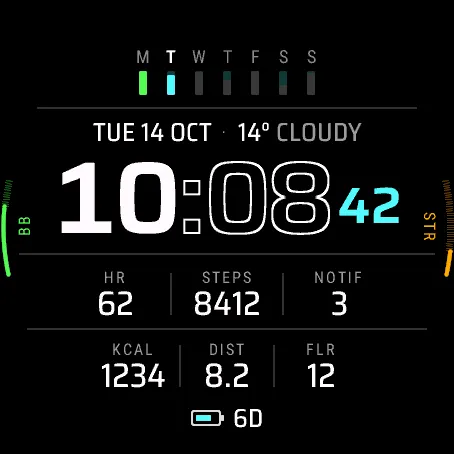
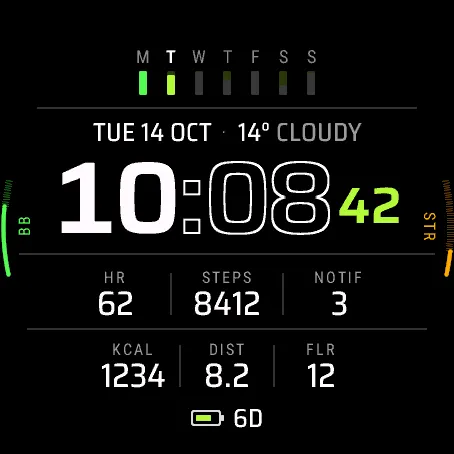
The rest of the settings: Original, Cyan, Lime or Mono theme. 12 or 24 hour time, or the watch's choice, and a leading zero for 12 h. Seconds on or off. Date as TUE 14 OCT, 14 OCT TUE, TUE 10/14 or 2026-10-14. Always-on style Rich, Minimal or Time only. Units from the watch, metric or imperial. Week starting as on the watch, Monday or Sunday. A second time zone (UTC offset and 4-letter label). Touch and hold a field to open its screen on touch watches.
Always-on mode: dim, simplified, updated once a minute, with a slight periodic shift to avoid burn-in.
Please note
Weather uses the last forecast your watch synced from the phone and shows "--" without a recent sync. Settings are changed in the Connect IQ Store app or the Garmin Connect app; there is no on-watch menu in this version. Seconds show in active mode only. Anything your watch model does not measure shows "--". Touch and hold works only on touchscreen watches. Health data is for general information, not for medical use.
Supported: AMOLED models of the Venu®, vívoactive®, Forerunner®, fēnix®, epix™, MARQ®, D2™, Descent™, Approach® and Instinct® 3 lines. The device list on this page has the full set.
Privacy: Week Grid collects no data and nothing leaves your watch. It has no internet, background or location permission. It uses Complications (to show data the watch already provides and open the related screen), User profile (resting heart rate and heart-rate zones) and Sensor history (fallback readings such as Body Battery™ and stress history).
Fonts: Roboto Condensed (© 2011 The Roboto Project Authors) and Saira (© 2020 The Saira Project Authors), used under the SIL Open Font License 1.1 (openfontlicense.org).
Price: free.
Support: https://watchfaces.thesako.com/help/ or [email protected]
Not affiliated with or endorsed by Garmin. Device and feature names are trademarks of Garmin Ltd. or its subsidiaries.
What is new
- Now on 43 more AMOLED watches: Venu® 2, 2 Plus, 3 and 3S, vívoactive® 5 and 6, Forerunner® 70, 165, 170, 265, 570, 965 and 970, fēnix® 8, 9 and E, epix™ (Gen 2) and epix™ Pro, MARQ® (Gen 2 and Gen 3), D2™ Mach 1, Mach 2 and Air X10, Descent™ Mk3 and G2, and Approach® S50, S70 and S72.
Screenshots
Supported language (1)
Compatible devices (58)
Approach® S50
Approach® S70 (42mm)
Approach® S70 (47mm)
Approach® S72 - 43 mm
Approach® S72 - 47 mm
D2™ Air X10
D2™ Air X15
D2™ Mach 1
D2™ Mach 1 Pro
D2™ Mach 2
D2™ Mach 2 Pro
Descent™ G2
Descent™ MK3 - 43mm
Descent™ MK3i - 51mm
epix™ (Gen 2)
epix™ (Gen 2)
epix™ Pro (42mm)
epix™ Pro (47mm)
epix™ Pro (51mm)
fēnix® 8 AMOLED (43mm)
fēnix® 8 AMOLED (47mm/51mm)
fēnix® 8 Pro
fenix® 9 - 43 mm
fenix® 9 – 47 mm
fenix® 9 Pro - 43 mm
fenix® 9 Pro - 47 mm
fēnix® E
Forerunner® 165
Forerunner® 165 Music
Forerunner® 170
Forerunner® 170 Music
Forerunner® 265
Forerunner® 570 - 42mm
Forerunner® 570 - 47mm
Forerunner® 70
Forerunner® 70
Forerunner® 965
Forerunner® 970
Instinct® 3 – 45 mm, AMOLED
Instinct® 3 – 50 mm, AMOLED
MARQ® (Gen 2)
MARQ® Adventurer (Gen 3)
MARQ® Commander (Gen 2) – Carbon Edition
MARQ™ Aviator (Gen 2)
Mercedes-Benz Venu® 2
Mercedes-Benz Venu® 2
tactix® 7 – AMOLED Edition
tactix® 8 – 47 mm, AMOLED
Venu® 2
Venu® 2
Venu® 2 Plus
Venu® 2 Plus
Venu® 3
Venu® 3S
Venu® 4 – 41 mm
Venu® 4 – 45 mm
vívoactive® 5
vívoactive® 6
Recent metric trend
Rating
Reviews
Snapshot dates
2026-10-27 → 2026-11-18