Opis
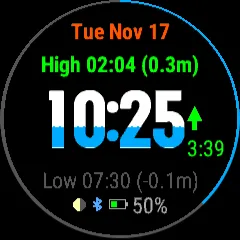
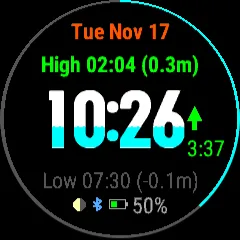
Know the tide at a glance. Tide Fill shows the time in big bold digits, and the water inside them rises and falls with the real tide where you are: empty at low tide, full at high tide.
FEATURES
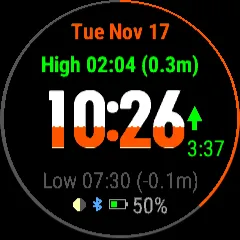
- Time digits fill with water as the tide comes in and drain as it goes out
- Next high tide (top) and next low tide (bottom), with times and heights
- The next tide is highlighted, with an up/down arrow and a countdown
- Ring around the edge shows progress from the last tide to the next
- Moon phase (shown correctly for the northern and southern hemispheres)
- Bluetooth, notification and alarm icons, plus battery level
- Settings: use GPS or a home beach, water colour (blue, cyan, green, orange), metres or feet
- Built to save battery: redraws once a minute, downloads tide data about every 3 hours, and keeps working offline for up to 2 days
SETUP
1. Install the face and make it your active watch face.
2. Location, either way works:
- GPS: the face uses the location of your last recorded activity. If it shows "No GPS fix yet", do one short outdoor GPS activity (e.g. a walk).
- Home beach: in the Connect IQ app, open the face's Settings and enter your beach's latitude and longitude (use a point on the coast).
If you set both, GPS is used when the watch has a fix and your home beach otherwise. Turn off "Use GPS when available" to always show your home beach's tides, even when you're inland.
3. Keep your phone connected via Garmin Connect. Tide data downloads through your phone. The first download can take up to 5 minutes.
PERMISSIONS
- Background / Internet: downloads tide data through your phone.
- Location: finds the tides nearest to you. Your location is sent only to the tide data service, rounded to about 100 m, and is not stored or shared anywhere else.
IMPORTANT
Tide predictions come from a global ocean model and may differ from local tide tables, especially in bays, estuaries and harbours. Heights are measured from mean sea level, so they won't match chart heights. Not for navigation or safety use.
CREDITS
Tide data by Open-Meteo.com (https://open-meteo.com), licensed under CC BY 4.0.
Dnevnik sprememb
First release.
Zaslonske slike
Podprt jezik (1)
Združljivi napravi (2)
Nedavni trend metrike
Ocena
Mnenja
Datumi posnetkov
2026-11-19 → 2026-11-25