Opis
Big, clear text you can read without your reading glasses.
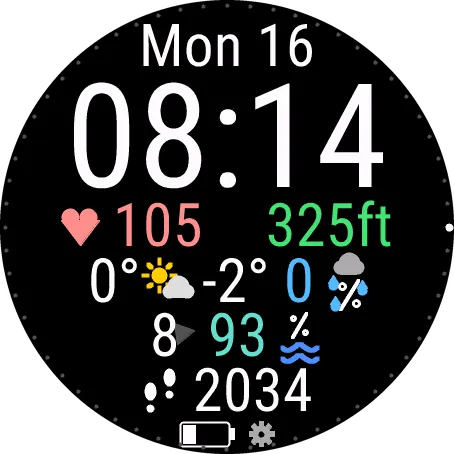
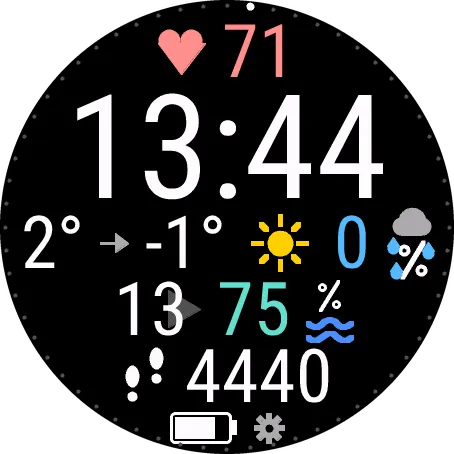
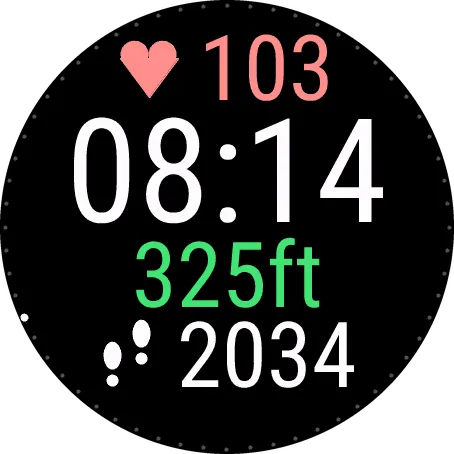
Zoomable fills the screen with the biggest text that fits: the time, date, heart rate, elevation, weather (temperature, conditions and chance of rain, plus optional feels like, wind and humidity), steps and battery. Every row is sized to the edge of the round screen, so nothing is smaller than it has to be.
ZOOM ANY FIELD
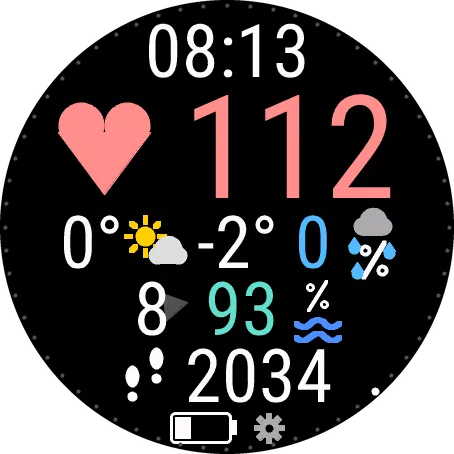
Touch and hold a field to make it the big one: your heart rate, the weather or anything else moves into the centre at full size, and the time steps aside. Touch and hold the big field again to open the matching Garmin widget. Hold the small time to bring it back.
An optional setting lets you hold a field to zoom it to full screen for a few seconds. If you hold it again while zoomed, it opens the matching Garmin widget. Another setting just opens the Garmin widget right away when you touch and hold a field.
HIDE WHAT YOU DON'T NEED
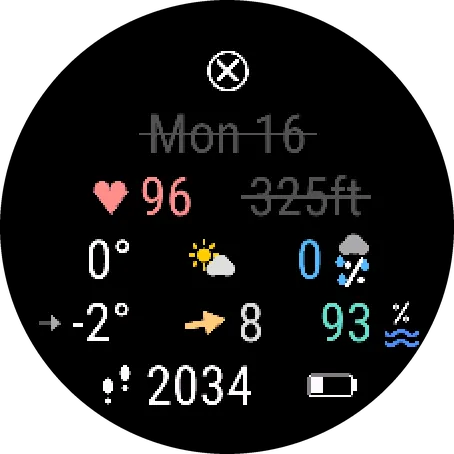
Turn off any field and the rest get bigger. Hide elevation and steps, for example, and your heart rate grows to about one and a half times its size. Touch and hold the small gear next to the battery to show or hide fields right on the watch, or use the phone settings.
SETTINGS
- On the watch: hold the gear to show or hide each field and each weather part.
- On the phone (Connect IQ app): font (Thin, Bold or Wide), which fields and weather parts to show, date format, seconds, the always-on screen, the gear, and how the weather extras, condition icon and wind/humidity icons are laid out.
- On the watch (watch face Customize / Style): what a touch-and-hold does: enlarge (default), zoom or open.
ALSO
- Follows your watch's 12/24-hour, metric/imperial and temperature settings.
- Optional seconds: small after the time, full size, or dots around the edge of the screen.
- The always-on screen shows the whole face, dimmed, and shifts each minute to protect AMOLED screens (or just the time, if you prefer).
- No data leaves your watch. Nothing is collected.
Help and tips: https://jasonm.ca/zoomable/
Questions or ideas: [email protected]
Dnevnik sprememb
WHAT'S NEW (1.1.2):
- Phone settings: choose how the weather extras are laid out, where the condition icon goes, and the style of the wind and humidity icons.
WHAT'S NEW (1.1.1):
- Settings on the watch: hold the gear by the battery to show or hide fields.
- More weather: feels like, wind (speed and an arrow showing its direction) and humidity, each optional. The condition icon and chance of rain can be hidden too.
- New rain chance and humidity icons.
- Seconds: small, full size, or dots around the edge.
- Date formats: "Wed 28", "We 28", "W 28", "28" or "Wed 28 Nov".
- The always-on screen now shows the whole face, dimmed.
- An enlarged weather field gets bigger, using up to three lines.
- With the date hidden, heart rate moves to the top.
Zaslonske slike
Podprt jezik (1)
Združljivih naprav (42)
Approach® S72 - 43 mm
Approach® S72 - 47 mm
D2™ Air X15
D2™ Mach 1
D2™ Mach 1 Pro
D2™ Mach 2
D2™ Mach 2 Pro
epix™ (Gen 2)
epix™ (Gen 2)
epix™ Pro (42mm)
epix™ Pro (47mm)
epix™ Pro (51mm)
fēnix® 8 AMOLED (43mm)
fēnix® 8 AMOLED (47mm/51mm)
fēnix® 8 Pro
fenix® 9 - 43 mm
fenix® 9 – 47 mm
fenix® 9 Pro - 43 mm
fenix® 9 Pro - 47 mm
fenix® 9 Pro - 51 mm
fēnix® E
Forerunner® 165
Forerunner® 165 Music
Forerunner® 170
Forerunner® 170 Music
Forerunner® 265
Forerunner® 265S
Forerunner® 570 - 42mm
Forerunner® 570 - 47mm
Forerunner® 70
Forerunner® 70
Forerunner® 965
Forerunner® 970
MARQ® (Gen 2)
MARQ® Adventurer (Gen 3)
MARQ® Commander (Gen 2) – Carbon Edition
MARQ™ Aviator (Gen 2)
tactix® 7 – AMOLED Edition
tactix® 8 – 47 mm, AMOLED
Venu® 4 – 41 mm
Venu® 4 – 45 mm
vívoactive® 6
Nedavni trend metrike
Ocena
Mnenja
Datumi posnetkov
2026-11-10 → 2026-11-26